Riddle Keypad Project (TEJ3M Summative)
Summative Project for TEJ3M
Components and supplies
1
Sunfounder Lcd
1
Arduino UNO
4
Jumper wires (generic)
8
Male/Female Jumper Wires
1
Keypad
Apps and platforms
1
Tinkercad
1
Dremel DigiLab 3D Slicer
1
Arduino IDE
Project description
Code
Riddle Keypad Code
arduino
1#include <Wire.h> 2#include <LiquidCrystal_I2C.h> 3#include <Keypad.h> //includes all the libraries 4 5#define Password_Length 5 //sets the length of the password 6int signalPin = 12; // 7 8char Data[Password_Length]; 9char Master[Password_Length] = "3.14"; //sets password 10byte data_count = 0, master_count = 0; 11bool Pass_is_good; 12char customKey; 13 14const byte ROWS = 4; 15const byte COLS = 4; 16 17char hexaKeys[ROWS][COLS] = { 18 {'1', '4', '7', '#'}, 19 {'2', '5', '8', '0'}, //tells the computer which button is which value 20 {'3', '6', '9', '.'}, 21 {'A', 'B', 'C', 'D'} 22}; 23 24byte rowPins[ROWS] = {9, 8, 7, 6}; 25byte colPins[COLS] = {5, 4, 3, 2}; 26 27Keypad customKeypad = Keypad(makeKeymap(hexaKeys), rowPins, colPins, ROWS, COLS); 28 29 30LiquidCrystal_I2C lcd(0x27, 16, 2);//tells the computer the dimensions of the lcd 31 32void setup(){ 33 lcd.init(); 34 lcd.backlight(); 35} 36 37void loop(){ 38 39 lcd.setCursor(0,0); 40 lcd.print("What do math"); 41 lcd.setCursor(0,2); 42 lcd.print("teachers eat?"); //Displays the question 43 44 45 customKey = customKeypad.getKey(); 46 if (customKey){ 47 Data[data_count] = customKey;; 48 lcd.setCursor(14,1); 49 lcd.print(Data[data_count]); 50 data_count++; 51 } // displays the button being pressed as you press it 52 53 if(data_count == Password_Length-1){ 54 delay(500); 55 lcd.clear(); 56 57 if(!strcmp(Data, Master)){ 58 lcd.print(" Unlocked!"); 59 delay(3000); 60 } // if the password is right, print unlocked... 61 else{ 62 lcd.print(" Try again!"); 63 lcd.setCursor(0,2); 64 lcd.print("Hint: Dessert"); 65 delay(2000); //...if not, say try again and give a hint 66 } 67 68 lcd.clear(); 69 clearData(); //clear everything on the screen and set data_count back to 0 70 } 71} 72 73void clearData(){ 74 while(data_count !=0){ 75 Data[data_count--] = 0; 76 } 77 return; 78}
Riddle Keypad Code
arduino
1#include <Wire.h> 2#include <LiquidCrystal_I2C.h> 3#include <Keypad.h> //includes all the libraries 4 5#define Password_Length 5 //sets the length of the password 6int signalPin = 12; // 7 8char Data[Password_Length]; 9char Master[Password_Length] = "3.14"; //sets password 10byte data_count = 0, master_count = 0; 11bool Pass_is_good; 12char customKey; 13 14const byte ROWS = 4; 15const byte COLS = 4; 16 17char hexaKeys[ROWS][COLS] = { 18 {'1', '4', '7', '#'}, 19 {'2', '5', '8', '0'}, //tells the computer which button is which value 20 {'3', '6', '9', '.'}, 21 {'A', 'B', 'C', 'D'} 22}; 23 24byte rowPins[ROWS] = {9, 8, 7, 6}; 25byte colPins[COLS] = {5, 4, 3, 2}; 26 27Keypad customKeypad = Keypad(makeKeymap(hexaKeys), rowPins, colPins, ROWS, COLS); 28 29 30LiquidCrystal_I2C lcd(0x27, 16, 2);//tells the computer the dimensions of the lcd 31 32void setup(){ 33 lcd.init(); 34 lcd.backlight(); 35} 36 37void loop(){ 38 39 lcd.setCursor(0,0); 40 lcd.print("What do math"); 41 lcd.setCursor(0,2); 42 lcd.print("teachers eat?"); //Displays the question 43 44 45 customKey = customKeypad.getKey(); 46 if (customKey){ 47 Data[data_count] = customKey;; 48 lcd.setCursor(14,1); 49 lcd.print(Data[data_count]); 50 data_count++; 51 } // displays the button being pressed as you press it 52 53 if(data_count == Password_Length-1){ 54 delay(500); 55 lcd.clear(); 56 57 if(!strcmp(Data, Master)){ 58 lcd.print(" Unlocked!"); 59 delay(3000); 60 } // if the password is right, print unlocked... 61 else{ 62 lcd.print(" Try again!"); 63 lcd.setCursor(0,2); 64 lcd.print("Hint: Dessert"); 65 delay(2000); //...if not, say try again and give a hint 66 } 67 68 lcd.clear(); 69 clearData(); //clear everything on the screen and set data_count back to 0 70 } 71} 72 73void clearData(){ 74 while(data_count !=0){ 75 Data[data_count--] = 0; 76 } 77 return; 78}
Downloadable files
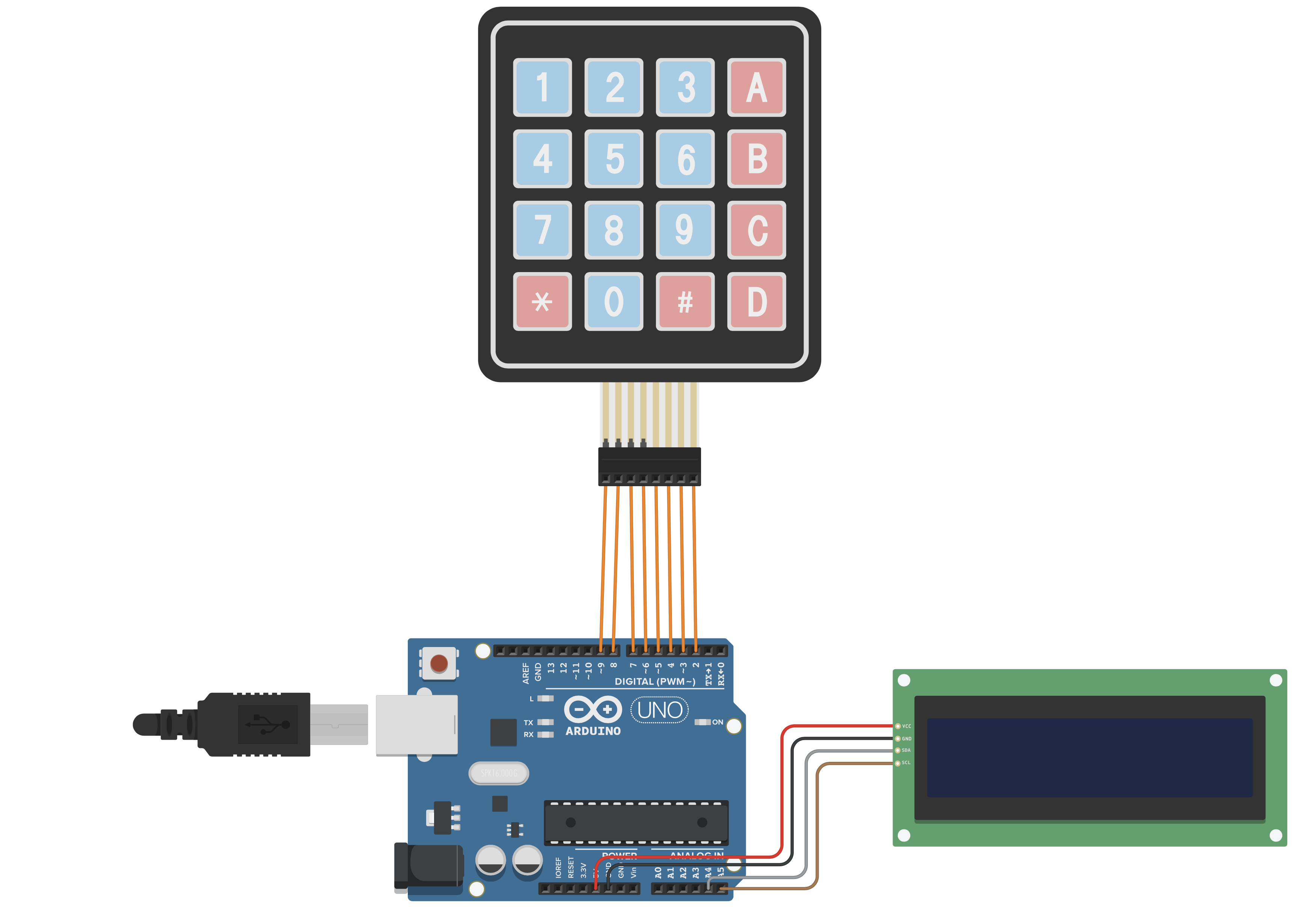
Diagram
Diagram

Documentation
summative_(keypad_case)_n26DwQWHUh.stl
Comments
Only logged in users can leave comments