Cheap slow 24 hour analog clock, recycled
Make a standard, cheap analog clock go just 1 round in 24 hours. Like Slow watches, just a lot cheaper, in all the word's meanings ;)
Components and supplies
1
Analog wall clock
1
Arduino Nano R3
1
Wire, Hook Up
Tools and machines
1
Soldering iron (generic)
1
Solder Wire, Lead Free
Project description
Code
24 hour clock
arduino
Pull cheap clock lavet motor a little once every 24 seconds to convert the minute hand into a 1-rotation-per-24-hour-hand
1/*
2  Arno's UTC clock
3
4  Copyleft Arno Teigseth
5  Licensed  under CC BY-NC-SA 4+
6
7  computer version see https://teigseth.no/clock
8
9*/
10
11int  D0 = 3;                  // Pin1 to use for clock's lavet motor
12int D1 = 4;                  //  Pin2 to use for clock's lavet motor
13int phase = 0;               // current motor  phase (forward/backward)
14unsigned long last = 0;      // last time we pulsed  the lavet motor
15unsigned long second = 1000; // standard period for second duration,  in milliseconds
16
17// the setup function runs once when you press reset or power  the board
18void setup() {
19  // initialize digital pin LED_BUILTIN as an output.
20  pinMode(LED_BUILTIN, OUTPUT);
21  pinMode(D0, OUTPUT);
22  pinMode(D1, OUTPUT);
23
24  second = 1000UL * 24UL; // 1/24 Hz, using the minute visor for "24-hours-per-rotation  hour hand". Note the UL https://forum.arduino.cc/t/unsigned-long-overflow/395902/2
25  // second = 1000; // 1 Hz for testing, to avoid waiting 24 seconds between second  visor movement
26}
27
28
29// function to set clock "motor" voltage
30//
31//  0 = off
32// 1 = on forward
33// 2 = on backward
34//
35void setit(int clockstate)  {
36  switch (clockstate)
37  {
38    case 0:
39      digitalWrite(D0, LOW);  // D0 -
40      digitalWrite(D1, LOW);  // D1 -
41      break;
42    case 1:
43      digitalWrite(D0, HIGH); // D0 +
44      digitalWrite(D1, LOW);  // D1 -
45      break;
46    case 2:
47      digitalWrite(D0, LOW);  // D0 -
48      digitalWrite(D1,  HIGH); // D1 +
49  }
50}
51
52// the loop function runs over and over again  forever
53void loop() {
54
55  if (millis() - last > (second)) {
56    if (last  == 0) {
57      last = millis(); // get initial milliseconds
58    } else {
59      last = last + second; // exactly 24000ms since last go. Or 1000ms if in test  mode
60      // Hoping it will rollover after 50 days 70 minutes, https://www.norwegiancreations.com/2018/10/arduino-tutorial-avoiding-the-overflow-issue-when-using-millis-and-micros/
61    }
62
63    // Toggle motor direction for a few ms
64    if (phase == 1) {
65      phase = 0;
66      setit(1); // "Tighten up" lavet motor to point in current  direction again (might have moved due to gravity while being turned off)
67      delay(50);
68      setit(0);
69      delay(50);
70      setit(2); // Then set to new direction
71      delay(100);
72      setit(0); // Done
73    } else {
74      phase = 1;
75      setit(2); // "Tighten up" lavet motor to point in current direction again  (might have moved due to gravity while being turned off)
76      delay(50);
77      setit(0); // Then set to new direction
78      delay(50);
79      setit(1);
80      delay(100);
81      setit(0); // Done
82    }
83  }
84}
24 hour clock
arduino
Pull cheap clock lavet motor a little once every 24 seconds to convert the minute hand into a 1-rotation-per-24-hour-hand
1/*
2  Arno's UTC clock
3
4  Copyleft Arno Teigseth
5  Licensed
6  under CC BY-NC-SA 4+
7
8  computer version see https://teigseth.no/clock
9
10*/
11
12int
13  D0 = 3;                  // Pin1 to use for clock's lavet motor
14int D1 = 4;                  //
15  Pin2 to use for clock's lavet motor
16int phase = 0;               // current motor
17  phase (forward/backward)
18unsigned long last = 0;      // last time we pulsed
19  the lavet motor
20unsigned long second = 1000; // standard period for second duration,
21  in milliseconds
22
23// the setup function runs once when you press reset or power
24  the board
25void setup() {
26  // initialize digital pin LED_BUILTIN as an output.
27
28  pinMode(LED_BUILTIN, OUTPUT);
29  pinMode(D0, OUTPUT);
30  pinMode(D1, OUTPUT);
31
32
33  second = 1000UL * 24UL; // 1/24 Hz, using the minute visor for "24-hours-per-rotation
34  hour hand". Note the UL https://forum.arduino.cc/t/unsigned-long-overflow/395902/2
35
36  // second = 1000; // 1 Hz for testing, to avoid waiting 24 seconds between second
37  visor movement
38}
39
40
41// function to set clock "motor" voltage
42//
43//
44  0 = off
45// 1 = on forward
46// 2 = on backward
47//
48void setit(int clockstate)
49  {
50  switch (clockstate)
51  {
52    case 0:
53      digitalWrite(D0, LOW);
54  // D0 -
55      digitalWrite(D1, LOW);  // D1 -
56      break;
57    case 1:
58
59      digitalWrite(D0, HIGH); // D0 +
60      digitalWrite(D1, LOW);  // D1 -
61
62      break;
63    case 2:
64      digitalWrite(D0, LOW);  // D0 -
65      digitalWrite(D1,
66  HIGH); // D1 +
67  }
68}
69
70// the loop function runs over and over again
71  forever
72void loop() {
73
74  if (millis() - last > (second)) {
75    if (last
76  == 0) {
77      last = millis(); // get initial milliseconds
78    } else {
79
80      last = last + second; // exactly 24000ms since last go. Or 1000ms if in test
81  mode
82      // Hoping it will rollover after 50 days 70 minutes, https://www.norwegiancreations.com/2018/10/arduino-tutorial-avoiding-the-overflow-issue-when-using-millis-and-micros/
83
84    }
85
86    // Toggle motor direction for a few ms
87    if (phase == 1) {
88
89      phase = 0;
90      setit(1); // "Tighten up" lavet motor to point in current
91  direction again (might have moved due to gravity while being turned off)
92      delay(50);
93
94      setit(0);
95      delay(50);
96      setit(2); // Then set to new direction
97
98      delay(100);
99      setit(0); // Done
100    } else {
101      phase = 1;
102
103      setit(2); // "Tighten up" lavet motor to point in current direction again
104  (might have moved due to gravity while being turned off)
105      delay(50);
106
107      setit(0); // Then set to new direction
108      delay(50);
109      setit(1);
110
111      delay(100);
112      setit(0); // Done
113    }
114  }
115}
Downloadable files
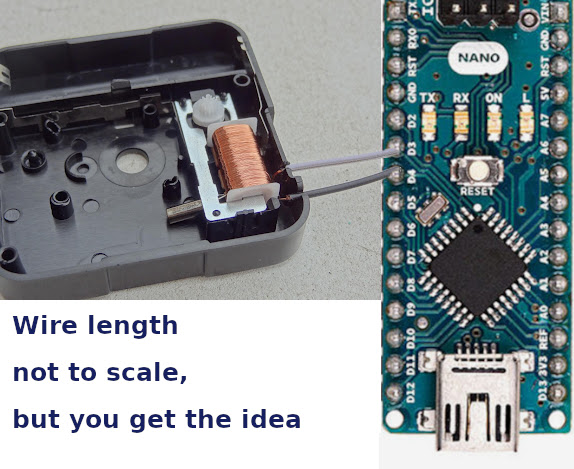
Clock schematics.
2 wires.
Clock schematics.
Comments
Only logged in users can leave comments