Devices & Components
Arduino Nano 33 IoT
STLinkv2 Hardware Debugger
Jumper wires (generic)
Software & Tools
Arduino IDE
Visual Studio 2017
Visual Micro
Project description
Code
Calcs.ino
arduino
Additional Code to be used in Debugging Sketch Example
1// Encapsualtion 2int calculateCurrentPWM_spiky(unsigned long periodTime) { 3 return calculateCurrentPWMMultiplier(periodTime) * currentResolution; 4} 5 6int calculateCurrentPWM_sine(unsigned long periodTime) { 7 return 8 round( 9 abs(int( 10 ( 11 sin( 12 ( 13 double(calculateCurrentPWM_spiky(periodTime)) 14 / 165.00 15 ) 16 ) 17 ) 18 * double(currentResolution) 19 ) 20 ) 21 ); 22} 23 24 25int oldValue = -1; 26void pwmWrite(int value) { 27 if (oldValue != value) { 28 analogWrite(motor, value); 29 oldValue = value; 30 Serial.print(","); 31 Serial.print(value); 32 } 33} 34 35double calculateCurrentPWMMultiplier(unsigned long periodTime) { 36 if ((double(periodTime % currentPeriod_MS) / double((currentPeriod_MS / 2.00))) <= 1.00) { 37 return (double(periodTime % currentPeriod_MS) / double((currentPeriod_MS / 2.00))); 38 } 39 else { 40 return (1.00 - ((double(periodTime % currentPeriod_MS) - double((currentPeriod_MS / 2.00))) / double((currentPeriod_MS / 2.00)))); 41 } 42} 43
Calcs.ino
arduino
Additional Code to be used in Debugging Sketch Example
1// Encapsualtion 2int calculateCurrentPWM_spiky(unsigned long periodTime) { 3 return calculateCurrentPWMMultiplier(periodTime) * currentResolution; 4} 5 6int calculateCurrentPWM_sine(unsigned long periodTime) { 7 return 8 round( 9 abs(int( 10 ( 11 sin( 12 ( 13 double(calculateCurrentPWM_spiky(periodTime)) 14 / 165.00 15 ) 16 ) 17 ) 18 * double(currentResolution) 19 ) 20 ) 21 ); 22} 23 24 25int oldValue = -1; 26void pwmWrite(int value) { 27 if (oldValue != value) { 28 analogWrite(motor, value); 29 oldValue = value; 30 Serial.print(","); 31 Serial.print(value); 32 } 33} 34 35double calculateCurrentPWMMultiplier(unsigned long periodTime) { 36 if ((double(periodTime % currentPeriod_MS) / double((currentPeriod_MS / 2.00))) <= 1.00) { 37 return (double(periodTime % currentPeriod_MS) / double((currentPeriod_MS / 2.00))); 38 } 39 else { 40 return (1.00 - ((double(periodTime % currentPeriod_MS) - double((currentPeriod_MS / 2.00))) / double((currentPeriod_MS / 2.00)))); 41 } 42} 43
NanoDebugExample.ino
arduino
Basic Sketch to use with debugging, use with other Ino file to use the same code as shown in the example.
1const int motor = 12; 2int currentMotorPWM = 0; 3unsigned long currentPeriodStartTime = 0; 4unsigned int currentPeriod_MS = 1000; 5unsigned int currentResolution = 254; 6unsigned int maxResolution = 254; 7int currentPWMVal = 0; 8unsigned long loopCounter = 0; 9 10void setup() { 11 pinMode(motor, OUTPUT); 12 analogWrite(motor, currentPWMVal); 13} 14 15void loop() { 16 currentPWMVal = calculateCurrentPWM_sine((millis() - currentPeriodStartTime) % currentPeriod_MS); 17 pwmWrite(currentPWMVal); 18 loopCounter++; 19} 20
Downloadable files
Example Nano33 IoT Connection Diagram
How to Connect the Nano-33 IoT to a Hardware Debugger
Example Nano33 IoT Connection Diagram
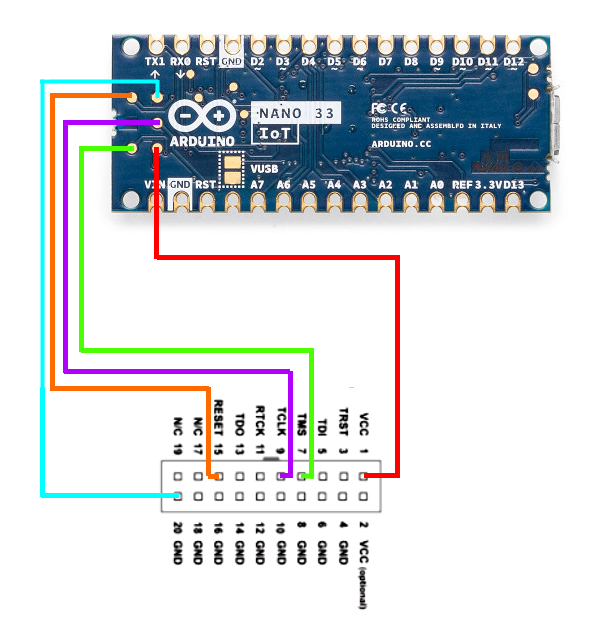
Example Nano33 IoT Connection Diagram
How to Connect the Nano-33 IoT to a Hardware Debugger
Example Nano33 IoT Connection Diagram

Comments
Only logged in users can leave comments