Online Attendance System (Without Ethernet)
Online Attendance System using RFID Module and PHP&MYSQL Only. Utility for all type of attendance requirements. \r\nUseful for online tracking
Devices & Components

Arduino Uno Rev3
RFID RC522
Jumper wires (generic)
Project description
Code
Arduino code
arduino
This code used to read user 8 Digit UID (ID CARD) and print on serial printer and to send it to processing.
1/*Created by: Anshul Pareek
2 * --------------------------------------------------------------------------------------------------------------------
3  * Example sketch/program showing how to read new NUID from a PICC to serial.
4  * --------------------------------------------------------------------------------------------------------------------
5  * This is a MFRC522 library example; for further details and other examples see:  https://github.com/miguelbalboa/rfid
6 *
7 * Example sketch/program showing  how to the read data from a PICC (that is: a RFID Tag or Card) using a MFRC522 based  RFID
8 * Reader on the Arduino SPI interface.
9 *
10 * When the Arduino and  the MFRC522 module are connected (see the pin layout below), load this sketch into  Arduino IDE
11 * then verify/compile and upload it. To see the output: use Tools,  Serial Monitor of the IDE (hit Ctrl+Shft+M). When
12 * you present a PICC (that  is: a RFID Tag or Card) at reading distance of the MFRC522 Reader/PCD, the serial  output
13 * will show the type, and the NUID if a new card has been detected. Note:  you may see "Timeout in communication" messages
14 * when removing the PICC from  reading distance too early.
15 *
16 * @license Released into the public domain.
17  *
18 * Typical pin layout used:
19 * -----------------------------------------------------------------------------------------
20  *             MFRC522      Arduino       Arduino   Arduino    Arduino          Arduino
21  *             Reader/PCD   Uno/101       Mega      Nano v3    Leonardo/Micro   Pro  Micro
22 * Signal      Pin          Pin           Pin       Pin        Pin              Pin
23  * -----------------------------------------------------------------------------------------
24  * RST/Reset   RST          9             5         D9         RESET/ICSP-5     RST
25  * SPI SS      SDA(SS)      10            53        D10        10               10
26  * SPI MOSI    MOSI         11 / ICSP-4   51        D11        ICSP-4           16
27  * SPI MISO    MISO         12 / ICSP-1   50        D12        ICSP-1           14
28  * SPI SCK     SCK          13 / ICSP-3   52        D13        ICSP-3           15
29  */
30
31#include <SPI.h>
32#include <MFRC522.h>
33
34#define SS_PIN 10
35#define  RST_PIN 9
36
37MFRC522 rfid(SS_PIN, RST_PIN); // Instance of the class
38
39MFRC522::MIFARE_Key  key;
40
41// Init array that will store new NUID
42byte nuidPICC[4];
43
44void  setup() {
45  Serial.begin(9600);
46  SPI.begin(); // Init SPI bus
47  rfid.PCD_Init();  // Init MFRC522
48
49  for (byte i = 0; i < 6; i++) {
50    key.keyByte[i] =  0xFF;
51  }
52
53}
54
55void loop() {
56
57  // Look for new cards
58  if  ( ! rfid.PICC_IsNewCardPresent())
59    return;
60
61  // Verify if the NUID  has been readed
62  if ( ! rfid.PICC_ReadCardSerial())
63    return;
64
65  MFRC522::PICC_Type  piccType = rfid.PICC_GetType(rfid.uid.sak);
66
67  // Check is the PICC of Classic  MIFARE type
68  if (piccType != MFRC522::PICC_TYPE_MIFARE_MINI &&
69    piccType  != MFRC522::PICC_TYPE_MIFARE_1K &&
70    piccType != MFRC522::PICC_TYPE_MIFARE_4K)  {
71    //Serial.println(F("Your tag is not of type MIFARE Classic."));
72    return;
73  }
74 String s;
75    for (byte i = 0; i < 4; i++) {
76
77      nuidPICC[i]  = rfid.uid.uidByte[i];
78
79    }
80
81
82    printHex(rfid.uid.uidByte,  rfid.uid.size);
83    Serial.println();
84
85  // Halt PICC
86  rfid.PICC_HaltA();
87
88  // Stop encryption on PCD
89  rfid.PCD_StopCrypto1();
90}
91
92/**
93 * Helper  routine to dump a byte array as hex values to Serial.
94 */
95void printHex(byte  *buffer, byte bufferSize) {
96  for (byte i = 0; i < bufferSize; i++) {
97    Serial.print(buffer[i]  < 0x10 ? "0" : "");
98    Serial.print(buffer[i], HEX);
99  }
100}
101
102/**
103  * Helper routine to dump a byte array as dec values to Serial.
104 */
105void printDec(byte  *buffer, byte bufferSize) {
106  for (byte i = 0; i < bufferSize; i++) {
107    Serial.print(buffer[i]  < 0x10 ? "0" : "");
108    Serial.print(buffer[i], DEC);
109  }
110}
111
markattendance
processing
Upload this code in processing and run when we need to mark attendance after adding user successfully!
1inary file (no preview
Arduino code
arduino
This code used to read user 8 Digit UID (ID CARD) and print on serial printer and to send it to processing.
1/*Created by: Anshul Pareek
2 * --------------------------------------------------------------------------------------------------------------------
3
4  * Example sketch/program showing how to read new NUID from a PICC to serial.
5
6  * --------------------------------------------------------------------------------------------------------------------
7
8  * This is a MFRC522 library example; for further details and other examples see:
9  https://github.com/miguelbalboa/rfid
10 *
11 * Example sketch/program showing
12  how to the read data from a PICC (that is: a RFID Tag or Card) using a MFRC522 based
13  RFID
14 * Reader on the Arduino SPI interface.
15 *
16 * When the Arduino and
17  the MFRC522 module are connected (see the pin layout below), load this sketch into
18  Arduino IDE
19 * then verify/compile and upload it. To see the output: use Tools,
20  Serial Monitor of the IDE (hit Ctrl+Shft+M). When
21 * you present a PICC (that
22  is: a RFID Tag or Card) at reading distance of the MFRC522 Reader/PCD, the serial
23  output
24 * will show the type, and the NUID if a new card has been detected. Note:
25  you may see "Timeout in communication" messages
26 * when removing the PICC from
27  reading distance too early.
28 *
29 * @license Released into the public domain.
30
31  *
32 * Typical pin layout used:
33 * -----------------------------------------------------------------------------------------
34
35  *             MFRC522      Arduino       Arduino   Arduino    Arduino          Arduino
36
37  *             Reader/PCD   Uno/101       Mega      Nano v3    Leonardo/Micro   Pro
38  Micro
39 * Signal      Pin          Pin           Pin       Pin        Pin              Pin
40
41  * -----------------------------------------------------------------------------------------
42
43  * RST/Reset   RST          9             5         D9         RESET/ICSP-5     RST
44
45  * SPI SS      SDA(SS)      10            53        D10        10               10
46
47  * SPI MOSI    MOSI         11 / ICSP-4   51        D11        ICSP-4           16
48
49  * SPI MISO    MISO         12 / ICSP-1   50        D12        ICSP-1           14
50
51  * SPI SCK     SCK          13 / ICSP-3   52        D13        ICSP-3           15
52
53  */
54
55#include <SPI.h>
56#include <MFRC522.h>
57
58#define SS_PIN 10
59#define
60  RST_PIN 9
61
62MFRC522 rfid(SS_PIN, RST_PIN); // Instance of the class
63
64MFRC522::MIFARE_Key
65  key;
66
67// Init array that will store new NUID
68byte nuidPICC[4];
69
70void
71  setup() {
72  Serial.begin(9600);
73  SPI.begin(); // Init SPI bus
74  rfid.PCD_Init();
75  // Init MFRC522
76
77  for (byte i = 0; i < 6; i++) {
78    key.keyByte[i] =
79  0xFF;
80  }
81
82}
83
84void loop() {
85
86  // Look for new cards
87  if
88  ( ! rfid.PICC_IsNewCardPresent())
89    return;
90
91  // Verify if the NUID
92  has been readed
93  if ( ! rfid.PICC_ReadCardSerial())
94    return;
95
96  MFRC522::PICC_Type
97  piccType = rfid.PICC_GetType(rfid.uid.sak);
98
99  // Check is the PICC of Classic
100  MIFARE type
101  if (piccType != MFRC522::PICC_TYPE_MIFARE_MINI &&
102    piccType
103  != MFRC522::PICC_TYPE_MIFARE_1K &&
104    piccType != MFRC522::PICC_TYPE_MIFARE_4K)
105  {
106    //Serial.println(F("Your tag is not of type MIFARE Classic."));
107    return;
108
109  }
110 String s;
111    for (byte i = 0; i < 4; i++) {
112
113      nuidPICC[i]
114  = rfid.uid.uidByte[i];
115
116    }
117
118
119    printHex(rfid.uid.uidByte,
120  rfid.uid.size);
121    Serial.println();
122
123  // Halt PICC
124  rfid.PICC_HaltA();
125
126
127  // Stop encryption on PCD
128  rfid.PCD_StopCrypto1();
129}
130
131/**
132 * Helper
133  routine to dump a byte array as hex values to Serial.
134 */
135void printHex(byte
136  *buffer, byte bufferSize) {
137  for (byte i = 0; i < bufferSize; i++) {
138    Serial.print(buffer[i]
139  < 0x10 ? "0" : "");
140    Serial.print(buffer[i], HEX);
141  }
142}
143
144/**
145
146  * Helper routine to dump a byte array as dec values to Serial.
147 */
148void printDec(byte
149  *buffer, byte bufferSize) {
150  for (byte i = 0; i < bufferSize; i++) {
151    Serial.print(buffer[i]
152  < 0x10 ? "0" : "");
153    Serial.print(buffer[i], DEC);
154  }
155}
156
mysql_query
mysql
please copy and paste this code in php mysql
1-- phpMyAdmin SQL Dump
2-- version 4.5.2
3-- http://www.phpmyadmin.net
4--
5--
6  Host: localhost
7-- Generation Time: Oct 19, 2017 at 09:42 PM
8-- Server version:
9  10.1.13-MariaDB
10-- PHP Version: 5.5.35
11
12SET SQL_MODE = "NO_AUTO_VALUE_ON_ZERO";
13SET
14  time_zone = "+00:00";
15
16--
17-- Database: `attendance`
18--
19
20-- --------------------------------------------------------
21
22--
23--
24  Table structure for table `tbl_attendance`
25--
26
27CREATE TABLE `tbl_attendance`
28  (
29  `att_id` int(11) NOT NULL,
30  `user_id` int(11) NOT NULL,
31  `rfid_uid`
32  varchar(255) NOT NULL,
33  `punch_time` timestamp NOT NULL DEFAULT CURRENT_TIMESTAMP
34  ON UPDATE CURRENT_TIMESTAMP,
35  `created` timestamp NOT NULL DEFAULT '0000-00-00
36  00:00:00'
37) ENGINE=InnoDB DEFAULT CHARSET=latin1;
38
39--
40-- Indexes for
41  dumped tables
42--
43
44--
45-- Indexes for table `tbl_attendance`
46--
47ALTER
48  TABLE `tbl_attendance`
49  ADD PRIMARY KEY (`att_id`);
50
51--
52-- AUTO_INCREMENT
53  for dumped tables
54--
55
56--
57-- AUTO_INCREMENT for table `tbl_attendance`
58--
59ALTER
60  TABLE `tbl_attendance`
61  MODIFY `att_id` int(11) NOT NULL AUTO_INCREMENT;
Script for tbl_users
mysql
Please copy and paste this code in php mysql
1SET SQL_MODE = "NO_AUTO_VALUE_ON_ZERO";
2SET AUTOCOMMIT = 0;
3
4START
5  TRANSACTION;
6SET time_zone = "+00:00"
7
8--
9-- Database: `attendance`
10--
11
12--
13  --------------------------------------------------------
14
15--
16-- Table structure
17  for table `tbl_users`
18--
19
20CREATE TABLE `tbl_users` (
21  `user_id` int(11)
22  NOT NULL,
23  `user_group_id` int(11) NOT NULL,
24  `name` varchar(255) NOT NULL,
25
26  `email_id` varchar(255) NOT NULL,
27  `mobile` varchar(120) NOT NULL,
28  `password`
29  varchar(20) NOT NULL,
30  `rfid_uid` varchar(20) NOT NULL,
31  `user_type` tinyint(1)
32  NOT NULL DEFAULT '1' COMMENT '1=>employee 2=>employer',
33  `is_pending` tinyint(1)
34  NOT NULL DEFAULT '1',
35  `image` blob NOT NULL,
36  `joining_date` datetime NOT
37  NULL,
38  `delflag` tinyint(1) NOT NULL DEFAULT '0',
39  `created` datetime NOT
40  NULL
41) ENGINE=InnoDB DEFAULT CHARSET=latin1;
42
43
44--
45-- Indexes for
46  table `tbl_users`
47--
48ALTER TABLE `tbl_users`
49  ADD PRIMARY KEY (`user_id`);
50
51--
52--
53  AUTO_INCREMENT for table `tbl_users`
54--
55ALTER TABLE `tbl_users`
56	MODIFY
57  `user_id` int(11) NOT NULL AUTO_INCREMENT, AUTO_INCREMENT=8;
58COMMIT;
59
60
attendanceSystem
php
This is php code so please put it inside xampp>htdocs with same name if you are new with php and web programming.
1inary file (no preview
attendanceSystem
php
This is php code so please put it inside xampp>htdocs with same name if you are new with php and web programming.
1inary file (no preview
markattendance
processing
Upload this code in processing and run when we need to mark attendance after adding user successfully!
1inary file (no preview
mysql_query
mysql
please copy and paste this code in php mysql
1-- phpMyAdmin SQL Dump
2-- version 4.5.2
3-- http://www.phpmyadmin.net
4--
5--  Host: localhost
6-- Generation Time: Oct 19, 2017 at 09:42 PM
7-- Server version:  10.1.13-MariaDB
8-- PHP Version: 5.5.35
9
10SET SQL_MODE = "NO_AUTO_VALUE_ON_ZERO";
11SET  time_zone = "+00:00";
12
13--
14-- Database: `attendance`
15--
16
17-- --------------------------------------------------------
18
19--
20--  Table structure for table `tbl_attendance`
21--
22
23CREATE TABLE `tbl_attendance`  (
24  `att_id` int(11) NOT NULL,
25  `user_id` int(11) NOT NULL,
26  `rfid_uid`  varchar(255) NOT NULL,
27  `punch_time` timestamp NOT NULL DEFAULT CURRENT_TIMESTAMP  ON UPDATE CURRENT_TIMESTAMP,
28  `created` timestamp NOT NULL DEFAULT '0000-00-00  00:00:00'
29) ENGINE=InnoDB DEFAULT CHARSET=latin1;
30
31--
32-- Indexes for  dumped tables
33--
34
35--
36-- Indexes for table `tbl_attendance`
37--
38ALTER  TABLE `tbl_attendance`
39  ADD PRIMARY KEY (`att_id`);
40
41--
42-- AUTO_INCREMENT  for dumped tables
43--
44
45--
46-- AUTO_INCREMENT for table `tbl_attendance`
47--
48ALTER  TABLE `tbl_attendance`
49  MODIFY `att_id` int(11) NOT NULL AUTO_INCREMENT;
Script for tbl_users
mysql
Please copy and paste this code in php mysql
1SET SQL_MODE = "NO_AUTO_VALUE_ON_ZERO";
2SET AUTOCOMMIT = 0;
3
4START  TRANSACTION;
5SET time_zone = "+00:00"
6
7--
8-- Database: `attendance`
9--
10
11--  --------------------------------------------------------
12
13--
14-- Table structure  for table `tbl_users`
15--
16
17CREATE TABLE `tbl_users` (
18  `user_id` int(11)  NOT NULL,
19  `user_group_id` int(11) NOT NULL,
20  `name` varchar(255) NOT NULL,
21  `email_id` varchar(255) NOT NULL,
22  `mobile` varchar(120) NOT NULL,
23  `password`  varchar(20) NOT NULL,
24  `rfid_uid` varchar(20) NOT NULL,
25  `user_type` tinyint(1)  NOT NULL DEFAULT '1' COMMENT '1=>employee 2=>employer',
26  `is_pending` tinyint(1)  NOT NULL DEFAULT '1',
27  `image` blob NOT NULL,
28  `joining_date` datetime NOT  NULL,
29  `delflag` tinyint(1) NOT NULL DEFAULT '0',
30  `created` datetime NOT  NULL
31) ENGINE=InnoDB DEFAULT CHARSET=latin1;
32
33
34--
35-- Indexes for  table `tbl_users`
36--
37ALTER TABLE `tbl_users`
38  ADD PRIMARY KEY (`user_id`);
39
40--
41--  AUTO_INCREMENT for table `tbl_users`
42--
43ALTER TABLE `tbl_users`
44	MODIFY  `user_id` int(11) NOT NULL AUTO_INCREMENT, AUTO_INCREMENT=8;
45COMMIT;
46
47
add_users
processing
This is different module so please add new file and upload this code it will show you two files which are used in creating form.
1inary file (no preview
Downloadable files
RFID CIRCUIT DIAGRAM
Please make given below circuit using RFID and Arduino Uno
RFID CIRCUIT DIAGRAM
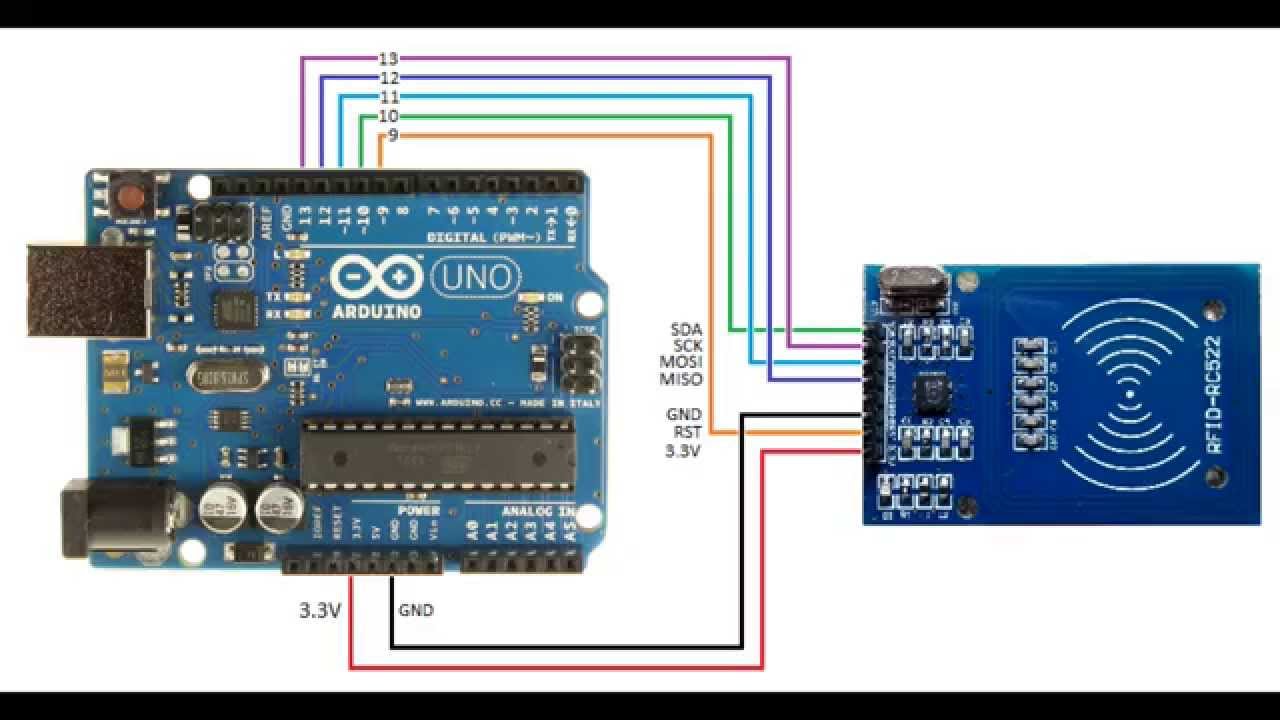
RFID CIRCUIT DIAGRAM
Please make given below circuit using RFID and Arduino Uno
RFID CIRCUIT DIAGRAM
Comments
Only logged in users can leave comments