Devices & Components
10 jumper wires 150mm male
40 colored male-female jumper wires
Arduino® UNO R4 WiFi
Breadboard - 400 contacts
Black Ping Pong Ball
DS18B20 Temperature Probe
Mini Solar Panel 6V
Solar Power Manager Module
DHT22 Temp and Humidity Sensor
18650 Lithium Battery
Hardware & Tools
Electronics Soldering Iron
Software & Tools
Arduino IDE
Creality Cloud
Project description
Code
WBGT connected to website
cpp
Code for connecting the WBGT monitor to a website
1#include <DHT.h> 2#include <Wire.h> 3#include <LiquidCrystal_I2C.h> 4#include <OneWire.h> 5#include <DallasTemperature.h> 6#include <RTClib.h> 7#include <WiFiS3.h> 8#include <ArduinoHttpClient.h> 9#include <ArduinoJson.h> 10 11// -------------------- Pin Definitions -------------------- 12#define DHTPIN 2 13#define DHTTYPE DHT22 14#define ONE_WIRE_BUS 8 15 16// -------------------- WiFi & API Settings -------------------- 17const char* WIFI_SSID = "WiFi Name"; //write wifi name here 18const char* WIFI_PASSWORD = "WiFi Passowrd"; //write wifi password here 19const char* SUPABASE_HOST = "iqxjjdbhqlpobreotjcp.supabase.co"; 20const char* SENSOR_ID = "Sensor ID"; //paste in sensor ID here 21const char* API_KEY = "sb_publishable_cm1u3V60C8JKuF2qBybrIg_BIOzopRf"; // <-- replace with your anon key 22 23// -------------------- Objects -------------------- 24DHT dht(DHTPIN, DHTTYPE); 25OneWire oneWire(ONE_WIRE_BUS); 26DallasTemperature globeSensor(&oneWire); 27LiquidCrystal_I2C lcd(0x27, 16, 2); 28RTC_DS1307 rtc; 29WiFiSSLClient wifi; 30HttpClient client = HttpClient(wifi, SUPABASE_HOST, 443); 31 32bool rtcAvailable = false; 33 34// -------------------- Functions -------------------- 35float wetBulb(float Ta, float RH) { 36 return Ta * atan(0.151977 * sqrt(RH + 8.313659)) 37 + atan(Ta + RH) 38 - atan(RH - 1.676331) 39 + 0.00391838 * pow(RH, 1.5) * atan(0.023101 * RH) 40 - 4.686035; 41} 42 43float CtoF(float C) { 44 return (C * 9.0 / 5.0) + 32.0; 45} 46 47String heatRiskF(float WBGT_F) { 48 if (WBGT_F < 82.4) return "Safe"; 49 else if (WBGT_F < 89.4) return "Caution"; 50 else if (WBGT_F < 94.8) return "Extreme"; 51 else if (WBGT_F < 100.4) return "Danger"; 52 else return "Extreme"; 53} 54 55void connectWiFi() { 56 Serial.print("Connecting to WiFi..."); 57 lcd.clear(); 58 lcd.setCursor(0, 0); 59 lcd.print("Connecting WiFi"); 60 WiFi.begin(WIFI_SSID, WIFI_PASSWORD); 61 int attempts = 0; 62 while (WiFi.status() != WL_CONNECTED && attempts < 40) { 63 delay(500); 64 Serial.print("."); 65 attempts++; 66 } 67 68 if (WiFi.status() == WL_CONNECTED) { 69 Serial.println(" Connected!"); 70 lcd.setCursor(0, 1); 71 lcd.print("WiFi Connected!"); 72 } else { 73 Serial.println(" WiFi Failed!"); 74 lcd.setCursor(0, 1); 75 lcd.print("WiFi Failed!"); 76 } 77 delay(2000); 78} 79 80// -------------------- Send Data to Supabase Table -------------------- 81void sendToWebsite(float TaC, float RH, float TgC, float TwbC, float WBGT_C, String risk) { 82 if (WiFi.status() != WL_CONNECTED) { 83 connectWiFi(); 84 } 85 86 StaticJsonDocument<512> doc; 87 doc["sensor_id"] = SENSOR_ID; 88 doc["dry_bulb"] = TaC; 89 doc["humidity"] = RH; 90 doc["globe_temp"] = TgC; 91 doc["wet_bulb"] = TwbC; 92 doc["wbgt"] = WBGT_C; 93 94 String payload; 95 serializeJson(doc, payload); 96 97 Serial.println("Sending data to Supabase table..."); 98 Serial.println(payload); 99 100 String bearerToken = "Bearer "; 101 bearerToken += API_KEY; 102 103 client.beginRequest(); 104 client.post("/rest/v1/sensor_readings"); 105 client.sendHeader("Content-Type", "application/json"); 106 client.sendHeader("apikey", API_KEY); 107 client.sendHeader("Authorization", bearerToken); 108 client.sendHeader("Prefer", "return=representation"); 109 client.sendHeader("Content-Length", payload.length()); 110 client.beginBody(); 111 client.print(payload); 112 client.endRequest(); 113 114 int statusCode = client.responseStatusCode(); 115 String response = client.responseBody(); 116 Serial.print("Server response: "); 117 Serial.println(statusCode); 118 Serial.println(response); 119 120 lcd.clear(); 121 lcd.setCursor(0, 0); 122 if (statusCode == 201) { 123 lcd.print("Data Sent OK!"); 124 } else { 125 lcd.print("Send Failed:"); 126 lcd.setCursor(0, 1); 127 lcd.print("Code: "); 128 lcd.print(statusCode); 129 } 130 delay(2000); 131} 132 133// -------------------- Setup -------------------- 134void setup() { 135 Serial.begin(9600); 136 delay(2000); 137 Wire.begin(); 138 139 dht.begin(); 140 globeSensor.begin(); 141 lcd.init(); 142 lcd.backlight(); 143 144 if (!rtc.begin()) { 145 Serial.println("RTC not found - continuing anyway"); 146 lcd.clear(); 147 lcd.print("RTC Error"); 148 delay(2000); 149 } else { 150 rtcAvailable = true; 151 if (!rtc.isrunning()) { 152 rtc.adjust(DateTime(F(__DATE__), F(__TIME__))); 153 } 154 } 155 156 lcd.clear(); 157 lcd.setCursor(0, 0); 158 lcd.print("Team 6"); 159 lcd.setCursor(0, 1); 160 lcd.print("WBGT Monitor"); 161 delay(2000); 162 lcd.clear(); 163 164 connectWiFi(); 165 lcd.clear(); 166} 167 168// -------------------- Loop -------------------- 169void loop() { 170 float TaC = dht.readTemperature(); 171 float RH = dht.readHumidity(); 172 173 globeSensor.requestTemperatures(); 174 float TgC = globeSensor.getTempCByIndex(0); 175 176 if (isnan(TaC) || isnan(RH) || TgC == DEVICE_DISCONNECTED_C) { 177 lcd.clear(); 178 lcd.print("Sensor Error"); 179 Serial.println("Sensor read error!"); 180 delay(2000); 181 return; 182 } 183 184 float TwbC = wetBulb(TaC, RH); 185 float WBGT_C = 0.7 * TwbC + 0.2 * TgC + 0.1 * TaC; 186 float TaF = CtoF(TaC); 187 float TgF = CtoF(TgC); 188 float TwbF = CtoF(TwbC); 189 float WBGT_F = CtoF(WBGT_C); 190 String risk = heatRiskF(WBGT_F); 191 192 // -------------------- LCD Screen 1 -------------------- 193 lcd.clear(); 194 lcd.setCursor(0, 0); 195 lcd.print("WBGT:"); 196 lcd.print(WBGT_F, 1); 197 lcd.print("F"); 198 lcd.setCursor(0, 1); 199 lcd.print(risk); 200 delay(15000); // show for 15 seconds 201 202 // -------------------- LCD Screen 2 -------------------- 203 lcd.clear(); 204 lcd.setCursor(0, 0); 205 lcd.print("Twb:"); 206 lcd.print(TwbF, 1); 207 lcd.print(" Tg:"); 208 lcd.print(TgF, 1); 209 lcd.setCursor(0, 1); 210 lcd.print("Ta:"); 211 lcd.print(TaF, 1); 212 lcd.print(" RH:"); 213 lcd.print(RH, 0); 214 lcd.print("%"); 215 delay(15000); // show for 15 seconds 216 217 // -------------------- LCD Screen 3 (RTC) -------------------- 218 if (rtcAvailable) { 219 DateTime now = rtc.now(); 220 lcd.clear(); 221 lcd.setCursor(0, 0); 222 lcd.print(now.month()); lcd.print("/"); 223 lcd.print(now.day()); lcd.print("/"); 224 lcd.print(now.year()); 225 lcd.setCursor(0, 1); 226 if (now.hour() < 10) lcd.print("0"); 227 lcd.print(now.hour()); lcd.print(":"); 228 if (now.minute() < 10) lcd.print("0"); 229 lcd.print(now.minute()); lcd.print(":"); 230 if (now.second() < 10) lcd.print("0"); 231 lcd.print(now.second()); 232 delay(5000); // 233 } 234 235 // -------------------- Send to Supabase Table (Celsius) -------------------- 236 sendToWebsite(TaC, RH, TgC, TwbC, WBGT_C, risk); 237}
Downloadable files
Base Layer
Monitor Case
BaseLayer.stl
Layer 1
Monitor Case
Layer1.stl
Layer 2
Monitor Case
Layer2.stl
Layer 3
Monitor Case
Layer3.stl
Layer 4
Monitor Case
Layer4.stl
Layer 5
Monitor Case
Layer5.stl
Layer 6
Monitor Case
Layer6.stl
Roof
Monitor Case
Roof.stl
Documentation
Tiger Sensor Guidance Package
Informational document for producing the monitor
Tiger Sensor Guidance Package.pdf
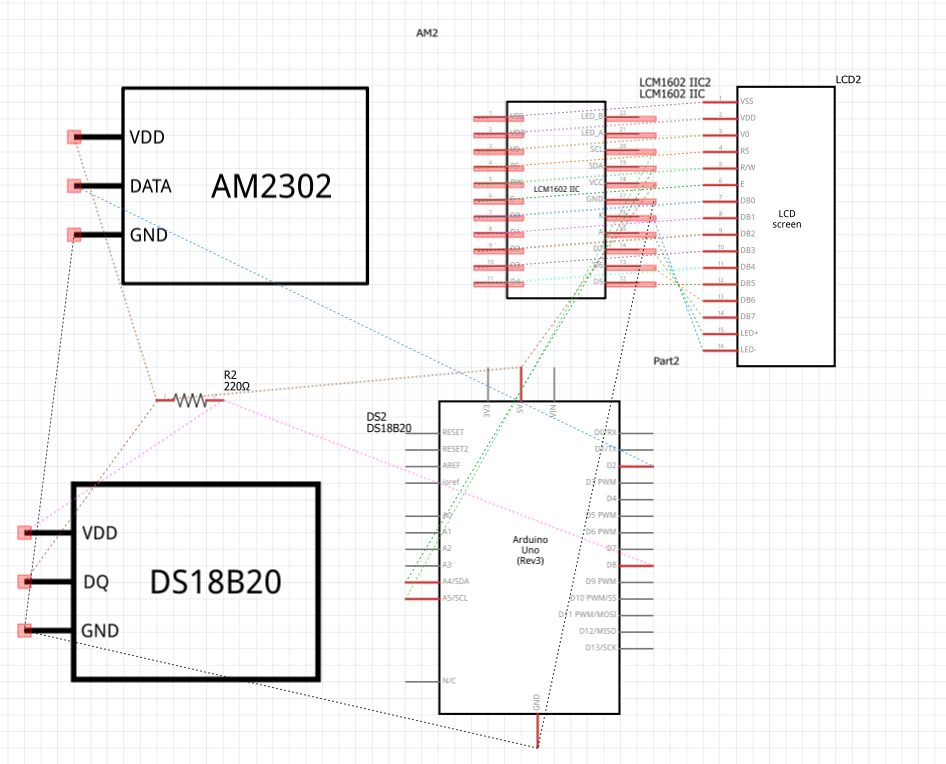
Monitor Schematic
Schematic of the monitor connections
Schematic.png
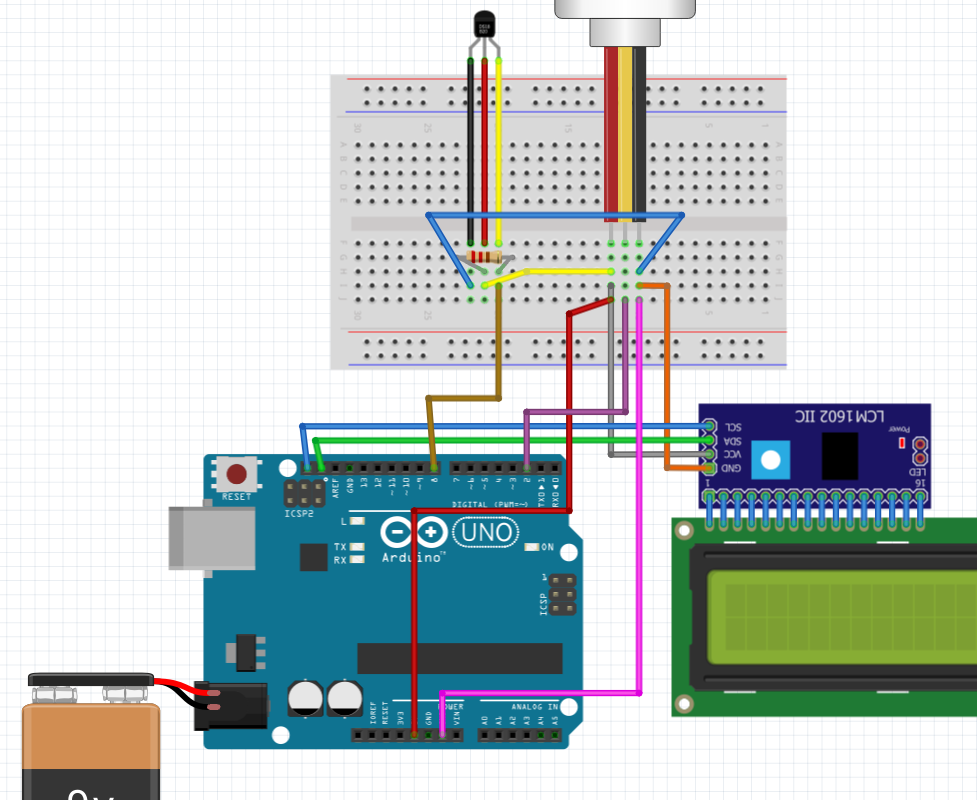
Breadboard View
Breadboard view of the monitor connections
Breadboard.png
Comments
Only logged in users can leave comments