Devices & Components
Box of 300 pcs 3-5 mm LED lights in various colors
Arduino Make Your UNO Kit
Software & Tools
Arduino IDE
Project description
Code
Arduino Bluetooth/Serial Monitor Controlled Car
cpp
Arduino Bluetooth/Serial Monitor Controlled Car
1/* 2 Arduino Bluetooth/Serial Monitor Controlled Car 3 4 This project controls a 4-wheel Arduino car using both 5 a Bluetooth mobile app (HC-05) and the Arduino IDE Serial Monitor. 6 7 The system uses: 8 - L293D Motor Driver Shield 9 - 4 DC Motors 10 - HC-05 Bluetooth Module 11 - Ultrasonic Sensor 12 - Servo Motor 13 14 Features: 15 - Forward, backward, left, and right movement 16 - Bluetooth and Serial Monitor control 17 - Automatic obstacle detection and avoidance 18 19Created by Balagie Hydara 20 21You can watch the video here: https://youtu.be/1xQAdOWvVt4 22*/ 23 24 25#include <AFMotor.h> 26#include <NewPing.h> 27#include <Servo.h> 28 29AF_DCMotor motor1(1, MOTOR12_1KHZ); 30AF_DCMotor motor2(2, MOTOR12_1KHZ); 31AF_DCMotor motor3(3, MOTOR34_1KHZ); 32AF_DCMotor motor4(4, MOTOR34_1KHZ); 33Servo myservo; 34 35int valSpeed = 255; 36 37// Ultrasonic 38#define TRIG_PIN A0 39#define ECHO_PIN A1 40#define MAX_DISTANCE 200 41NewPing sonar(TRIG_PIN, ECHO_PIN, MAX_DISTANCE); 42 43int stopDistance = 20; 44 45// movement state 46char currentMode = 'S'; 47 48void setup() { 49 Serial.begin(9600); 50 51 myservo.attach(10); 52 myservo.write(115); 53 delay(500); 54 55 SetSpeed(valSpeed); 56 stopMotors(); 57 58 Serial.println("F=forward auto avoid, B=back, L=left, R=right, S=stop"); 59} 60 61void loop() { 62 // read command from Serial Monitor 63 if (Serial.available() > 0) { 64 char cmd = Serial.read(); 65 66 if (cmd == 'f' || cmd == 'F') { 67 currentMode = 'F'; 68 Serial.println("Forward with auto obstacle avoidance"); 69 } 70 else if (cmd == 'b' || cmd == 'B') { 71 currentMode = 'B'; 72 moveBackward(); 73 Serial.println("Backward"); 74 } 75 else if (cmd == 'l' || cmd == 'L') { 76 currentMode = 'L'; 77 turnLeft(); 78 Serial.println("Left"); 79 } 80 else if (cmd == 'r' || cmd == 'R') { 81 currentMode = 'R'; 82 turnRight(); 83 Serial.println("Right"); 84 } 85 else if (cmd == 's' || cmd == 'S') { 86 currentMode = 'S'; 87 stopMotors(); 88 Serial.println("Stop"); 89 } 90 } 91 92 // automatic obstacle detection only when going forward 93 if (currentMode == 'F') { 94 int d = readDistance(); 95 96 if (d > stopDistance) { 97 moveForward(); 98 } else { 99 obstacleAvoid(); 100 } 101 } 102} 103 104void SetSpeed(int val) { 105 valSpeed = val; 106 motor1.setSpeed(val); 107 motor2.setSpeed(val); 108 motor3.setSpeed(val); 109 motor4.setSpeed(val); 110} 111 112void moveForward() { 113 motor1.run(FORWARD); 114 motor2.run(FORWARD); 115 motor3.run(FORWARD); 116 motor4.run(FORWARD); 117} 118 119void moveBackward() { 120 motor1.run(BACKWARD); 121 motor2.run(BACKWARD); 122 motor3.run(BACKWARD); 123 motor4.run(BACKWARD); 124} 125 126void turnLeft() { 127 motor1.run(FORWARD); 128 motor2.run(BACKWARD); 129 motor3.run(BACKWARD); 130 motor4.run(FORWARD); 131} 132 133void turnRight() { 134 motor1.run(BACKWARD); 135 motor2.run(FORWARD); 136 motor3.run(FORWARD); 137 motor4.run(BACKWARD); 138} 139 140void stopMotors() { 141 motor1.run(RELEASE); 142 motor2.run(RELEASE); 143 motor3.run(RELEASE); 144 motor4.run(RELEASE); 145} 146 147int readPingOnly() { 148 delay(50); 149 int cm = sonar.ping_cm(); 150 if (cm == 0) cm = 250; 151 return cm; 152} 153 154int readDistance() { 155 myservo.write(115); 156 delay(200); 157 return readPingOnly(); 158} 159 160int lookLeft() { 161 myservo.write(170); 162 delay(400); 163 int d = readPingOnly(); 164 myservo.write(115); 165 delay(200); 166 return d; 167} 168 169int lookRight() { 170 myservo.write(50); 171 delay(400); 172 int d = readPingOnly(); 173 myservo.write(115); 174 delay(200); 175 return d; 176} 177 178void obstacleAvoid() { 179 stopMotors(); 180 delay(200); 181 182 moveBackward(); 183 delay(400); 184 stopMotors(); 185 delay(200); 186 187 int rightD = lookRight(); 188 int leftD = lookLeft(); 189 190 if (rightD >= leftD) { 191 turnRight(); 192 delay(500); 193 } else { 194 turnLeft(); 195 delay(500); 196 } 197 198 stopMotors(); 199 delay(200); 200}
Downloadable files
robotic_car
this is the code file
robotic_car.ino
Arduino Bluetooth
THIS IS THE FULL PDF VERSION
Arduino Bluetooth.pdf
Documentation
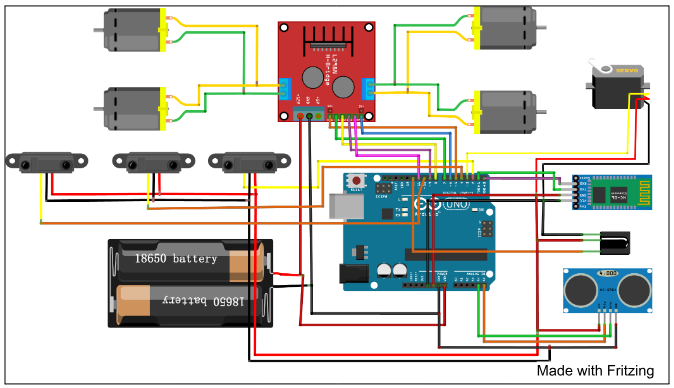
schematic
this is the Schematic Diagram (Made with Fritzing)
schematic.png
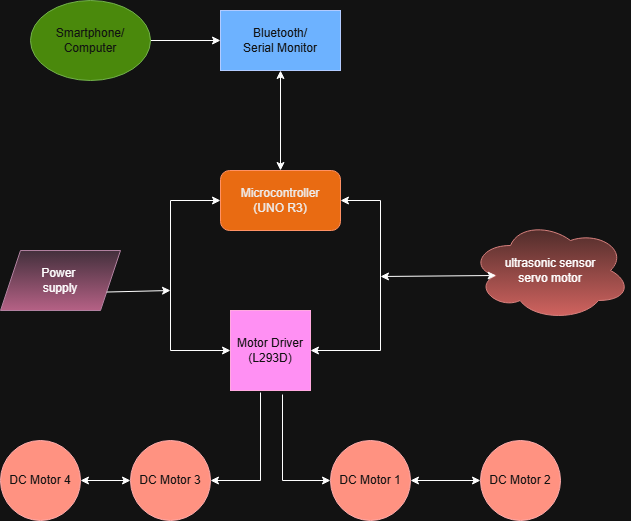
Block_Diagram_final
this is the block diagram
Block_Diagram_final.png
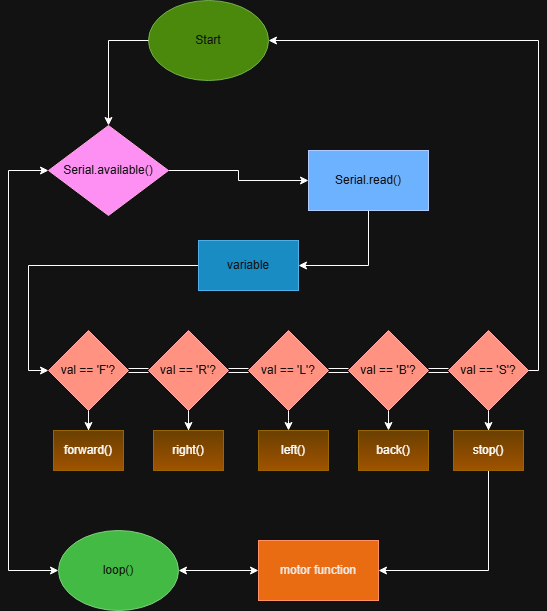
Flow_Chart
this is the Flow_Chart
Flow_Chart.png
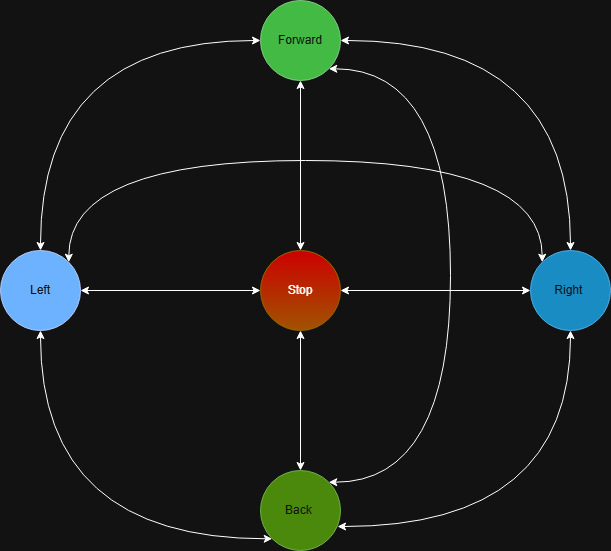
state_diagram
this is the state_diagram
state_diagram.png
Comments
Only logged in users can leave comments