4 WD/2WD auto obstacle avoidance car / Bluetooth control car
This is 4 Wheel car based on Arduino which can be drive automatically on its own by detecting obstacle or you can take full control manually
Devices & Components

Arduino Nano
HC-05 Bluetooth Module
Slide Switch
Buzzer
SG90 Micro-servo motor
Ultrasonic Sensor - HC-SR04 (Generic)
IR Obstacle Sensor
Dual H-Bridge motor drivers L298
LED (generic)
Battery Holder, 18650 x 2
Battery, 3.6 V
Maker Essentials - Micro-motors & Grippy Wheels
Jumper wires (generic)
Arduino Nano I/O Shield
Hardware & Tools
Soldering iron (generic)
Multitool, Screwdriver
Solder Wire, Lead Free
Software & Tools
Bluetooth RC Controller

Arduino IDE
Project description
Code
4WD/2WD car Bluetooth Manual / Auto obstacle avoidance (Auto Pilot Mode)
arduino
Updated Code for Obstacle avoidabce
1//Project developed by Alok Dubey
2//Avaiable free to do the changes   as per your need :)
3//Date :16 June 2021 (v.13)
4
5#include <Servo.h>        //   Include Servo Library
6#include <NewPing.h>      // Include Newping Library
7
8//   L298N Control Pins
9const int LeftMotorForward = 4; // Black wire then Red Wire   of Left Motor, combile black+black , Red+Red of Both Motor
10const int LeftMotorBackward   = 5;// Black wire then Red Wire of Left Motor, combile black+black , Red+Red of   Both Motor
11const int RightMotorForward = 6;// Red Wire then Black Wire of Right   Motor, combile black+black , Red+Red of Both Motor
12const int RightMotorBackward   = 7;// Red Wire then Black Wire of Right Motor, combile black+black , Red+Red of   Both Motor
13const int Ena = 3; // To control Speed of Motor A
14const int Enb   = 11;// To control Speed of Motor B
15const int buzzer = 10; //buzzer to arduino   pin 10
16const int BTState = 2; //STATE pin of Bluetooth (when bluetooth not connected   it is LOW)
17
18#define TRIGGER_PIN  A1  // Arduino pin tied to trigger pin on   the ultrasonic sensor.
19#define ECHO_PIN     A2  // Arduino pin tied to echo pin   on the ultrasonic sensor.
20#define MAX_DISTANCE 250 // Maximum distance we want   to ping for (in centimeters). Maximum sensor distance is rated at 250cm.
21#define   obstacleF  12
22#define backLED  13
23#define obstaclePin 8 // IR Sensor OUT pin
24Servo   servo_motor;  // Servo's name
25NewPing sonar(TRIGGER_PIN, ECHO_PIN, MAX_DISTANCE);   // NewPing setup of pins and maximum distance.
26
27int isObstacle = HIGH;//HIGH   means No Obstacle
28int isObstacleF = LOW;//LOW means CAR IS ON GROUND
29int distance   = 0 ;
30int i, j = 0 ;
31
32void setup()
33{
34
35  // Set L298N Control Pins   as Output
36  pinMode(RightMotorForward, OUTPUT);
37  pinMode(LeftMotorForward,   OUTPUT);
38  pinMode(LeftMotorBackward, OUTPUT);
39  pinMode(RightMotorBackward,   OUTPUT);
40  pinMode(Ena, OUTPUT);
41  pinMode(Enb, OUTPUT);
42  pinMode(buzzer,   OUTPUT); // Set buzzer - pin 10 as an output
43  pinMode(obstacleF, INPUT);
44   pinMode(backLED, OUTPUT);
45  pinMode(BTState, INPUT);
46  pinMode(obstaclePin,   INPUT);
47
48  // Keep Motor not moving initially.
49  digitalWrite(RightMotorForward,   LOW);
50  digitalWrite(RightMotorBackward, LOW);
51  digitalWrite(LeftMotorForward,   LOW);
52  digitalWrite(LeftMotorBackward, LOW);
53  digitalWrite(backLED, HIGH);
54   digitalWrite(buzzer, LOW);
55  analogWrite(Ena, 0);
56  analogWrite(Enb, 0);
57
58   servo_motor.attach(9);   // Attachs the servo on pin 9 to servo object.
59  servo_motor.write(90);    // Set at 90 degrees.
60  delay(2000);             // Wait for 2000ms.
61  distance   = readPing();    // Get Ping Distance.
62  delay(100);             // Wait for   1ms.
63  distance = readPing();
64  delay(100);
65
66  Serial.begin(9600);
67}
68
69void   loop()
70
71{
72  if (digitalRead(BTState) == LOW)
73  {
74    int distanceRight   = 0;
75    int distanceLeft = 0;
76    if (distance <= 45)//its in cm change as   per your need
77    {
78      digitalWrite(buzzer, HIGH);
79      delay(100);
80       digitalWrite(buzzer, LOW);
81
82      moveStop();
83      moveBackward();
84       delay(300);
85      moveStop();
86      distanceRight = lookRight();
87       delay(500);
88      distanceLeft = lookLeft();
89      delay(500);
90
91       if (distanceRight > distanceLeft)
92      {
93        turnRight();
94        delay(600);
95         moveStop();
96        distance = readPing();
97      }
98      else if   (distanceLeft > distanceRight)
99      {
100        turnLeft();
101        delay(600);
102         moveStop();
103        distance = readPing();
104      }
105
106    }
107     else
108    {
109      isObstacleF = digitalRead(obstacleF); // to avoide to   fall where is no ground / or its farther then sensor set distance
110      if (isObstacleF   == HIGH)
111      {
112        moveStop();
113        moveBackward();
114        delay(300);
115         if (distanceLeft > distanceRight)
116        {
117          turnLeft();
118           delay(500);
119          moveStop();
120          distance = readPing();
121         }
122        else
123        {
124          turnRight();
125          delay(500);
126           moveStop();
127          distance = readPing();
128
129        }
130        moveStop();
131       }
132      else
133      {
134        moveForward();
135      }
136      //reseting   the variable after the operations
137      distance = readPing();
138      delay(100);
139     }
140  }
141  else
142  {
143
144    if (Serial.available())
145    {
146      moveStop();
147       char data = Serial.read();
148      Serial.println(data);
149      if (data   == 'F')
150      {
151        distance = readPing();    // Get Ping Distance.
152         if (distance <= 45) //distance in cm change as per your need
153        {
154           moveStop();
155          moveBackward();
156          delay(100);
157           moveStop();
158        }
159        else
160        {
161          isObstacleF   = digitalRead(obstacleF); //to avoide to fall where is no ground / or its farther   then sensor set distance
162          if (isObstacleF == HIGH)
163          {
164             moveStop();
165            moveBackward();
166            delay(300);
167             moveStop();
168          }
169          else
170          {
171            moveForward();
172           }
173        }
174      }
175      if (data == 'B')
176      {
177        isObstacle   = digitalRead(obstaclePin);
178        if (isObstacle == LOW)
179        {
180          moveStop();
181           moveForward();
182          delay(100);
183          moveStop();
184        }
185         else
186        {
187          moveBackward();
188        }
189      }
190       if (data == 'S')
191      {
192        moveStop();
193      }
194      if   (data == 'L')
195      {
196        turnLeft();
197      }
198      if (data ==   'R')
199      {
200        turnRight();
201      }
202    }
203
204  }
205
206  distance   = readPing();
207
208}
209
210// Loop ends here
211
212//--------------------Declaring   Function below for Loop----------------------------------------------------------------------------------------------------
213
214int   lookRight()     // Look Right Function for Servo Motor
215{
216  servo_motor.write(180);
217   delay(500);
218  int distance = readPing();
219  delay(100);
220  servo_motor.write(90);
221   return distance;
222}
223
224int lookLeft()      // Look Left Function for Servo   Motor
225{
226  servo_motor.write(0);
227  delay(500);
228  int distance = readPing();
229   delay(100);
230  servo_motor.write(90);
231  return distance;
232
233}
234
235int   readPing()      // Read Ping Function for Ultrasonic Sensor.
236{
237  delay(40);                  // Wait 40ms between pings (about 20 pings/sec). 29ms should be   the shortest delay between pings.
238  int cm = sonar.ping_cm();   //Send ping,   get ping distance in centimeters (cm).
239  if (cm == 0)
240  {
241    cm = 250;
242   }
243  return cm;
244}
245
246
247void moveStop()       // Move Stop Function   for Motor Driver.
248{
249
250  digitalWrite(RightMotorForward, LOW);
251  digitalWrite(RightMotorBackward,   LOW);
252  digitalWrite(LeftMotorForward, LOW);
253  digitalWrite(LeftMotorBackward,   LOW);
254}
255
256void moveForward()    // Move Forward Function for Motor Driver.
257{
258   for (i = 0; i <= 90; i ++)
259
260  {
261    analogWrite(Ena, i);
262    analogWrite(Enb,   i);
263    digitalWrite(RightMotorForward, HIGH);
264    digitalWrite(RightMotorBackward,   LOW);
265    digitalWrite(LeftMotorForward, HIGH);
266    digitalWrite(LeftMotorBackward,   LOW);
267
268  }
269}
270
271void moveBackward()   // Move Backward Function for   Motor Driver.
272{
273  for (j = 0; j <= 100; j ++)
274  {
275    analogWrite(Ena,   j);
276    analogWrite(Enb, j);
277    digitalWrite(RightMotorForward, LOW);
278     digitalWrite(RightMotorBackward, HIGH);
279    digitalWrite(LeftMotorForward,   LOW);
280    digitalWrite(LeftMotorBackward, HIGH);
281  }
282}
283
284void turnRight()       // Turn Right Function for Motor Driver.
285{
286  digitalWrite(RightMotorForward,   LOW);
287  digitalWrite(RightMotorBackward, HIGH);
288  digitalWrite(LeftMotorForward,   HIGH);
289  digitalWrite(LeftMotorBackward, LOW);
290
291}
292
293void turnLeft()        // Turn Left Function for Motor Driver.
294{
295  digitalWrite(RightMotorForward,   HIGH);
296  digitalWrite(RightMotorBackward, LOW);
297  digitalWrite(LeftMotorForward,   LOW);
298  digitalWrite(LeftMotorBackward, HIGH);
299
300}
301
4WD/2WD car Bluetooth Manual / Auto obstacle avoidance (Auto Pilot Mode)
arduino
Updated Code for Obstacle avoidabce
1//Project developed by Alok Dubey
2//Avaiable free to do the changes  as per your need :)
3//Date :16 June 2021 (v.13)
4
5#include <Servo.h>        //  Include Servo Library
6#include <NewPing.h>      // Include Newping Library
7
8//  L298N Control Pins
9const int LeftMotorForward = 4; // Black wire then Red Wire  of Left Motor, combile black+black , Red+Red of Both Motor
10const int LeftMotorBackward  = 5;// Black wire then Red Wire of Left Motor, combile black+black , Red+Red of  Both Motor
11const int RightMotorForward = 6;// Red Wire then Black Wire of Right  Motor, combile black+black , Red+Red of Both Motor
12const int RightMotorBackward  = 7;// Red Wire then Black Wire of Right Motor, combile black+black , Red+Red of  Both Motor
13const int Ena = 3; // To control Speed of Motor A
14const int Enb  = 11;// To control Speed of Motor B
15const int buzzer = 10; //buzzer to arduino  pin 10
16const int BTState = 2; //STATE pin of Bluetooth (when bluetooth not connected  it is LOW)
17
18#define TRIGGER_PIN  A1  // Arduino pin tied to trigger pin on  the ultrasonic sensor.
19#define ECHO_PIN     A2  // Arduino pin tied to echo pin  on the ultrasonic sensor.
20#define MAX_DISTANCE 250 // Maximum distance we want  to ping for (in centimeters). Maximum sensor distance is rated at 250cm.
21#define  obstacleF  12
22#define backLED  13
23#define obstaclePin 8 // IR Sensor OUT pin
24Servo  servo_motor;  // Servo's name
25NewPing sonar(TRIGGER_PIN, ECHO_PIN, MAX_DISTANCE);  // NewPing setup of pins and maximum distance.
26
27int isObstacle = HIGH;//HIGH  means No Obstacle
28int isObstacleF = LOW;//LOW means CAR IS ON GROUND
29int distance  = 0 ;
30int i, j = 0 ;
31
32void setup()
33{
34
35  // Set L298N Control Pins  as Output
36  pinMode(RightMotorForward, OUTPUT);
37  pinMode(LeftMotorForward,  OUTPUT);
38  pinMode(LeftMotorBackward, OUTPUT);
39  pinMode(RightMotorBackward,  OUTPUT);
40  pinMode(Ena, OUTPUT);
41  pinMode(Enb, OUTPUT);
42  pinMode(buzzer,  OUTPUT); // Set buzzer - pin 10 as an output
43  pinMode(obstacleF, INPUT);
44  pinMode(backLED, OUTPUT);
45  pinMode(BTState, INPUT);
46  pinMode(obstaclePin,  INPUT);
47
48  // Keep Motor not moving initially.
49  digitalWrite(RightMotorForward,  LOW);
50  digitalWrite(RightMotorBackward, LOW);
51  digitalWrite(LeftMotorForward,  LOW);
52  digitalWrite(LeftMotorBackward, LOW);
53  digitalWrite(backLED, HIGH);
54  digitalWrite(buzzer, LOW);
55  analogWrite(Ena, 0);
56  analogWrite(Enb, 0);
57
58  servo_motor.attach(9);   // Attachs the servo on pin 9 to servo object.
59  servo_motor.write(90);   // Set at 90 degrees.
60  delay(2000);             // Wait for 2000ms.
61  distance  = readPing();    // Get Ping Distance.
62  delay(100);             // Wait for  1ms.
63  distance = readPing();
64  delay(100);
65
66  Serial.begin(9600);
67}
68
69void  loop()
70
71{
72  if (digitalRead(BTState) == LOW)
73  {
74    int distanceRight  = 0;
75    int distanceLeft = 0;
76    if (distance <= 45)//its in cm change as  per your need
77    {
78      digitalWrite(buzzer, HIGH);
79      delay(100);
80      digitalWrite(buzzer, LOW);
81
82      moveStop();
83      moveBackward();
84      delay(300);
85      moveStop();
86      distanceRight = lookRight();
87      delay(500);
88      distanceLeft = lookLeft();
89      delay(500);
90
91      if (distanceRight > distanceLeft)
92      {
93        turnRight();
94        delay(600);
95        moveStop();
96        distance = readPing();
97      }
98      else if  (distanceLeft > distanceRight)
99      {
100        turnLeft();
101        delay(600);
102        moveStop();
103        distance = readPing();
104      }
105
106    }
107    else
108    {
109      isObstacleF = digitalRead(obstacleF); // to avoide to  fall where is no ground / or its farther then sensor set distance
110      if (isObstacleF  == HIGH)
111      {
112        moveStop();
113        moveBackward();
114        delay(300);
115        if (distanceLeft > distanceRight)
116        {
117          turnLeft();
118          delay(500);
119          moveStop();
120          distance = readPing();
121        }
122        else
123        {
124          turnRight();
125          delay(500);
126          moveStop();
127          distance = readPing();
128
129        }
130        moveStop();
131      }
132      else
133      {
134        moveForward();
135      }
136      //reseting  the variable after the operations
137      distance = readPing();
138      delay(100);
139    }
140  }
141  else
142  {
143
144    if (Serial.available())
145    {
146      moveStop();
147      char data = Serial.read();
148      Serial.println(data);
149      if (data  == 'F')
150      {
151        distance = readPing();    // Get Ping Distance.
152        if (distance <= 45) //distance in cm change as per your need
153        {
154          moveStop();
155          moveBackward();
156          delay(100);
157          moveStop();
158        }
159        else
160        {
161          isObstacleF  = digitalRead(obstacleF); //to avoide to fall where is no ground / or its farther  then sensor set distance
162          if (isObstacleF == HIGH)
163          {
164            moveStop();
165            moveBackward();
166            delay(300);
167            moveStop();
168          }
169          else
170          {
171            moveForward();
172          }
173        }
174      }
175      if (data == 'B')
176      {
177        isObstacle  = digitalRead(obstaclePin);
178        if (isObstacle == LOW)
179        {
180          moveStop();
181          moveForward();
182          delay(100);
183          moveStop();
184        }
185        else
186        {
187          moveBackward();
188        }
189      }
190      if (data == 'S')
191      {
192        moveStop();
193      }
194      if  (data == 'L')
195      {
196        turnLeft();
197      }
198      if (data ==  'R')
199      {
200        turnRight();
201      }
202    }
203
204  }
205
206  distance  = readPing();
207
208}
209
210// Loop ends here
211
212//--------------------Declaring  Function below for Loop----------------------------------------------------------------------------------------------------
213
214int  lookRight()     // Look Right Function for Servo Motor
215{
216  servo_motor.write(180);
217  delay(500);
218  int distance = readPing();
219  delay(100);
220  servo_motor.write(90);
221  return distance;
222}
223
224int lookLeft()      // Look Left Function for Servo  Motor
225{
226  servo_motor.write(0);
227  delay(500);
228  int distance = readPing();
229  delay(100);
230  servo_motor.write(90);
231  return distance;
232
233}
234
235int  readPing()      // Read Ping Function for Ultrasonic Sensor.
236{
237  delay(40);                 // Wait 40ms between pings (about 20 pings/sec). 29ms should be  the shortest delay between pings.
238  int cm = sonar.ping_cm();   //Send ping,  get ping distance in centimeters (cm).
239  if (cm == 0)
240  {
241    cm = 250;
242  }
243  return cm;
244}
245
246
247void moveStop()       // Move Stop Function  for Motor Driver.
248{
249
250  digitalWrite(RightMotorForward, LOW);
251  digitalWrite(RightMotorBackward,  LOW);
252  digitalWrite(LeftMotorForward, LOW);
253  digitalWrite(LeftMotorBackward,  LOW);
254}
255
256void moveForward()    // Move Forward Function for Motor Driver.
257{
258  for (i = 0; i <= 90; i ++)
259
260  {
261    analogWrite(Ena, i);
262    analogWrite(Enb,  i);
263    digitalWrite(RightMotorForward, HIGH);
264    digitalWrite(RightMotorBackward,  LOW);
265    digitalWrite(LeftMotorForward, HIGH);
266    digitalWrite(LeftMotorBackward,  LOW);
267
268  }
269}
270
271void moveBackward()   // Move Backward Function for  Motor Driver.
272{
273  for (j = 0; j <= 100; j ++)
274  {
275    analogWrite(Ena,  j);
276    analogWrite(Enb, j);
277    digitalWrite(RightMotorForward, LOW);
278    digitalWrite(RightMotorBackward, HIGH);
279    digitalWrite(LeftMotorForward,  LOW);
280    digitalWrite(LeftMotorBackward, HIGH);
281  }
282}
283
284void turnRight()      // Turn Right Function for Motor Driver.
285{
286  digitalWrite(RightMotorForward,  LOW);
287  digitalWrite(RightMotorBackward, HIGH);
288  digitalWrite(LeftMotorForward,  HIGH);
289  digitalWrite(LeftMotorBackward, LOW);
290
291}
292
293void turnLeft()       // Turn Left Function for Motor Driver.
294{
295  digitalWrite(RightMotorForward,  HIGH);
296  digitalWrite(RightMotorBackward, LOW);
297  digitalWrite(LeftMotorForward,  LOW);
298  digitalWrite(LeftMotorBackward, HIGH);
299
300}
301
Downloadable files
4WD car Bluetooth Manual / Auto obstacle avoidance (Auto Pilot Mode)
For 4 Wheel Car
4WD car Bluetooth Manual / Auto obstacle avoidance (Auto Pilot Mode)
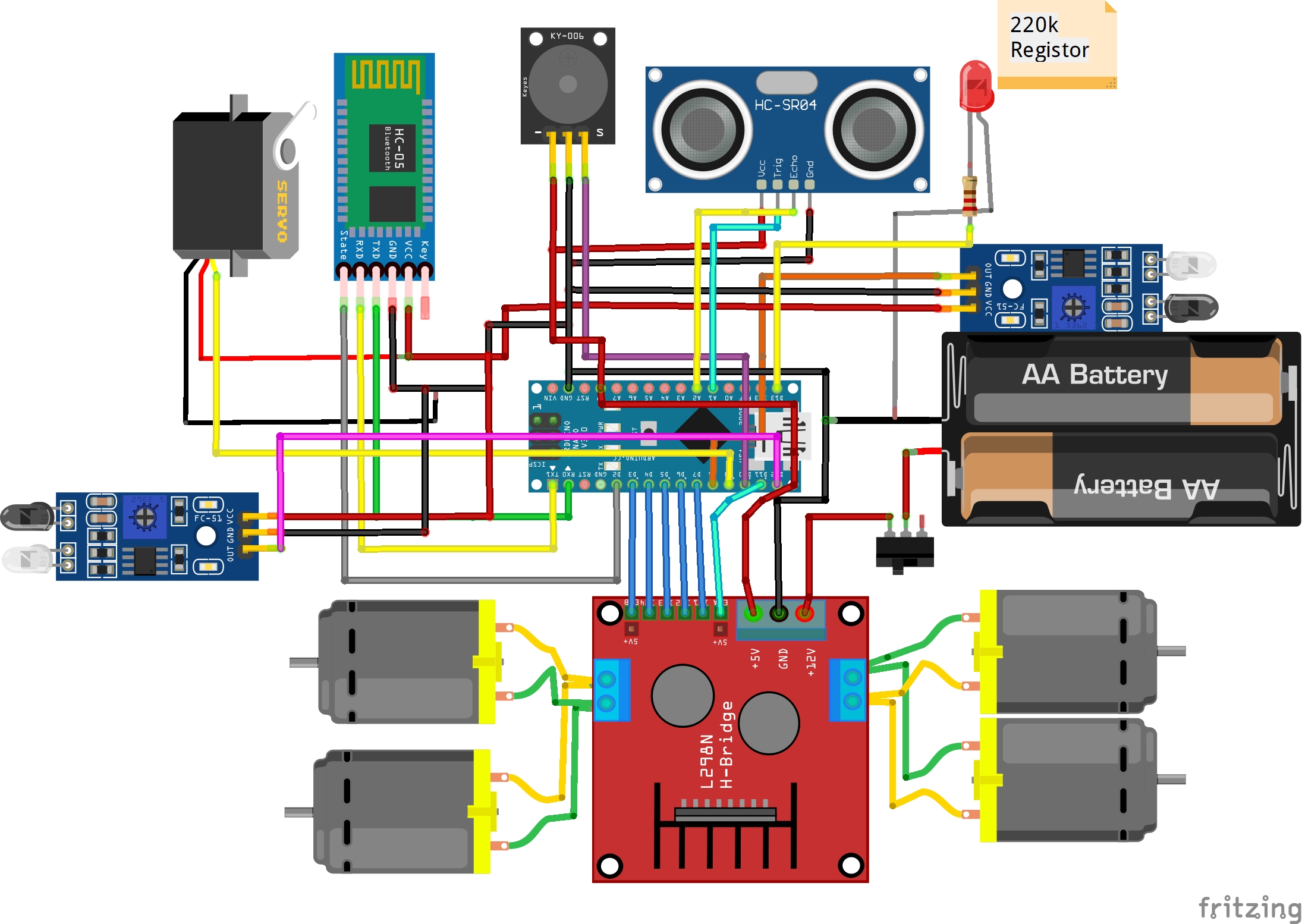
4WD car Bluetooth Manual / Auto obstacle avoidance (Auto Pilot Mode)
For 4 Wheel Car
4WD car Bluetooth Manual / Auto obstacle avoidance (Auto Pilot Mode)
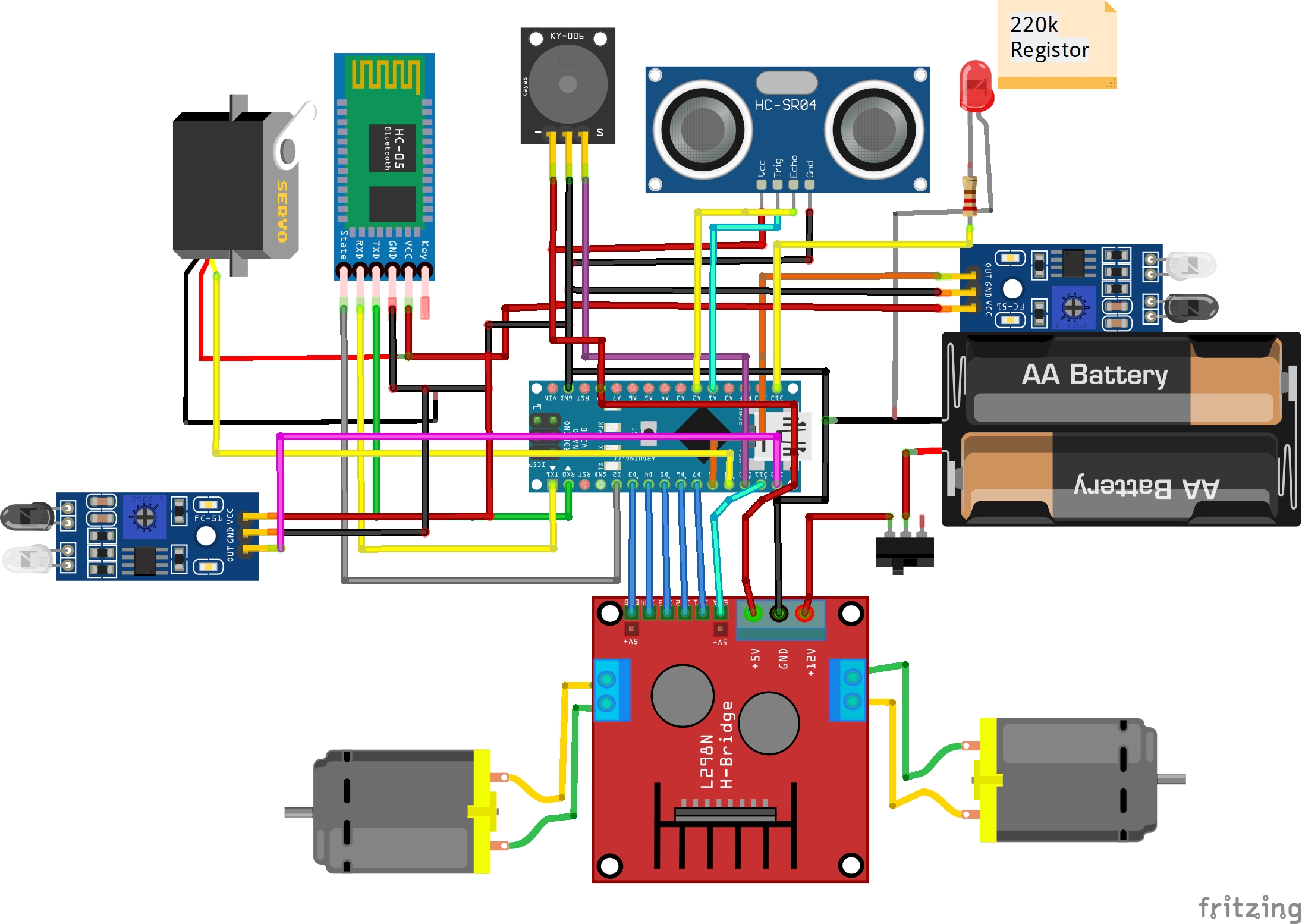
2WD car Bluetooth Manual / Auto obstacle avoidance (Auto Pilot Mode)
For 2 Wheel Car
2WD car Bluetooth Manual / Auto obstacle avoidance (Auto Pilot Mode)
Comments
Only logged in users can leave comments