BLE Autonomous Rover
The tools include Arduino 101, SeeedStudio Skeleton Bot -4WD Mobile Robotic Platform, SeeedStudio Grove Starter Kit for Arduino101, etc.
Devices & Components
Arduino 101
Hardware & Tools
Tape, Velcro® Stick On Tape/Strip
Nordic Semiconductor BLE Toolbox
Software & Tools
BLE Autonomous Rover
Project description
Code
Ardunio 101 Based 4WD Rover Code
c_cpp
This code drives an Arduino101 microcontroller board using built-in Bluetooth Low Energy (BLE) functionality, 4 sets of motor on the SEEDstudio Skeleton Bot chassis driven by 2 grove I2C motor control drivers. Additional components included from SEEDstudio include: Grove LED Socket, Green LED, Grove 80cm proximity sensor.
1/* Authors: Oliver Chen, Raad Hashim, Prashant Lalwani and Purval Sule
2
3   Autonomous Arduino 101 based 4WD Rover code.
4   This code drives an  Arduino101 microcontroller board
5   using the builtin Bluetooth Low Energy (BLE)  functonality
6   , 4 sets of motor on the SEEDstudio Skeleton Bot chassis
7   driven by 2 grove I2C motor control drivers.
8   Additional components included  from SEEDstudio include:
9   Grove LED Socket, Green LED, Grove 80cm proximity  sensor
10
11   Motor driver example code found at:
12   https://github.com/Seeed-Studio/Grove_I2C_Motor_Driver
13
14   Initial UART BLE from Dave Shade's Arduino101 BLE Rover
15
16   This demo code  is free software; you can redistribute it and/or
17   modify it under the terms  of the GNU Lesser General Public
18   License as published by the Free Software  Foundation; either
19   version 2.1 of the License, or (at your option) any later  version.
20
21   This library is distributed in the hope that it will be useful,
22   but WITHOUT ANY WARRANTY; without even the implied warranty of
23   MERCHANTABILITY  or FITNESS FOR A PARTICULAR PURPOSE.  See the GNU
24   Lesser General Public License  for more details.
25
26   You should have received a copy of the GNU Lesser General  Public
27   License along with this library; if not, write to the Free Software
28   Foundation, Inc., 51 Franklin St, Fifth Floor, Boston, MA  02110-1301  USA
29
30
31*/
32
33// Tested on Ubuntu 16.04, Arduino 1.6.13, and corelibs 1.0.7
34
35////////////////
36//  Libraries //
37//////////////
38
39// Curie Bluetooth Library
40#include <CurieBLE.h>
41//  I2C Library
42#include <Wire.h>
43
44//////////////
45// Defines //
46////////////
47
48//  defines required by motor driver functions
49#define MotorSpeedSet             0x82
50#define  PWMFrequenceSet           0x84
51#define DirectionSet              0xaa
52#define  MotorSetA                 0xa1
53#define MotorSetB                 0xa5
54#define  Nothing                   0x01
55// Note: each I2C motor driver has a unique address  (selectable on board)
56#define I2CMotorDriver_right_Addr 0x01   // Set the address  of the I2CMotorDriver - right
57#define I2CMotorDriver_left_Addr  0x02   // Set  the address of the I2CMotorDriver - left
58#define IR_PROXIMITY_SENSOR A1 // Analog  input pin that  is attached to the sensor
59#define ADC_REF 5//reference voltage  of ADC is 5v.If the Vcc switch on the Seeeduino
60                     //board  switches to 3V3, the ADC_REF should be 3.3
61float voltage;//the sensor voltage,  you can calculate or find the distance
62                    // to the reflective  object according to the figures
63                    //on page 4 or page 5 of  the datasheet of the GP2Y0A21YK.
64
65
66///////////////
67// Pin list //
68/////////////
69
70const  int connect_led_pin = 2;  // pin used for connect status LED. Doubles up as Calibration  failed
71
72//////////////////////////////////////
73// Motor Speed  and direction  task //
74////////////////////////////////////
75
76// Function to set Motor  A and B speed as well as direction for a specific motor driver (address)
77// Note:  1001 indicates M1 in forward and M2 in reverse direction
78// Note: Bit 0 and 1  should be a complement and Bit 1 and 2 should be complement
79void Set_MotorSpeed_and_direction(unsigned  char MotorSpeedA, unsigned char MotorSpeedB, unsigned char Direction, unsigned char  I2C_MotorDriver_Addr)
80{
81  //Convert 0-100% to analog values 0-255
82  MotorSpeedA  = map(MotorSpeedA, 0, 100, 0, 255);
83  MotorSpeedB = map(MotorSpeedB, 0, 100,  0, 255);
84
85  // Speed
86  Wire.beginTransmission(I2C_MotorDriver_Addr); //  transmit to specified address
87  Wire.write(MotorSpeedSet);                    //  set pwm header
88  Wire.write(MotorSpeedA);                      // send pwma
89  Wire.write(MotorSpeedB);                      // send pwmb
90  Wire.endTransmission();               	      // stop transmitting
91
92  // Direction
93  Wire.beginTransmission(I2C_MotorDriver_Addr);  // transmit to device I2CMotorDriverAdd
94  Wire.write(DirectionSet);                     //  Direction control header
95  Wire.write(Direction);                        // send  direction control information
96  Wire.write(Nothing);                          //  need to send this byte as the third byte(no meaning)
97  Wire.endTransmission();                       // stop transmitting
98}
99
100///////////////////////
101//  Global Variables //
102/////////////////////
103String cmdInput; // Command received  from BLE- Auto:Stop, Auto:Up, Auto:Right, Auto:Left, Auto:Back, Auto:Auto
104String  lastCmd="";
105int lastTurn=0;
106int turnTime=1000;
107
108/////////////////////////////////
109//  BLE handle and definitions //
110///////////////////////////////
111
112BLEPeripheral  blePeripheral;
113BLEService uartService = BLEService("6E400001B5A3F393E0A9E50E24DCCA9E");
114//  create characteristics
115BLECharacteristic rxCharacteristic = BLECharacteristic("6E400002B5A3F393E0A9E50E24DCCA9E",  BLEWriteWithoutResponse, 20);  // == TX on central (central control app)
116BLECharacteristic  txCharacteristic = BLECharacteristic("6E400003B5A3F393E0A9E50E24DCCA9E", BLENotify  , 20); // == RX on central (central control app)
117
118bool connectionStatus =  false;
119
120void roverStop(){
121  // Turn off all Motors (to be safe)
122  Set_MotorSpeed_and_direction(0,  0, 0b1010, I2CMotorDriver_right_Addr);
123  Set_MotorSpeed_and_direction(0, 0, 0b0101,  I2CMotorDriver_left_Addr);
124  Serial.println("Rover Stop");
125}
126
127void  roverUp(){
128  Set_MotorSpeed_and_direction(40, 40, 0b1010, I2CMotorDriver_right_Addr);
129  Set_MotorSpeed_and_direction(40, 40, 0b0101, I2CMotorDriver_left_Addr);
130  Serial.println("Rover  Up");
131}
132
133void roverBack(){
134  Set_MotorSpeed_and_direction(40, 40, 0b0101,  I2CMotorDriver_right_Addr);
135  Set_MotorSpeed_and_direction(40, 40, 0b1010, I2CMotorDriver_left_Addr);
136  Serial.println("Rover Up");
137}
138
139void roverLeft(){
140  Set_MotorSpeed_and_direction(100,  100, 0b1010, I2CMotorDriver_right_Addr);
141  Set_MotorSpeed_and_direction(1, 1,  0b0101, I2CMotorDriver_left_Addr);
142  Serial.println("Rover Left");
143}
144
145void  roverRight(){
146  Set_MotorSpeed_and_direction(1, 1, 0b1010, I2CMotorDriver_right_Addr);
147  Set_MotorSpeed_and_direction(100, 100, 0b0101, I2CMotorDriver_left_Addr);
148  Serial.println("Rover Right");
149}
150
151void roverAvoidLeft(){
152  Set_MotorSpeed_and_direction(100,  100, 0b1010, I2CMotorDriver_right_Addr);
153  Set_MotorSpeed_and_direction(50, 50,  0b1010, I2CMotorDriver_left_Addr);
154  Serial.println("Rover Avoid Left");
155  delay(turnTime);
156}
157
158void roverAvoidRight(){
159  Set_MotorSpeed_and_direction(50,  50, 0b0101, I2CMotorDriver_right_Addr);
160  Set_MotorSpeed_and_direction(100, 100,  0b0101, I2CMotorDriver_left_Addr);
161  Serial.println("Rover Avoid Right");
162  delay(turnTime);
163}
164
165void roverAuto(){
166  lastCmd=cmdInput;
167  Serial.println("Rover  Auto");
168  if (voltage < 1) {
169    roverUp();
170  } else if (lastTurn==0)  {
171    roverAvoidRight();
172    lastTurn=1;
173
174  } else {
175    roverAvoidLeft();
176    lastTurn=0;
177  }
178
179}
180void fullStop(){
181  roverStop();
182}
183
184/////////////////
185//  Setup Loop //
186///////////////
187
188void setup()
189{
190  // Setting up serial  connection
191  Serial.begin(9600);
192
193  // join i2c bus (address optional for  master)
194  Wire.begin();
195
196  // wait to make sure I2C is initialized
197  delayMicroseconds(10000);
198
199  // specifying connection LED pin as output
200  pinMode(connect_led_pin, OUTPUT);
201
202  blePeripheral.setLocalName("4WDUART");
203  blePeripheral.setAdvertisedServiceUuid(uartService.uuid());
204  // add service,  rx and tx characteristics:
205  blePeripheral.addAttribute(uartService);
206  blePeripheral.addAttribute(rxCharacteristic);
207  blePeripheral.addAttribute(txCharacteristic);
208  // assign event handlers for  connected, disconnected to peripheral
209  blePeripheral.setEventHandler(BLEConnected,  blePeripheralConnectHandler);
210  blePeripheral.setEventHandler(BLEDisconnected,  blePeripheralDisconnectHandler);
211  rxCharacteristic.setEventHandler(BLEWritten,  rxCharacteristicWritten);
212  blePeripheral.begin();
213  delay(5000);
214  Serial.println("BLE  UART Peripheral");
215}
216
217////////////////
218// Main loop //
219//////////////
220
221void  loop()
222{
223  // Keep polling over the Peripheral
224  blePeripheral.poll();
225
226  // Check BLE connection before executing any code
227  if (connectionStatus)
228  {
229    // Turn on connection LED
230    digitalWrite(connect_led_pin, HIGH);
231
232    Serial.print(String(cmdInput));
233    voltage = getVoltage();
234    Serial.print("  sensor voltage  = " );
235    Serial.println(voltage);
236
237    if (String(cmdInput) == "Auto:Stop") {
238        roverStop();
239    }  else if ((String(cmdInput) == "Auto:Auto") or (String(lastCmd) == "Auto:Auto")){
240        roverAuto();
241    } else if (String(cmdInput) == "Auto:Up"){
242        roverUp();
243    } else if (String(cmdInput) == "Auto:Left"){
244        roverLeft();
245    }  else if (String(cmdInput) == "Auto:Right"){
246        roverRight();
247    }  else if (String(cmdInput) == "Auto:Back"){
248        roverBack();
249    } else  {
250        fullStop();
251    }
252    lastCmd=cmdInput;
253  }
254  else
255  {
256     Serial.println("not connected");
257    // Turn off connection LED
258    digitalWrite(connect_led_pin, LOW);
259
260    // Turn off everything to  be safe
261    fullStop();
262  }
263} // void loop()
264
265void blePeripheralConnectHandler(BLECentral&  central) {
266  // central connected event handler
267  Serial.print("Connected  event, central: ");
268  Serial.println(central.address());
269  digitalWrite(connect_led_pin,  HIGH);
270  connectionStatus = true;
271}
272
273void blePeripheralDisconnectHandler(BLECentral&  central) {
274  // central disconnected event handler
275  Serial.print("Disconnected  event, central: ");
276  Serial.println(central.address());
277  digitalWrite(connect_led_pin,  LOW);
278  connectionStatus = false;
279}
280
281void rxCharacteristicWritten(BLECentral&  central, BLECharacteristic& characteristic) {
282  // central wrote new value to  characteristic, update LED
283  Serial.print("Characteristic event, written: ");
284  if (characteristic.value()) {       //null pointer check
285    int len = characteristic.valueLength();  //get size
286    if (cmdInput) {
287      lastCmd=cmdInput;
288    }
289    cmdInput=  "";
290    for(int i=0; i<len; i++){
291      cmdInput+= (char)*(characteristic.value()+i);
292    }
293    Serial.println(cmdInput);
294  }
295}
296
297//////////////////////////////////////////////////////////
298//Get  voltage from the sensor connected to analog pin A0//
299//Parameter:-void                                       //
300//Return:   -float,the voltage of the analog pin        //
301//////////////////////////////////////////////////////////
302float  getVoltage()
303{
304    int sensor_value;
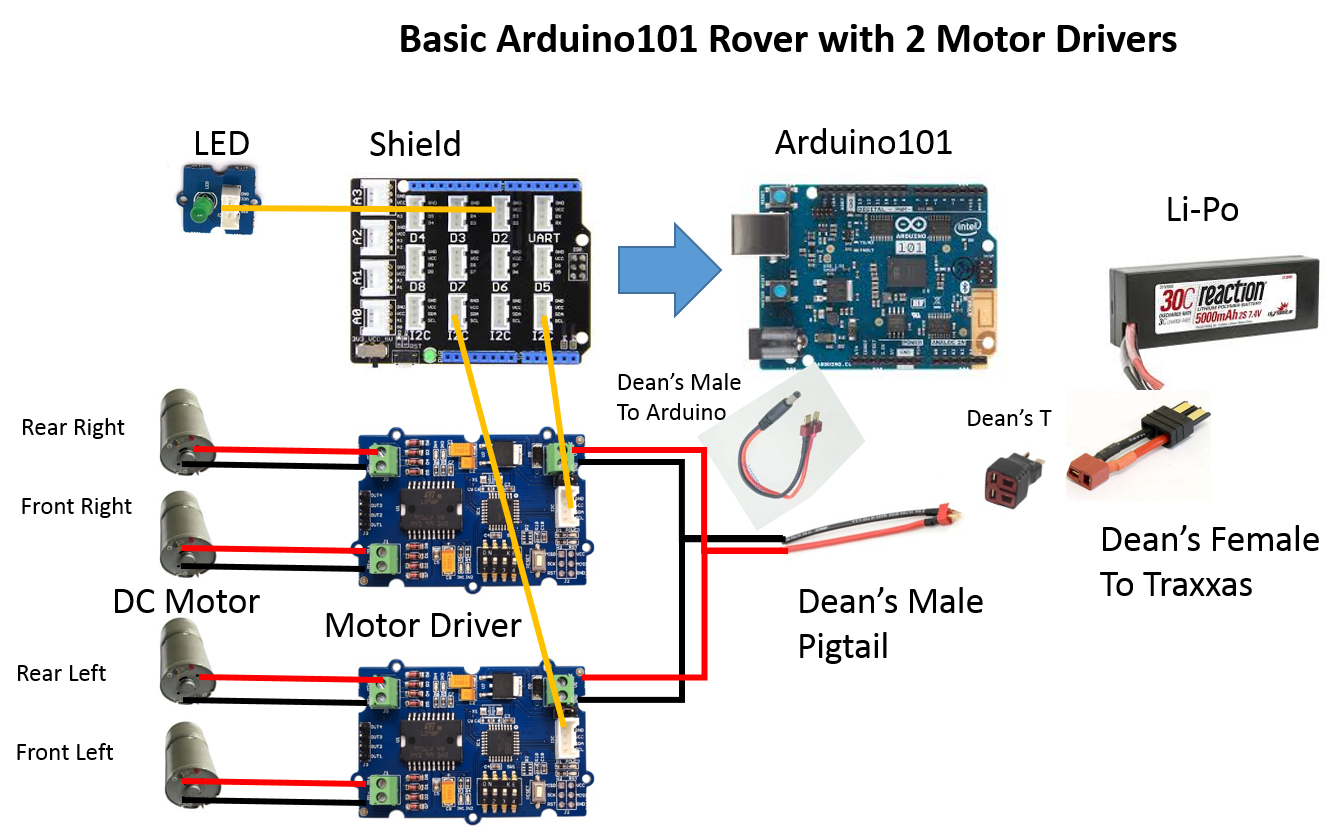
305    int sum;
306    // read the  analog in value:
307    for (int i = 0;i < 20;i ++)//Continuous sampling 20 times
308    {
309        sensor_value = analogRead(IR_PROXIMITY_SENSOR);
310        sum  += sensor_value;
311    }
312    sensor_value = sum / 20;
313    float voltage;
314    voltage = (float)sensor_value*ADC_REF/1024;
315    return voltage;
316}
317SCHEMATICS
318Base  Rover Schematic
319
Downloadable files
Arduino101 Rover
This is a basic Arduino101 rover with 2 motor drivers!
Arduino101 Rover
Arduino101 Rover
This is a basic Arduino101 rover with 2 motor drivers!
Arduino101 Rover
Comments
Only logged in users can leave comments