3D Illusion Lamp
Now we are with the 3D ILLUSION LAMP. Are you thinking of buying a new night light?
Devices & Components
1
Arduino Nano
1
RGB Stribe Led
Hardware & Tools
1
Soldering iron (generic)
Project description
Code
lamba.ino
arduino
1#include <Adafruit_NeoPixel.h>
2#ifdef __AVR__
3  #include <avr/power.h>
4#endif
5
6#define   PIN 6
7
8// Parameter 1 = number of pixels in strip
9// Parameter 2 = Arduino   pin number (most are valid)
10// Parameter 3 = pixel type flags, add together as   needed:
11//   NEO_KHZ800  800 KHz bitstream (most NeoPixel products w/WS2812 LEDs)
12//    NEO_KHZ400  400 KHz (classic 'v1' (not v2) FLORA pixels, WS2811 drivers)
13//    NEO_GRB     Pixels are wired for GRB bitstream (most NeoPixel products)
14//    NEO_RGB     Pixels are wired for RGB bitstream (v1 FLORA pixels, not v2)
15//    NEO_RGBW    Pixels are wired for RGBW bitstream (NeoPixel RGBW products)
16Adafruit_NeoPixel   strip = Adafruit_NeoPixel(7, PIN, NEO_GRB + NEO_KHZ800);
17
18// IMPORTANT: To   reduce NeoPixel burnout risk, add 1000 uF capacitor across
19// pixel power leads,   add 300 - 500 Ohm resistor on first pixel's data input
20// and minimize distance   between Arduino and first pixel.  Avoid connecting
21// on a live circuit...if   you must, connect GND first.
22
23void setup() {
24  // This is for Trinket 5V   16MHz, you can remove these three lines if you are not using a Trinket
25  #if   defined (__AVR_ATtiny85__)
26    if (F_CPU == 16000000) clock_prescale_set(clock_div_1);
27   #endif
28  // End of trinket special code
29
30
31  strip.begin();
32  strip.show();   // Initialize all pixels to 'off'
33}
34
35void loop() {
36  // Some example   procedures showing how to display to the pixels:
37  colorWipe(strip.Color(255,   0, 0), 50); // Red
38  colorWipe(strip.Color(0, 255, 0), 50); // Green
39  colorWipe(strip.Color(0,   0, 255), 50); // Blue
40//colorWipe(strip.Color(0, 0, 0, 255), 50); // White RGBW
41   // Send a theater pixel chase in...
42
43
44  rainbow(50);
45  rainbowCycle(50);
46   //theaterChaseRainbow(50);
47}
48
49// Fill the dots one after the other with   a color
50void colorWipe(uint32_t c, uint8_t wait) {
51  for(uint16_t i=0; i<strip.numPixels();   i++) {
52    strip.setPixelColor(i, c);
53    strip.show();
54    delay(wait);
55   }
56}
57
58void rainbow(uint8_t wait) {
59  uint16_t i, j;
60
61  for(j=0;   j<256; j++) {
62    for(i=0; i<strip.numPixels(); i++) {
63      strip.setPixelColor(i,   Wheel((i+j) & 255));
64    }
65    strip.show();
66    delay(wait);
67  }
68}
69
70//   Slightly different, this makes the rainbow equally distributed throughout
71void   rainbowCycle(uint8_t wait) {
72  uint16_t i, j;
73
74  for(j=0; j<256*5; j++)   { // 5 cycles of all colors on wheel
75    for(i=0; i< strip.numPixels(); i++)   {
76      strip.setPixelColor(i, Wheel(((i * 256 / strip.numPixels()) + j) & 255));
77     }
78    strip.show();
79    delay(wait);
80  }
81}
82
83//Theatre-style   crawling lights.
84void theaterChase(uint32_t c, uint8_t wait) {
85  for (int   j=0; j<10; j++) {  //do 10 cycles of chasing
86    for (int q=0; q < 3; q++) {
87       for (int i=0; i < strip.numPixels(); i=i+3) {
88        strip.setPixelColor(i+q,   c);    //turn every third pixel on
89      }
90      strip.show();
91
92      delay(wait);
93
94       for (int i=0; i < strip.numPixels(); i=i+3) {
95        strip.setPixelColor(i+q,   0);        //turn every third pixel off
96      }
97    }
98  }
99}
100
101//Theatre-style   crawling lights with rainbow effect
102void theaterChaseRainbow(uint8_t wait) {
103   for (int j=0; j < 256; j++) {     // cycle all 256 colors in the wheel
104    for   (int q=0; q < 3; q++) {
105      for (int i=0; i < strip.numPixels(); i=i+3) {
106         strip.setPixelColor(i+q, Wheel( (i+j) % 255));    //turn every third pixel   on
107      }
108      strip.show();
109
110      delay(wait);
111
112      for   (int i=0; i < strip.numPixels(); i=i+3) {
113        strip.setPixelColor(i+q, 0);         //turn every third pixel off
114      }
115    }
116  }
117}
118
119// Input   a value 0 to 255 to get a color value.
120// The colours are a transition r - g   - b - back to r.
121uint32_t Wheel(byte WheelPos) {
122  WheelPos = 255 - WheelPos;
123   if(WheelPos < 85) {
124    return strip.Color(255 - WheelPos * 3, 0, WheelPos   * 3);
125  }
126  if(WheelPos < 170) {
127    WheelPos -= 85;
128    return strip.Color(0,   WheelPos * 3, 255 - WheelPos * 3);
129  }
130  WheelPos -= 170;
131  return strip.Color(WheelPos   * 3, 255 - WheelPos * 3, 0);
132}
133
lamba.ino
arduino
1#include <Adafruit_NeoPixel.h>
2#ifdef __AVR__
3  #include <avr/power.h>
4#endif
5
6#define  PIN 6
7
8// Parameter 1 = number of pixels in strip
9// Parameter 2 = Arduino  pin number (most are valid)
10// Parameter 3 = pixel type flags, add together as  needed:
11//   NEO_KHZ800  800 KHz bitstream (most NeoPixel products w/WS2812 LEDs)
12//   NEO_KHZ400  400 KHz (classic 'v1' (not v2) FLORA pixels, WS2811 drivers)
13//   NEO_GRB     Pixels are wired for GRB bitstream (most NeoPixel products)
14//   NEO_RGB     Pixels are wired for RGB bitstream (v1 FLORA pixels, not v2)
15//   NEO_RGBW    Pixels are wired for RGBW bitstream (NeoPixel RGBW products)
16Adafruit_NeoPixel  strip = Adafruit_NeoPixel(7, PIN, NEO_GRB + NEO_KHZ800);
17
18// IMPORTANT: To  reduce NeoPixel burnout risk, add 1000 uF capacitor across
19// pixel power leads,  add 300 - 500 Ohm resistor on first pixel's data input
20// and minimize distance  between Arduino and first pixel.  Avoid connecting
21// on a live circuit...if  you must, connect GND first.
22
23void setup() {
24  // This is for Trinket 5V  16MHz, you can remove these three lines if you are not using a Trinket
25  #if  defined (__AVR_ATtiny85__)
26    if (F_CPU == 16000000) clock_prescale_set(clock_div_1);
27  #endif
28  // End of trinket special code
29
30
31  strip.begin();
32  strip.show();  // Initialize all pixels to 'off'
33}
34
35void loop() {
36  // Some example  procedures showing how to display to the pixels:
37  colorWipe(strip.Color(255,  0, 0), 50); // Red
38  colorWipe(strip.Color(0, 255, 0), 50); // Green
39  colorWipe(strip.Color(0,  0, 255), 50); // Blue
40//colorWipe(strip.Color(0, 0, 0, 255), 50); // White RGBW
41  // Send a theater pixel chase in...
42
43
44  rainbow(50);
45  rainbowCycle(50);
46  //theaterChaseRainbow(50);
47}
48
49// Fill the dots one after the other with  a color
50void colorWipe(uint32_t c, uint8_t wait) {
51  for(uint16_t i=0; i<strip.numPixels();  i++) {
52    strip.setPixelColor(i, c);
53    strip.show();
54    delay(wait);
55  }
56}
57
58void rainbow(uint8_t wait) {
59  uint16_t i, j;
60
61  for(j=0;  j<256; j++) {
62    for(i=0; i<strip.numPixels(); i++) {
63      strip.setPixelColor(i,  Wheel((i+j) & 255));
64    }
65    strip.show();
66    delay(wait);
67  }
68}
69
70//  Slightly different, this makes the rainbow equally distributed throughout
71void  rainbowCycle(uint8_t wait) {
72  uint16_t i, j;
73
74  for(j=0; j<256*5; j++)  { // 5 cycles of all colors on wheel
75    for(i=0; i< strip.numPixels(); i++)  {
76      strip.setPixelColor(i, Wheel(((i * 256 / strip.numPixels()) + j) & 255));
77    }
78    strip.show();
79    delay(wait);
80  }
81}
82
83//Theatre-style  crawling lights.
84void theaterChase(uint32_t c, uint8_t wait) {
85  for (int  j=0; j<10; j++) {  //do 10 cycles of chasing
86    for (int q=0; q < 3; q++) {
87      for (int i=0; i < strip.numPixels(); i=i+3) {
88        strip.setPixelColor(i+q,  c);    //turn every third pixel on
89      }
90      strip.show();
91
92      delay(wait);
93
94      for (int i=0; i < strip.numPixels(); i=i+3) {
95        strip.setPixelColor(i+q,  0);        //turn every third pixel off
96      }
97    }
98  }
99}
100
101//Theatre-style  crawling lights with rainbow effect
102void theaterChaseRainbow(uint8_t wait) {
103  for (int j=0; j < 256; j++) {     // cycle all 256 colors in the wheel
104    for  (int q=0; q < 3; q++) {
105      for (int i=0; i < strip.numPixels(); i=i+3) {
106        strip.setPixelColor(i+q, Wheel( (i+j) % 255));    //turn every third pixel  on
107      }
108      strip.show();
109
110      delay(wait);
111
112      for  (int i=0; i < strip.numPixels(); i=i+3) {
113        strip.setPixelColor(i+q, 0);        //turn every third pixel off
114      }
115    }
116  }
117}
118
119// Input  a value 0 to 255 to get a color value.
120// The colours are a transition r - g  - b - back to r.
121uint32_t Wheel(byte WheelPos) {
122  WheelPos = 255 - WheelPos;
123  if(WheelPos < 85) {
124    return strip.Color(255 - WheelPos * 3, 0, WheelPos  * 3);
125  }
126  if(WheelPos < 170) {
127    WheelPos -= 85;
128    return strip.Color(0,  WheelPos * 3, 255 - WheelPos * 3);
129  }
130  WheelPos -= 170;
131  return strip.Color(WheelPos  * 3, 255 - WheelPos * 3, 0);
132}
133
Downloadable files
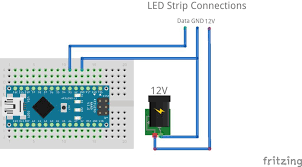
shema_dTObxkHx2I.png
shema_dTObxkHx2I.png
Comments
Only logged in users can leave comments