Temperature Plot Using Processing and Arduino
The main aim of this project is to show how to plot a variable graph using processing environment and Arduino.
Project description
Code
Temperature Plot Using Processing and Arduino
c_cpp
1// Arduino Code
2
3#include<LiquidCrystal.h>
4#define sensor A0
5float
6  analog_value;
7LiquidCrystal lcd(2,3,4,5,6,7);
8
9byte degree[8] =
10              {
11
12                0b00011,
13                0b00011,
14                0b00000,
15
16                0b00000,
17                0b00000,
18                0b00000,
19
20                0b00000,
21                0b00000
22              };
23
24void
25  setup()
26{
27   lcd.createChar(1, degree);
28  lcd.begin(16,2);
29  Serial.begin(9600);
30
31  pinMode(sensor, INPUT);
32
33  lcd.setCursor(0,0);
34  lcd.print("Temperature
35  Plot");
36  lcd.setCursor(0,1);
37  lcd.print("Using Proccesing");
38  delay(2000);
39
40  lcd.clear();
41  lcd.setCursor(0,0);
42  lcd.print(" By Saddam Khan ");
43
44  lcd.setCursor(0,1);
45  lcd.print("ENGINEERS GARAGE");
46  delay(2000);
47
48  lcd.clear();
49}
50
51void loop()
52{
53  float reading=analogRead(sensor);
54
55  analog_value=reading*(5.0/1023.0)*100;
56
57  lcd.setCursor(0,0);
58  lcd.print("
59  Temperature  ");
60  lcd.setCursor(4,1);
61  lcd.print(analog_value);
62  lcd.write(1);
63
64  lcd.print("C");
65  Serial.println(analog_value);
66  delay(700);
67}
68
69
70
71//
72  ------------------------------------------------------------------------------------
73//
74  Processing Code
75
76 import processing.serial.*;
77 PFont f;
78 PFont F;
79
80  Serial myPort;        // The serial port
81 int xPos = 40;         // horizontal
82  position of the graph
83
84 void setup () {
85 // set the window size:  and
86  Font size
87 f = createFont("Arial",12,true);
88 F = createFont("Arial",24,true);
89
90  size(700, 600);
91
92 // List all the available serial ports
93 println(Serial.list());
94
95  myPort = new Serial(this, Serial.list()[0], 9600);
96  myPort.bufferUntil('\
97');
98
99  // set inital background:
100 background(70);
101 }
102 void draw ()
103 {
104
105   // everything happens in the serialEvent()
106 }
107
108 void serialEvent (Serial
109  myPort) {
110 // get the ASCII string:
111 String inString = myPort.readStringUntil('\
112');
113
114
115 if (inString != null) {
116 // trim off any whitespace:
117
118 print("Temperature:
119  ");
120 print(inString);
121 println("Degree Celcius");
122 inString = trim(inString);
123
124
125 // convert to an int and map to the screen height:
126 float inByte = float(inString+(char)9);
127
128 inByte = map(inByte, 0,117, 0, height);
129
130 println(inByte);
131
132
133  stroke(175);                       // temperature line
134  line(40,height-40,40,0);
135
136
137  stroke(175);                          // Time line
138  line(40,height-40,width,height-40);
139
140
141  stroke(100,100,255);                          // 30 degree line
142  line(40,height-194,width,height-194);
143
144
145 stroke(100,100,255);                          // 60 degree line
146  line(40,height-344,width,height-344);
147
148
149  textFont(F);
150  fill(255);
151
152 textAlign(RIGHT);
153  text("Temperature
154  Plot Using Proccessing",680,40);
155
156  textAlign(RIGHT);
157  text("And
158  Arduino By Saddam Khan",653,70);
159
160  textAlign(RIGHT);
161  text("Engineers
162  Garage",580,100);
163
164   textAlign(RIGHT);
165  text("TEMP",70,40);
166
167
168  textAlign(RIGHT);
169  text("TIME --->",650,580);
170
171
172
173
174   textAlign(RIGHT);
175  text(inString,500,200);
176
177   textAlign(RIGHT);
178
179  text(" Degree Celsuis",560,230);
180
181
182  fill(0);
183 // int j;
184
185  stroke(255);
186  for(int j=500;j>430;j--)
187  {
188  line(j,height-398,j,height-425);
189
190  }
191  stroke(0,0,0);
192  textAlign(RIGHT);
193  text(inString,495,200);
194
195
196
197 fill(240);
198 textFont(f);
199
200  textAlign(RIGHT);
201  text("(In
202  Degree)",140,40);
203
204  textAlign(RIGHT);                 // 100 degree
205
206  text("100 -",40,60);
207
208   textAlign(RIGHT);                // 90 degree
209
210  text("90 -",40,110);
211
212   textAlign(RIGHT);                // 80 degree
213
214  text("80 -",40,160);
215
216   textAlign(RIGHT);                 // 70 degree
217
218  text("70 -",40,210);
219
220   textAlign(RIGHT);                // 60 degree
221
222  text("60 -",40,260);
223
224   textAlign(RIGHT);               // 50 degree
225
226  text("50 -",40,310);
227
228   textAlign(RIGHT);                 // 40 degree
229
230  text("40 -",40,360);
231
232   textAlign(RIGHT);
233  text("30 -",40,410);
234
235
236   textAlign(RIGHT);
237  text("20 -",40,460);
238
239   textAlign(RIGHT);
240
241  text("10 -",40,510);
242
243  textAlign(RIGHT);
244  text("0 -",40,560);
245
246
247 /*---- scale between 30 degree to 40 degree------*/
248
249  textAlign(RIGHT);
250
251  text("   -",40,370);
252
253  textAlign(RIGHT);
254  text("   -",40,380);
255
256
257  textAlign(RIGHT);
258  text("   -",40,390);
259
260  textAlign(RIGHT);
261
262  text("   -",40,400);
263
264 // textAlign(RIGHT);
265 // text("0 -",40,360);
266
267
268 // draw the line:
269 int shift=40;            // set trace origin
270 stroke(255,0,0);
271              // trace colour
272 for(int i=0;i<2;i++)
273 {
274// line(xPos, height-inByte-1,
275  xPos, height - inByte);
276   line(xPos, height-inByte-(shift+2), xPos, height-inByte-shift);
277
278   xPos++;
279 }
280 if (xPos >= width)         //  go back to begining
281 {
282
283  xPos = 40;
284 background(100);
285 }
286 }
287 }
Downloadable files
Temperature Plot Using Processing and Arduino
Temperature Plot Using Processing and Arduino
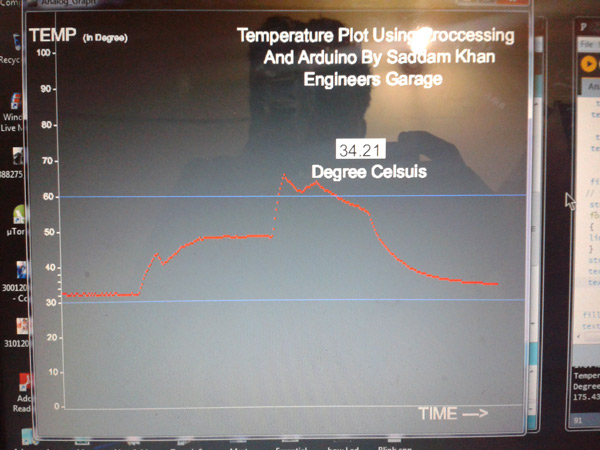
Temperature Plot Using Processing and Arduino
Temperature Plot Using Processing and Arduino
Comments
Only logged in users can leave comments