Arduino Based Wattmeter
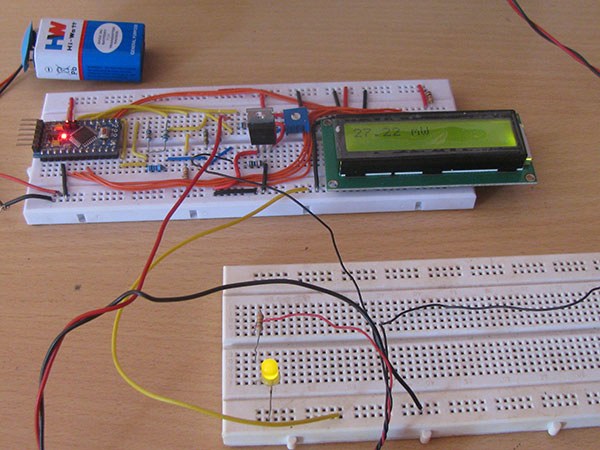
When we connect this wattmeter to a device which is in operation, the 16*2 LCD displays its power consumption value in Watts.
Project description
Code
Arduino based Wattmeter
c_cpp
1// include the library code:
2
3#include <LiquidCrystal.h>
4
5
6
7// initialize the library with the numbers of the interface pins
8
9LiquidCrystal   lcd(12, 11, 5, 4, 3, 2);
10
11
12
13int adc_value = 0;
14
15int voltage_peak_value   = 0;
16
17float voltage_average_value = 0;
18
19float dc_voltage_V0 = 0;
20
21float   ac_voltage_V0 = 0;
22
23float dc_voltage_V1 = 0;
24
25float ac_voltage_V1 =   0;
26
27float dc_current_I0 = 0;
28
29float ac_current_I0 = 0;
30
31float   dc_power = 0;
32
33float ac_power = 0;
34
35unsigned long resistance;
36
37unsigned   long sample_count = 0;
38
39
40
41void setup()
42
43{
44
45  // set up   the LCD's number of columns and rows:
46
47  lcd.begin(16, 2);
48
49  // Print   a message to the LCD.
50
51  lcd.print("    EG LABS    ");
52
53  pinMode(13,   OUTPUT);
54
55}
56
57
58
59void loop()
60
61{
62
63
64
65//  Serial.println("===============================   VOLTAGE ========================================");
66
67
68
69  voltage_peak_value   = 0;
70
71  for(sample_count = 0; sample_count < 5000; sample_count ++)
72
73   {
74
75      adc_value = analogRead(A0);
76
77      if(voltage_peak_value   < adc_value)
78
79          voltage_peak_value = adc_value;
80
81      else;
82
83       delayMicroseconds(10);
84
85  }
86
87
88
89  dc_voltage_V0 = voltage_peak_value   * 0.00488;
90
91  ac_voltage_V0 = dc_voltage_V0 / 1.414;
92
93
94
95
96
97//   Serial.println("================================ CURRENT ========================================");
98
99
100
101  voltage_peak_value = 0;
102
103  for(sample_count = 0; sample_count <   5000; sample_count ++)
104
105  {
106
107      adc_value = analogRead(A2);
108
109       if(voltage_peak_value < adc_value)
110
111          voltage_peak_value = adc_value;
112
113       else;
114
115      delayMicroseconds(10);
116
117  }
118
119
120
121  dc_voltage_V1   = voltage_peak_value * 0.00488;
122
123  ac_voltage_V1 = dc_voltage_V1 / 1.414;
124
125
126
127  dc_current_I0 = (dc_voltage_V1 - dc_voltage_V0) * 100;
128
129  ac_current_I0   = (ac_voltage_V1 - ac_voltage_V0) * 100;
130
131
132
133  //=================================   POWER =========================================
134
135
136
137  dc_power = dc_current_I0   * dc_voltage_V1;
138
139  ac_power = ac_current_I0 * ac_voltage_V1;
140
141
142
143   lcd.clear();
144
145  lcd.setCursor(0, 0);
146
147  lcd.print(dc_power);
148
149   lcd.print(" mW");
150
151
152
153 //=================================================================================
154
155
156
157  delay(1000);
158
159}
Arduino based Wattmeter
c_cpp
1// include the library code:
2
3#include <LiquidCrystal.h>
4
5
6
7// initialize the library with the numbers of the interface pins
8
9LiquidCrystal  lcd(12, 11, 5, 4, 3, 2);
10
11
12
13int adc_value = 0;
14
15int voltage_peak_value  = 0;
16
17float voltage_average_value = 0;
18
19float dc_voltage_V0 = 0;
20
21float  ac_voltage_V0 = 0;
22
23float dc_voltage_V1 = 0;
24
25float ac_voltage_V1 =  0;
26
27float dc_current_I0 = 0;
28
29float ac_current_I0 = 0;
30
31float  dc_power = 0;
32
33float ac_power = 0;
34
35unsigned long resistance;
36
37unsigned  long sample_count = 0;
38
39
40
41void setup()
42
43{
44
45  // set up  the LCD's number of columns and rows:
46
47  lcd.begin(16, 2);
48
49  // Print  a message to the LCD.
50
51  lcd.print("    EG LABS    ");
52
53  pinMode(13,  OUTPUT);
54
55}
56
57
58
59void loop()
60
61{
62
63
64
65//  Serial.println("===============================  VOLTAGE ========================================");
66
67
68
69  voltage_peak_value  = 0;
70
71  for(sample_count = 0; sample_count < 5000; sample_count ++)
72
73  {
74
75      adc_value = analogRead(A0);
76
77      if(voltage_peak_value  < adc_value)
78
79          voltage_peak_value = adc_value;
80
81      else;
82
83      delayMicroseconds(10);
84
85  }
86
87
88
89  dc_voltage_V0 = voltage_peak_value  * 0.00488;
90
91  ac_voltage_V0 = dc_voltage_V0 / 1.414;
92
93
94
95
96
97//  Serial.println("================================ CURRENT ========================================");
98
99
100
101  voltage_peak_value = 0;
102
103  for(sample_count = 0; sample_count <  5000; sample_count ++)
104
105  {
106
107      adc_value = analogRead(A2);
108
109      if(voltage_peak_value < adc_value)
110
111          voltage_peak_value = adc_value;
112
113      else;
114
115      delayMicroseconds(10);
116
117  }
118
119
120
121  dc_voltage_V1  = voltage_peak_value * 0.00488;
122
123  ac_voltage_V1 = dc_voltage_V1 / 1.414;
124
125
126
127  dc_current_I0 = (dc_voltage_V1 - dc_voltage_V0) * 100;
128
129  ac_current_I0  = (ac_voltage_V1 - ac_voltage_V0) * 100;
130
131
132
133  //=================================  POWER =========================================
134
135
136
137  dc_power = dc_current_I0  * dc_voltage_V1;
138
139  ac_power = ac_current_I0 * ac_voltage_V1;
140
141
142
143  lcd.clear();
144
145  lcd.setCursor(0, 0);
146
147  lcd.print(dc_power);
148
149  lcd.print(" mW");
150
151
152
153 //=================================================================================
154
155
156
157  delay(1000);
158
159}
Downloadable files
Arduino based Wattmeter
Arduino based Wattmeter
Comments
Only logged in users can leave comments