Arduino Based Rotating Head Obstacle Avoiding Robot
This autonomous robot is built on Arduino UNO and can sense its environment with the help of an ultrasonic sensor.
Project description
Code
Program Code
h
1//Program to
2
3#include <Servo.h>
4
5#include <NewPing.h>
6
7Servo  myservo;
8
9//define the pins to be connected to ultrasonic sensor
10
11#define  trigPin A0
12
13#define echoPin A1
14
15//define the pins to be connected to  ultrasonic sensor
16
17#define LeftMotor1  4
18
19#define LeftMotor2  5
20
21#define  RightMotor1 2
22
23#define RightMotor2 3
24
25#define maxdist 300
26
27#define  objdist 23
28
29NewPing sonar(trigPin, echoPin, maxdist);
30
31int leftDistance,  rightDistance;
32
33//setup function to define the pinmodes
34
35void setup()
36
37{
38
39  pinMode(LeftMotor1,  OUTPUT);
40
41  pinMode(LeftMotor2,  OUTPUT);
42
43  pinMode(RightMotor1, OUTPUT);
44
45  pinMode(RightMotor2, OUTPUT);
46
47
48  pinMode(trigPin, OUTPUT);
49
50  pinMode(echoPin, INPUT);
51
52  myservo.attach(11);
53
54  myservo.write(90);
55
56
57  delay(1000);
58
59}
60
61//Loop  infinite function
62
63void loop()
64
65{
66
67   int read_dist;
68
69  //Make  servo to turn 90 degree
70
71   myservo.write(90);
72
73
74
75   delay(90);
76
77   //calling read sensor function to read the sensor data
78
79   read_dist =  readsensors();
80
81   //checking the distance that is measured with the predefined  value
82
83    if(read_dist < objdist)
84
85   {
86
87    //if low calling  the decide path function
88
89    decide_path();
90
91   }
92
93   //calling  the move forward function to move the robot forward
94
95   moveforward();
96
97
98   delay(500);
99
100}
101
102//Function to read the sensor value
103
104int readsensors()
105
106{
107
108  int distance;
109
110
111  delay(70);
112
113  //using the newping.h library  function to measure the distance
114
115  unsigned int uS = sonar.ping();
116
117  distance = uS/US_ROUNDTRIP_CM;
118
119  return distance;
120
121}
122
123void  decide_path()
124
125{
126
127  robostop();
128
129  //rotating the servo to 3 degree  to right side
130
131  myservo.write(3);
132
133  delay(500);
134
135  //calling  read sensor function to measure the distance on right side
136
137  rightDistance  = readsensors();
138
139  delay(500);
140
141  myservo.write(180);
142
143  delay(700);
144
145  leftDistance = readsensors();
146
147  delay(500);
148
149  myservo.write(90);
150
151  delay(100);
152
153  check_distance();
154
155}
156
157//function to  compare the distances
158
159void check_distance()
160
161{
162
163  //checking  whether left measured distance is lesser that right
164
165  if (leftDistance <  rightDistance)
166
167  {
168
169    turnright();
170
171  }
172
173  //checking  whether left measured distance is greater that right
174
175  else if (leftDistance  > rightDistance)
176
177  {
178
179    turnleft();
180
181  }
182
183  else
184
185  {
186
187    turnaround();
188
189  }
190
191}
192
193void moveforward()
194
195{
196
197  digitalWrite(LeftMotor1, HIGH);
198
199  digitalWrite(LeftMotor2, LOW);
200
201  digitalWrite(RightMotor1, HIGH);
202
203  digitalWrite(RightMotor2, LOW);
204
205}
206
207void  turnleft()
208
209{
210
211  digitalWrite(LeftMotor1, LOW);
212
213  digitalWrite(LeftMotor2,  LOW);
214
215  digitalWrite(RightMotor1, HIGH);
216
217  digitalWrite(RightMotor2,  LOW);
218
219  delay(350);
220
221  moveforward();
222
223}
224
225void turnright()
226
227{
228
229  digitalWrite(LeftMotor1, HIGH);
230
231  digitalWrite(LeftMotor2, LOW);
232
233  digitalWrite(RightMotor1, LOW);
234
235  digitalWrite(RightMotor2, LOW);
236
237  delay(350);
238
239  moveforward();
240
241}
242
243void turnaround()
244
245{
246
247  digitalWrite(LeftMotor1, LOW);
248
249  digitalWrite(LeftMotor2, HIGH);
250
251  digitalWrite(RightMotor1, HIGH);
252
253  digitalWrite(RightMotor2, LOW);
254
255  delay(700);
256
257  moveforward();
258
259}
260
261void robostop()
262
263{
264
265  digitalWrite(LeftMotor1, LOW);
266
267  digitalWrite(LeftMotor2, LOW);
268
269  digitalWrite(RightMotor1, LOW);
270
271  digitalWrite(RightMotor2, LOW);
272
273}
Downloadable files
Arduino Atutonomous Robot
Arduino Atutonomous Robot
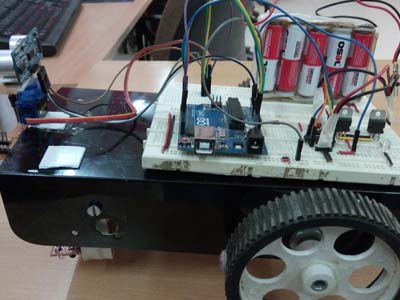
Arduino Atutonomous Robot
Arduino Atutonomous Robot
Comments
Only logged in users can leave comments