Devices & Components
1
Arduino Uno Rev3
1
DHT11 Temperature & Humidity Sensor (3 pins)
1
MLX90614
1
SIM800L EVB
Software & Tools

Arduino IDE
Project description
Code
Code_1_SIM800L_SetSMSmode_checkSMS.ino
arduino
With comments to help you.
1/* This code works with SIM800L Evb version, it sets the module on receiving   SMS mode
2 * And when the user sends SMS it will be shown on the serial monitor
3   * The receiving mode is only set at the setup, you can later set the mode you want   and check the AT functions you want
4 * It's a basic code to test the SIM800L
5   * Refer to www.SurtrTech.com for more detaims
6 */
7
8#include <SoftwareSerial.h>     //Library required for serial communication
9
10SoftwareSerial sim800l(2,   3); // RX,TX for Arduino and for the module it's TXD RXD, they should be inverted
11
12
13
14void   setup()
15{
16
17  sim800l.begin(9600);              //Module baude rate,   this is on max, it depends on the version
18  Serial.begin(9600);               //Begin   the Serial communication with PC
19  Serial.println("Starting ...");
20  delay(5000);                       //Delay to let the module to connect to network, if turned   on before you can remove this
21  sim800l.println("AT");            //Send AT   command it will says "OK" if everything is fine
22  Serialcom();                      //description   below
23  sim800l.println("AT+CMGF=1");     // Configuring TEXT mode
24  Serialcom();
25   sim800l.println("AT+CNMI=2,2,0,0,0"); //The way to handle the SMS received,   check the module manual, to sum up: store the text or transfert it to serial or   other number....
26  Serialcom();
27
28}
29
30
31
32void loop() {
33
34Serialcom();                 //The only function to run in loop, this function just check if   the user has sent something using the Serial monitor and transfers it to the module
35                             //and if the module has something to say it will be   displayed on the serial monitor, here used to show the feedback of the AT commands   sent in the setup
36                            //and shows the received SMS
37
38}
39
40
41void   Serialcom()
42{
43  delay(500);
44  while(Serial.available())                                                                      //   IDE serial l serial  sim800L
45  {
46    sim800l.write(Serial.read());//Forward   what Serial received to Software Serial Port
47  }
48  while(sim800l.available())                                                                       //serialsim800L   l serial dial IDE
49  {
50    Serial.write(sim800l.read());//Forward what Software   Serial received to Serial Port
51  }
52}
53
Code_2_SIM800L_RequestData.ino
arduino
With comments to help you
1/* This code works with SIM800L Evb version, DHT11 and MLX90614
2 *  It sets the module on receiving SMS mode, wait if the user has sent a SMS containing  keywords "DHT" or "MLX"
3 * Check which one is received then proceed to get  data from the chosen sensor and send it via SMS to the programmed phone number
4  * And come back to receiving mode.
5 * Refer to www.SurtrTech.com for more detaims
6  */
7
8#include <SoftwareSerial.h>        //Libraries required for Serial communication,  ic communication, DHT11 and MLX90614
9#include <Wire.h>
10#include <Adafruit_MLX90614.h>
11#include  "DHT.h"
12
13#define DHTPIN 7                 //DHT OneWire pin and its type
14#define  DHTTYPE DHT11
15
16char Received_SMS;              //Here we store the full received  SMS (with phone sending number and date/time) as char
17short DHT_OK=-1,MLX_OK=-1;      //Used later it shows if there's the word "DHT"/"MLX" within the received  SMS "-1" means they are not found
18
19String Data_SMS;               //Here's  the SMS that we gonna send to the phone number, it may contain DHT data or MLX data
20
21
22SoftwareSerial  sim800l(2, 3);                     // RX,TX for Arduino and for the module it's  TXD RXD, they should be inverted
23Adafruit_MLX90614 mlx = Adafruit_MLX90614();      //Declaring MLX instance and DHT
24DHT dht(DHTPIN, DHTTYPE);
25
26void  setup()
27{
28
29  sim800l.begin(9600);   //Begin all the communications needed  Arduino with PC serial and Arduino with all devices (SIM800L+DHT+MLX)
30  Serial.begin(9600);
31  mlx.begin();
32  dht.begin();
33  Serial.println("Starting ...");
34  delay(3000);         //Delay to let the module connect to network, can be removed
35  ReceiveMode();       //Calling the function that puts the SIM800L moduleon receiving  SMS mode
36
37}
38
39
40
41void loop() {
42
43  String RSMS;             //We  add this new variable String type, and we put it in loop so everytime gets initialized
44                           //This is where we put the Received SMS, yes above there's  Recevied_SMS variable, we use a trick below
45                           //To concatenate  the "char Recevied_SMS" to "String RSMS" which makes the "RSMS" contains the  SMS received but as a String
46                           //The recevied SMS cannot  be stored directly as String
47
48    while(sim800l.available()>0){       //When  SIM800L sends something to the Arduino... problably the SMS received... if something  else it's not a problem
49
50        Received_SMS=sim800l.read();  //"char  Received_SMS" is now containing the full SMS received
51        Serial.print(Received_SMS);   //Show it on the serial monitor (optional)
52        RSMS.concat(Received_SMS);    //concatenate "char received_SMS" to RSMS which is "empty"
53        DHT_OK=RSMS.indexOf("DHT");   //And this is why we changed from char to String, it's to be able to use this  function "indexOf"
54        MLX_OK=RSMS.indexOf("MLX");   //"indexOf function  looks for the substring "x" within the String (here RSMS) and gives us its index  or position
55                                      //For example if found at the  beginning it will give "0" after 1 character it will be "1"
56                                      //If  it's not found it will give "-1", so the variables are integers
57
58    }
59
60  if(DHT_OK!=-1){                         //If "DHT" word is  found within the SMS, it means that DHT_OK have other value than -1 so we can proceed
61    Serial.println("found DHT");          //Shows on the serial monitor "found  DHT" (optional)
62    float h = dht.readHumidity();         //Read temperature  and humidity
63    float t = dht.readTemperature();
64    Serial.print("DHT11  Temperature = "); Serial.print(t); Serial.print("*C      DHT11 Humidity = ");  Serial.print(h); Serial.println(" %");
65                                          //Show  it on the serial monitor also optional
66
67    Data_SMS = "DHT11\
68Temp = "+String(t,1)+"  C"+" \
69Humidity ="+String(h,1)+" %";       //Prepare the SMS to send, it contains  some strings like "DHT" "Temperature"...
70                                                                                         //And  then the values read
71
72    Send_Data();                      //This function  set the sending SMS mode, prepare the phone number to which we gonna send, and send  "Data_SMS" String
73    ReceiveMode();                   //Come back to Receving  SMS mode and wait for other SMS
74
75    DHT_OK=-1;                      //If  the DHT is found the variable should be reset to -1 otherwise it will be kept as  !=-1 and will send SMS over and over
76    MLX_OK=-1;                      //Maybe  not required... I did a lot of tests and maybe at the beginning the RSMS string  kept concating and MLX word was kept there
77                                    //And  at this point I'm too lazy to reupload the code without it and test...
78  }
79
80
81  if(MLX_OK!=-1){                   //Same thing if the "MLX" word is found, Serial.print  things are optionnal
82  delay(1000);
83  Serial.println("found MLX");
84  Serial.print("Ambient  = "); Serial.print(mlx.readAmbientTempC());
85  Serial.print("*C\	Object =  "); Serial.print(mlx.readObjectTempC()); Serial.println("*C");
86
87  Data_SMS  = "MLX\
88Ambient = "+String(mlx.readAmbientTempC(),1)+" C"+" \
89Object ="+String(mlx.readObjectTempC(),1)+"  C";
90
91  Send_Data();
92  ReceiveMode();
93
94  MLX_OK=-1;
95  DHT_OK=-1;
96}
97
98
99}
100
101
102void Serialcom() //This is used with ReceiveMode function,  it's okay to use for tests with Serial monitor
103{
104  delay(500);
105  while(Serial.available())
106  {
107    sim800l.write(Serial.read());//Forward what Serial received to Software Serial  Port
108  }
109  while(sim800l.available())
110  {
111    Serial.write(sim800l.read());//Forward what Software Serial received  to Serial Port
112  }
113}
114
115void ReceiveMode(){       //Set the SIM800L Receive  mode
116
117  sim800l.println("AT"); //If everything is Okay it will show "OK"  on the serial monitor
118  Serialcom();
119  sim800l.println("AT+CMGF=1"); //  Configuring TEXT mode
120  Serialcom();
121  sim800l.println("AT+CNMI=2,2,0,0,0");  //Configure the SIM800L on how to manage the Received SMS... Check the SIM800L AT  commands manual
122  Serialcom();
123}
124
125void Send_Data()
126{
127  Serial.println("Sending  Data...");     //Displays on the serial monitor...Optional
128  sim800l.print("AT+CMGF=1\
");          //Set the module to SMS mode
129  delay(100);
130  sim800l.print("AT+CMGS=\\"+***********\\"\
");  //Your phone number don't forget to include your country code example +212xxxxxxxxx"
131  delay(500);
132  sim800l.print(Data_SMS);  //This string is sent as SMS
133  delay(500);
134  sim800l.print((char)26);//Required to tell the module that it  can send the SMS
135  delay(500);
136  sim800l.println();
137  Serial.println("Data  Sent.");
138  delay(500);
139
140}
141
Code_2_SIM800L_RequestData.ino
arduino
With comments to help you
1/* This code works with SIM800L Evb version, DHT11 and MLX90614
2 *
3  It sets the module on receiving SMS mode, wait if the user has sent a SMS containing
4  keywords "DHT" or "MLX"
5 * Check which one is received then proceed to get
6  data from the chosen sensor and send it via SMS to the programmed phone number
7
8  * And come back to receiving mode.
9 * Refer to www.SurtrTech.com for more detaims
10
11  */
12
13#include <SoftwareSerial.h>        //Libraries required for Serial communication,
14  ic communication, DHT11 and MLX90614
15#include <Wire.h>
16#include <Adafruit_MLX90614.h>
17#include
18  "DHT.h"
19
20#define DHTPIN 7                 //DHT OneWire pin and its type
21#define
22  DHTTYPE DHT11
23
24char Received_SMS;              //Here we store the full received
25  SMS (with phone sending number and date/time) as char
26short DHT_OK=-1,MLX_OK=-1;
27      //Used later it shows if there's the word "DHT"/"MLX" within the received
28  SMS "-1" means they are not found
29
30String Data_SMS;               //Here's
31  the SMS that we gonna send to the phone number, it may contain DHT data or MLX data
32
33
34SoftwareSerial
35  sim800l(2, 3);                     // RX,TX for Arduino and for the module it's
36  TXD RXD, they should be inverted
37Adafruit_MLX90614 mlx = Adafruit_MLX90614();
38      //Declaring MLX instance and DHT
39DHT dht(DHTPIN, DHTTYPE);
40
41void
42  setup()
43{
44
45  sim800l.begin(9600);   //Begin all the communications needed
46  Arduino with PC serial and Arduino with all devices (SIM800L+DHT+MLX)
47  Serial.begin(9600);
48
49  mlx.begin();
50  dht.begin();
51  Serial.println("Starting ...");
52
53  delay(3000);         //Delay to let the module connect to network, can be removed
54
55  ReceiveMode();       //Calling the function that puts the SIM800L moduleon receiving
56  SMS mode
57
58}
59
60
61
62void loop() {
63
64  String RSMS;             //We
65  add this new variable String type, and we put it in loop so everytime gets initialized
66
67                           //This is where we put the Received SMS, yes above there's
68  Recevied_SMS variable, we use a trick below
69                           //To concatenate
70  the "char Recevied_SMS" to "String RSMS" which makes the "RSMS" contains the
71  SMS received but as a String
72                           //The recevied SMS cannot
73  be stored directly as String
74
75    while(sim800l.available()>0){       //When
76  SIM800L sends something to the Arduino... problably the SMS received... if something
77  else it's not a problem
78
79        Received_SMS=sim800l.read();  //"char
80  Received_SMS" is now containing the full SMS received
81        Serial.print(Received_SMS);
82   //Show it on the serial monitor (optional)
83        RSMS.concat(Received_SMS);
84    //concatenate "char received_SMS" to RSMS which is "empty"
85        DHT_OK=RSMS.indexOf("DHT");
86   //And this is why we changed from char to String, it's to be able to use this
87  function "indexOf"
88        MLX_OK=RSMS.indexOf("MLX");   //"indexOf function
89  looks for the substring "x" within the String (here RSMS) and gives us its index
90  or position
91                                      //For example if found at the
92  beginning it will give "0" after 1 character it will be "1"
93                                      //If
94  it's not found it will give "-1", so the variables are integers
95
96
97    }
98
99  if(DHT_OK!=-1){                         //If "DHT" word is
100  found within the SMS, it means that DHT_OK have other value than -1 so we can proceed
101
102    Serial.println("found DHT");          //Shows on the serial monitor "found
103  DHT" (optional)
104    float h = dht.readHumidity();         //Read temperature
105  and humidity
106    float t = dht.readTemperature();
107    Serial.print("DHT11
108  Temperature = "); Serial.print(t); Serial.print("*C      DHT11 Humidity = ");
109  Serial.print(h); Serial.println(" %");
110                                          //Show
111  it on the serial monitor also optional
112
113    Data_SMS = "DHT11\
114Temp = "+String(t,1)+"
115  C"+" \
116Humidity ="+String(h,1)+" %";       //Prepare the SMS to send, it contains
117  some strings like "DHT" "Temperature"...
118                                                                                         //And
119  then the values read
120
121    Send_Data();                      //This function
122  set the sending SMS mode, prepare the phone number to which we gonna send, and send
123  "Data_SMS" String
124    ReceiveMode();                   //Come back to Receving
125  SMS mode and wait for other SMS
126
127    DHT_OK=-1;                      //If
128  the DHT is found the variable should be reset to -1 otherwise it will be kept as
129  !=-1 and will send SMS over and over
130    MLX_OK=-1;                      //Maybe
131  not required... I did a lot of tests and maybe at the beginning the RSMS string
132  kept concating and MLX word was kept there
133                                    //And
134  at this point I'm too lazy to reupload the code without it and test...
135  }
136
137
138
139  if(MLX_OK!=-1){                   //Same thing if the "MLX" word is found, Serial.print
140  things are optionnal
141  delay(1000);
142  Serial.println("found MLX");
143  Serial.print("Ambient
144  = "); Serial.print(mlx.readAmbientTempC());
145  Serial.print("*C\	Object =
146  "); Serial.print(mlx.readObjectTempC()); Serial.println("*C");
147
148  Data_SMS
149  = "MLX\
150Ambient = "+String(mlx.readAmbientTempC(),1)+" C"+" \
151Object ="+String(mlx.readObjectTempC(),1)+"
152  C";
153
154  Send_Data();
155  ReceiveMode();
156
157  MLX_OK=-1;
158  DHT_OK=-1;
159}
160
161
162
163}
164
165
166void Serialcom() //This is used with ReceiveMode function,
167  it's okay to use for tests with Serial monitor
168{
169  delay(500);
170  while(Serial.available())
171
172  {
173
174    sim800l.write(Serial.read());//Forward what Serial received to Software Serial
175  Port
176  }
177  while(sim800l.available())
178
179  {
180    Serial.write(sim800l.read());//Forward what Software Serial received
181  to Serial Port
182  }
183}
184
185void ReceiveMode(){       //Set the SIM800L Receive
186  mode
187
188  sim800l.println("AT"); //If everything is Okay it will show "OK"
189  on the serial monitor
190  Serialcom();
191  sim800l.println("AT+CMGF=1"); //
192  Configuring TEXT mode
193  Serialcom();
194  sim800l.println("AT+CNMI=2,2,0,0,0");
195  //Configure the SIM800L on how to manage the Received SMS... Check the SIM800L AT
196  commands manual
197  Serialcom();
198}
199
200void Send_Data()
201{
202  Serial.println("Sending
203  Data...");     //Displays on the serial monitor...Optional
204  sim800l.print("AT+CMGF=1\
");
205          //Set the module to SMS mode
206  delay(100);
207  sim800l.print("AT+CMGS=\\"+***********\\"\
");
208  //Your phone number don't forget to include your country code example +212xxxxxxxxx"
209
210  delay(500);
211  sim800l.print(Data_SMS);  //This string is sent as SMS
212
213  delay(500);
214  sim800l.print((char)26);//Required to tell the module that it
215  can send the SMS
216  delay(500);
217  sim800l.println();
218  Serial.println("Data
219  Sent.");
220  delay(500);
221
222}
223
Code_1_SIM800L_SetSMSmode_checkSMS.ino
arduino
With comments to help you.
1/* This code works with SIM800L Evb version, it sets the module on receiving  SMS mode
2 * And when the user sends SMS it will be shown on the serial monitor
3  * The receiving mode is only set at the setup, you can later set the mode you want  and check the AT functions you want
4 * It's a basic code to test the SIM800L
5  * Refer to www.SurtrTech.com for more detaims
6 */
7
8#include <SoftwareSerial.h>    //Library required for serial communication
9
10SoftwareSerial sim800l(2,  3); // RX,TX for Arduino and for the module it's TXD RXD, they should be inverted
11
12
13
14void  setup()
15{
16
17  sim800l.begin(9600);              //Module baude rate,  this is on max, it depends on the version
18  Serial.begin(9600);               //Begin  the Serial communication with PC
19  Serial.println("Starting ...");
20  delay(5000);                      //Delay to let the module to connect to network, if turned  on before you can remove this
21  sim800l.println("AT");            //Send AT  command it will says "OK" if everything is fine
22  Serialcom();                      //description  below
23  sim800l.println("AT+CMGF=1");     // Configuring TEXT mode
24  Serialcom();
25  sim800l.println("AT+CNMI=2,2,0,0,0"); //The way to handle the SMS received,  check the module manual, to sum up: store the text or transfert it to serial or  other number....
26  Serialcom();
27
28}
29
30
31
32void loop() {
33
34Serialcom();                //The only function to run in loop, this function just check if  the user has sent something using the Serial monitor and transfers it to the module
35                            //and if the module has something to say it will be  displayed on the serial monitor, here used to show the feedback of the AT commands  sent in the setup
36                            //and shows the received SMS
37
38}
39
40
41void  Serialcom()
42{
43  delay(500);
44  while(Serial.available())                                                                      //  IDE serial l serial  sim800L
45  {
46    sim800l.write(Serial.read());//Forward  what Serial received to Software Serial Port
47  }
48  while(sim800l.available())                                                                      //serialsim800L  l serial dial IDE
49  {
50    Serial.write(sim800l.read());//Forward what Software  Serial received to Serial Port
51  }
52}
53
Downloadable files
Wiring 2
Adding the DHT11 and MLX90614 sensor
Wiring 2

Wiring 1
Basic wiring
Wiring 1
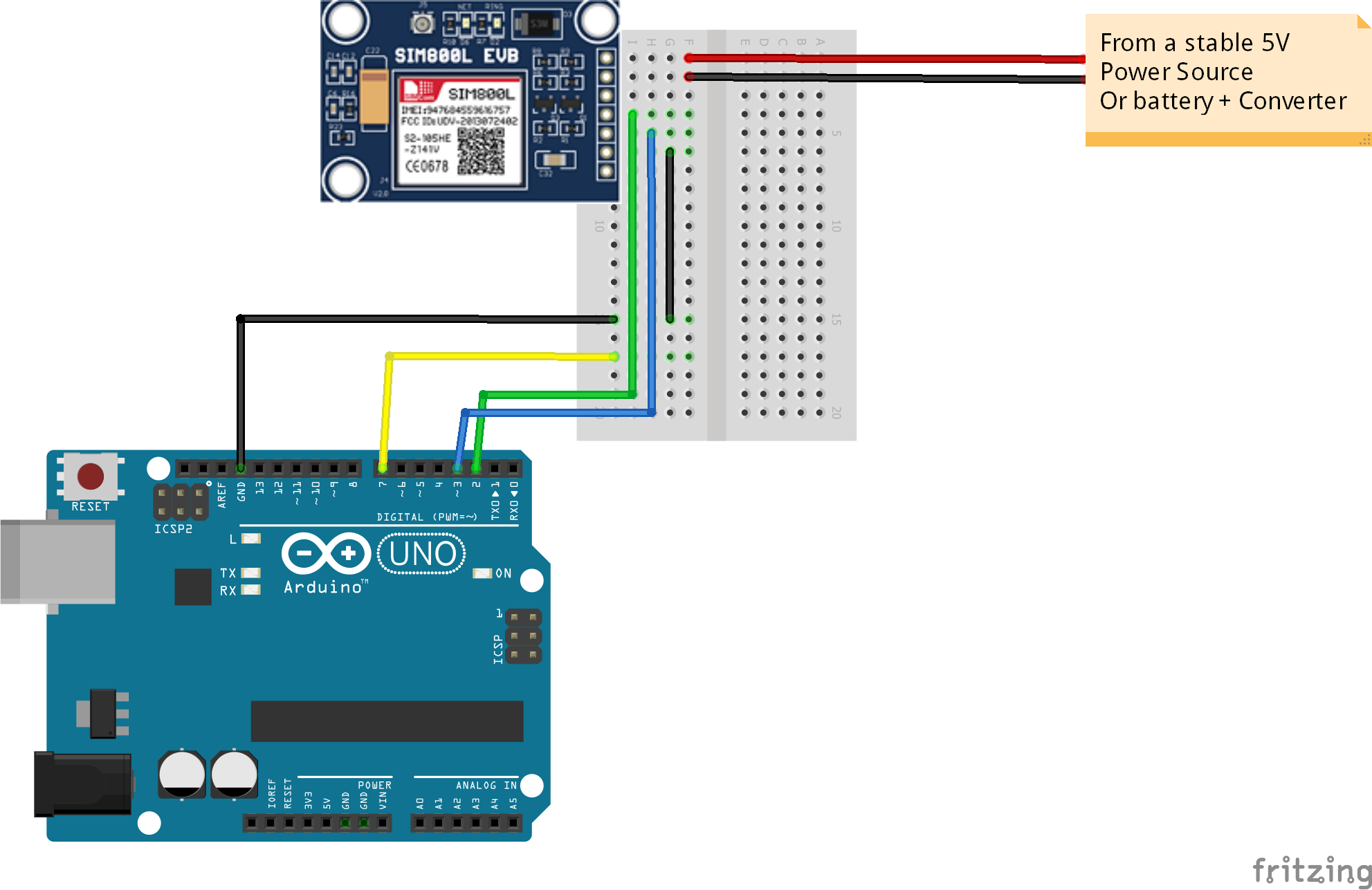
Wiring 1
Basic wiring
Wiring 1
Comments
Only logged in users can leave comments