Arduino Radar with Distance and Width
This is an Arduino-based project with the help of an HC-SR04 and servo motor, providing a 180-degree view.
Devices & Components
1
Arduino Uno Rev3
1
Ultrasonic Sensor - HC-SR04 (Generic)
1
Jumper wires (generic)
1
Servos (Tower Pro MG996R)
Hardware & Tools
1
Soldering iron (generic)
Software & Tools
1
eclipse

Arduino IDE
Project description
Code
java code for radar
java
1import processing.serial.*; // imports library for serial communication
2import  java.awt.event.KeyEvent; // imports library for reading the data from the serial  port
3import java.io.IOException;
4Serial myPort; // defines Object Serial
5//  defubes variables
6String angle="";
7String distance="";
8String data="";
9String  noObject;
10float pixsDistance;
11int iAngle, iDistance;
12int index1=0;
13int  index2=0;
14PFont orcFont;
15void setup() {
16
17 size (1920, 1080);
18 smooth();
19  myPort = new Serial(this,"COM4", 9600); // starts the serial communication
20  myPort.bufferUntil('.'); // reads the data from the serial port up to the character  '.'. So actually it reads this: angle,distance.
21 orcFont = loadFont("OCRAExtended-30.vlw");
22}
23void  draw() {
24
25  fill(98,245,31);
26  textFont(orcFont);
27  // simulating  motion blur and slow fade of the moving line
28  noStroke();
29  fill(0,4);
30  rect(0, 0, width, 1010);
31
32  fill(98,245,31); // green color
33  // calls  the functions for drawing the radar
34  drawRadar();
35  drawLine();
36  drawObject();
37  drawText();
38}
39void serialEvent (Serial myPort) { // starts reading data  from the Serial Port
40  // reads the data from the Serial Port up to the character  '.' and puts it into the String variable "data".
41  data = myPort.readStringUntil('.');
42  data = data.substring(0,data.length()-1);
43
44  index1 = data.indexOf(",");  // find the character ',' and puts it into the variable "index1"
45  angle= data.substring(0,  index1); // read the data from position "0" to position of the variable index1  or thats the value of the angle the Arduino Board sent into the Serial Port
46  distance= data.substring(index1+1, data.length()); // read the data from position  "index1" to the end of the data pr thats the value of the distance
47
48  //  converts the String variables into Integer
49  iAngle = int(angle);
50  iDistance  = int(distance);
51}
52void drawRadar() {
53  pushMatrix();
54  translate(960,1000);  // moves the starting coordinats to new location
55  noFill();
56  strokeWeight(2);
57  stroke(98,245,31);
58  // draws the arc lines
59  arc(0,0,1800,1800,PI,TWO_PI);
60  arc(0,0,1400,1400,PI,TWO_PI);
61  arc(0,0,1000,1000,PI,TWO_PI);
62  arc(0,0,600,600,PI,TWO_PI);
63  // draws the angle lines
64  line(-960,0,960,0);
65  line(0,0,-960*cos(radians(30)),-960*sin(radians(30)));
66  line(0,0,-960*cos(radians(60)),-960*sin(radians(60)));
67  line(0,0,-960*cos(radians(90)),-960*sin(radians(90)));
68  line(0,0,-960*cos(radians(120)),-960*sin(radians(120)));
69  line(0,0,-960*cos(radians(150)),-960*sin(radians(150)));
70  line(-960*cos(radians(30)),0,960,0);
71  popMatrix();
72}
73void drawObject()  {
74  pushMatrix();
75  translate(960,1000); // moves the starting coordinats  to new location
76  strokeWeight(9);
77  stroke(255,10,10); // red color
78  pixsDistance  = iDistance*22.5; // covers the distance from the sensor from cm to pixels
79  //  limiting the range to 40 cms
80  if(iDistance<40){
81    // draws the object according  to the angle and the distance
82  line(pixsDistance*cos(radians(iAngle)),-pixsDistance*sin(radians(iAngle)),950*cos(radians(iAngle)),-950*sin(radians(iAngle)));
83  }
84  popMatrix();
85}
86void drawLine() {
87  pushMatrix();
88  strokeWeight(9);
89  stroke(30,250,60);
90  translate(960,1000); // moves the starting coordinats  to new location
91  line(0,0,950*cos(radians(iAngle)),-950*sin(radians(iAngle)));  // draws the line according to the angle
92  popMatrix();
93}
94void drawText()  { // draws the texts on the screen
95
96  pushMatrix();
97  if(iDistance>40)  {
98  noObject = "Out of Range";
99  }
100  else {
101  noObject = "In Range";
102  }
103  fill(0,0,0);
104  noStroke();
105  rect(0, 1010, width, 1080);
106  fill(98,245,31);
107  textSize(25);
108  text("10cm",1180,990);
109  text("20cm",1380,990);
110  text("30cm",1580,990);
111  text("40cm",1780,990);
112  textSize(40);
113  text("Object: " + noObject, 240, 1050);
114  text("Angle: " + iAngle +" °",  1050, 1050);
115  text("Distance: ", 1380, 1050);
116  if(iDistance<40) {
117  text("        " + iDistance +" cm", 1400, 1050);
118  }
119  textSize(25);
120  fill(98,245,60);
121  translate(961+960*cos(radians(30)),982-960*sin(radians(30)));
122  rotate(-radians(-60));
123  text("30°",0,0);
124  resetMatrix();
125  translate(954+960*cos(radians(60)),984-960*sin(radians(60)));
126  rotate(-radians(-30));
127  text("60°",0,0);
128  resetMatrix();
129  translate(945+960*cos(radians(90)),990-960*sin(radians(90)));
130  rotate(radians(0));
131  text("90°",0,0);
132  resetMatrix();
133  translate(935+960*cos(radians(120)),1003-960*sin(radians(120)));
134  rotate(radians(-30));
135  text("120°",0,0);
136  resetMatrix();
137  translate(940+960*cos(radians(150)),1018-960*sin(radians(150)));
138  rotate(radians(-60));
139  text("150°",0,0);
140  popMatrix();
141}
arduino code for arduino ide
c_cpp
1// Includes the Servo library
2#include <Servo.h>.
3// Defines Tirg   and Echo pins of the Ultrasonic Sensor
4const int trigPin = 10;
5const int echoPin   = 11;
6// Variables for the duration and the distance
7long duration;
8int   distance;
9Servo myServo; // Creates a servo object for controlling the servo   motor
10void setup() {
11  pinMode(trigPin, OUTPUT); // Sets the trigPin as an   Output
12  pinMode(echoPin, INPUT); // Sets the echoPin as an Input
13  Serial.begin(9600);
14   myServo.attach(12); // Defines on which pin is the servo motor attached
15}
16void   loop() {
17  // rotates the servo motor from 15 to 165 degrees
18  for(int i=15;i<=165;i++){
19  myServo.write(i);
20  delay(30);
21  distance = calculateDistance();//   Calls a function for calculating the distance measured by the Ultrasonic sensor   for each degree
22
23  Serial.print(i); // Sends the current degree into the   Serial Port
24  Serial.print(","); // Sends addition character right next to   the previous value needed later in the Processing IDE for indexing
25  Serial.print(distance);   // Sends the distance value into the Serial Port
26  Serial.print("."); // Sends   addition character right next to the previous value needed later in the Processing   IDE for indexing
27  }
28  // Repeats the previous lines from 165 to 15 degrees
29   for(int i=165;i>15;i--){
30  myServo.write(i);
31  delay(30);
32  distance   = calculateDistance();
33  Serial.print(i);
34  Serial.print(",");
35  Serial.print(distance);
36   Serial.print(".");
37  }
38}
39// Function for calculating the distance measured   by the Ultrasonic sensor
40int calculateDistance(){
41
42  digitalWrite(trigPin,   LOW);
43  delayMicroseconds(2);
44  // Sets the trigPin on HIGH state for 10   micro seconds
45  digitalWrite(trigPin, HIGH);
46  delayMicroseconds(10);
47   digitalWrite(trigPin, LOW);
48  duration = pulseIn(echoPin, HIGH); // Reads the   echoPin, returns the sound wave travel time in microseconds
49  distance= duration*0.034/2;
50   return distance;
51}
arduino code for arduino ide
c_cpp
1// Includes the Servo library
2#include <Servo.h>.
3// Defines Tirg  and Echo pins of the Ultrasonic Sensor
4const int trigPin = 10;
5const int echoPin  = 11;
6// Variables for the duration and the distance
7long duration;
8int  distance;
9Servo myServo; // Creates a servo object for controlling the servo  motor
10void setup() {
11  pinMode(trigPin, OUTPUT); // Sets the trigPin as an  Output
12  pinMode(echoPin, INPUT); // Sets the echoPin as an Input
13  Serial.begin(9600);
14  myServo.attach(12); // Defines on which pin is the servo motor attached
15}
16void  loop() {
17  // rotates the servo motor from 15 to 165 degrees
18  for(int i=15;i<=165;i++){
19  myServo.write(i);
20  delay(30);
21  distance = calculateDistance();//  Calls a function for calculating the distance measured by the Ultrasonic sensor  for each degree
22
23  Serial.print(i); // Sends the current degree into the  Serial Port
24  Serial.print(","); // Sends addition character right next to  the previous value needed later in the Processing IDE for indexing
25  Serial.print(distance);  // Sends the distance value into the Serial Port
26  Serial.print("."); // Sends  addition character right next to the previous value needed later in the Processing  IDE for indexing
27  }
28  // Repeats the previous lines from 165 to 15 degrees
29  for(int i=165;i>15;i--){
30  myServo.write(i);
31  delay(30);
32  distance  = calculateDistance();
33  Serial.print(i);
34  Serial.print(",");
35  Serial.print(distance);
36  Serial.print(".");
37  }
38}
39// Function for calculating the distance measured  by the Ultrasonic sensor
40int calculateDistance(){
41
42  digitalWrite(trigPin,  LOW);
43  delayMicroseconds(2);
44  // Sets the trigPin on HIGH state for 10  micro seconds
45  digitalWrite(trigPin, HIGH);
46  delayMicroseconds(10);
47  digitalWrite(trigPin, LOW);
48  duration = pulseIn(echoPin, HIGH); // Reads the  echoPin, returns the sound wave travel time in microseconds
49  distance= duration*0.034/2;
50  return distance;
51}
Downloadable files
circuit
this is the circuit diagram for the project
circuit
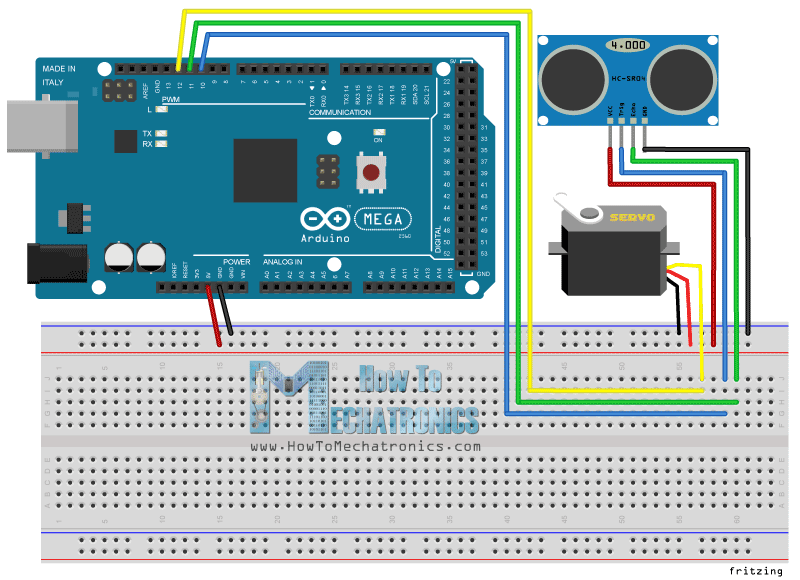
circuit
this is the circuit diagram for the project
circuit
Comments
Only logged in users can leave comments