Improving work efficiency with Fitbit - #cloudgames2022
Program detects when user walks into office, and shows the user their predicted working efficiency based on Fitbit data collected that day.
Devices & Components
1
Arduino Oplà IoT Kit
1
SG90 Micro Servo
1
18650 Li-lion Battery
Software & Tools
1
Arduino Web Editor
1
Atom
1
Fitbit API
1
Arduino IoT Cloud
Project description
Code
The Code
cpp
PIR Sensor -> Fetch data from Fitbit -> Calculate
1/*
2  ◦ ♥ ◦ ❀ ◦ ♥ ◦ |  S. Caplan & 4C Mech Official  | ◦ ♥ ◦ ❀ ◦ ♥ ◦
3  ◦❀◦♡◦❀◦♡◦❀◦♡   |  𝕾. 𝕮𝖆𝖕𝖑𝖆𝖓 .ᵒᶠᶠ   |   ♡◦❀◦♡◦❀◦♡◦❀◦
4⑄⑄⑄⑄⑄⑄⑄⑄⑄⑄⑄⑄⑄⑄⑄⑄⑄⑄⑄⑄⑄⑄⑄⑄⑄⑄⑄⑄⑄⑄⑄⑄⑄⑄⑄⑄⑄⑄⑄⑄⑄⑄⑄⑄⑄⑄⑄⑄⑄⑄⑄⑄⑄⑄⑄⑄⑄⑄⑄⑄⑄⑄⑄⑄⑄⑄⑄⑄⑄⑄⑄⑄⑄⑄
5A FISH IN SEA 🐟
6
7By: Shonie Caplan
8Contact: shonie4caplan@gmail.com
9⑄⑄⑄⑄⑄⑄⑄⑄⑄⑄⑄⑄⑄⑄⑄⑄⑄⑄⑄⑄⑄⑄⑄⑄⑄⑄⑄⑄⑄⑄⑄⑄⑄⑄⑄⑄⑄⑄⑄⑄⑄⑄⑄⑄⑄⑄⑄⑄⑄⑄⑄⑄⑄⑄⑄⑄⑄⑄⑄⑄⑄⑄⑄⑄⑄⑄⑄⑄⑄⑄⑄⑄⑄⑄
10Arduino Cloud Games 2022 Project
11⑄⑄⑄⑄⑄⑄⑄⑄⑄⑄⑄⑄⑄⑄⑄⑄⑄⑄⑄⑄⑄⑄⑄⑄⑄⑄⑄⑄⑄⑄⑄⑄⑄⑄⑄⑄⑄⑄⑄⑄⑄⑄⑄⑄⑄⑄⑄⑄⑄⑄⑄⑄⑄⑄⑄⑄⑄⑄⑄⑄⑄⑄⑄⑄⑄⑄⑄⑄⑄⑄⑄⑄⑄⑄
12Program detects when user walks into their office, turns
13on light and provides the user with predicted working efficiency
14based on data feteched from the Fitbit API.
15
16I'm using this everyday to collect more data and adjust values to
17improve the accuracy of the program. The predicted work efficiency
18is rough, but as I use
19
20Predictions are based on the user's sleep, physical activity and age.
21(Nutrition, heartrate, burned calories, and user input will
22be added in the future).
23
24Efficiency will also be printed on Opla MKR Carrier in the future.
25⑄⑄⑄⑄⑄⑄⑄⑄⑄⑄⑄⑄⑄⑄⑄⑄⑄⑄⑄⑄⑄⑄⑄⑄⑄⑄⑄⑄⑄⑄⑄⑄⑄⑄⑄⑄⑄⑄⑄⑄⑄⑄⑄⑄⑄⑄⑄⑄⑄⑄⑄⑄⑄⑄⑄⑄⑄⑄⑄⑄⑄⑄⑄⑄⑄⑄⑄⑄⑄⑄⑄⑄⑄⑄
26Thank you to the community helpers for helping me ◦ ❀ ◦
27⑄⑄⑄⑄⑄⑄⑄⑄⑄⑄⑄⑄⑄⑄⑄⑄⑄⑄⑄⑄⑄⑄⑄⑄⑄⑄⑄⑄⑄⑄⑄⑄⑄⑄⑄⑄⑄⑄⑄⑄⑄⑄⑄⑄⑄⑄⑄⑄⑄⑄⑄⑄⑄⑄⑄⑄⑄⑄⑄⑄⑄⑄⑄⑄⑄⑄⑄⑄⑄⑄⑄⑄⑄⑄
28*/
29
30#include <ArduinoHttpClient.h>
31#include <SPI.h>
32#include <WiFiNINA.h>
33#include <RTCZero.h>
34
35#include <ArduinoJson.h>
36#include <ArduinoJson.hpp>
37
38#include <Servo.h>
39
40
41// Setup your SSID and password in the "Secret tab"
42const char ssid[]     = SECRET_SSID;    // Network SSID (name)
43const char pass[]     = SECRET_PASS;    // Network password (use for WPA, or use as key for WEP)
44
45//⑄⑄ Servo Variables ⑄⑄⑄⑄⑄⑄⑄⑄⑄⑄⑄⑄⑄⑄⑄⑄⑄⑄⑄⑄⑄⑄⑄⑄⑄⑄⑄⑄⑄⑄⑄⑄⑄⑄⑄⑄⑄⑄⑄⑄⑄⑄⑄⑄⑄⑄⑄⑄⑄⑄⑄⑄⑄⑄⑄⑄⑄⑄⑄⑄⑄⑄⑄⑄♡
46
47//Create Servo object
48Servo servo;
49
50//the number of times the calibration 'for' loop (1 sec each), cycles
51int calibrationTime = 20;
52
53//the time when the sensor outputs a low impulse
54long unsigned int lowIn;
55
56//the amount of milliseconds the sensor has to be low
57//before we assume all motion has stopped
58long unsigned int pause = 5000;
59
60boolean lockLow = true;
61boolean takeLowTime;
62
63//⑄⑄ Pin Variables ⑄⑄⑄⑄⑄⑄⑄⑄⑄⑄⑄⑄⑄⑄⑄⑄⑄⑄⑄⑄⑄⑄⑄⑄⑄⑄⑄⑄⑄⑄⑄⑄⑄⑄⑄⑄⑄⑄⑄⑄⑄⑄⑄⑄⑄⑄⑄⑄⑄⑄⑄⑄⑄⑄⑄⑄⑄⑄⑄⑄⑄⑄⑄⑄⑄⑄⑄♡
64//int pirPin is the digital pin connected to the PIR sensor's output
65const int pirPin = 3;
66
67// the digital pin connected to the servo's input
68const int servoPin = 7;
69//⑄⑄⑄⑄⑄⑄⑄⑄⑄⑄⑄⑄⑄⑄⑄⑄⑄⑄⑄⑄⑄⑄⑄⑄⑄⑄⑄⑄⑄⑄⑄⑄⑄⑄⑄⑄⑄⑄⑄⑄⑄⑄⑄⑄⑄⑄⑄⑄⑄⑄⑄⑄⑄⑄⑄⑄⑄⑄⑄⑄⑄⑄⑄⑄⑄⑄⑄⑄⑄⑄⑄⑄⑄⑄⑄⑄⑄⑄⑄⑄⑄⑄⑄⑄⑄♡
70
71
72//int 'val' reads PIR sensor pin; either 0 (OFF), or 1 (ON)
73int val;
74
75//int 'j' is to only run PIR calibration sequence a set amount of times
76int j = 0;
77
78//int 'k' is to only print ending bracket of PIR calibration sensor once
79int k = 0;
80
81//int 'valprev' is what val must be higher than, to increase 'i' (pir detection)
82const int valprev = 0;
83
84//int 'x' is to only run the 'if' delay 3 times
85int x = 0;
86
87//⑄⑄⑄⑄⑄⑄⑄⑄⑄⑄⑄⑄⑄⑄⑄⑄⑄⑄⑄⑄⑄⑄⑄⑄⑄⑄⑄⑄⑄⑄⑄⑄⑄⑄⑄⑄⑄⑄⑄⑄⑄⑄⑄⑄⑄⑄⑄⑄⑄⑄⑄⑄⑄⑄⑄⑄⑄⑄⑄⑄⑄⑄⑄⑄⑄⑄⑄⑄⑄⑄⑄⑄⑄⑄⑄⑄⑄⑄⑄⑄⑄⑄⑄⑄⑄♡
88
89
90//⑄⑄ Fitbit variables ⑄⑄⑄⑄⑄⑄⑄⑄⑄⑄⑄⑄⑄⑄⑄⑄⑄⑄⑄⑄⑄⑄⑄⑄⑄⑄⑄⑄⑄⑄⑄⑄⑄⑄⑄⑄⑄⑄⑄⑄⑄⑄⑄⑄⑄⑄⑄⑄⑄⑄⑄⑄⑄⑄⑄⑄⑄⑄⑄⑄⑄⑄⑄♡
91
92//Flag to send Json request once
93int SendOnce = 0;
94
95//TODO: Put your USER ID here
96String userid = "";
97
98//The location where we will be making the requests
99String ApiTarget = "api.fitbit.com";
100
101//Request Sending Booleans
102bool req1 = false;   // First req is set true by PIR motion detection
103bool req2 = false;
104bool req3 = false;
105bool req4 = false;
106bool req5 = false;
107bool req6 = false;
108
109//Boolean to start calculating work efficiency, set true after all requests
110bool mathQ = false;
111
112//Age of user
113int age;
114
115//Today's steps of user
116int steps;
117
118//Locations in the endpoint for data
119String ApiActivityTypes = "/1/activities.json";
120String ApiActivityLifetimeStats = "/1/user/-/activities.json";
121
122
123//TODO: put your access token here
124String AccessToken = "";
125String HeaderAccessToken = "Bearer " + AccessToken;
126
127WiFiSSLClient wifi;
128HttpClient client = HttpClient(wifi, ApiTarget, 443);
129int status = WL_IDLE_STATUS;
130
131//⑄⑄ RTC Code ⑄⑄⑄⑄⑄⑄⑄⑄⑄⑄⑄⑄⑄⑄⑄⑄⑄⑄⑄⑄⑄⑄⑄⑄⑄⑄⑄⑄⑄⑄⑄⑄⑄⑄⑄⑄⑄⑄⑄⑄⑄⑄⑄⑄⑄⑄⑄⑄⑄⑄⑄⑄⑄⑄⑄⑄⑄⑄⑄⑄⑄⑄⑄⑄⑄⑄⑄⑄⑄⑄⑄⑄⑄♡
132RTCZero rtc;
133
134/* Change these values to set the current initial time */
135const int seconds = 0;
136const int minutes = 36;
137const int hours = 9;
138
139/* Change these values to set the current initial date */
140const int day = 16;
141const int month = 3;
142const int year = 22;
143//⑄⑄⑄⑄⑄⑄⑄⑄⑄⑄⑄⑄⑄⑄⑄⑄⑄⑄⑄⑄⑄⑄⑄⑄⑄⑄⑄⑄⑄⑄⑄⑄⑄⑄⑄⑄⑄⑄⑄⑄⑄⑄⑄⑄⑄⑄⑄⑄⑄⑄⑄⑄⑄⑄⑄⑄⑄⑄⑄⑄⑄⑄⑄⑄⑄⑄⑄⑄⑄⑄⑄⑄⑄⑄⑄⑄⑄⑄⑄⑄⑄⑄⑄⑄⑄♡
144
145
146//⑄⑄⑄⑄⑄⑄⑄⑄⑄⑄⑄⑄⑄⑄⑄⑄⑄⑄⑄⑄⑄⑄⑄⑄⑄⑄⑄⑄⑄⑄⑄⑄⑄⑄⑄⑄⑄⑄⑄⑄⑄⑄⑄⑄⑄⑄⑄⑄⑄⑄⑄⑄⑄⑄⑄⑄⑄⑄⑄⑄⑄⑄⑄⑄⑄⑄⑄⑄⑄⑄⑄⑄⑄⑄⑄⑄⑄⑄⑄⑄⑄⑄⑄⑄⑄⑄⑄⑄⑄⑄⑄⑄⑄⑄⑄⑄⑄⑄⑄⑄⑄⑄⑄⑄⑄⑄⑄⑄⑄⑄⑄⑄⑄⑄⑄⑄⑄⑄⑄⑄⑄⑄⑄⑄⑄⑄♡
147  void setup() {  // ◦ ♡ ◦ ♡ ◦ ♡ ◦ ♡ ◦ ♡ ◦ ♡ ◦ ♡ ◦ ♡ ◦ ♡ ◦ ♡ ◦ ♡ ◦ ♡ ◦ ♡ ◦ ♡ ◦ ♡ ◦ ♡ ◦ ♡ ◦ ♡ ◦ ♡ ◦ ♡ ◦ ♡ ◦ ♡ ◦ ♡
148//⑄⑄⑄⑄⑄⑄⑄⑄⑄⑄⑄⑄⑄⑄⑄⑄⑄⑄⑄⑄⑄⑄⑄⑄⑄⑄⑄⑄⑄⑄⑄⑄⑄⑄⑄⑄⑄⑄⑄⑄⑄⑄⑄⑄⑄⑄⑄⑄⑄⑄⑄⑄⑄⑄⑄⑄⑄⑄⑄⑄⑄⑄⑄⑄⑄⑄⑄⑄⑄⑄⑄⑄⑄⑄⑄⑄⑄⑄⑄⑄⑄⑄⑄⑄⑄⑄⑄⑄⑄⑄⑄⑄⑄⑄⑄⑄⑄⑄⑄⑄⑄⑄⑄⑄⑄⑄⑄⑄⑄⑄⑄⑄⑄⑄⑄⑄⑄⑄⑄⑄⑄⑄⑄⑄⑄⑄♡
149
150  Serial.begin(9600);
151
152  while (!Serial) {
153    ; // wait for serial port to connect. Needed for native USB port only
154  }
155
156//⑄⑄ Attach Pins ⑄⑄⑄⑄⑄⑄⑄⑄⑄⑄⑄⑄⑄⑄⑄⑄⑄⑄⑄⑄⑄⑄⑄⑄⑄⑄⑄⑄⑄⑄⑄⑄⑄⑄⑄⑄⑄⑄⑄⑄⑄⑄⑄⑄⑄⑄⑄⑄⑄⑄⑄⑄⑄⑄⑄⑄⑄⑄⑄⑄⑄⑄⑄⑄⑄⑄⑄⑄⑄♡
157  pinMode(pirPin, INPUT);
158  digitalWrite(pirPin, LOW);
159
160  servo.attach(servoPin);
161  servo.write(90);
162  delay(10);
163//⑄⑄⑄⑄⑄⑄⑄⑄⑄⑄⑄⑄⑄⑄⑄⑄⑄⑄⑄⑄⑄⑄⑄⑄⑄⑄⑄⑄⑄⑄⑄⑄⑄⑄⑄⑄⑄⑄⑄⑄⑄⑄⑄⑄⑄⑄⑄⑄⑄⑄⑄⑄⑄⑄⑄⑄⑄⑄⑄⑄⑄⑄⑄⑄⑄⑄⑄⑄⑄⑄⑄⑄⑄⑄⑄⑄⑄⑄⑄⑄⑄⑄⑄⑄⑄♡
164
165  Serial.print("Attempting to connect to Network named: ");
166// Print the network name (SSID);
167  Serial.println(ssid);
168  while ( status != WL_CONNECTED) {
169
170  // Connect to WPA/WPA2 network:
171    status = WiFi.begin(ssid, pass);
172  }
173
174// Print the SSID of the network you're attached to:
175  Serial.print("SSID: ");
176  Serial.println(WiFi.SSID());
177
178// Print your WiFi shield's IP address:
179  IPAddress ip = WiFi.localIP();
180  Serial.print("IP Address: ");
181  Serial.println(ip);
182
183// PIR sensor is active
184  Serial.println("= = = = SENSOR ACTIVE = = = =");
185
186// Start RTC
187  rtc.begin(); // initialize RTC
188  rtc.setTime(hours, minutes, seconds);
189  rtc.setDate(day, month, year);
190}
191//⑄⑄⑄⑄⑄⑄⑄⑄⑄⑄⑄⑄⑄⑄⑄⑄⑄⑄⑄⑄⑄⑄⑄⑄⑄⑄⑄⑄⑄⑄⑄⑄⑄⑄⑄⑄⑄⑄⑄⑄⑄⑄⑄⑄⑄⑄⑄⑄⑄⑄⑄⑄⑄⑄⑄⑄⑄⑄⑄⑄⑄⑄⑄⑄⑄⑄⑄⑄⑄⑄⑄⑄⑄⑄⑄⑄⑄⑄⑄⑄⑄⑄⑄⑄⑄⑄⑄⑄⑄⑄⑄⑄⑄⑄⑄⑄⑄⑄⑄⑄⑄⑄⑄⑄⑄⑄⑄⑄⑄⑄⑄⑄⑄⑄⑄⑄⑄⑄⑄⑄⑄⑄⑄⑄⑄⑄♡
192// End of setup  ◦ ♡ ◦ ♡ ◦ ♡ ◦ ♡ ◦ ♡ ◦ ♡ ◦ ♡ ◦ ♡ ◦ ♡ ◦ ♡ ◦ ♡ ◦ ♡ ◦ ♡ ◦ ♡ ◦ ♡ ◦ ♡ ◦ ♡ ◦ ♡ ◦ ♡ ◦ ♡ ◦ ♡ ◦ ♡ ◦ ♡ ◦ ♡
193//⑄⑄⑄⑄⑄⑄⑄⑄⑄⑄⑄⑄⑄⑄⑄⑄⑄⑄⑄⑄⑄⑄⑄⑄⑄⑄⑄⑄⑄⑄⑄⑄⑄⑄⑄⑄⑄⑄⑄⑄⑄⑄⑄⑄⑄⑄⑄⑄⑄⑄⑄⑄⑄⑄⑄⑄⑄⑄⑄⑄⑄⑄⑄⑄⑄⑄⑄⑄⑄⑄⑄⑄⑄⑄⑄⑄⑄⑄⑄⑄⑄⑄⑄⑄⑄⑄⑄⑄⑄⑄⑄⑄⑄⑄⑄⑄⑄⑄⑄⑄⑄⑄⑄⑄⑄⑄⑄⑄⑄⑄⑄⑄⑄⑄⑄⑄⑄⑄⑄⑄⑄⑄⑄⑄⑄⑄♡
194
195
196
197//⑄⑄⑄⑄⑄⑄⑄⑄⑄⑄⑄⑄⑄⑄⑄⑄⑄⑄⑄⑄⑄⑄⑄⑄⑄⑄⑄⑄⑄⑄⑄⑄⑄⑄⑄⑄⑄⑄⑄⑄⑄⑄⑄⑄⑄⑄⑄⑄⑄⑄⑄⑄⑄⑄⑄⑄⑄⑄⑄⑄⑄⑄⑄⑄⑄⑄⑄⑄⑄⑄⑄⑄⑄⑄⑄⑄⑄⑄⑄⑄⑄⑄⑄⑄⑄⑄⑄⑄⑄⑄⑄⑄⑄⑄⑄⑄⑄⑄⑄⑄⑄⑄⑄⑄⑄⑄⑄⑄⑄⑄⑄⑄⑄⑄⑄⑄⑄⑄⑄⑄⑄⑄⑄⑄⑄⑄♡
198  void loop() {   // ◦ ♡ ◦ ♡ ◦ ♡ ◦ ♡ ◦ ♡ ◦ ♡ ◦ ♡ ◦ ♡ ◦ ♡ ◦ ♡ ◦ ♡ ◦ ♡ ◦ ♡ ◦ ♡ ◦ ♡ ◦ ♡ ◦ ♡ ◦ ♡ ◦ ♡ ◦ ♡ ◦ ♡ ◦ ♡ ◦ ♡
199//⑄⑄⑄⑄⑄⑄⑄⑄⑄⑄⑄⑄⑄⑄⑄⑄⑄⑄⑄⑄⑄⑄⑄⑄⑄⑄⑄⑄⑄⑄⑄⑄⑄⑄⑄⑄⑄⑄⑄⑄⑄⑄⑄⑄⑄⑄⑄⑄⑄⑄⑄⑄⑄⑄⑄⑄⑄⑄⑄⑄⑄⑄⑄⑄⑄⑄⑄⑄⑄⑄⑄⑄⑄⑄⑄⑄⑄⑄⑄⑄⑄⑄⑄⑄⑄⑄⑄⑄⑄⑄⑄⑄⑄⑄⑄⑄⑄⑄⑄⑄⑄⑄⑄⑄⑄⑄⑄⑄⑄⑄⑄⑄⑄⑄⑄⑄⑄⑄⑄⑄⑄⑄⑄⑄⑄⑄♡
200
201//Detecting movement
202  val = digitalRead(pirPin);
203
204  if (val > valprev) {
205
206  //increase 'k' to turn on light
207    k = k + 1;
208
209
210  }
211
212//⑄⑄ Light On ⑄⑄⑄⑄⑄⑄⑄⑄⑄⑄⑄⑄⑄⑄⑄⑄⑄⑄⑄⑄⑄⑄⑄⑄⑄⑄⑄⑄⑄⑄⑄⑄⑄⑄⑄⑄⑄⑄⑄⑄⑄⑄⑄⑄⑄⑄⑄⑄⑄⑄⑄⑄⑄⑄⑄⑄⑄⑄⑄⑄⑄⑄⑄⑄⑄⑄⑄⑄⑄⑄⑄⑄♡
213
214  if (k == 1) {
215
216  //Turn Light on
217    servo.write(130);
218    delay(500);
219
220  //Start requesting sequence
221    req1 = true;
222
223  //Turn back to middle position
224    servo.write(90);
225    delay(500);
226
227    k = k + 1;
228
229
230
231    //Embedded 'if'
232    if (lockLow == true) {
233
234      Serial.println( "---" );
235
236      Serial.print( "motion detected at " );
237
238      Serial.print( millis() / 1000 );
239
240      Serial.println( " sec" );
241
242      //makes sure we wait for a transition to LOW before any further output is made:
243      lockLow = false;
244
245      delay(1500);
246    }
247
248    takeLowTime = true; // takeLowTime = true
249    delay(5000); // delay so the sensor doesnt re-detect same object
250  }
251
252
253//⑄⑄ Light Off ⑄⑄⑄⑄⑄⑄⑄⑄⑄⑄⑄⑄⑄⑄⑄⑄⑄⑄⑄⑄⑄⑄⑄⑄⑄⑄⑄⑄⑄⑄⑄⑄⑄⑄⑄⑄⑄⑄⑄⑄⑄⑄⑄⑄⑄⑄⑄⑄⑄⑄⑄⑄⑄⑄⑄⑄⑄⑄⑄⑄⑄⑄⑄⑄⑄⑄⑄⑄⑄⑄⑄♡
254
255  if (k == 3) {
256
257    servo.write(60);
258    delay(500);
259
260    servo.write(90);
261    delay(500);
262
263
264      //Embedded 'if'
265      if (takeLowTime) {
266        //save the time of the transition from high to LOW
267        lowIn = millis();
268
269        //make sure this is only done at the start of a LOW phase
270        takeLowTime = false;
271      }
272
273      //if the sensor is low for more than the given pause,
274      //we assume that no more motion is going to happen
275    if ( lockLow == false && millis() - lowIn > pause ) {
276
277      //makes sure this block of code is only executed again after
278      //a new motion sequence has been detected
279      lockLow = true;
280
281      Serial.print("motion ended at ");
282      Serial.print((millis() - pause) / 1000);
283      Serial.println(" sec");
284      delay(50);
285    }
286
287
288
289      delay(5000); //delay so the sensor doesnt re-detect same object
290
291      //set int 'i' back to 0
292      k = 0;
293    }
294
295//⑄⑄⑄⑄⑄⑄⑄⑄⑄⑄⑄⑄⑄⑄⑄⑄⑄⑄⑄⑄⑄⑄⑄⑄⑄⑄⑄⑄⑄⑄⑄⑄⑄⑄⑄⑄⑄⑄⑄⑄⑄⑄⑄⑄⑄⑄⑄⑄⑄⑄⑄⑄⑄⑄⑄⑄⑄⑄⑄⑄⑄⑄⑄⑄⑄⑄⑄⑄⑄⑄⑄⑄⑄⑄⑄⑄⑄⑄⑄⑄⑄⑄⑄⑄⑄⑄⑄⑄⑄⑄⑄⑄⑄⑄⑄⑄⑄⑄⑄⑄♡
296// String Builder ◦ ♡ ◦ ♡ ◦ ♡ ◦ ♡ ◦ ♡ ◦ ♡ ◦ ♡ ◦ ♡ ◦ ♡ ◦ ♡ ◦ ♡ ◦ ♡ ◦ ♡ ◦ ♡ ◦ ♡ ◦ ♡ ◦ ♡ ◦ ♡
297//⑄⑄⑄⑄⑄⑄⑄⑄⑄⑄⑄⑄⑄⑄⑄⑄⑄⑄⑄⑄⑄⑄⑄⑄⑄⑄⑄⑄⑄⑄⑄⑄⑄⑄⑄⑄⑄⑄⑄⑄⑄⑄⑄⑄⑄⑄⑄⑄⑄⑄⑄⑄⑄⑄⑄⑄⑄⑄⑄⑄⑄⑄⑄⑄⑄⑄⑄⑄⑄⑄⑄⑄⑄⑄⑄⑄⑄⑄⑄⑄⑄⑄⑄⑄⑄⑄⑄⑄⑄⑄⑄⑄⑄⑄⑄⑄⑄⑄⑄⑄♡
298
299//⑄⑄ Getting date to build string ⑄⑄⑄⑄⑄⑄⑄⑄⑄⑄⑄⑄⑄⑄⑄⑄⑄⑄⑄⑄⑄⑄⑄⑄⑄⑄⑄⑄⑄⑄⑄⑄⑄⑄⑄⑄⑄⑄⑄⑄⑄⑄⑄⑄⑄⑄⑄⑄⑄⑄⑄♡
300  int dd = rtc.getDay();      // Get current date & store as int
301  int mm = rtc.getMonth();    // Get current month & store as int
302  int yy = rtc.getYear();     // Get current year & store as int
303
304//⑄⑄ Building parts of string ⑄⑄⑄⑄⑄⑄⑄⑄⑄⑄⑄⑄⑄⑄⑄⑄⑄⑄⑄⑄⑄⑄⑄⑄⑄⑄⑄⑄⑄⑄⑄⑄⑄⑄⑄⑄⑄⑄⑄⑄⑄⑄⑄⑄⑄⑄⑄⑄⑄⑄⑄⑄⑄⑄⑄♡
305  String pt1 = "/1/user/";    // Start of request
306  String pt2 = "/1.2/user/";  // Start of request (some reqs use different start)
307  String dash = "-";
308  String endpt = ".json";     // End part of request
309  String yypt1 = "20";        // Put in front of 'yy' to make yyyy (Change to '21' in 2100)
310
311//⑄⑄ Specific parts ⑄⑄⑄⑄⑄⑄⑄⑄⑄⑄⑄⑄⑄⑄⑄⑄⑄⑄⑄⑄⑄⑄⑄⑄⑄⑄⑄⑄⑄⑄⑄⑄⑄⑄⑄⑄⑄⑄⑄⑄⑄⑄⑄⑄⑄⑄⑄⑄⑄⑄⑄⑄⑄⑄⑄⑄⑄⑄⑄⑄⑄⑄⑄⑄⑄⑄♡
312  String sleepSTR = "/sleep/date/";
313  String activitySTR = "/activities/date/";
314  String ageSTR = "/profile/age";
315  String stepsSTR = "/activities/steps/date/today/1d/15min";
316  String calsSTR = "/activities/calories/date/today/1d/15min";
317  String heartSTR = "/activities/heart/date/today/1d/1min";
318
319  String prevsleepSTR = "/sleep/list.json?afterDate=2021-07-27&sort=desc&offset=0&limit=1";
320
321//⑄⑄⑄⑄⑄⑄⑄⑄⑄⑄⑄⑄⑄⑄⑄⑄⑄⑄⑄⑄⑄⑄⑄⑄⑄⑄⑄⑄⑄⑄⑄⑄⑄⑄⑄⑄⑄⑄⑄⑄⑄⑄⑄⑄⑄⑄⑄⑄⑄⑄⑄⑄⑄⑄⑄⑄⑄⑄⑄⑄⑄⑄⑄⑄⑄⑄⑄⑄⑄⑄⑄⑄⑄⑄⑄⑄⑄⑄⑄⑄⑄⑄⑄⑄⑄♡
322//⑄⑄ Building Strings ⑄⑄⑄⑄⑄⑄⑄⑄⑄⑄⑄⑄⑄⑄⑄⑄⑄⑄⑄⑄⑄⑄⑄⑄⑄⑄⑄⑄⑄⑄⑄⑄⑄⑄⑄⑄⑄⑄⑄⑄⑄⑄⑄⑄⑄⑄⑄⑄⑄⑄⑄⑄⑄⑄⑄⑄⑄⑄⑄⑄⑄⑄⑄♡
323
324//⑄⑄ Sleep data from today ⑄⑄⑄⑄⑄⑄⑄⑄⑄⑄⑄⑄⑄⑄⑄⑄⑄⑄⑄⑄⑄⑄⑄⑄⑄⑄⑄⑄⑄⑄⑄⑄⑄⑄⑄⑄⑄⑄⑄⑄⑄⑄⑄⑄⑄⑄⑄⑄⑄⑄⑄⑄⑄⑄⑄⑄⑄⑄♡
325  String ApiSleep = pt2 + userid + sleepSTR + yypt1 + yy + dash + mm + dash + dd + endpt;
326
327//⑄⑄ Intraday Step data ⑄⑄⑄⑄⑄⑄⑄⑄⑄⑄⑄⑄⑄⑄⑄⑄⑄⑄⑄⑄⑄⑄⑄⑄⑄⑄⑄⑄⑄⑄⑄⑄⑄⑄⑄⑄⑄⑄⑄⑄⑄⑄⑄⑄⑄⑄⑄⑄⑄⑄⑄⑄⑄⑄⑄⑄⑄⑄⑄⑄⑄♡
328  String ApiStep = pt1 + userid + stepsSTR + endpt;
329
330//⑄⑄ Age data ⑄⑄⑄⑄⑄⑄⑄⑄⑄⑄⑄⑄⑄⑄⑄⑄⑄⑄⑄⑄⑄⑄⑄⑄⑄⑄⑄⑄⑄⑄⑄⑄⑄⑄⑄⑄⑄⑄⑄⑄⑄⑄⑄⑄⑄⑄⑄⑄⑄⑄⑄⑄⑄⑄⑄⑄⑄⑄⑄⑄⑄⑄⑄⑄⑄⑄⑄⑄⑄⑄⑄⑄♡
331  String ApiAge = pt1 + userid + ageSTR + endpt;
332
333//⑄⑄ Intraday Calorie data ⑄⑄⑄⑄⑄⑄⑄⑄⑄⑄⑄⑄⑄⑄⑄⑄⑄⑄⑄⑄⑄⑄⑄⑄⑄⑄⑄⑄⑄⑄⑄⑄⑄⑄⑄⑄⑄⑄⑄⑄⑄⑄⑄⑄⑄⑄⑄⑄⑄⑄⑄⑄⑄⑄⑄⑄⑄⑄♡
334  String ApiCal = pt1 + userid + calsSTR + endpt;
335
336//⑄⑄ Intraday Heart Rate data ⑄⑄⑄⑄⑄⑄⑄⑄⑄⑄⑄⑄⑄⑄⑄⑄⑄⑄⑄⑄⑄⑄⑄⑄⑄⑄⑄⑄⑄⑄⑄⑄⑄⑄⑄⑄⑄⑄⑄⑄⑄⑄⑄⑄⑄⑄⑄⑄⑄⑄⑄⑄⑄⑄♡
337  String ApiHeart = pt1 + userid + heartSTR + endpt;
338//⑄⑄⑄⑄⑄⑄⑄⑄⑄⑄⑄⑄⑄⑄⑄⑄⑄⑄⑄⑄⑄⑄⑄⑄⑄⑄⑄⑄⑄⑄⑄⑄⑄⑄⑄⑄⑄⑄⑄⑄⑄⑄⑄⑄⑄⑄⑄⑄⑄⑄⑄⑄⑄⑄⑄⑄⑄⑄⑄⑄⑄⑄⑄⑄⑄⑄⑄⑄⑄⑄⑄⑄⑄⑄⑄⑄⑄⑄⑄⑄⑄⑄⑄⑄⑄♡
339
340//⑄⑄⑄⑄⑄⑄⑄⑄⑄⑄⑄⑄⑄⑄⑄⑄⑄⑄⑄⑄⑄⑄⑄⑄⑄⑄⑄⑄⑄⑄⑄⑄⑄⑄⑄⑄⑄⑄⑄⑄⑄⑄⑄⑄⑄⑄⑄⑄⑄⑄⑄⑄⑄⑄⑄⑄⑄⑄⑄⑄⑄⑄⑄⑄⑄⑄⑄⑄⑄⑄⑄⑄⑄⑄⑄⑄⑄⑄⑄⑄⑄⑄⑄⑄⑄⑄⑄⑄⑄⑄⑄⑄⑄⑄⑄⑄⑄⑄⑄⑄♡
341// ♡ ◦ ♡ ◦ ♡ ◦ ♡ ◦ ♡ ◦ ♡ ◦ ♡ ◦ ♡ ◦ ♡ ◦ ♡ ◦ ♡ ◦ ♡ ◦ ♡ ◦ ♡ ◦ ♡ ◦ ♡ ◦ ♡ ◦ ♡ ◦ ♡ ◦ ♡ ◦ ♡ ◦ ♡
342//⑄⑄⑄⑄⑄⑄⑄⑄⑄⑄⑄⑄⑄⑄⑄⑄⑄⑄⑄⑄⑄⑄⑄⑄⑄⑄⑄⑄⑄⑄⑄⑄⑄⑄⑄⑄⑄⑄⑄⑄⑄⑄⑄⑄⑄⑄⑄⑄⑄⑄⑄⑄⑄⑄⑄⑄⑄⑄⑄⑄⑄⑄⑄⑄⑄⑄⑄⑄⑄⑄⑄⑄⑄⑄⑄⑄⑄⑄⑄⑄⑄⑄⑄⑄⑄⑄⑄⑄⑄⑄⑄⑄⑄⑄⑄⑄⑄⑄⑄⑄♡
343
344
345//⑄⑄⑄⑄⑄⑄⑄⑄⑄⑄⑄⑄⑄⑄⑄⑄⑄⑄⑄⑄⑄⑄⑄⑄⑄⑄⑄⑄⑄⑄⑄⑄⑄⑄⑄⑄⑄⑄⑄⑄⑄⑄⑄⑄⑄⑄⑄⑄⑄⑄⑄⑄⑄⑄⑄⑄⑄⑄⑄⑄⑄⑄⑄⑄⑄⑄⑄⑄⑄⑄⑄⑄⑄⑄⑄⑄⑄⑄⑄⑄⑄⑄⑄⑄⑄⑄⑄⑄⑄⑄⑄⑄⑄⑄⑄⑄⑄⑄⑄⑄♡
346// Requesting Data ◦ ♡ ◦ ♡ ◦ ♡ ◦ ♡ ◦ ♡ ◦ ♡ ◦ ♡ ◦ ♡ ◦ ♡ ◦ ♡ ◦ ♡ ◦ ♡ ◦ ♡ ◦ ♡ ◦ ♡ ◦ ♡ ◦ ♡ ◦ ♡
347//⑄⑄⑄⑄⑄⑄⑄⑄⑄⑄⑄⑄⑄⑄⑄⑄⑄⑄⑄⑄⑄⑄⑄⑄⑄⑄⑄⑄⑄⑄⑄⑄⑄⑄⑄⑄⑄⑄⑄⑄⑄⑄⑄⑄⑄⑄⑄⑄⑄⑄⑄⑄⑄⑄⑄⑄⑄⑄⑄⑄⑄⑄⑄⑄⑄⑄⑄⑄⑄⑄⑄⑄⑄⑄⑄⑄⑄⑄⑄⑄⑄⑄⑄⑄⑄⑄⑄⑄⑄⑄⑄⑄⑄⑄⑄⑄⑄⑄⑄⑄♡
348
349//⑄⑄ Send Sleep request ⑄⑄⑄⑄⑄⑄⑄⑄⑄⑄⑄⑄⑄⑄⑄⑄⑄⑄⑄⑄⑄⑄⑄⑄⑄⑄⑄⑄⑄⑄⑄⑄⑄⑄⑄⑄⑄⑄⑄⑄⑄⑄⑄⑄⑄⑄⑄⑄⑄⑄⑄⑄⑄⑄⑄⑄⑄⑄⑄⑄⑄⑄♡
350  if (req1 == true) {    // To only send once
351
352    client.beginRequest();
353    client.get(ApiSleep);
354    client.sendHeader("accept", "application/json");
355    client.sendHeader("authorization", HeaderAccessToken);
356    client.endRequest();
357
358  // Read the status code and body of the response
359    int statusCode = client.responseStatusCode();
360    String sleepRES = client.responseBody();
361
362    DynamicJsonDocument doc(6144);
363
364  // Deserialize the JSON document
365    DeserializationError error = deserializeJson(doc, sleepRES);
366
367  // Test if parsing succeeds.
368  if (error) {
369    Serial.print(F("deserializeJson() failed: "));
370    Serial.println(error.f_str());
371    return;
372  }
373
374    JsonObject sleepdoc = doc["sleep"][0];
375
376  // Sleep duration in seconds
377    long sleepDuration = sleepdoc["duration"];
378
379  // Sleep efficiency out of 100
380    int sleepEfficiency = sleepdoc["efficiency"];
381
382    // Serial.println(sleepEfficiency);
383
384    // Serial.print("GET Status code: ");
385    // Serial.println(statusCode);
386    // Serial.print("GET Response: ");
387    // Serial.println(sleepRES);
388
389    delay(3000);
390
391  // Get out of Sleep Request loop
392    req1 = false;
393
394  // Set 2nd loop Flag to true
395    req2 = true;
396  }
397//⑄⑄⑄⑄⑄⑄⑄⑄⑄⑄⑄⑄⑄⑄⑄⑄⑄⑄⑄⑄⑄⑄⑄⑄⑄⑄⑄⑄⑄⑄⑄⑄⑄⑄⑄⑄⑄⑄⑄⑄⑄⑄⑄⑄⑄⑄⑄⑄⑄⑄⑄⑄⑄⑄⑄⑄⑄⑄⑄⑄⑄⑄⑄⑄⑄⑄⑄⑄⑄⑄⑄⑄⑄⑄⑄⑄⑄⑄⑄⑄⑄⑄⑄⑄⑄⑄♡
398
399//⑄⑄ Send Step request ⑄⑄⑄⑄⑄⑄⑄⑄⑄⑄⑄⑄⑄⑄⑄⑄⑄⑄⑄⑄⑄⑄⑄⑄⑄⑄⑄⑄⑄⑄⑄⑄⑄⑄⑄⑄⑄⑄⑄⑄⑄⑄⑄⑄⑄⑄⑄⑄⑄⑄⑄⑄⑄⑄⑄⑄⑄⑄⑄⑄⑄⑄⑄♡
400  if (req2 == true) {    // To only send once
401
402    client.beginRequest();
403    client.get(ApiStep);
404    client.sendHeader("accept", "application/json");
405    client.sendHeader("authorization", HeaderAccessToken);
406    client.endRequest();
407
408  // Read the status code and body of the response
409    int statusCode = client.responseStatusCode();
410    String stepRES = client.responseBody();
411
412    DynamicJsonDocument doc(6144);
413
414    DeserializationError error = deserializeJson(doc, stepRES);
415
416  if (error) {
417    Serial.print("deserializeJson() failed: ");
418    Serial.println(error.c_str());
419    return;
420  }
421
422    steps = doc["activities-steps"][0]["value"]; // "241"
423
424    // Serial.print("GET Status code: ");
425    // Serial.println(statusCode);
426    // Serial.print("GET Response: ");
427    // Serial.println(steps);
428
429    delay(3000);
430
431  // Get out of Step Request loop
432    req2 = false;
433
434  // Set 5th loop Flag to true
435    req3 = true;
436  }
437//⑄⑄⑄⑄⑄⑄⑄⑄⑄⑄⑄⑄⑄⑄⑄⑄⑄⑄⑄⑄⑄⑄⑄⑄⑄⑄⑄⑄⑄⑄⑄⑄⑄⑄⑄⑄⑄⑄⑄⑄⑄⑄⑄⑄⑄⑄⑄⑄⑄⑄⑄⑄⑄⑄⑄⑄⑄⑄⑄⑄⑄⑄⑄⑄⑄⑄⑄⑄⑄⑄⑄⑄⑄⑄⑄⑄⑄⑄⑄⑄⑄⑄⑄⑄⑄⑄♡
438
439//⑄⑄ Send Age request ⑄⑄⑄⑄⑄⑄⑄⑄⑄⑄⑄⑄⑄⑄⑄⑄⑄⑄⑄⑄⑄⑄⑄⑄⑄⑄⑄⑄⑄⑄⑄⑄⑄⑄⑄⑄⑄⑄⑄⑄⑄⑄⑄⑄⑄⑄⑄⑄⑄⑄⑄⑄⑄⑄⑄⑄⑄⑄⑄⑄⑄⑄⑄⑄♡
440  if (req3 == true) {    // To only send once
441
442    client.beginRequest();
443    client.get(ApiAge);
444    client.sendHeader("accept", "application/json");
445    client.sendHeader("authorization", HeaderAccessToken);
446    client.endRequest();
447
448  // Read the status code and body of the response
449    int statusCode = client.responseStatusCode();
450    String ageRES = client.responseBody();
451
452    DynamicJsonDocument agedoc(8192);
453
454  // Deserialize the JSON document
455    DeserializationError agejs = deserializeJson(agedoc, ageRES);
456
457  // Test if parsing succeeds.
458  if (agejs) {
459    Serial.print(F("deserializeJson() failed: "));
460    Serial.println(agejs.f_str());
461    return;
462  }
463
464
465  JsonObject user = agedoc["user"];
466  age = user["age"];
467
468    // Serial.print("GET Status code: ");
469    // Serial.println(statusCode);
470    // Serial.print("GET Response: ");
471    // Serial.println(age);
472
473    delay(3000);
474
475  // Get out of Age Request loop
476    req3 = false;
477
478  // Set 4th loop Flag to true
479    req4 = true;
480  }
481//⑄⑄⑄⑄⑄⑄⑄⑄⑄⑄⑄⑄⑄⑄⑄⑄⑄⑄⑄⑄⑄⑄⑄⑄⑄⑄⑄⑄⑄⑄⑄⑄⑄⑄⑄⑄⑄⑄⑄⑄⑄⑄⑄⑄⑄⑄⑄⑄⑄⑄⑄⑄⑄⑄⑄⑄⑄⑄⑄⑄⑄⑄⑄⑄⑄⑄⑄⑄⑄⑄⑄⑄⑄⑄⑄⑄⑄⑄⑄⑄⑄⑄⑄⑄⑄⑄♡
482
483//⑄⑄ Send Calorie request ⑄⑄⑄⑄⑄⑄⑄⑄⑄⑄⑄⑄⑄⑄⑄⑄⑄⑄⑄⑄⑄⑄⑄⑄⑄⑄⑄⑄⑄⑄⑄⑄⑄⑄⑄⑄⑄⑄⑄⑄⑄⑄⑄⑄⑄⑄⑄⑄⑄⑄⑄⑄⑄⑄⑄⑄⑄⑄⑄⑄♡
484  if (req4 == true) {    // To only send once
485
486    client.beginRequest();
487    client.get(ApiCal);
488    client.sendHeader("accept", "application/json");
489    client.sendHeader("authorization", HeaderAccessToken);
490    client.endRequest();
491
492  // Read the status code and body of the response
493    int statusCode = client.responseStatusCode();
494    String calRES = client.responseBody();
495
496    // Serial.print("GET Status code: ");
497    // Serial.println(statusCode);
498    // Serial.print("GET Response: ");
499    // Serial.println(calRES);
500
501    delay(3000);
502
503  // Get out of Calorie Request loop
504    req4 = false;
505
506  // Set 5th loop Flag to true
507    req5 = true;
508  }
509//⑄⑄⑄⑄⑄⑄⑄⑄⑄⑄⑄⑄⑄⑄⑄⑄⑄⑄⑄⑄⑄⑄⑄⑄⑄⑄⑄⑄⑄⑄⑄⑄⑄⑄⑄⑄⑄⑄⑄⑄⑄⑄⑄⑄⑄⑄⑄⑄⑄⑄⑄⑄⑄⑄⑄⑄⑄⑄⑄⑄⑄⑄⑄⑄⑄⑄⑄⑄⑄⑄⑄⑄⑄⑄⑄⑄⑄⑄⑄⑄⑄⑄⑄⑄⑄⑄♡
510
511//⑄⑄ Send Heart Rate request ⑄⑄⑄⑄⑄⑄⑄⑄⑄⑄⑄⑄⑄⑄⑄⑄⑄⑄⑄⑄⑄⑄⑄⑄⑄⑄⑄⑄⑄⑄⑄⑄⑄⑄⑄⑄⑄⑄⑄⑄⑄⑄⑄⑄⑄⑄⑄⑄⑄⑄⑄⑄⑄⑄⑄⑄⑄♡
512  if (req5 == true) {    // To only send once
513
514    client.beginRequest();
515    client.get(ApiHeart);
516    client.sendHeader("accept", "application/json");
517    client.sendHeader("authorization", HeaderAccessToken);
518    client.endRequest();
519
520  // Read the status code and body of the response
521    int statusCode = client.responseStatusCode();
522    String heartRES = client.responseBody();
523
524    // Serial.print("GET Status code: ");
525    // Serial.println(statusCode);
526    // Serial.print("GET Response: ");
527    // Serial.println(heartRES);
528
529    delay(3000);
530
531  // Get out of Heart Rate Request loop
532    req6 = false;
533
534  // Start parsing json files
535    mathQ = true;
536  }
537//⑄⑄⑄⑄⑄⑄⑄⑄⑄⑄⑄⑄⑄⑄⑄⑄⑄⑄⑄⑄⑄⑄⑄⑄⑄⑄⑄⑄⑄⑄⑄⑄⑄⑄⑄⑄⑄⑄⑄⑄⑄⑄⑄⑄⑄⑄⑄⑄⑄⑄⑄⑄⑄⑄⑄⑄⑄⑄⑄⑄⑄⑄⑄⑄⑄⑄⑄⑄⑄⑄⑄⑄⑄⑄⑄⑄⑄⑄⑄⑄⑄⑄⑄⑄⑄⑄♡
538
539//⑄⑄⑄⑄⑄⑄⑄⑄⑄⑄⑄⑄⑄⑄⑄⑄⑄⑄⑄⑄⑄⑄⑄⑄⑄⑄⑄⑄⑄⑄⑄⑄⑄⑄⑄⑄⑄⑄⑄⑄⑄⑄⑄⑄⑄⑄⑄⑄⑄⑄⑄⑄⑄⑄⑄⑄⑄⑄⑄⑄⑄⑄⑄⑄⑄⑄⑄⑄⑄⑄⑄⑄⑄⑄⑄⑄⑄⑄⑄⑄⑄⑄⑄⑄⑄⑄⑄⑄⑄⑄⑄⑄⑄⑄⑄⑄⑄⑄⑄⑄♡
540// Predicting Efficiency (Math Section) ◦ ♡ ◦ ♡ ◦ ♡ ◦ ♡ ◦ ♡ ◦ ♡ ◦ ♡ ◦ ♡ ◦ ♡ ◦ ♡ ◦ ♡ ◦ ♡ ◦ ♡
541//⑄⑄⑄⑄⑄⑄⑄⑄⑄⑄⑄⑄⑄⑄⑄⑄⑄⑄⑄⑄⑄⑄⑄⑄⑄⑄⑄⑄⑄⑄⑄⑄⑄⑄⑄⑄⑄⑄⑄⑄⑄⑄⑄⑄⑄⑄⑄⑄⑄⑄⑄⑄⑄⑄⑄⑄⑄⑄⑄⑄⑄⑄⑄⑄⑄⑄⑄⑄⑄⑄⑄⑄⑄⑄⑄⑄⑄⑄⑄⑄⑄⑄⑄⑄⑄⑄⑄⑄⑄⑄⑄⑄⑄⑄⑄⑄⑄⑄⑄⑄♡
542
543/*
544Age	                 Steps: Minimum	     Steps: Active	 Steps: Highly Active
5454-6   years old	        6,000 steps	      10,000 steps   	  14,500 steps
5466-11  years old (female)6,500 steps	      11,000 steps	    13,500 steps
5476-11  years old (male)	7,000 steps	      13,000 steps   	  15,500 steps
54812-19 years old	        6,500 steps	      10,000 steps   	  12,500 steps
54920-65 years old	        4,000 steps	      7,000  steps	    11,500 steps
55065+   years old	        3,000 steps	      7,000  steps  	  10,500 steps
551*/
552int DaySteps;
553
554  if (mathQ == true) {
555
556
557    if (age > 0) {
558
559
560      if (age < 6 && age > 4 || age <= 19 && age >= 12) {
561        DaySteps = 6500;
562
563      } else if (age < 4) {
564        Serial.println("User is too young!");
565
566      } else if (age > 6) {
567
568          if (age >= 6 && age <= 11) {
569            DaySteps = 7000;
570
571          } else if (age > 11) {
572
573            if (age > 19 && age <= 65) {
574              DaySteps = 4000;
575
576            } else if (age > 65) {
577              DaySteps = 3000;
578
579            }
580          }
581      }
582
583    } else {
584
585      Serial.println("User must be at least 4 years old");
586      mathQ = false;
587    }
588
589    int stepcomp = (DaySteps - steps)
590
591    if (stepcomp > 0) {
592      Serial.println("Consider taking a walk to increase work efficiency and feel better");
593
594    } else if (stepcomp < 0) {
595      Serial.println("Good job! You have surpassed the steps threshold for your age, you are in good condition to work");
596    }
597
598    Serial.println("Your sleep efficieny last night was: " + sleepEfficiency);
599
600    if (sleepEfficiency >= 50) {
601
602        if (sleepEfficiency <= 75) {
603          Serial.println("You had okay last night, but a short nap will still improve your productivity");
604
605        } else if (sleepEfficiency > 75) {
606          Serial.println("You had great sleep last night, you should be in great condition to work!");
607        }
608    } else if (sleepEfficiency < 50) {
609      Serial.println("You did't have a great sleep last night, consider taking a 20 minute nap, this will help your working efficiency a lot");
610    }
611
612
613  }
614//⑄⑄⑄⑄⑄⑄⑄⑄⑄⑄⑄⑄⑄⑄⑄⑄⑄⑄⑄⑄⑄⑄⑄⑄⑄⑄⑄⑄⑄⑄⑄⑄⑄⑄⑄⑄⑄⑄⑄⑄⑄⑄⑄⑄⑄⑄⑄⑄⑄⑄⑄⑄⑄⑄⑄⑄⑄⑄⑄⑄⑄⑄⑄⑄⑄⑄⑄⑄⑄⑄⑄⑄⑄⑄⑄⑄⑄⑄⑄⑄⑄⑄⑄⑄⑄⑄⑄⑄⑄⑄⑄⑄⑄⑄⑄⑄⑄⑄⑄⑄♡
615// ♡ ◦ ♡ ◦ ♡ ◦ ♡ ◦ ♡ ◦ ♡ ◦ ♡ ◦ ♡ ◦ ♡ ◦ ♡ ◦ ♡ ◦ ♡ ◦ ♡ ◦ ♡ ◦ ♡ ◦ ♡ ◦ ♡ ◦ ♡ ◦ ♡ ◦ ♡ ◦ ♡ ◦ ♡
616//⑄⑄⑄⑄⑄⑄⑄⑄⑄⑄⑄⑄⑄⑄⑄⑄⑄⑄⑄⑄⑄⑄⑄⑄⑄⑄⑄⑄⑄⑄⑄⑄⑄⑄⑄⑄⑄⑄⑄⑄⑄⑄⑄⑄⑄⑄⑄⑄⑄⑄⑄⑄⑄⑄⑄⑄⑄⑄⑄⑄⑄⑄⑄⑄⑄⑄⑄⑄⑄⑄⑄⑄⑄⑄⑄⑄⑄⑄⑄⑄⑄⑄⑄⑄⑄⑄⑄⑄⑄⑄⑄⑄⑄⑄⑄⑄⑄⑄⑄⑄♡
617
618
619}
620//⑄⑄⑄⑄⑄⑄⑄⑄⑄⑄⑄⑄⑄⑄⑄⑄⑄⑄⑄⑄⑄⑄⑄⑄⑄⑄⑄⑄⑄⑄⑄⑄⑄⑄⑄⑄⑄⑄⑄⑄⑄⑄⑄⑄⑄⑄⑄⑄⑄⑄⑄⑄⑄⑄⑄⑄⑄⑄⑄⑄⑄⑄⑄⑄⑄⑄⑄⑄⑄⑄⑄⑄⑄⑄⑄⑄⑄⑄⑄⑄⑄⑄⑄⑄⑄⑄⑄⑄⑄⑄⑄⑄⑄⑄⑄⑄⑄⑄⑄⑄⑄⑄⑄⑄⑄⑄⑄⑄⑄⑄⑄⑄⑄⑄⑄⑄⑄⑄⑄⑄⑄⑄⑄⑄⑄⑄♡
621//  End of loop  ◦ ♡ ◦ ♡ ◦ ♡ ◦ ♡ ◦ ♡ ◦ ♡ ◦ ♡ ◦ ♡ ◦ ♡ ◦ ♡ ◦ ♡ ◦ ♡ ◦ ♡ ◦ ♡ ◦ ♡ ◦ ♡ ◦ ♡ ◦ ♡ ◦ ♡ ◦ ♡ ◦ ♡ ◦ ♡ ◦ ♡ ◦ ♡
622//⑄⑄⑄⑄⑄⑄⑄⑄⑄⑄⑄⑄⑄⑄⑄⑄⑄⑄⑄⑄⑄⑄⑄⑄⑄⑄⑄⑄⑄⑄⑄⑄⑄⑄⑄⑄⑄⑄⑄⑄⑄⑄⑄⑄⑄⑄⑄⑄⑄⑄⑄⑄⑄⑄⑄⑄⑄⑄⑄⑄⑄⑄⑄⑄⑄⑄⑄⑄⑄⑄⑄⑄⑄⑄⑄⑄⑄⑄⑄⑄⑄⑄⑄⑄⑄⑄⑄⑄⑄⑄⑄⑄⑄⑄⑄⑄⑄⑄⑄⑄⑄⑄⑄⑄⑄⑄⑄⑄⑄⑄⑄⑄⑄⑄⑄⑄⑄⑄⑄⑄⑄⑄⑄⑄⑄⑄♡
623
624/*
625  Since AvgSleepWeek is READ_WRITE variable, onAvgSleepWeekChange() is
626  executed every time a new value is received from IoT Cloud.
627*/
628void onAvgSleepWeekChange()  {
629  // Add your code here to act upon AvgSleepWeek change
630}
631
632/*
633  Since LightState is READ_WRITE variable, onLightStateChange() is
634  executed every time a new value is received from IoT Cloud.
635*/
636void onLightStateChange()  {
637  // Add your code here to act upon LightState change
638}
Downloadable files
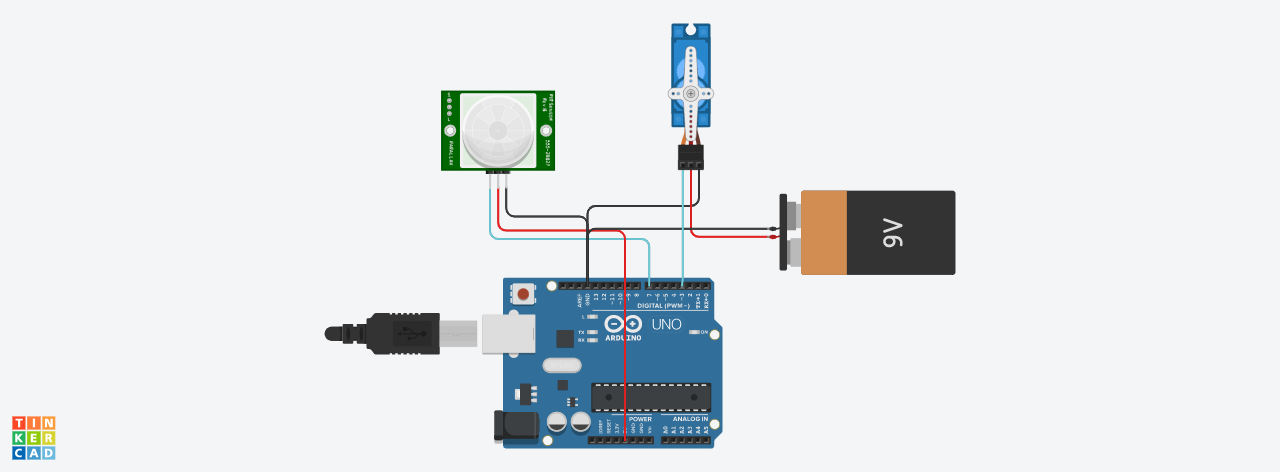
Schematic
Project was on MKR WiFi 1010 not UNO R3
Daring Waasa-Gaaris.png
Comments
Only logged in users can leave comments