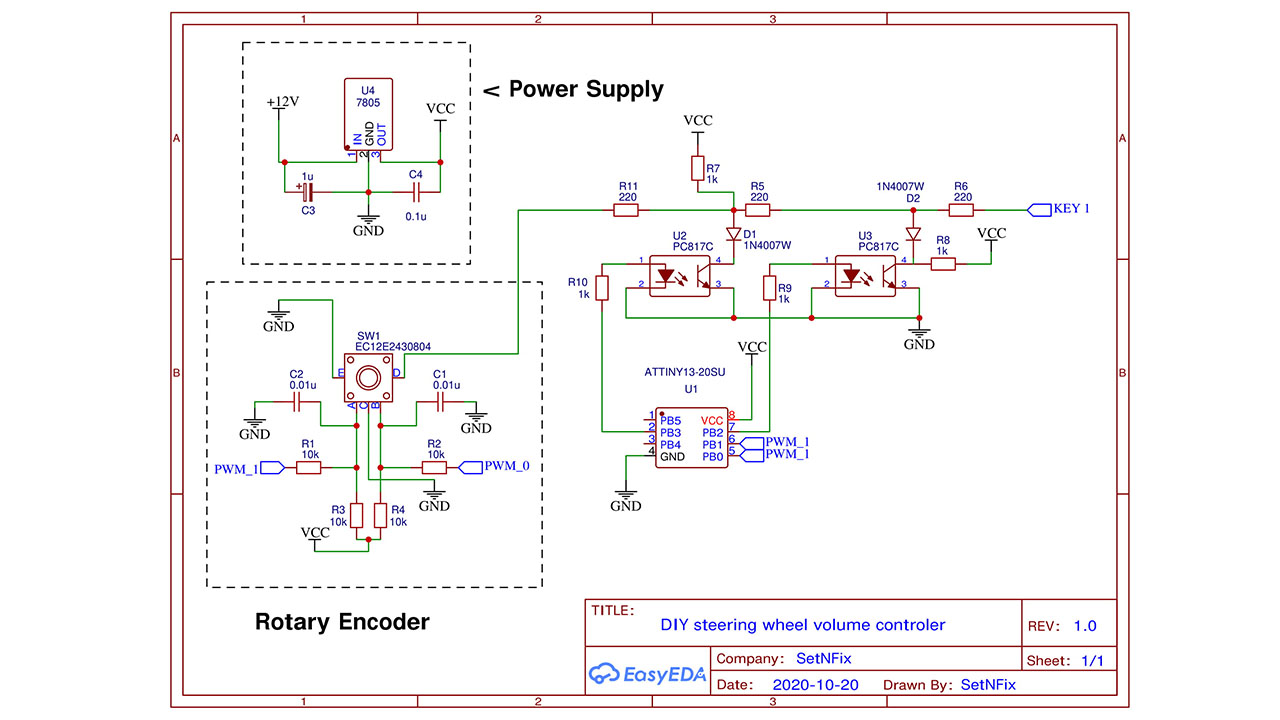
DIY car steering wheel controller with volume control
Control head unit of the using your own switch
Devices & Components
1
Arduino Uno Rev3
1
Resistor 10k ohm
1
Test Probe Connector, Multimeter
Hardware & Tools
1
Solder Wire, Lead Free
1
Soldering iron (generic)
Project description
Code
Code
arduino
1 /* Read Quadrature Encoder
2  * Connect Encoder to Pins encoder0PinA,   encoder0PinB, and +5V.
3  *
4  * www.setnfix.com
5  *
6  *
7  */
8
9
10   int val;
11 int encoder0PinA = 0;
12 int encoder0PinB = 1;
13 int test = A2;
14   int testdata=0;
15 int volP = A3; // Volume control +
16 int volM = A1;// Volume   control -
17 int encoder0Pos = 0;
18 int encoder0PinALast = LOW;
19 int n = LOW;
20//   int BOOT = 3; //boot up set
21// int ampoff = 11;
22/// int AMP=2;
23 //int POWER   = 5;
24
25 // Variables will change :
26//int ledState = LOW;             //   ledState used to set the LED
27
28// Generally, you should use "unsigned long"   for variables that hold time
29// The value will quickly become too large for an   int to store
30unsigned long previousMillis = 0;        // will store last time   LED was updated
31
32// constants won't change :
33const long interval = 1800000;            // interval at which to blink (milliseconds)
34
35 void setup() {
36    pinMode (encoder0PinA,INPUT);
37   pinMode (encoder0PinB,INPUT);
38   pinMode   (test,INPUT);
39   //pinMode (BOOT,OUTPUT);
40   pinMode (volP,OUTPUT);
41   pinMode   (volM,OUTPUT);
42 }
43
44 void loop() {
45
46
47
48testdata = analogRead(test);
49
50
51   n = digitalRead(encoder0PinA);
52   if ((encoder0PinALast == LOW) &&   (n == HIGH)) {
53     if (digitalRead(encoder0PinB) == LOW) {
54       VolumeUP();
55        //delay(200);
56     } else {
57      VolumeDOWN();
58      //delay(200);
59      }
60     //Serial.print (encoder0Pos);
61    // Serial.print ("/");
62    }
63   encoder0PinALast = n;
64
65
66   //POWERON/OFF switch
67
68      unsigned long currentMillis = millis();
69
70  if (currentMillis - previousMillis   >= interval) {
71    // save the last time you blinked the LED
72    previousMillis   = currentMillis;
73
74    // set the LED with the ledState of the variable:
75     //digitalWrite(POWER, ledState);
76  }
77
78
79
80   }
81
82    void VolumeUP(){
83    digitalWrite(volP,HIGH);
84    delay(500);
85    digitalWrite(volP,LOW);
86    }
87
88   void VolumeDOWN(){
89    digitalWrite(volM,HIGH);
90    delay(500);
91     digitalWrite(volM,LOW);
92   }
93
Code
arduino
1 /* Read Quadrature Encoder
2  * Connect Encoder to Pins encoder0PinA,  encoder0PinB, and +5V.
3  *
4  * www.setnfix.com
5  *
6  *
7  */
8
9
10  int val;
11 int encoder0PinA = 0;
12 int encoder0PinB = 1;
13 int test = A2;
14  int testdata=0;
15 int volP = A3; // Volume control +
16 int volM = A1;// Volume  control -
17 int encoder0Pos = 0;
18 int encoder0PinALast = LOW;
19 int n = LOW;
20//  int BOOT = 3; //boot up set
21// int ampoff = 11;
22/// int AMP=2;
23 //int POWER  = 5;
24
25 // Variables will change :
26//int ledState = LOW;             //  ledState used to set the LED
27
28// Generally, you should use "unsigned long"  for variables that hold time
29// The value will quickly become too large for an  int to store
30unsigned long previousMillis = 0;        // will store last time  LED was updated
31
32// constants won't change :
33const long interval = 1800000;           // interval at which to blink (milliseconds)
34
35 void setup() {
36   pinMode (encoder0PinA,INPUT);
37   pinMode (encoder0PinB,INPUT);
38   pinMode  (test,INPUT);
39   //pinMode (BOOT,OUTPUT);
40   pinMode (volP,OUTPUT);
41   pinMode  (volM,OUTPUT);
42 }
43
44 void loop() {
45
46
47
48testdata = analogRead(test);
49
50
51   n = digitalRead(encoder0PinA);
52   if ((encoder0PinALast == LOW) &&  (n == HIGH)) {
53     if (digitalRead(encoder0PinB) == LOW) {
54       VolumeUP();
55       //delay(200);
56     } else {
57      VolumeDOWN();
58      //delay(200);
59     }
60     //Serial.print (encoder0Pos);
61    // Serial.print ("/");
62   }
63   encoder0PinALast = n;
64
65
66   //POWERON/OFF switch
67
68     unsigned long currentMillis = millis();
69
70  if (currentMillis - previousMillis  >= interval) {
71    // save the last time you blinked the LED
72    previousMillis  = currentMillis;
73
74    // set the LED with the ledState of the variable:
75    //digitalWrite(POWER, ledState);
76  }
77
78
79
80   }
81
82   void VolumeUP(){
83    digitalWrite(volP,HIGH);
84    delay(500);
85    digitalWrite(volP,LOW);
86   }
87
88   void VolumeDOWN(){
89    digitalWrite(volM,HIGH);
90    delay(500);
91    digitalWrite(volM,LOW);
92   }
93
Downloadable files
Circuit
Progamming Attiny13
Circuit
Comments
Only logged in users can leave comments