Devices & Components
Arduino Uno Rev3
LED (generic)
RobotGeek Tilt Sensor
Software & Tools
Arduino IDE
Project description
Code
TILT SENSOR
arduino
1int inPin = 2; // the number of the input pin 2int outPin = 13; // the number of the output pin 3 4int LEDstate = HIGH; // the current state of the output pin 5int reading; // the current reading from the input pin 6int previous = LOW; // the previous reading from the input pin 7 8// the follow variables are long's because the time, measured in milliseconds, 9// will quickly become a bigger number than can be stored in an int. 10long time = 0; // the last time the output pin was toggled 11long debounce = 50; // the debounce time, increase if the output flickers 12 13void setup() 14{ 15pinMode(inPin, INPUT); 16digitalWrite(inPin, HIGH); // turn on the built in pull-up resistor 17pinMode(outPin, OUTPUT); 18} 19 20void loop() 21{ 22int switchstate; 23 24reading = digitalRead(inPin); 25 26// If the switch changed, due to bounce or pressing... 27if (reading != previous) { 28// reset the debouncing timer 29time = millis(); 30} 31 32if ((millis() - time) > debounce) { 33// whatever the switch is at, its been there for a long time 34// so lets settle on it! 35switchstate = reading; 36 37// Now invert the output on the pin13 LED 38if (switchstate == HIGH) 39LEDstate = LOW; 40else 41LEDstate = HIGH; 42} 43digitalWrite(outPin, LEDstate); 44 45// Save the last reading so we keep a running tally 46previous = reading; 47}
TILT SENSOR
arduino
1int inPin = 2; // the number of the input pin 2int outPin = 13; // the number of the output pin 3 4int LEDstate = HIGH; // the current state of the output pin 5int reading; // the current reading from the input pin 6int previous = LOW; // the previous reading from the input pin 7 8// the follow variables are long's because the time, measured in milliseconds, 9// will quickly become a bigger number than can be stored in an int. 10long time = 0; // the last time the output pin was toggled 11long debounce = 50; // the debounce time, increase if the output flickers 12 13void setup() 14{ 15pinMode(inPin, INPUT); 16digitalWrite(inPin, HIGH); // turn on the built in pull-up resistor 17pinMode(outPin, OUTPUT); 18} 19 20void loop() 21{ 22int switchstate; 23 24reading = digitalRead(inPin); 25 26// If the switch changed, due to bounce or pressing... 27if (reading != previous) { 28// reset the debouncing timer 29time = millis(); 30} 31 32if ((millis() - time) > debounce) { 33// whatever the switch is at, its been there for a long time 34// so lets settle on it! 35switchstate = reading; 36 37// Now invert the output on the pin13 LED 38if (switchstate == HIGH) 39LEDstate = LOW; 40else 41LEDstate = HIGH; 42} 43digitalWrite(outPin, LEDstate); 44 45// Save the last reading so we keep a running tally 46previous = reading; 47}
Downloadable files
TILT MEASUREMENTAND DISPLAY
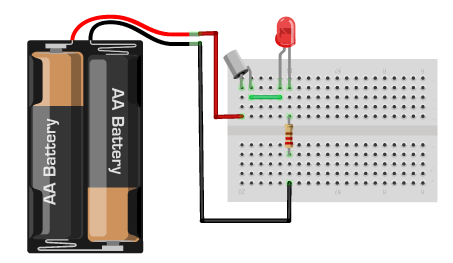
TILT MEASUREMENTAND DISPLAY

Documentation
TILT DISPLAY AND MEASUREMENT
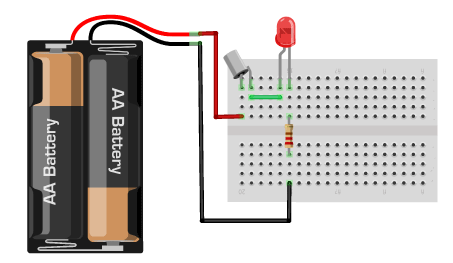
Comments
Only logged in users can leave comments