Devices & Components
Arduino Uno Rev3
Single Turn Potentiometer- 10k ohms
USB-A to B Cable
Jumper wires (generic)
Standard LCD - 16x2 White on Blue
Project description
Code
HELLOWORLD
arduino
1/* 2 LiquidCrystal Library - Hello World 3 4 Demonstrates the use a 16x2 LCD display. The LiquidCrystal 5 library works with all LCD displays that are compatible with the 6 Hitachi HD44780 driver. There are many of them out there, and you 7 can usually tell them by the 16-pin interface. 8 9 This sketch prints "ROBO-CREATORS" to the LCD 10 and shows the time. 11 12 The circuit: 13 * LCD RS pin to digital pin 12 14 * LCD Enable pin to digital pin 11 15 * LCD D4 pin to digital pin 5 16 * LCD D5 pin to digital pin 4 17 * LCD D6 pin to digital pin 3 18 * LCD D7 pin to digital pin 2 19 * LCD R/W pin to ground 20 * LCD VSS pin to ground 21 * LCD VCC pin to 5V 22 * 10K resistor: 23 * ends to +5V and ground 24 * wiper to LCD VO pin (pin 3) 25 26 27 28 This example code is in the public domain. 29 30 http://www.arduino.cc/en/Tutorial/LiquidCrystal 31 */ 32 33// include the library code: 34#include <LiquidCrystal.h> 35 36// initialize the library with the numbers of the interface pins 37LiquidCrystal lcd(12, 11, 5, 4, 3, 2); 38 39void setup() { 40 // set up the LCD's number of columns and rows: 41 lcd.begin(16, 2); 42 // Print a message to the LCD. 43 lcd.print("ROBO-CREATORS");//YOU CAN CHANGE IT 44} 45 46void loop() { 47 // set the cursor to column 0, line 1 48 // (note: line 1 is the second row, since counting begins with 0): 49 lcd.setCursor(0, 1); 50 // print the number of seconds since reset: 51 lcd.print(millis() / 1000); 52} 53
HELLOWORLD
arduino
1/* 2 LiquidCrystal Library - Hello World 3 4 Demonstrates the use a 16x2 LCD display. The LiquidCrystal 5 library works with all LCD displays that are compatible with the 6 Hitachi HD44780 driver. There are many of them out there, and you 7 can usually tell them by the 16-pin interface. 8 9 This sketch prints "ROBO-CREATORS" to the LCD 10 and shows the time. 11 12 The circuit: 13 * LCD RS pin to digital pin 12 14 * LCD Enable pin to digital pin 11 15 * LCD D4 pin to digital pin 5 16 * LCD D5 pin to digital pin 4 17 * LCD D6 pin to digital pin 3 18 * LCD D7 pin to digital pin 2 19 * LCD R/W pin to ground 20 * LCD VSS pin to ground 21 * LCD VCC pin to 5V 22 * 10K resistor: 23 * ends to +5V and ground 24 * wiper to LCD VO pin (pin 3) 25 26 27 28 This example code is in the public domain. 29 30 http://www.arduino.cc/en/Tutorial/LiquidCrystal 31 */ 32 33// include the library code: 34#include <LiquidCrystal.h> 35 36// initialize the library with the numbers of the interface pins 37LiquidCrystal lcd(12, 11, 5, 4, 3, 2); 38 39void setup() { 40 // set up the LCD's number of columns and rows: 41 lcd.begin(16, 2); 42 // Print a message to the LCD. 43 lcd.print("ROBO-CREATORS");//YOU CAN CHANGE IT 44} 45 46void loop() { 47 // set the cursor to column 0, line 1 48 // (note: line 1 is the second row, since counting begins with 0): 49 lcd.setCursor(0, 1); 50 // print the number of seconds since reset: 51 lcd.print(millis() / 1000); 52} 53
Downloadable files
THE SCHEMATIC
THE SCHEMATIC
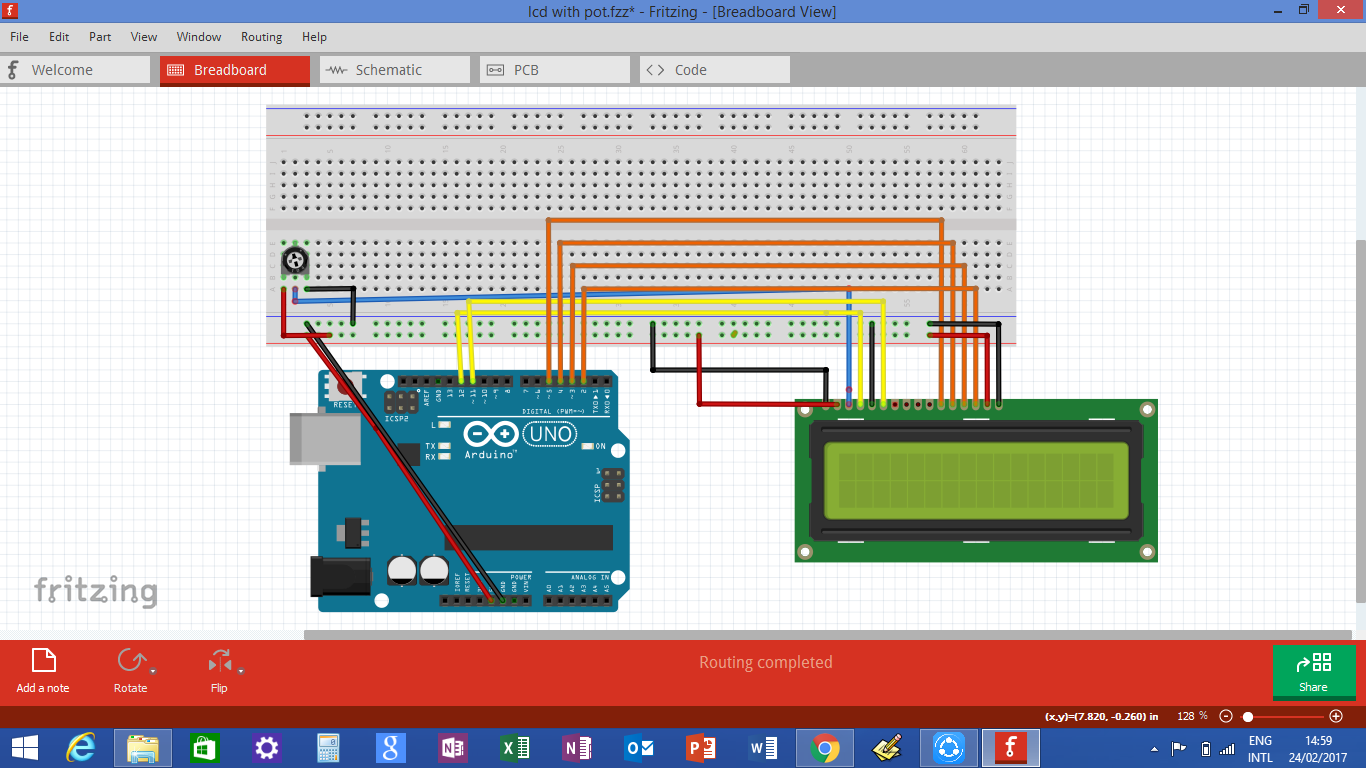
screenshot_(21)_7PiGzei5Mg.png

THE SCHEMATIC
THE SCHEMATIC

Comments
Only logged in users can leave comments