Devices & Components
1
Arduino Nano
1
Buzzer
1
9V battery (generic)
3
Resistor 330 ohm
6
LED (generic)
1
Rocker Switch 250V 3A
1
SparkFun Solder-able Breadboard - Mini
2
Pushbutton switch 12mm
Hardware & Tools
1
Soldering iron (generic)
Project description
Code
USA_ANTHEM_Updated.ino
arduino
The Star Spangled Banner with LEDs, Charge, tone, all functions. Just copy and paste.
1/*Star Spangled Banner with LEDs
2Created by Ryan Aebi June 2018
3
4Code  Structure
5-Basic Loop to refernce other functions
6-Push buttons do either  Star Spangled Banner or Charge sounds with lights
7
8Star Spangled Banner Notes
9-Funtion  has note assigned by integer for Frequncy(Hz), & duration(time in n)
10-LED is  choosen by myself semi-randomly when writing function
11-Function is built to increase  in pitch with each play (resets to normal pitch on startup/hardware reset)
12-Pitch  calculated is 1/12 of a whole or .06
13
14
15
16Button Design/wiring
17-3  LED sets of Red, Blue & Green on each channel including 2 of each in parallel.
18-External  reset button
19-start button for song
20-interrupt song for charge
21*/
22
23
24//**************************************************************Declared  Integers
25  const int ChargeButton=3; //(Nano D3) uno pin 2 should be an interupt  pin
26  const int StartButton=5; //(Nano D5) uno pin 4
27  const int BuzzerPin=9;  //(Nano D9) uno pin 9
28  const int RedLED=6; //(Nano D6) uno pin 6
29  const  int WhiteLED=7; //(Nano D7) uno pin 7
30  const int BlueLED=8; //(Nano D8) uno  pin 8
31
32  int n=1000; //declaring the integer this value will change with  each song
33  int DurationOn=n; //declaing integer for later on will be used in  stacatto calculations
34  int DurationRest=n; //declaing integer for later on will  be used in stacatto calculations
35
36  //sum of x & y should be 1 I have more  notes on this later on
37  float x=.66; //declaring float for time on
38  float  y=.34; //declaring float for time off
39
40  //rate at which lights randomly  flash while waiting button input
41  int Twinkle_Rate=250; //note that if increased  drastically buttons may not respond 100% of the time
42  //lower twinkle rate improves  button press response
43
44  //sets integers for button states
45  int StartButtonState;
46  int ChargeButtonState;
47
48  //note middle C is 4C (B flats & E flats)
49  int Note1=233; //3Bb   233Hz
50  int Note2=294; //4D    294Hz
51  int Note3=330;  //4E    330Hz
52  int Note4=349; //4F    349Hz
53  int Note5=392; //4G    392Hz
54  int Note6=440; //4A    440Hz
55  int Note7=466; //4Bb   466Hz
56  int Note8=523;  //5C    523Hz
57  int Note9=587; //5D    587Hz
58  int Note10=622; //5Eb  622Hz
59  int Note11=698; //5F   698Hz
60
61
62//**************************************************************Charge  Function/Song
63void Charge(){
64  n=600; //rate at which song progresses
65
66  //Format: write pin(s) on, tone at specific frequency (this way its not  subject to
67  //changes at end of National Anthem, more on this later on), delay  for same time as tone to sync up music,
68  //write pin(s) off that were on and  delay for a rest
69  digitalWrite(RedLED, HIGH);
70  tone(BuzzerPin, 392, n/3);
71  delay(n/3);
72  digitalWrite(RedLED, LOW);
73  delay(70);
74
75  digitalWrite(WhiteLED,  HIGH);
76  tone(BuzzerPin, 523, n/3);
77  delay(n/3);
78  digitalWrite(WhiteLED,  LOW);
79  delay(70);
80
81  digitalWrite(BlueLED, HIGH);
82  tone(BuzzerPin,  659, n/3);
83  delay(n/3);
84  digitalWrite(BlueLED, LOW);
85  delay(70);
86
87  digitalWrite(RedLED, HIGH);
88  digitalWrite(WhiteLED, HIGH);
89  digitalWrite(BlueLED,  HIGH);
90  tone(BuzzerPin, 784, n*3/4);
91  delay(n*3/4);
92  digitalWrite(BlueLED,  LOW);
93  digitalWrite(RedLED, LOW);
94  digitalWrite(WhiteLED, LOW);
95  delay(70);
96
97  digitalWrite(BlueLED, HIGH);
98  tone(BuzzerPin, 659, n/4);
99  delay(n/4);
100  digitalWrite(BlueLED, LOW);
101  delay(70);
102
103  digitalWrite(RedLED, HIGH);
104  digitalWrite(WhiteLED, HIGH);
105  digitalWrite(BlueLED, HIGH);
106  tone(BuzzerPin,  784, n*2);
107  delay(n*2);
108  digitalWrite(BlueLED, LOW);
109  digitalWrite(RedLED,  LOW);
110  digitalWrite(WhiteLED, LOW);
111  delay(70);
112}
113
114//**************************************************************SingleDW  function
115void SingleDWwithNote(int HZ, int TurnOn, int Duration, int Staccato){
116  //Hertz at which note is (references Note#)
117  //turn on= pin (red/white/blue  LED) that will be tuned on
118  //duration is for how long
119  //Staccato 1=yes,  0=no results in slightly shortened note, or a high int x value as just a brief pause
120
121
122
123  if (Staccato==1){DurationOn=Duration*x;} //how long tone & lights  are on is DurationShort
124  else if (Staccato==0){DurationOn=Duration;}
125
126    digitalWrite(TurnOn, HIGH);
127
128    tone(BuzzerPin, HZ, DurationOn);
129    delay(DurationOn);
130
131    digitalWrite(TurnOn, LOW);
132
133  if (Staccato==1)  {
134    DurationRest=Duration*y;
135    delay(DurationRest);
136    }
137}
138
139//**************************************************************USA  National Anthem Function/Song
140void USNationalAnthem(){
141  n=577; //rate at  which sound plays calulated from: 60,000 (ms/BPM factor) / 104 BPM = 577 ms
142  /*
143    quarter note value is n
144    half note value in n*2
145    eighth  notes it n/2
146    dotted eights note is n*3/4
147  */
148
149  //x & y integers  are for staccato/adding rest after a note
150  //note that x+y must =1 or the int.  n rate will be thrown off
151  //decrease x and increase y though to make the notes  more pronouced and jumpy/upbeat
152  x=.92; //true stacatio is about 1/2 or 2/3  value so x value around .5 to .7 for a true staccato
153  y=.08; //1.00-.92(x value)  =.08
154
155  //bars 1-5, lines 1
156  SingleDWwithNote(Note4, RedLED, n*3/4,  1);
157  SingleDWwithNote(Note2, WhiteLED, n/4, 1);
158  SingleDWwithNote(Note1,  RedLED, n, 1);
159  SingleDWwithNote(Note2, WhiteLED, n, 1);
160  SingleDWwithNote(Note4,  RedLED, n, 1);
161  SingleDWwithNote(Note7, WhiteLED, n*2, 1);
162  SingleDWwithNote(Note9,  BlueLED, n*3/4, 1);
163  SingleDWwithNote(Note8, WhiteLED, n/4, 1);
164  SingleDWwithNote(Note7,  RedLED, n, 1);
165  SingleDWwithNote(Note2, WhiteLED, n, 1);
166  SingleDWwithNote(Note3,  BlueLED, n, 1);
167  SingleDWwithNote(Note4, RedLED, n*2, 1);
168  SingleDWwithNote(Note4,  RedLED, n/2, 1);
169  SingleDWwithNote(Note4, RedLED, n/2, 1);
170
171  //bar6-9  line 2
172  SingleDWwithNote(Note9, BlueLED, n*3/2, 1);
173  SingleDWwithNote(Note8,  WhiteLED, n/2, 1);
174  SingleDWwithNote(Note7, RedLED, n, 1);
175  SingleDWwithNote(Note6,  BlueLED, n*2, 1);
176  SingleDWwithNote(Note5, WhiteLED, n/2, 1);
177  SingleDWwithNote(Note6,  BlueLED, n/2, 1);
178  SingleDWwithNote(Note7, RedLED, n, 1);
179  SingleDWwithNote(Note7,  RedLED, n, 1);
180  SingleDWwithNote(Note4, BlueLED, n, 1);
181  SingleDWwithNote(Note2,  WhiteLED, n, 1);
182  SingleDWwithNote(Note1, BlueLED, n, 1);
183  SingleDWwithNote(Note4,  RedLED, n*3/4, 1);
184  SingleDWwithNote(Note2, WhiteLED, n/4, 1);
185
186  //bars  10-13 line 3
187  SingleDWwithNote(Note1, RedLED, n, 1);
188  SingleDWwithNote(Note2,  WhiteLED, n, 1);
189  SingleDWwithNote(Note4, RedLED, n, 1);
190  SingleDWwithNote(Note7,  WhiteLED, n*2, 1);
191  SingleDWwithNote(Note9, BlueLED, n*3/4, 1);
192  SingleDWwithNote(Note8,  WhiteLED, n/4, 1);
193  SingleDWwithNote(Note7, RedLED, n, 1);
194  SingleDWwithNote(Note2,  WhiteLED, n, 1);
195  SingleDWwithNote(Note3, BlueLED, n, 1);
196  SingleDWwithNote(Note4,  RedLED, n*2, 1);
197  SingleDWwithNote(Note4, RedLED, n/2, 1);
198  SingleDWwithNote(Note4,  RedLED, n/2, 1);
199
200  //bar 14-17, line 4, end of page 1
201  SingleDWwithNote(Note9,  BlueLED, n*3/2, 1);
202  SingleDWwithNote(Note8, WhiteLED, n/2, 1);
203  SingleDWwithNote(Note7,  RedLED, n, 1);
204  SingleDWwithNote(Note6, BlueLED, n*2, 1);
205  SingleDWwithNote(Note5,  WhiteLED, n/2, 1);
206  SingleDWwithNote(Note6, BlueLED, n/2, 1);
207  SingleDWwithNote(Note7,  RedLED, n, 1);
208  SingleDWwithNote(Note7, RedLED, n, 1);
209  SingleDWwithNote(Note4,  BlueLED, n, 1);
210  SingleDWwithNote(Note2, WhiteLED, n, 1);
211  SingleDWwithNote(Note1,  RedLED, n, 1);
212  SingleDWwithNote(Note9, BlueLED, n/2, 1);
213  SingleDWwithNote(Note9,  BlueLED, n/2, 1);
214
215  //bars 18-21, line 5, start of page 2
216  SingleDWwithNote(Note9,  BlueLED, n, 1);
217  SingleDWwithNote(Note10, RedLED, n, 1);
218  SingleDWwithNote(Note11,  WhiteLED, n, 1);
219  SingleDWwithNote(Note11, WhiteLED, n*2, 1);
220  SingleDWwithNote(Note10,  RedLED, n/2, 1);
221  SingleDWwithNote(Note9, BlueLED, n/2, 1);
222  SingleDWwithNote(Note8,  WhiteLED, n, 1);
223  SingleDWwithNote(Note9, BlueLED, n, 1);
224  SingleDWwithNote(Note10,  RedLED, n, 1);
225  SingleDWwithNote(Note10, RedLED, n*2, 1);
226  SingleDWwithNote(Note10,  RedLED, n, 1);
227
228  //bars 22-25, line 6
229  SingleDWwithNote(Note9, WhiteLED,  n*3/2, 1);
230  SingleDWwithNote(Note8, BlueLED, n/2, 1);
231  SingleDWwithNote(Note7,  WhiteLED, n, 1);
232  SingleDWwithNote(Note6, RedLED, n*2, 1);
233  SingleDWwithNote(Note5,  BlueLED, n/2, 1);
234  SingleDWwithNote(Note6, RedLED, n/2, 1);
235  SingleDWwithNote(Note7,  WhiteLED, n, 1);
236  SingleDWwithNote(Note2, BlueLED, n, 1);
237  SingleDWwithNote(Note3,  RedLED, n, 1);
238  SingleDWwithNote(Note4, WhiteLED, n*2, 1);
239  SingleDWwithNote(Note4,  RedLED, n, 1);
240
241  n=n*1.08; //60,000 / 96 bpm= 625 ms; just a slight retard
242
243  //bars 26-28, line 7
244
245  SingleDWwithNote(Note7, WhiteLED, n, 1);
246  SingleDWwithNote(Note7, WhiteLED, n, 1);
247  SingleDWwithNote(Note7, WhiteLED,  n/2, 1);
248  SingleDWwithNote(Note6, BlueLED, n/2, 1);
249  SingleDWwithNote(Note5,  RedLED, n, 1);
250  SingleDWwithNote(Note5, RedLED, n, 1);
251  SingleDWwithNote(Note5,  RedLED, n, 1);
252  SingleDWwithNote(Note8, WhiteLED, n, 1);
253  SingleDWwithNote(Note10,  RedLED, n/2, 1);
254  SingleDWwithNote(Note9, BlueLED, n/2, 1);
255  SingleDWwithNote(Note8,  WhiteLED, n/2, 1);
256  SingleDWwithNote(Note7, RedLED, n/2, 1);
257
258  //bars  29-30
259  SingleDWwithNote(Note7, RedLED, n, 1);
260  SingleDWwithNote(Note6, BlueLED,  n*2, 1); //2x for holding
261  SingleDWwithNote(Note4, RedLED, n/2, 1);
262  SingleDWwithNote(Note4,  RedLED, n/2, 1);
263  SingleDWwithNote(Note7, BlueLED, n*3/2, 1);
264  SingleDWwithNote(Note8,  WhiteLED, n/2, 1);
265  SingleDWwithNote(Note9, BlueLED, n/2, 1);
266  SingleDWwithNote(Note10,  RedLED, n/2, 1);
267
268  n=n*1.2; //large retard
269
270  //bars 31-34 end  of song
271  SingleDWwithNote(Note11, WhiteLED, n*2, 1); //extra hold on free
272  SingleDWwithNote(Note7, RedLED, n/2, 1);
273  SingleDWwithNote(Note8, WhiteLED,  n/2, 1);
274  SingleDWwithNote(Note9, BlueLED, n*3/2, 1);
275  SingleDWwithNote(Note10,  RedLED, n/2, 1);
276  SingleDWwithNote(Note8, WhiteLED, n, 1);
277  SingleDWwithNote(Note7,  RedLED, n*3, 1); //only holding for 3 values
278
279  //rasie all notes by 3 steps
280  //1.06 derived from music theory. Take a note in hertz and then divide by the
281  //note below it (sharps and flats count as a note) all round to 1.06
282  //You  can delete this next paragraph to avoid frequency changes or change it up if you  want
283  Note1=Note1*1.06*1.06*1.06;
284  Note2=Note2*1.06*1.06*1.06;
285  Note3=Note3*1.06*1.06*1.06;
286  Note4=Note4*1.06*1.06*1.06;
287  Note5=Note5*1.06*1.06*1.06;
288  Note6=Note6*1.06*1.06*1.06;
289  Note7=Note7*1.06*1.06*1.06;
290  Note8=Note8*1.06*1.06*1.06;
291  Note9=Note9*1.06*1.06*1.06;
292  Note10=Note10*1.06*1.06*1.06;
293  Note11=Note11*1.06*1.06*1.06;
294}
295
296//**************************************************************Twinkle
297void Twinkle(int Twinkle_Time) //Place a number in () shows how long the twinkle  occurs
298{
299  //built this function for another use so it has a bizarre starting  unnesseary calculation
300
301  //changes time&rate into a smaller number integer,  note it front end rounds
302  Twinkle_Time=Twinkle_Time/Twinkle_Rate; // in this  case Tiwkle Time is = to Twinkle Rate so value is 1
303  for(Twinkle_Time;Twinkle_Time>0;Twinkle_Time--)  //since value is 1 only processes once
304
305  {
306  int B= random(1,4); //random  integer of 1, 2 or 3
307  int C= random(1,4); //random integer of 1, 2 or 3
308  //no issues if both integers are the same, just one LED comes on, adds to randomness
309
310  //evaluates each integer to run on a specific color LED
311  if(B==1){digitalWrite(RedLED,  HIGH);}
312  if(B==2){digitalWrite(WhiteLED, HIGH);}
313  if(B==3){digitalWrite(BlueLED,  HIGH);}
314
315  if(C==1){digitalWrite(RedLED, HIGH);}
316  if(C==2){digitalWrite(WhiteLED,  HIGH);}
317  if(C==3){digitalWrite(BlueLED, HIGH);}
318
319  delay(Twinkle_Rate);//  keeps LED on for a set period of time
320
321  //and then we write corresponding  LEDs low. cold possibly simlify and just write all 3 low may speed up timing
322  if(B==1){digitalWrite(RedLED, LOW);}
323  if(B==2){digitalWrite(WhiteLED, LOW);}
324  if(B==3){digitalWrite(BlueLED, LOW);}
325
326  if(C==1){digitalWrite(RedLED,  LOW);}
327  if(C==2){digitalWrite(WhiteLED, LOW);}
328  if(C==3){digitalWrite(BlueLED,  LOW);}
329  }}
330
331//**************************************************************Setup
332void  setup(){
333
334  pinMode(ChargeButton, INPUT_PULLUP); //puts as input and enables  internal pull up resistor for button
335  pinMode(StartButton, INPUT_PULLUP); //puts  as input and enables internal pull up resistor for button
336
337  pinMode(RedLED,  OUTPUT); //LED configured as output
338  pinMode(WhiteLED, OUTPUT); //LED configured  as output
339  pinMode(BlueLED, OUTPUT); //LED configured as output
340
341  pinMode(BuzzerPin,  OUTPUT); //Buzzer configured as output
342
343  //digitalWrite(ChargeButton, HIGH);  not necessary since it is enabled as pullup, its just redundant
344  //digitalWrite(StartButton,  HIGH); not necessary since it is enabled as pullup, its just redundant
345
346  //sets all LEDs to LOW to avoid any errors. For my deisgn HIGH=ON, LOW=OFF
347  digitalWrite(RedLED, LOW);
348  digitalWrite(WhiteLED, LOW);
349  digitalWrite(BlueLED,  LOW);
350
351}
352
353
354//**************************************************************Main  Loop
355void loop(){
356
357  //reads button states, pins were hooked to internal  resistor configured as high
358  //pins will be low when pressed
359  StartButtonState  = digitalRead(StartButton); //low=pressed
360  ChargeButtonState = digitalRead(ChargeButton);  //low=pressed
361
362  //evalues against integers to do the 1st function pin that  was resistered as low
363  //sampling rate for reading buttons is the int twinkle_rate  (.25 seconds)
364  if (StartButtonState==LOW){USNationalAnthem();}
365  else if  (ChargeButtonState==LOW){Charge();}
366
367  else{Twinkle(Twinkle_Rate);} // if  no pins pressed then twinkle on! again... and again... and again...
368
369}
370
Downloadable files
Fritzing Electrical Diagram
Shows Electrical connections using breadboard
Fritzing Electrical Diagram
Cost Spreadsheet
Shows cost of each item , total cost and where bought.
Cost Spreadsheet
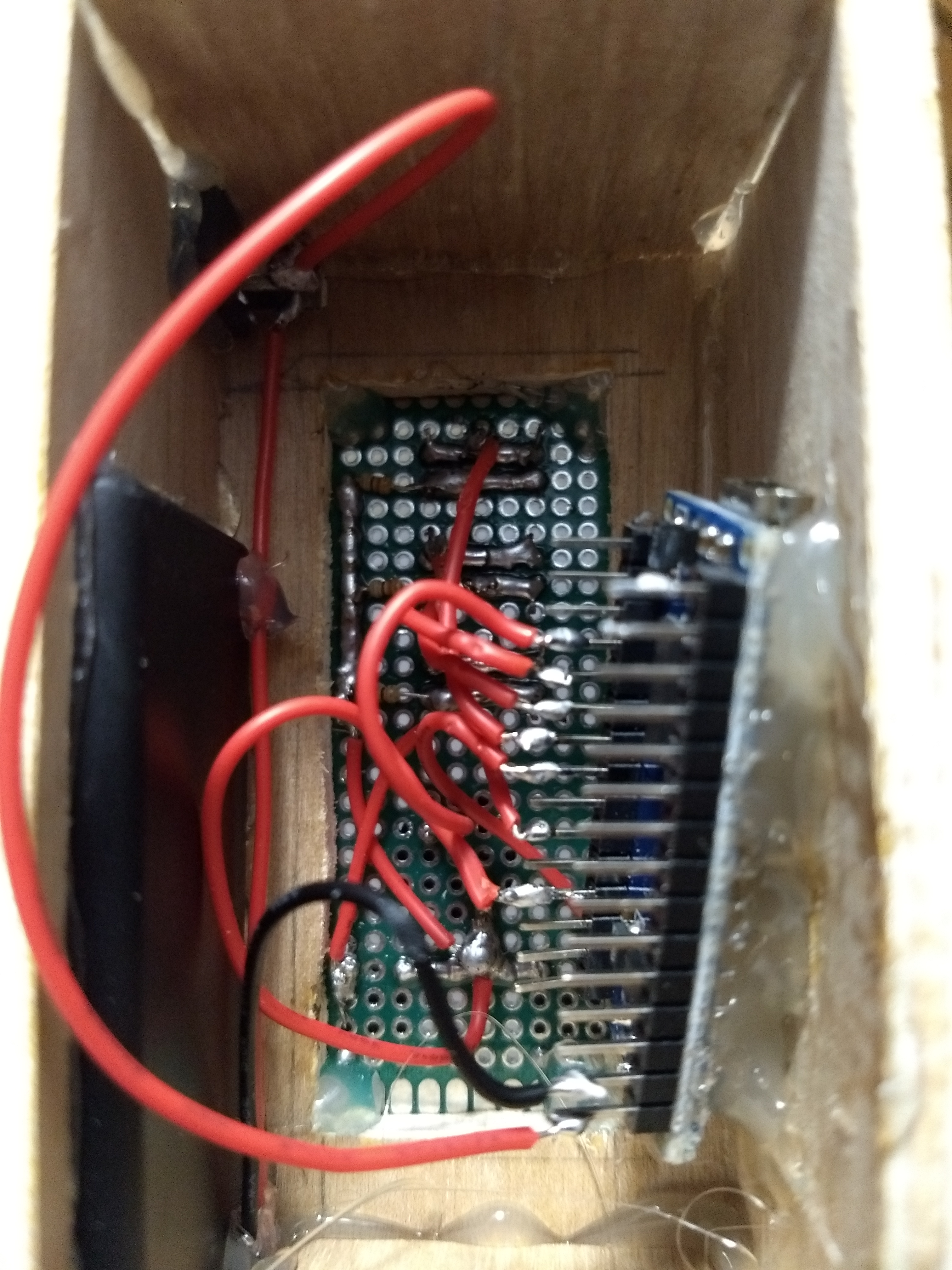
Internal Wiring View
Follow the wires!
Internal Wiring View
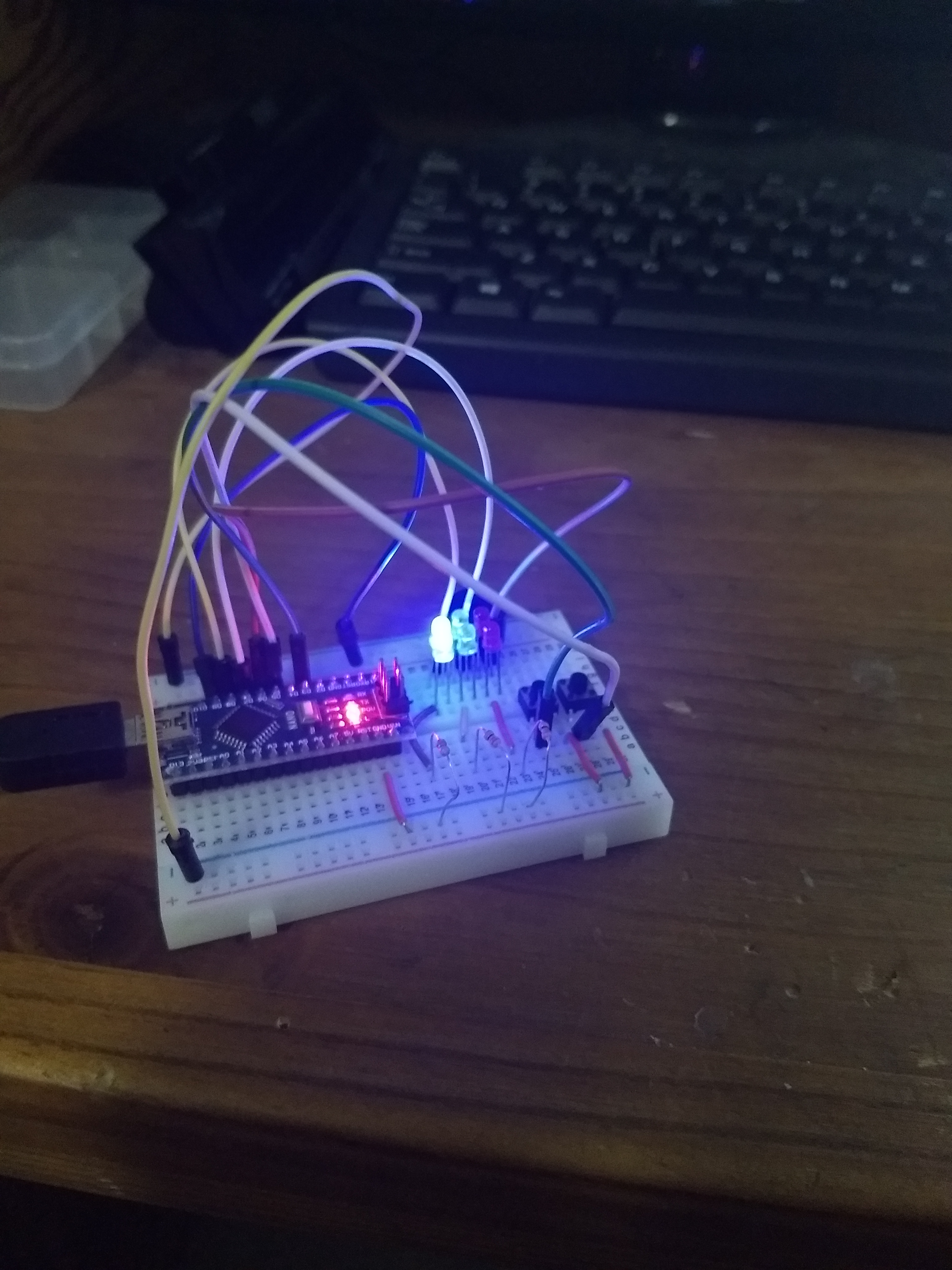
Breadboard (pre-soldering)
Shows wiring connections without soldering
Breadboard (pre-soldering)
Comments
Only logged in users can leave comments