Devices & Components
Arduino Uno Rev3
Male/Male Jumper Wires
RGB Backlight LCD - 16x2
IR tracking sensor module
Ultrasonic Sensor - HC-SR04 (Generic)
Solderless Breadboard Half Size
SG90 Micro-servo motor
Male/Female Jumper Wires
Software & Tools
Arduino IDE
Project description
Code
Code
arduino
You will be needing the Wire, Servo and LiquidCrystal_I2C libraries for this project. Wire and Servo libraries are inbuilt but the LiquidCrystal_I2C library should be downloaded. The link will be provided in the comments section below.
1// LIMIT THE CROWD TO PREVENT THE SPREAD OF COVID-19 2// ARDUINO PROJECTS BY R 3// AUTHOR: RUCKSIKAA RAAJKUMAR 4#include <LiquidCrystal_I2C.h> 5#include <Wire.h> 6#include <Servo.h> 7#define trig 4 8#define echo 3 9const int out_sensor=5; 10int out_state; 11Servo servo; 12LiquidCrystal_I2C lcd(0x27,16,2); 13int count; // Variable to store the number of people inside 14int limit = 15; // The maximum occupancy 15long duration; 16int distance; 17void setup() { // put your setup code here, to run once: 18 pinMode(out_sensor, INPUT); // Configure the pin of the IR tracking sensor as INPUT 19 pinMode(trig, OUTPUT); // Configure the trig pin of the Ultrasonic sensor module as OUTPUT as it emits ultrasonic waves (pulse) 20 pinMode(echo, INPUT); // Configure the echo pin of the echo pin as INPUT 21 Serial.begin(9600); 22 servo.attach(9); // Servo motor is connected to D9 23 servo.write(0); // Set the initial position of servo motor as 0 degrees. 24 lcd.begin(); 25} 26void loop() { // put your main code here, to run repeatedly: 27 if(count==limit){ // If maximum occupancy is reached 28 lcd.clear(); 29 lcd.setCursor(1,0); 30 lcd.print("Max. occupancy"); 31 lcd.setCursor(5,1); 32 lcd.print("reached"); 33 }else{ // If maximum occupancy is not reached 34 lcd.clear(); 35 lcd.print("No. of people="); 36 lcd.print(count); 37 } 38 digitalWrite(trig, LOW); 39 delayMicroseconds(5); 40 digitalWrite(trig, HIGH); 41 delayMicroseconds(10); 42 digitalWrite(trig, LOW); 43 duration = pulseIn(echo, HIGH); // Calculate time taken (in microseconds) for the pulse emitted by the trigger pin to reach the echo pin. 44 distance = (duration/2) * (331.3/10000); // Calculate the distance from the sensor to the obstacle in cm, using the speed of sound in air(m/s) and the time taken (stored in duration variable) 45 Serial.println(distance); 46 out_state=digitalRead(out_sensor); 47 Serial.println(count); 48 if(out_state==LOW){ // If anyone hovers over the IR sensor 49 count--; // Value stored in count variable will be decreased by one as the person is exiting the building or vehicle 50 servo.write(90); 51 delay(5000); // Door will remain open for 5 seconds 52 servo.write(0); 53 if(count<0){ 54 count=0; 55 } 56 } 57 if(distance<5){ 58 if(count>limit){ // If value stored in count variable is greater than maximum occupancy 59 lcd.clear(); 60 lcd.print("You can't enter"); 61 lcd.setCursor(6,1); 62 lcd.print("now"); 63 delay(2000); 64 }else{ 65 count++; // Count will increase by one as a person is entering 66 servo.write(90); 67 delay(5000); 68 servo.write(0); 69 } 70 } 71}
Code
arduino
You will be needing the Wire, Servo and LiquidCrystal_I2C libraries for this project. Wire and Servo libraries are inbuilt but the LiquidCrystal_I2C library should be downloaded. The link will be provided in the comments section below.
1// LIMIT THE CROWD TO PREVENT THE SPREAD OF COVID-19 2// ARDUINO PROJECTS 3 BY R 4// AUTHOR: RUCKSIKAA RAAJKUMAR 5#include <LiquidCrystal_I2C.h> 6#include 7 <Wire.h> 8#include <Servo.h> 9#define trig 4 10#define echo 3 11const int 12 out_sensor=5; 13int out_state; 14Servo servo; 15LiquidCrystal_I2C lcd(0x27,16,2); 16int 17 count; // Variable to store the number of people inside 18int limit = 15; // The 19 maximum occupancy 20long duration; 21int distance; 22void setup() { // put your 23 setup code here, to run once: 24 pinMode(out_sensor, INPUT); // Configure the 25 pin of the IR tracking sensor as INPUT 26 pinMode(trig, OUTPUT); // Configure 27 the trig pin of the Ultrasonic sensor module as OUTPUT as it emits ultrasonic waves 28 (pulse) 29 pinMode(echo, INPUT); // Configure the echo pin of the echo pin as 30 INPUT 31 Serial.begin(9600); 32 servo.attach(9); // Servo motor is connected 33 to D9 34 servo.write(0); // Set the initial position of servo motor as 0 degrees. 35 36 lcd.begin(); 37} 38void loop() { // put your main code here, to run repeatedly: 39 40 if(count==limit){ // If maximum occupancy is reached 41 lcd.clear(); 42 lcd.setCursor(1,0); 43 44 lcd.print("Max. occupancy"); 45 lcd.setCursor(5,1); 46 lcd.print("reached"); 47 48 }else{ // If maximum occupancy is not reached 49 lcd.clear(); 50 lcd.print("No. 51 of people="); 52 lcd.print(count); 53 } 54 digitalWrite(trig, LOW); 55 56 delayMicroseconds(5); 57 digitalWrite(trig, HIGH); 58 delayMicroseconds(10); 59 60 digitalWrite(trig, LOW); 61 duration = pulseIn(echo, HIGH); // Calculate time 62 taken (in microseconds) for the pulse emitted by the trigger pin to reach the echo 63 pin. 64 distance = (duration/2) * (331.3/10000); // Calculate the distance from 65 the sensor to the obstacle in cm, using the speed of sound in air(m/s) and the time 66 taken (stored in duration variable) 67 Serial.println(distance); 68 out_state=digitalRead(out_sensor); 69 70 Serial.println(count); 71 if(out_state==LOW){ // If anyone hovers over the 72 IR sensor 73 count--; // Value stored in count variable will be decreased by 74 one as the person is exiting the building or vehicle 75 servo.write(90); 76 77 delay(5000); // Door will remain open for 5 seconds 78 servo.write(0); 79 80 if(count<0){ 81 count=0; 82 } 83 } 84 if(distance<5){ 85 if(count>limit){ 86 // If value stored in count variable is greater than maximum occupancy 87 lcd.clear(); 88 89 lcd.print("You can't enter"); 90 lcd.setCursor(6,1); 91 lcd.print("now"); 92 93 delay(2000); 94 }else{ 95 count++; // Count will increase by one 96 as a person is entering 97 servo.write(90); 98 delay(5000); 99 servo.write(0); 100 101 } 102 } 103}
Downloadable files
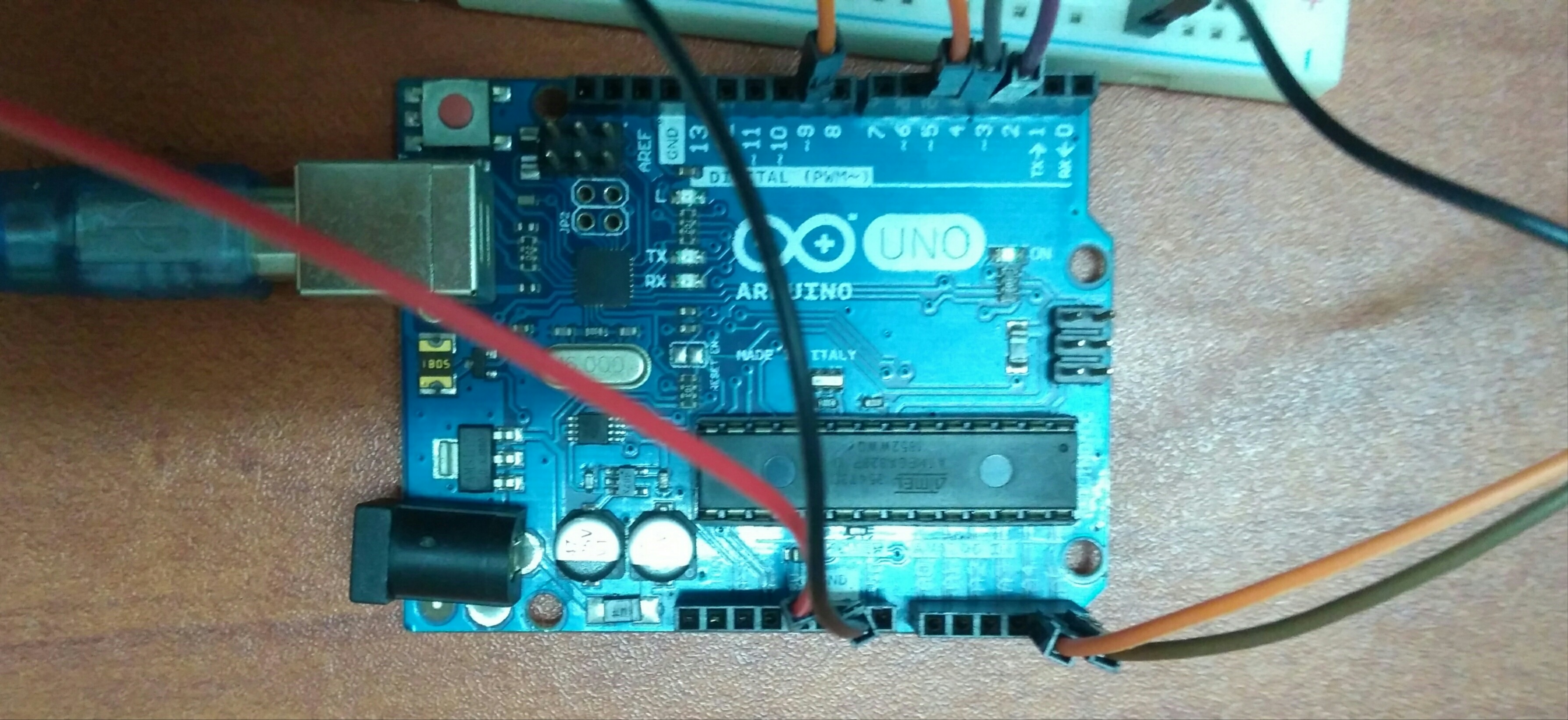
Arduino Uno microcontroller board
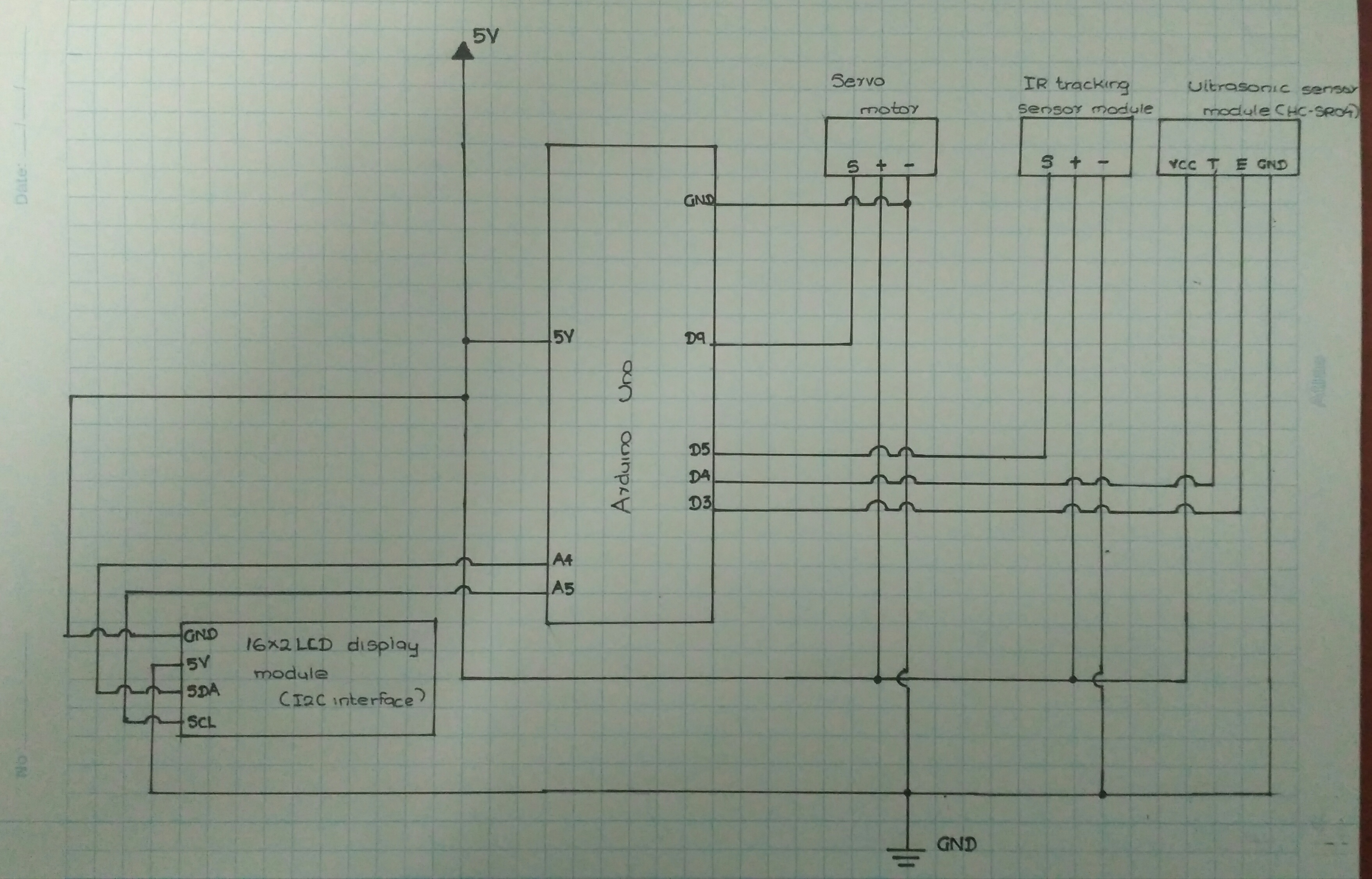
Schematic
Schematic
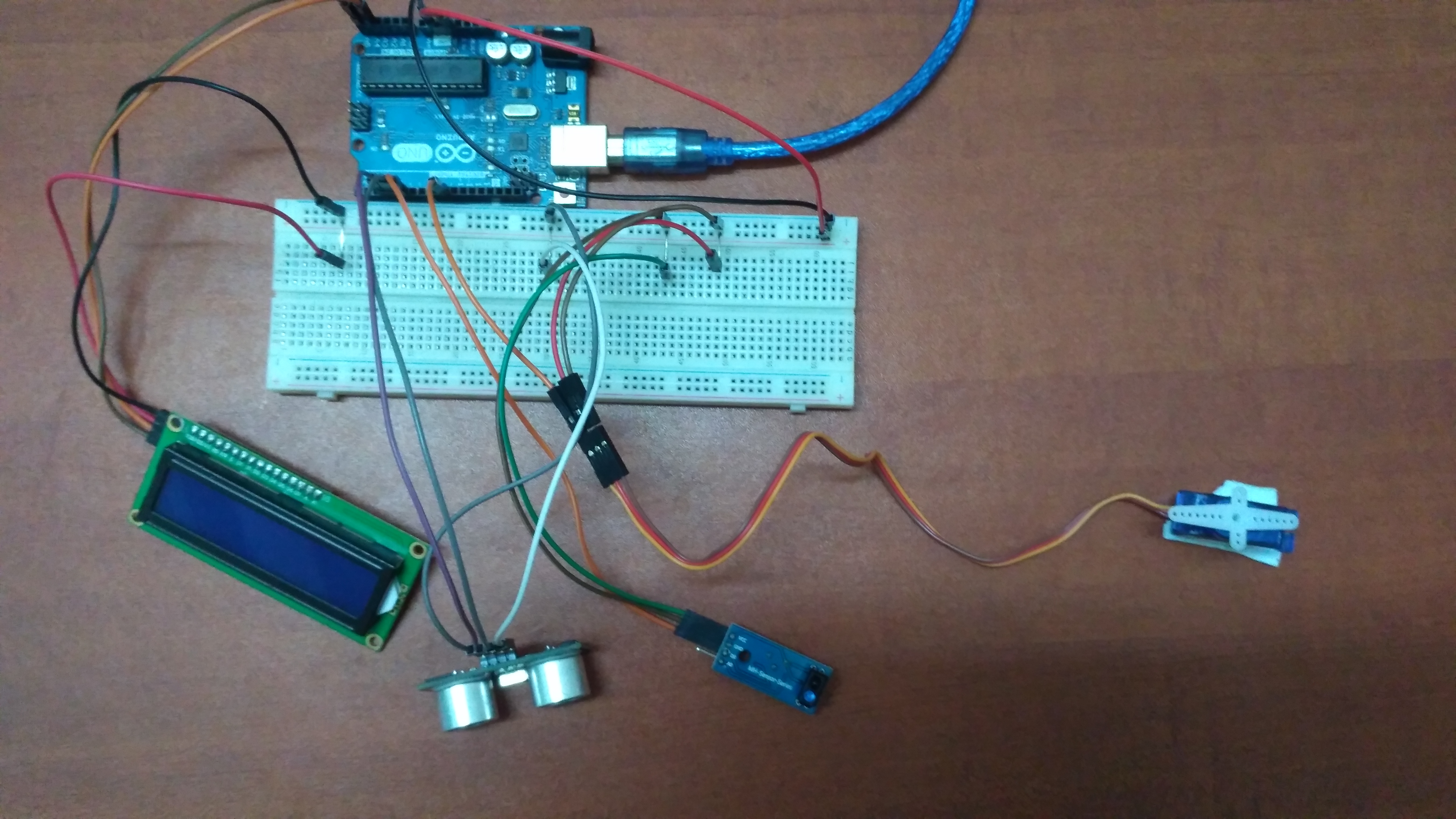
Connections
Connections
Arduino Uno microcontroller board

Connections
Connections

Schematic
Schematic

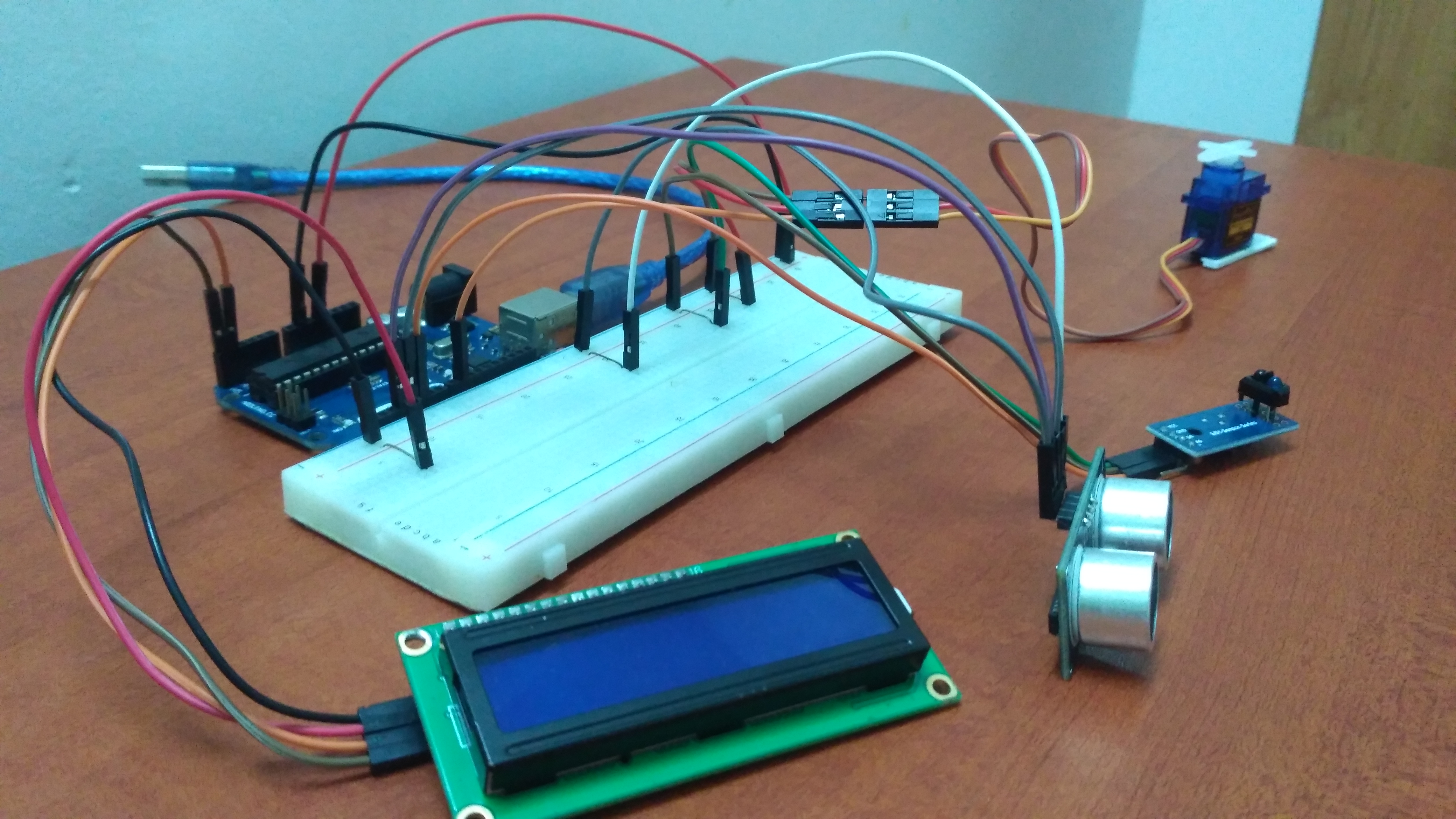
Connections (2)
Connections (2)
Comments
Only logged in users can leave comments