Devices & Components
Rotary Encoder with Push-Button
Resistor 10k ohm
Raspberry Pi Pico
Tactile Switch, Top Actuated
Project description
Code
Raspberry Pi Pico macro keyboard
arduino
Test code for Rotary encoder with push-button function test. Rotate knob for volume, press to play / pause.
1#include <USBKeyboard.h> 2 3USBKeyboard keyb; 4int encA = 14; 5int encB = 15; 6int btn = 16; 7 8void setup() { 9 pinMode(encA, INPUT); 10 pinMode(encB, INPUT); 11 pinMode(btn, INPUT); 12 // pinMode(LED_BUILTIN, OUTPUT); 13} 14 15int main(void) { 16 while(1) { 17 18 if(digitalRead(encA) == HIGH || digitalRead(encB) == HIGH) { 19 digitalWrite(LED_BUILTIN, HIGH); 20 delay(2); 21 if(digitalRead(encA) == HIGH) { 22 keyb.media_control(KEY_VOLUME_UP); 23 } 24 else if(digitalRead(encB) == HIGH) { 25 keyb.media_control(KEY_VOLUME_DOWN); 26 } 27 else {} 28 while(digitalRead(encA) == HIGH || digitalRead(encB) == HIGH) { 29 delay(20); 30 } 31 digitalWrite(LED_BUILTIN, LOW); 32 } 33 34 else if(digitalRead(btn) == HIGH) { 35 digitalWrite(LED_BUILTIN, HIGH); 36 delay(5); 37 keyb.media_control(KEY_PLAY_PAUSE); 38 while(digitalRead(btn) == HIGH) { 39 delay(50); 40 } 41 digitalWrite(LED_BUILTIN, LOW); 42 } 43 44 // keyb.printf("Hello World\ \ 45"); 46 // keyb.media_control(KEY_VOLUME_DOWN); 47 // keyb.key_code('d', KEY_LOGO); 48 // keyb.key_code('q', 101); // ALT 100; SHIFT 10; CTRL 1; CTRL+SHIFT 11 49 // keyb.key_code('d'); 50 // keyb.key_code(0, KEY_LOGO); 51 // keyb._putc(KEY_F1); 52 // keyb._putc('d'); 53 } 54}
Downloadable files
Prototype scheme
Prototype scheme
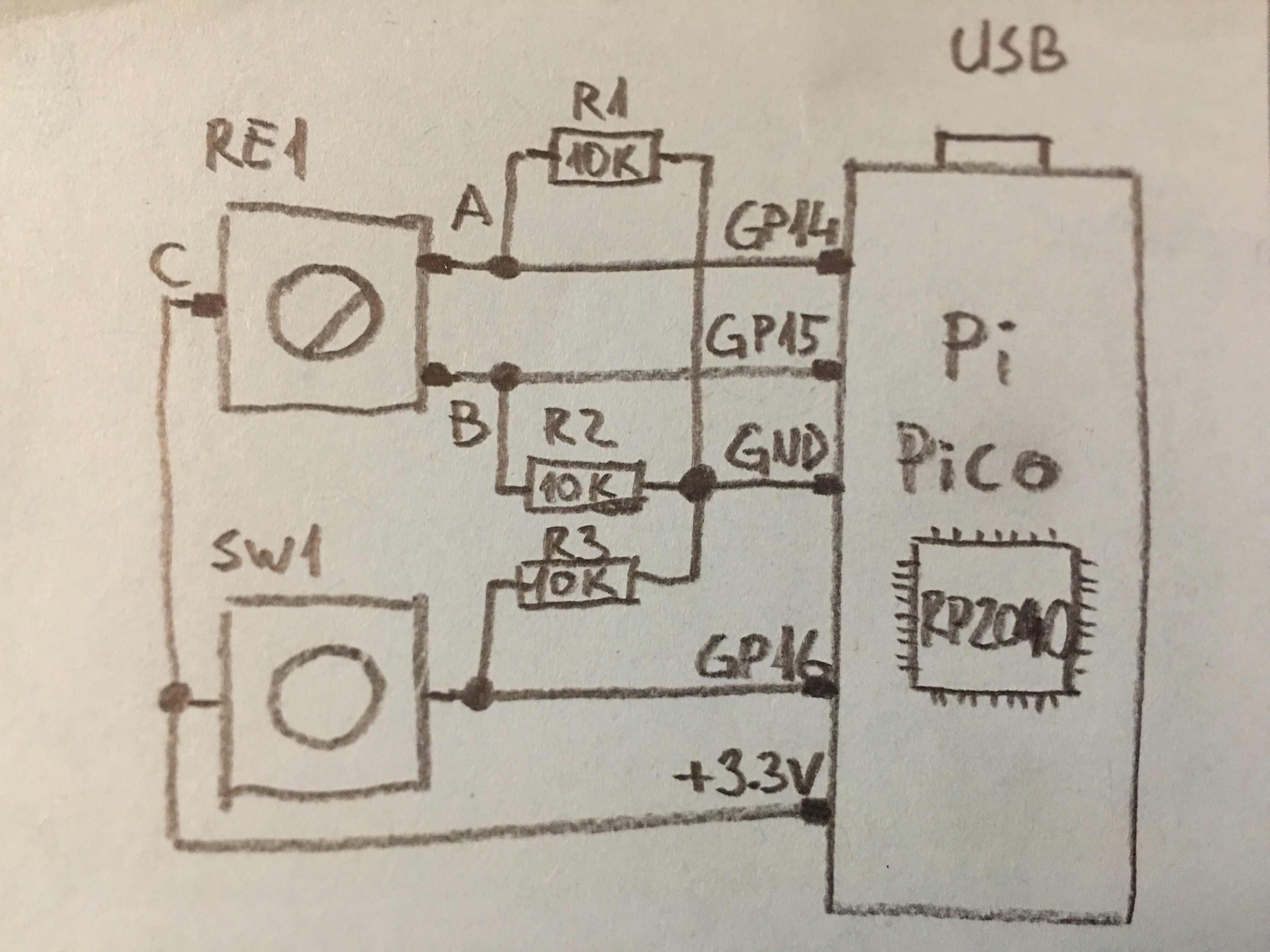
Prototype scheme
Prototype scheme

Comments
Only logged in users can leave comments