Devices & Components
Arduino Uno Rev3
Pushbutton switch 12mm
Through Hole Resistor, 680 ohm
Jumper wires (generic)
Resistor 10k ohm
LED (generic)
Software & Tools
Arduino IDE
Project description
Code
ARDUINO BUTTON.ino
arduino
1const int buttonPin = 2; 2const int ledPin = 13; 3 4int buttonState = 0; 5 6void setup() 7{ 8 pinMode(ledPin, OUTPUT); 9 pinMode(buttonPin, INPUT); 10} 11 12void loop() 13{ 14 buttonState = digitalRead(buttonPin); 15 16 if (buttonState == HIGH) 17 { 18 digitalWrite(ledPin, HIGH); 19 } 20 else 21 { 22 digitalWrite(ledPin, LOW); 23 } 24} 25
ARDUINO BUTTON.ino
arduino
1const int buttonPin = 2; 2const int ledPin = 13; 3 4int buttonState = 0; 5 6void setup() 7{ 8 pinMode(ledPin, OUTPUT); 9 pinMode(buttonPin, INPUT); 10} 11 12void loop() 13{ 14 buttonState = digitalRead(buttonPin); 15 16 if (buttonState == HIGH) 17 { 18 digitalWrite(ledPin, HIGH); 19 } 20 else 21 { 22 digitalWrite(ledPin, LOW); 23 } 24} 25
Downloadable files
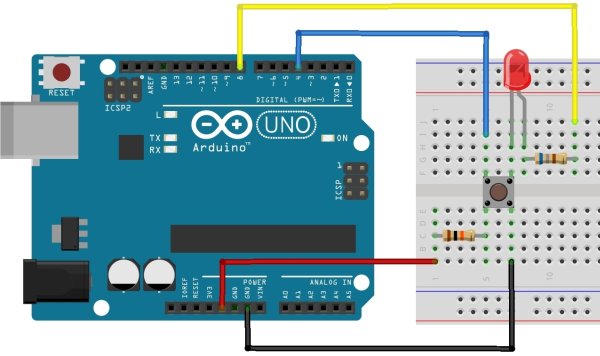
ARDUINO PUSHBUTTON with LED
The circuit diagram
ARDUINO PUSHBUTTON with LED
Comments
Only logged in users can leave comments