Gps bike computer
Nice
Devices & Components
1
Arduino Nano
1
Jumper wires (generic)
1
Nokia 5110 display
1
Neo 6m Gps
Hardware & Tools
1
Solder Flux, Soldering
1
Soldering iron (generic)
Software & Tools
1
Tinycad

Arduino IDE
Project description
Code
Code
c_cpp
1/*
2
3-----------Bike comuter-----------
4----by Trybulski Mikolaj----------
5*/
6
7//gps
8  libaries
9#include <TinyGPS++.h>
10#include <SoftwareSerial.h>
11
12//lcd libaries
13#include
14  <SPI.h>
15#include <Adafruit_GFX.h>
16#include <Adafruit_PCD8544.h>
17
18//variables
19  used for distance calculations
20float latold;
21float longold;
22float wholedistance;
23
24//
25  The TinyGPS++ object
26TinyGPSPlus gps;
27
28// The serial connection to the
29  GPS device
30SoftwareSerial ss(7, 6); //tx (on gps) - 7, rx (on gps) - 6
31
32//lcd
33  settin
34
35//pinout 9 CLK , 10 DIN , 11 DC , 12 CE , 2 RST , 8  BL
36const
37  int clk = 9;
38const int din = 10;
39const int dc = 11;
40const int ce = 12;
41const
42  int rst = 2;
43const int bl = 8; //low - on, high - off
44
45Adafruit_PCD8544
46  display = Adafruit_PCD8544(clk, din, dc, ce, rst);
47
48
49
50void setup(){
51
52  wholedistance = 0;
53  latold = 0;
54  longold = 0;
55
56  ss.begin(9600);
57
58  delay(300);
59  pinMode(bl, OUTPUT);
60 digitalWrite(bl, LOW);
61  display.begin();
62
63  display.setContrast(60);
64 display.clearDisplay();
65
66 display.setTextColor(BLACK);
67
68  display.setCursor(0,0);
69  display.setTextSize(1);
70  display.print("Bike computer
71  v1.0, made by Trybulski Mikolaj  ");
72    display.display();
73    delay(2000);
74
75  display.clearDisplay();
76 display.setCursor(0,0);
77  display.setTextSize(2);
78
79  display.print("waitingfor gps... ");
80    display.display();
81}
82
83void
84  loop(){
85  display.clearDisplay();
86   display.setTextColor(BLACK);
87  //
88  This sketch displays information every time a new sentence is correctly encoded.
89
90  while (ss.available() > 0){
91    gps.encode(ss.read());
92
93
94    if
95  (gps.location.isUpdated()){
96
97    //dist calculations
98  if(latold == 0 ||
99  longold == 0){//dont calculate using 0 coordinates (which are set for stary value)
100
101  latold = gps.location.lat();//update ealier position
102  longold = gps.location.lng();
103
104  delay(300);
105    }
106    else{
107  if(gps.location.lat() == latold || gps.location.lng()
108  == longold){
109    delay(1000);
110    }
111  else{
112  float distLat = abs(gps.location.lat()
113  - latold) * 111194.9;
114  float distLong = 111194.9 * abs(gps.location.lng() -
115  longold) * cos(radians((gps.location.lat() + latold) / 2));
116  float distance
117  = sqrt(pow(distLat, 2) + pow(distLong, 2));        // equation form https://www.instructables.com/Distance-measuring-and-more-device-using-Arduino-a/
118
119  latold = gps.location.lat();//update ealier position
120  longold = gps.location.lng();
121
122  wholedistance = distance + wholedistance; // add newly calculated distance to
123  ealier one for trip distance
124    }
125    }
126    //dist display
127  display.setTextSize(1.5);
128
129  display.setCursor(0,25);
130  display.print(wholedistance / 1000);
131  display.println("km");
132
133
134  int readvalue = gps.course.deg(); //define and round heading
135  int speedo
136  = gps.speed.kmph(); // define and round speed
137
138  display.setCursor(0,0);
139
140  display.setTextSize(3);
141  display.print(speedo);
142  display.setTextSize(1);
143
144  display.print("kph ");
145  display.setTextSize(2);
146
147  if (readvalue
148  >=338 || readvalue < 22){
149    display.println("N");
150    }
151  else if
152  (readvalue >= 22 && readvalue < 68)
153  {
154    display.println("NE");
155    }
156
157    else if (readvalue >= 68 && readvalue < 113)
158  {
159    display.println("E");
160
161    }
162      else if (readvalue >= 113 && readvalue < 158)
163  {
164    display.println("SE");
165
166    }
167     else if (readvalue >= 158 && readvalue < 203)
168  {
169    display.println("S");
170
171    }
172    else if (readvalue >= 203 && readvalue < 248)
173  {
174    display.println("SW");
175
176    }
177   else if (readvalue >= 248 && readvalue < 293)
178  {
179   display.println("W");
180
181    }
182   else if (readvalue >= 293 && readvalue < 338)
183  {
184  display.println("NW");
185
186    }
187
188 display.display();
189  delay(1000);  //wait. we dont need to update
190  so many times
191
192    }
193  }
194}
195
Code
c_cpp
1/*
2
3-----------Bike comuter-----------
4----by Trybulski Mikolaj----------
5*/
6
7//gps  libaries
8#include <TinyGPS++.h>
9#include <SoftwareSerial.h>
10
11//lcd libaries
12#include  <SPI.h>
13#include <Adafruit_GFX.h>
14#include <Adafruit_PCD8544.h>
15
16//variables  used for distance calculations
17float latold;
18float longold;
19float wholedistance;
20
21//  The TinyGPS++ object
22TinyGPSPlus gps;
23
24// The serial connection to the  GPS device
25SoftwareSerial ss(7, 6); //tx (on gps) - 7, rx (on gps) - 6
26
27//lcd  settin
28
29//pinout 9 CLK , 10 DIN , 11 DC , 12 CE , 2 RST , 8  BL
30const  int clk = 9;
31const int din = 10;
32const int dc = 11;
33const int ce = 12;
34const  int rst = 2;
35const int bl = 8; //low - on, high - off
36
37Adafruit_PCD8544  display = Adafruit_PCD8544(clk, din, dc, ce, rst);
38
39
40
41void setup(){
42  wholedistance = 0;
43  latold = 0;
44  longold = 0;
45
46  ss.begin(9600);
47  delay(300);
48  pinMode(bl, OUTPUT);
49 digitalWrite(bl, LOW);
50  display.begin();
51  display.setContrast(60);
52 display.clearDisplay();
53
54 display.setTextColor(BLACK);
55  display.setCursor(0,0);
56  display.setTextSize(1);
57  display.print("Bike computer  v1.0, made by Trybulski Mikolaj  ");
58    display.display();
59    delay(2000);
60  display.clearDisplay();
61 display.setCursor(0,0);
62  display.setTextSize(2);
63  display.print("waitingfor gps... ");
64    display.display();
65}
66
67void  loop(){
68  display.clearDisplay();
69   display.setTextColor(BLACK);
70  //  This sketch displays information every time a new sentence is correctly encoded.
71  while (ss.available() > 0){
72    gps.encode(ss.read());
73
74
75    if  (gps.location.isUpdated()){
76
77    //dist calculations
78  if(latold == 0 ||  longold == 0){//dont calculate using 0 coordinates (which are set for stary value)
79  latold = gps.location.lat();//update ealier position
80  longold = gps.location.lng();
81  delay(300);
82    }
83    else{
84  if(gps.location.lat() == latold || gps.location.lng()  == longold){
85    delay(1000);
86    }
87  else{
88  float distLat = abs(gps.location.lat()  - latold) * 111194.9;
89  float distLong = 111194.9 * abs(gps.location.lng() -  longold) * cos(radians((gps.location.lat() + latold) / 2));
90  float distance  = sqrt(pow(distLat, 2) + pow(distLong, 2));        // equation form https://www.instructables.com/Distance-measuring-and-more-device-using-Arduino-a/
91  latold = gps.location.lat();//update ealier position
92  longold = gps.location.lng();
93  wholedistance = distance + wholedistance; // add newly calculated distance to  ealier one for trip distance
94    }
95    }
96    //dist display
97  display.setTextSize(1.5);
98  display.setCursor(0,25);
99  display.print(wholedistance / 1000);
100  display.println("km");
101
102  int readvalue = gps.course.deg(); //define and round heading
103  int speedo  = gps.speed.kmph(); // define and round speed
104
105  display.setCursor(0,0);
106  display.setTextSize(3);
107  display.print(speedo);
108  display.setTextSize(1);
109  display.print("kph ");
110  display.setTextSize(2);
111
112  if (readvalue  >=338 || readvalue < 22){
113    display.println("N");
114    }
115  else if  (readvalue >= 22 && readvalue < 68)
116  {
117    display.println("NE");
118    }
119    else if (readvalue >= 68 && readvalue < 113)
120  {
121    display.println("E");
122    }
123      else if (readvalue >= 113 && readvalue < 158)
124  {
125    display.println("SE");
126    }
127     else if (readvalue >= 158 && readvalue < 203)
128  {
129    display.println("S");
130    }
131    else if (readvalue >= 203 && readvalue < 248)
132  {
133    display.println("SW");
134    }
135   else if (readvalue >= 248 && readvalue < 293)
136  {
137   display.println("W");
138    }
139   else if (readvalue >= 293 && readvalue < 338)
140  {
141  display.println("NW");
142    }
143
144 display.display();
145  delay(1000);  //wait. we dont need to update  so many times
146
147    }
148  }
149}
150
Downloadable files
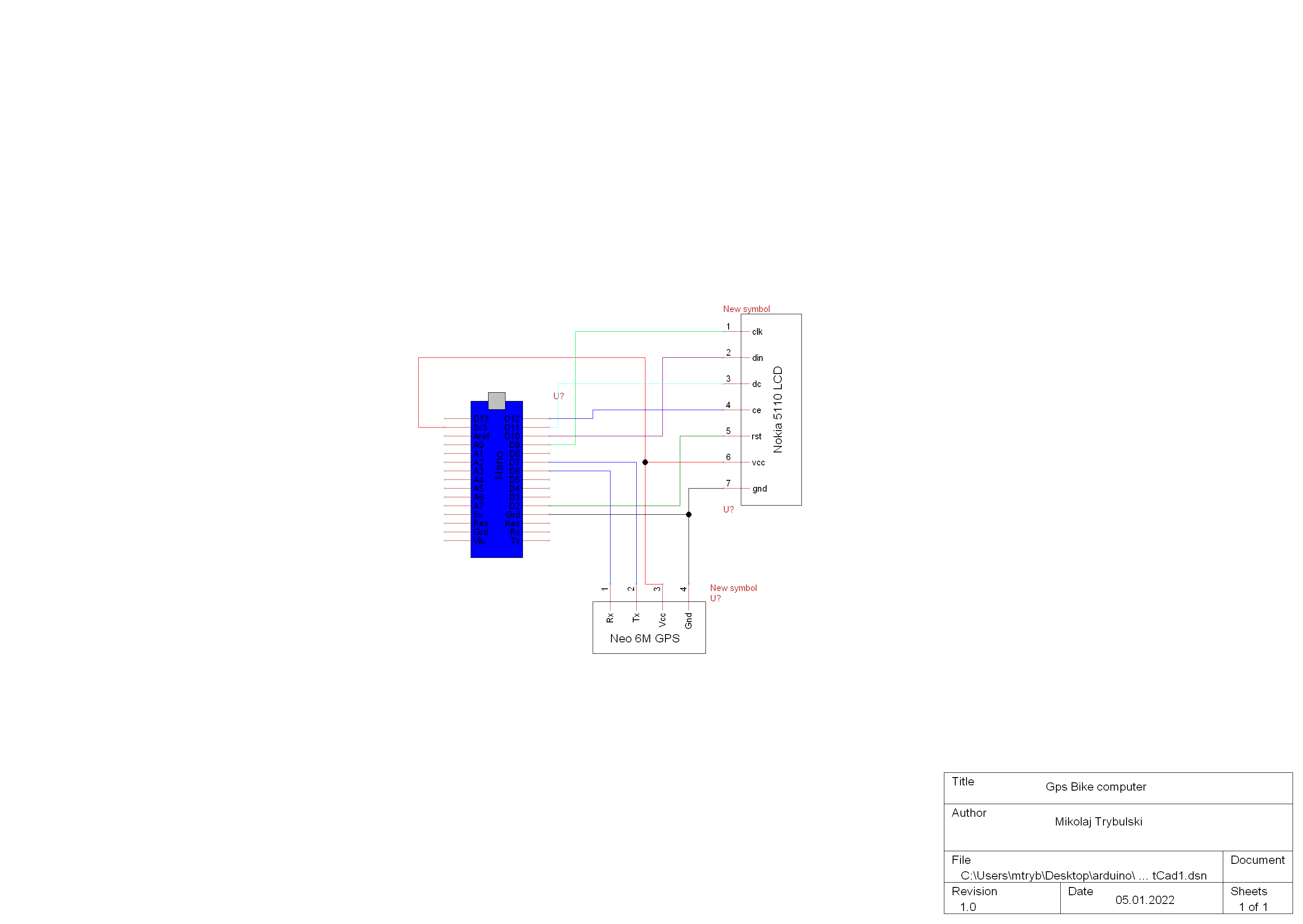
Schematic
Schematic
Comments
Only logged in users can leave comments