Voice Controlled Wooden Edison Lamp - Question Price $5
"I have not failed. I've just found 10'000 ways that won't work. " - Thomas Alva Edison
Components and supplies
Sonoff Basic
CP2102 USB 2.0 to TTL UART Module FT232
Apps and platforms
Android Studio
Arduino IDE
Project description
Code
Android code work with WiFi
java
This code is responsible for sending commands to the server (our light bulb)
1
2public class LightOn extends AsyncTask<Void,Void,Void> {
3
4    private   static final String LOG_TAG = "MyLog";
5
6    @Override
7    protected Void   doInBackground(Void... params) {
8
9        URL url;
10        HttpURLConnection   urlConnection = null;
11        try {
12            url = new URL("http://192.168.1.112/12/1");   // "0" to turn off
13
14            urlConnection = (HttpURLConnection) url
15                     .openConnection();
16
17            InputStream in = urlConnection.getInputStream();
18
19             InputStreamReader isw = new InputStreamReader(in);
20
21            int   data = isw.read();
22            while (data != -1) {
23                char current   = (char) data;
24                data = isw.read();
25                System.out.print(current);
26                 Log.e(LOG_TAG, "Reply from server - " + current);
27            }
28         } catch (Exception e) {
29            e.printStackTrace();
30        }   finally {
31            if (urlConnection != null) {
32                urlConnection.disconnect();
33             }
34        }
35
36        return null;
37    }
38}
39
40
41
42//   run it
43new LightOn().execute();
Android code work with WiFi
java
This code is responsible for sending commands to the server (our light bulb)
1
2public class LightOn extends AsyncTask<Void,Void,Void> {
3
4    private  static final String LOG_TAG = "MyLog";
5
6    @Override
7    protected Void  doInBackground(Void... params) {
8
9        URL url;
10        HttpURLConnection  urlConnection = null;
11        try {
12            url = new URL("http://192.168.1.112/12/1");  // "0" to turn off
13
14            urlConnection = (HttpURLConnection) url
15                    .openConnection();
16
17            InputStream in = urlConnection.getInputStream();
18
19            InputStreamReader isw = new InputStreamReader(in);
20
21            int  data = isw.read();
22            while (data != -1) {
23                char current  = (char) data;
24                data = isw.read();
25                System.out.print(current);
26                Log.e(LOG_TAG, "Reply from server - " + current);
27            }
28        } catch (Exception e) {
29            e.printStackTrace();
30        }  finally {
31            if (urlConnection != null) {
32                urlConnection.disconnect();
33            }
34        }
35
36        return null;
37    }
38}
39
40
41
42//  run it
43new LightOn().execute();
Android main code parts, to use voice recognition.
java
You just need to put it in you app. For example - to put on processing the pressing of a button.
1// Main code to start speech recognition.
2// You can put it's execution,
3  on some button in your app.
4
5        Intent speechIntent = new Intent(RecognizerIntent.ACTION_RECOGNIZE_SPEECH);
6
7        speechIntent.putExtra(RecognizerIntent.EXTRA_LANGUAGE_MODEL,
8                RecognizerIntent.LANGUAGE_MODEL_FREE_FORM);
9
10        speechIntent.putExtra(RecognizerIntent.EXTRA_PROMPT, "Speak please");
11
12        startActivityForResult(speechIntent, RESULT_SPEECH_TO_TEXT);
13
14
15//
16  Then on onAcivityResult we will get result
17
18    @Override
19    protected
20  void onActivityResult(int requestCode, int resultCode, Intent data) {
21        if
22  (requestCode == RESULT_SPEECH_TO_TEXT && resultCode == RESULT_OK) {
23
24            ArrayList<String>
25  matches = data.getStringArrayListExtra(RecognizerIntent.EXTRA_RESULTS);
26
27
28            if (!matches.isEmpty()) {
29
30              String
31  result_recognition_string = matches.get(0);
32
33		// convert to lower case,
34  since google speech recognition
35                 // returns "different" results.
36  For example: youtube defines //as YouTube
37                result_recognition_string
38  = result_recognition_string.toLowerCase(Locale.getDefault());
39
40
41                  if
42  (result_recognition_string.contains("lamp on") ) {
43			// lamp on
44			new
45  LightOn().execute();
46                }
47             }
48    }
49}
Android code to work with WiFi
java
This code is responsible for sending commands to the server (our light bulb)
1
2public class LightOn extends AsyncTask<Void,Void,Void> {
3
4    private
5  static final String LOG_TAG = "MyLog";
6
7    @Override
8    protected Void
9  doInBackground(Void... params) {
10
11        URL url;
12        HttpURLConnection
13  urlConnection = null;
14        try {
15            url = new URL("http://192.168.1.112/12/1");
16  // "0" to turn off
17
18            urlConnection = (HttpURLConnection) url
19
20                    .openConnection();
21
22            InputStream in = urlConnection.getInputStream();
23
24
25            InputStreamReader isw = new InputStreamReader(in);
26
27            int
28  data = isw.read();
29            while (data != -1) {
30                char current
31  = (char) data;
32                data = isw.read();
33                System.out.print(current);
34
35                Log.e(LOG_TAG, "Reply from server - " + current);
36            }
37
38        } catch (Exception e) {
39            e.printStackTrace();
40        }
41  finally {
42            if (urlConnection != null) {
43                urlConnection.disconnect();
44
45            }
46        }
47
48        return null;
49    }
50}
51
52
53
54//
55  run it
56new LightOn().execute();
Sonoff esp8266 code
c_cpp
Firmware for SONOFF Wi-Fi relay. To use it through your home router.
1
2
3#include <ESP8266WiFi.h>
4#include <ESP8266WebServer.h>
5#include  <WiFiClient.h>
6
7// name and password from WiFi network
8const char* ssid  = "Your access point (router) name";
9const char* password = "router password";
10
11
12IPAddress  ip(192,168,1,112); // enter static ip
13IPAddress gateway(192,168,1,1);
14IPAddress  subnet(255,255,255,0);
15
16
17// server port 80
18
19WiFiServer server(80);
20
21void setup() {
22 Serial.begin(115200);
23 delay(100);
24
25 //preparing  GPIO
26
27 pinMode(12, OUTPUT);
28 digitalWrite(12, 1);
29
30 pinMode(13, OUTPUT);
31  digitalWrite(13, 1);
32
33
34
35 // connecting to WiFi
36 Serial.println();
37  Serial.println();
38 Serial.print("Connecting to ");
39 Serial.println(ssid);
40  WiFi.begin(ssid, password);
41 WiFi.config(ip, gateway, subnet);
42
43 // waiting  for connection
44 while (WiFi.status() != WL_CONNECTED) {
45 delay(500);
46 Serial.print(".");
47  }
48 Serial.println("");
49 Serial.println("WiFi connected");
50
51 //  run server
52 server.begin();
53 Serial.println("Server started");
54
55  // show ip
56 Serial.println(WiFi.localIP());
57}
58
59void loop() {
60
61  // connection check
62 WiFiClient client = server.available();
63 if (!client)  {
64 return;
65 }
66
67 // Waiting for data
68 Serial.println("new client");
69  while (!client.available()) {
70 delay(1);
71 }
72
73 // Reading the first  line of the query
74 String req = client.readStringUntil('\r');
75 Serial.println(req);
76  client.flush();
77
78 // works with GPIO
79 if (req.indexOf("/12/0") != -1)
80  digitalWrite(12, 0);
81 else if (req.indexOf("/12/1") != -1){
82 digitalWrite(12,  1);
83 Serial.println("TEST OK");
84 String s = "HTTP/1.1 200 OK\
\
85Content-Type:  text/html\
\
86\
\
87<!DOCTYPE HTML>\
\
88<html>\
\
89Test OK. Uptime: ";
90
91
92  // UpTime
93 int Sec = (millis() / 1000UL) % 60;
94 int Min = ((millis() / 1000UL)  / 60UL) % 60;
95 int Hours = ((millis() / 1000UL) / 3600UL) % 24;
96 int Day =  ((millis() / 1000UL) / 3600UL / 24UL);
97 s += Day;
98 s += "d ";
99 s += Hours;
100  s += ":";
101 s += Min;
102 s += ":";
103 s += Sec;
104 s += "</html>\
105";
106  client.print(s);
107 client.stop();
108 return;
109 }
110 else
111 // If an invalid  query write error
112 {
113 Serial.println("invalid request");
114 String s =  "HTTP/1.1 200 OK\
\
115Content-Type: text/html\
\
116\
\
117<!DOCTYPE HTML>\
\
118<html>\
\
119Invalid  request";
120 s += "</html>\
121";
122 client.print(s);
123 client.stop();
124  return;
125 }
126
127 client.flush();
128
129
130 // Response formation
131 String  s = "HTTP/1.1 200 OK\
\
132Content-Type: text/html\
\
133\
\
134<!DOCTYPE HTML>\
\
135<html>\
\
136GPIO  set OK";
137 s += "</html>\
138";
139
140 // Send the response to the client
141  client.print(s);
142 delay(1);
143 Serial.println("Client disonnected");
144
145}
146
Android main code parts, to use voice recognition.
java
You just need to put it in you app. For example - to put on processing the pressing of a button.
1// Main code to start speech recognition.
2// You can put it's execution,  on some button in your app.
3
4        Intent speechIntent = new Intent(RecognizerIntent.ACTION_RECOGNIZE_SPEECH);
5        speechIntent.putExtra(RecognizerIntent.EXTRA_LANGUAGE_MODEL,
6                RecognizerIntent.LANGUAGE_MODEL_FREE_FORM);
7        speechIntent.putExtra(RecognizerIntent.EXTRA_PROMPT, "Speak please");
8        startActivityForResult(speechIntent, RESULT_SPEECH_TO_TEXT);
9
10
11//  Then on onAcivityResult we will get result
12
13    @Override
14    protected  void onActivityResult(int requestCode, int resultCode, Intent data) {
15        if  (requestCode == RESULT_SPEECH_TO_TEXT && resultCode == RESULT_OK) {
16
17            ArrayList<String>  matches = data.getStringArrayListExtra(RecognizerIntent.EXTRA_RESULTS);
18
19            if (!matches.isEmpty()) {
20
21              String  result_recognition_string = matches.get(0);
22
23		// convert to lower case,  since google speech recognition
24                 // returns "different" results.  For example: youtube defines //as YouTube
25                result_recognition_string  = result_recognition_string.toLowerCase(Locale.getDefault());
26
27
28                  if  (result_recognition_string.contains("lamp on") ) {
29			// lamp on
30			new  LightOn().execute();
31                }
32             }
33    }
34}
Android code to work with WiFi
java
This code is responsible for sending commands to the server (our light bulb)
1
2public class LightOn extends AsyncTask<Void,Void,Void> {
3
4    private  static final String LOG_TAG = "MyLog";
5
6    @Override
7    protected Void  doInBackground(Void... params) {
8
9        URL url;
10        HttpURLConnection  urlConnection = null;
11        try {
12            url = new URL("http://192.168.1.112/12/1");  // "0" to turn off
13
14            urlConnection = (HttpURLConnection) url
15                    .openConnection();
16
17            InputStream in = urlConnection.getInputStream();
18
19            InputStreamReader isw = new InputStreamReader(in);
20
21            int  data = isw.read();
22            while (data != -1) {
23                char current  = (char) data;
24                data = isw.read();
25                System.out.print(current);
26                Log.e(LOG_TAG, "Reply from server - " + current);
27            }
28        } catch (Exception e) {
29            e.printStackTrace();
30        }  finally {
31            if (urlConnection != null) {
32                urlConnection.disconnect();
33            }
34        }
35
36        return null;
37    }
38}
39
40
41
42//  run it
43new LightOn().execute();
Downloadable files
Wifi Relay SONOFF pins
Connecting Wi-Fi relay for flashing.
Wifi Relay SONOFF pins
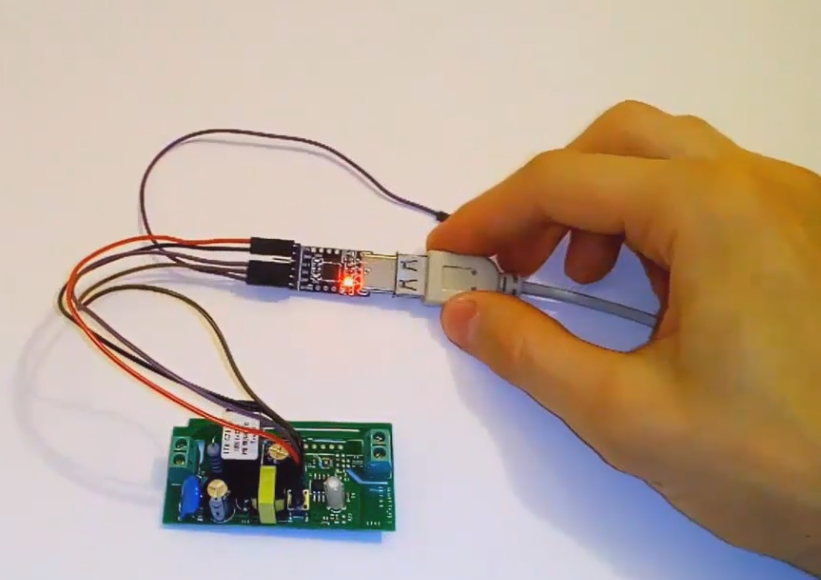
Wifi Relay SONOFF pins
Connecting Wi-Fi relay for flashing.
Wifi Relay SONOFF pins
Comments
Only logged in users can leave comments