Private Real-time Weather Station
This project is used to monitor the weather conditions of your home in real-time on a web application.
Devices & Components
1
Arduino Uno Rev3
1
DHT11 Temperature & Humidity Sensor (3 pins)
1
Jumper wires (generic)
1
NodeMCU ESP8266 Breakout Board
1
Breadboard (generic)
1
LDR (light detecting resistor)
1
Resistor 100 ohm
Software & Tools
1
Atom

Arduino IDE
1
Firebase
Project description
Code
Weather station
c_cpp
Upload this code onto nodeMCU
1#include <DHT.h>        // including the library of DHT11 temperature  and humidity sensor
2#include <ESP8266WiFi.h>
3#include <FirebaseArduino.h>
4#define  DHTTYPE DHT11   // DHT 11
5
6// Set these to run example.
7#define FIREBASE_HOST  "YOUR DATABASE LINK"
8#define FIREBASE_AUTH "SECRET CODE"
9#define WIFI_SSID  "YOUR SSID"
10#define WIFI_PASSWORD "YOUR PASSWORD"
11#define dht_dpin 0
12
13DHT  dht(dht_dpin, DHTTYPE);
14void setup()
15{
16  Serial.begin(9600);
17  dht.begin();
18  WiFi.begin(WIFI_SSID, WIFI_PASSWORD);
19  Serial.print("connecting");
20  while  (WiFi.status() != WL_CONNECTED) {
21    Serial.print(".");
22    delay(500);
23  }
24  Serial.println();
25  Serial.print("connected: ");
26  Serial.println(WiFi.localIP());
27
28  Firebase.begin(FIREBASE_HOST, FIREBASE_AUTH);
29}
30
31
32void loop()  {
33  int n= 0;
34    float light = analogRead(A0);
35    float hum = dht.readHumidity();
36    float temp = dht.readTemperature();
37  delay(800);
38  Serial.println(light);
39  Serial.println(hum);
40  Serial.println(temp);
41  // set value
42
43  Firebase.setFloat("light",  light);
44  // handle error
45  if (Firebase.failed()) {
46      Serial.print("setting  /light failed:");
47      Serial.println(Firebase.error());
48      return;
49  }
50  delay(100);
51  Firebase.setFloat("moisture", hum);
52  if (Firebase.failed())  {
53      Serial.print("setting /hum failed:");
54      Serial.println(Firebase.error());
55      return;
56  }
57  delay(100);
58  Firebase.setFloat("temperature",  temp);
59  if (Firebase.failed()) {
60      Serial.print("setting /temp failed:");
61      Serial.println(Firebase.error());
62      return;
63  }
64  delay(100);
65  //get values
66  Serial.print("light: ");
67  Serial.println(Firebase.getFloat("light"));
68  Serial.print("humidity: ");
69  Serial.println(Firebase.getFloat("moisture"));
70  Serial.print("temperature: ");
71  Serial.println(Firebase.getFloat("temperature"));
72  delay(100);
73
74  // append a new value to /logs
75  String name = Firebase.pushInt("logs",  n++);
76  // handle error
77  if (Firebase.failed()) {
78      Serial.print("pushing  /logs failed:");
79      Serial.println(Firebase.error());
80      return;
81  }
82  Serial.print("pushed: /logs/");
83  Serial.println(name);
84  delay(1000);
85}
86
87
88
Weather station
c_cpp
Upload this code onto nodeMCU
1#include <DHT.h>        // including the library of DHT11 temperature
2  and humidity sensor
3#include <ESP8266WiFi.h>
4#include <FirebaseArduino.h>
5#define
6  DHTTYPE DHT11   // DHT 11
7
8// Set these to run example.
9#define FIREBASE_HOST
10  "YOUR DATABASE LINK"
11#define FIREBASE_AUTH "SECRET CODE"
12#define WIFI_SSID
13  "YOUR SSID"
14#define WIFI_PASSWORD "YOUR PASSWORD"
15#define dht_dpin 0
16
17DHT
18  dht(dht_dpin, DHTTYPE);
19void setup()
20{
21  Serial.begin(9600);
22  dht.begin();
23
24  WiFi.begin(WIFI_SSID, WIFI_PASSWORD);
25  Serial.print("connecting");
26  while
27  (WiFi.status() != WL_CONNECTED) {
28    Serial.print(".");
29    delay(500);
30
31  }
32  Serial.println();
33  Serial.print("connected: ");
34  Serial.println(WiFi.localIP());
35
36
37  Firebase.begin(FIREBASE_HOST, FIREBASE_AUTH);
38}
39
40
41void loop()
42  {
43  int n= 0;
44    float light = analogRead(A0);
45    float hum = dht.readHumidity();
46
47    float temp = dht.readTemperature();
48  delay(800);
49  Serial.println(light);
50
51  Serial.println(hum);
52  Serial.println(temp);
53  // set value
54
55  Firebase.setFloat("light",
56  light);
57  // handle error
58  if (Firebase.failed()) {
59      Serial.print("setting
60  /light failed:");
61      Serial.println(Firebase.error());
62      return;
63
64  }
65  delay(100);
66  Firebase.setFloat("moisture", hum);
67  if (Firebase.failed())
68  {
69      Serial.print("setting /hum failed:");
70      Serial.println(Firebase.error());
71
72      return;
73  }
74  delay(100);
75  Firebase.setFloat("temperature",
76  temp);
77  if (Firebase.failed()) {
78      Serial.print("setting /temp failed:");
79
80      Serial.println(Firebase.error());
81      return;
82  }
83  delay(100);
84
85  //get values
86  Serial.print("light: ");
87  Serial.println(Firebase.getFloat("light"));
88
89  Serial.print("humidity: ");
90  Serial.println(Firebase.getFloat("moisture"));
91
92  Serial.print("temperature: ");
93  Serial.println(Firebase.getFloat("temperature"));
94
95  delay(100);
96
97  // append a new value to /logs
98  String name = Firebase.pushInt("logs",
99  n++);
100  // handle error
101  if (Firebase.failed()) {
102      Serial.print("pushing
103  /logs failed:");
104      Serial.println(Firebase.error());
105      return;
106
107  }
108  Serial.print("pushed: /logs/");
109  Serial.println(name);
110  delay(1000);
111}
112
113
114
115
Downloadable files
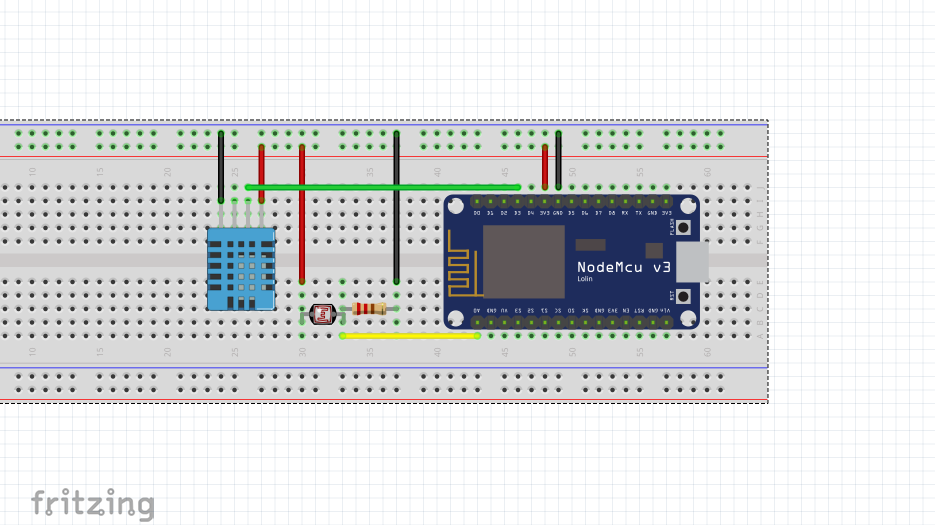
The Circuit
Make connections as per the Schematic.
The Circuit
Comments
Only logged in users can leave comments