How to Use an RGB LED
In this tutorial, we will learn how to use an RGB LED.
Devices & Components
1
Arduino Uno Rev3
3
Resistor 220 ohm
1
Jumper wires (generic)
1
RGB Diffused Common Cathode
Software & Tools

Arduino IDE
Project description
Code
CODE!!!
c_cpp
This is the code for RGB led.
1//www.elegoo.com
2//2016.12.8
3
4// Define Pins
5#define BLUE   3
6#define GREEN 5
7#define RED 6
8
9void setup()
10{
11pinMode(RED, OUTPUT);
12pinMode(GREEN,   OUTPUT);
13pinMode(BLUE, OUTPUT);
14digitalWrite(RED, HIGH);
15digitalWrite(GREEN,   LOW);
16digitalWrite(BLUE, LOW);
17}
18
19// define variables
20int redValue;
21int   greenValue;
22int blueValue;
23
24// main loop
25void loop()
26{
27#define   delayTime 10 // fading time between colors
28
29redValue = 255; // choose a value   between 1 and 255 to change the color.
30greenValue = 0;
31blueValue = 0;
32
33//   this is unnecessary as we've either turned on RED in SETUP
34// or in the previous   loop ... regardless, this turns RED off
35// analogWrite(RED, 0);
36// delay(1000);
37
38for(int   i = 0; i < 255; i += 1) // fades out red bring green full when i=255
39{
40redValue   -= 1;
41greenValue += 1;
42// The following was reversed, counting in the wrong   directions
43// analogWrite(RED, 255 - redValue);
44// analogWrite(GREEN, 255   - greenValue);
45analogWrite(RED, redValue);
46analogWrite(GREEN, greenValue);
47delay(delayTime);
48}
49
50redValue   = 0;
51greenValue = 255;
52blueValue = 0;
53
54for(int i = 0; i < 255; i +=   1) // fades out green bring blue full when i=255
55{
56greenValue -= 1;
57blueValue   += 1;
58// The following was reversed, counting in the wrong directions
59// analogWrite(GREEN,   255 - greenValue);
60// analogWrite(BLUE, 255 - blueValue);
61analogWrite(GREEN,   greenValue);
62analogWrite(BLUE, blueValue);
63delay(delayTime);
64}
65
66redValue   = 0;
67greenValue = 0;
68blueValue = 255;
69
70for(int i = 0; i < 255; i +=   1) // fades out blue bring green full when i=255
71{
72// The following code has   been rearranged to match the other two similar sections
73blueValue -= 1;
74redValue   += 1;
75// The following was reversed, counting in the wrong directions
76// analogWrite(BLUE,   255 - blueValue);
77// analogWrite(RED, 255 - redValue);
78analogWrite(BLUE, blueValue);
79analogWrite(RED,   redValue);
80delay(delayTime);
81}
82}
CODE!!!
c_cpp
This is the code for RGB led.
1//www.elegoo.com
2//2016.12.8
3
4// Define Pins
5#define BLUE  3
6#define GREEN 5
7#define RED 6
8
9void setup()
10{
11pinMode(RED, OUTPUT);
12pinMode(GREEN,  OUTPUT);
13pinMode(BLUE, OUTPUT);
14digitalWrite(RED, HIGH);
15digitalWrite(GREEN,  LOW);
16digitalWrite(BLUE, LOW);
17}
18
19// define variables
20int redValue;
21int  greenValue;
22int blueValue;
23
24// main loop
25void loop()
26{
27#define  delayTime 10 // fading time between colors
28
29redValue = 255; // choose a value  between 1 and 255 to change the color.
30greenValue = 0;
31blueValue = 0;
32
33//  this is unnecessary as we've either turned on RED in SETUP
34// or in the previous  loop ... regardless, this turns RED off
35// analogWrite(RED, 0);
36// delay(1000);
37
38for(int  i = 0; i < 255; i += 1) // fades out red bring green full when i=255
39{
40redValue  -= 1;
41greenValue += 1;
42// The following was reversed, counting in the wrong  directions
43// analogWrite(RED, 255 - redValue);
44// analogWrite(GREEN, 255  - greenValue);
45analogWrite(RED, redValue);
46analogWrite(GREEN, greenValue);
47delay(delayTime);
48}
49
50redValue  = 0;
51greenValue = 255;
52blueValue = 0;
53
54for(int i = 0; i < 255; i +=  1) // fades out green bring blue full when i=255
55{
56greenValue -= 1;
57blueValue  += 1;
58// The following was reversed, counting in the wrong directions
59// analogWrite(GREEN,  255 - greenValue);
60// analogWrite(BLUE, 255 - blueValue);
61analogWrite(GREEN,  greenValue);
62analogWrite(BLUE, blueValue);
63delay(delayTime);
64}
65
66redValue  = 0;
67greenValue = 0;
68blueValue = 255;
69
70for(int i = 0; i < 255; i +=  1) // fades out blue bring green full when i=255
71{
72// The following code has  been rearranged to match the other two similar sections
73blueValue -= 1;
74redValue  += 1;
75// The following was reversed, counting in the wrong directions
76// analogWrite(BLUE,  255 - blueValue);
77// analogWrite(RED, 255 - redValue);
78analogWrite(BLUE, blueValue);
79analogWrite(RED,  redValue);
80delay(delayTime);
81}
82}
Downloadable files
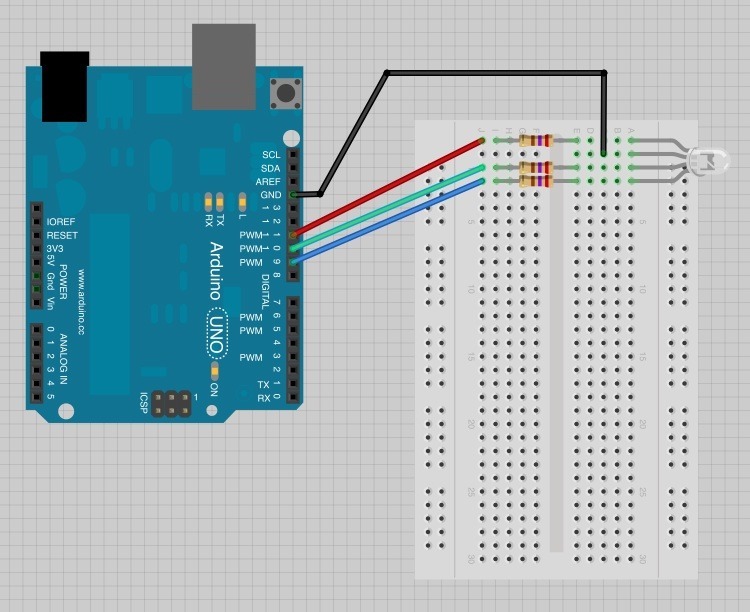
RGB schematic
This is the schematic from fritzing.
RGB schematic
Comments
Only logged in users can leave comments