Bike Turn Signal - Part 1
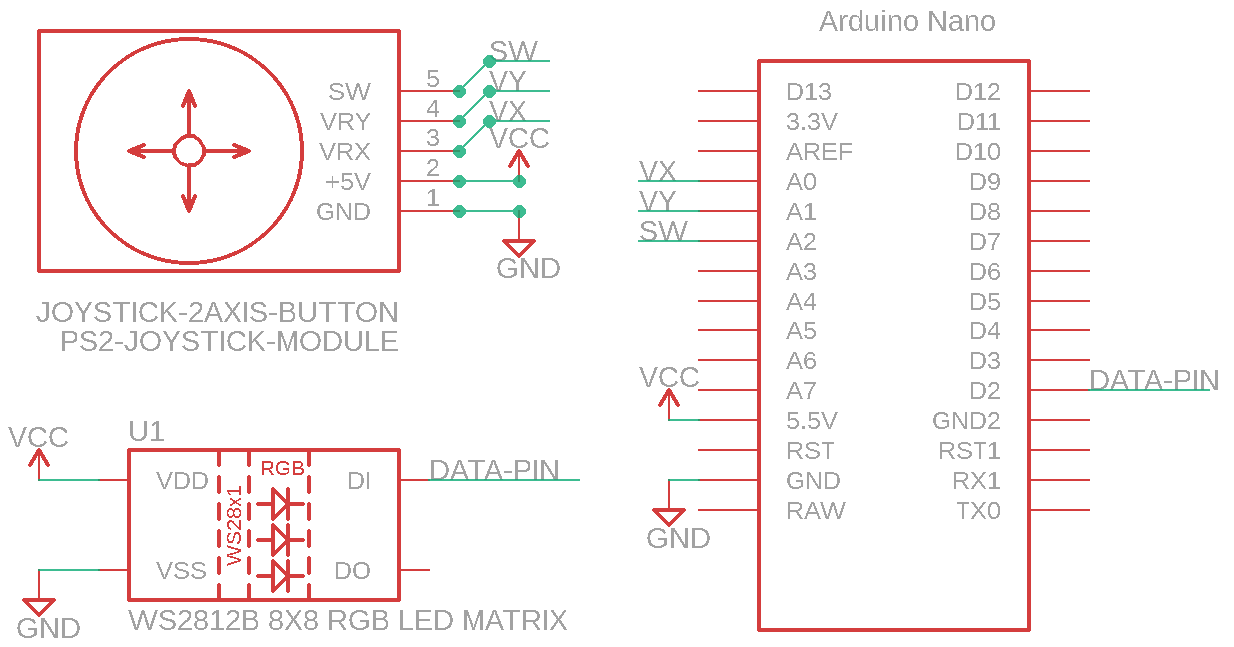
Using 8x8 WS2812B RGB LED Matrix, Arduino Nano & PS2 Joystick Module
Devices & Components
1
Arduino Nano
1
Analog joystick (Generic)
1
RGB LED Pixel Matrix, NeoPixel NeoMatrix
1
Jumper wires (generic)
Hardware & Tools
1
Soldering iron (generic)
Software & Tools

Arduino IDE
Project description
Code
Initial_Test_Code.ino
arduino
1#include <Arduino.h>
2#include "FastLED.h"
3#define Vx A0 // Define  / Equate "Vx" with A0, the pin where Vx is connected
4#define Vy A1 // Define  / Equate "Vy" with A1, the pin where Vy is connected
5#define Button A2 // Define  / Equate Button with A2, the pin where the button is connected
6#define NUM_LEDS  64
7#define DATA_PIN 2
8
9CRGB leds[NUM_LEDS];
10
11void setup() {
12  pinMode(Vx,  INPUT); // Configure Vx (A0) as an Input
13  pinMode(Vy, INPUT); // Configure Vy  (A1) as an Input
14  pinMode(Button, INPUT_PULLUP); // Configure Button (A2) as  an Input, internally "pulled-up" to 5V
15  // Note, we're configuring an Analog  input as digital input
16  // which is perfectly fine.  I did this to make the  wiring easier
17  // and keep all of the wires on the same side of the board
18  FastLED.addLeds<WS2812B, DATA_PIN, GRB>(leds, NUM_LEDS);
19  FastLED.setBrightness(64);
20  Serial.begin(9600); // Initialize Serial Port at 9600 baud to display the results
21
22}
23
24void  loop()
25{
26  int x, y, btn;
27
28  x = analogRead(Vx); // Read the analog  value of Vx (Analog Values are from 0-1023 which equate to 0V to 5V)
29  y = analogRead(Vy);  // Read the analog value of Vy
30  btn = digitalRead(Button); // Read the button.  When the button is open (unpushed),
31  // the input will read High (+5V)
32  // When the button is closed (pressed), the input pin
33  // is connected to  ground and will read Low (0V)
34
35  /*Serial.print(x);  // Print the X value  to the serial port
36    Serial.print("\	"); // Print a Tab character
37    Serial.print(y);  // Print the Y value
38    Serial.print("\	"); // Print a Tab
39    Serial.println(btn);  // Print the value of the Btn (0=Pushed, 1 = Not Pushed)
40    delay(250); // Delay  250ms so the results don't print too quickly*/
41
42  if  (x <= 80) {
43
44    FastLED.clear();
45    leds[3] = CRGB(255, 18, 0);
46    leds[4] = CRGB(255,  18, 0);
47    leds[11] = CRGB(255, 18, 0);
48    leds[12] = CRGB(255, 18, 0);
49    leds[19] = CRGB(255, 18, 0);
50    leds[20] = CRGB(255, 18, 0);
51    leds[24]  = CRGB(255, 18, 0);
52    leds[27] = CRGB(255, 18, 0);
53    leds[28] = CRGB(255,  18, 0);
54    leds[31] = CRGB(255, 18, 0);
55    leds[32] = CRGB(255, 18, 0);
56    leds[33] = CRGB(255, 18, 0);
57    leds[35] = CRGB(255, 18, 0);
58    leds[36]  = CRGB(255, 18, 0);
59    leds[38] = CRGB(255, 18, 0);
60    leds[39] = CRGB(255,  18, 0);
61    leds[41] = CRGB(255, 18, 0);
62    leds[42] = CRGB(255, 18, 0);
63    leds[43] = CRGB(255, 18, 0);
64    leds[44] = CRGB(255, 18, 0);
65    leds[45]  = CRGB(255, 18, 0);
66    leds[46] = CRGB(255, 18, 0);
67    leds[50] = CRGB(255,  18, 0);
68    leds[51] = CRGB(255, 18, 0);
69    leds[52] = CRGB(255, 18, 0);
70    leds[53] = CRGB(255, 18, 0);
71    leds[59] = CRGB(255, 18, 0);
72    leds[60]  = CRGB(255, 18, 0);
73    FastLED.show();
74  }
75
76  if  (x >= 900) {
77
78    FastLED.clear();
79    leds[3] = CRGB(255, 18, 0);
80    leds[4] = CRGB(255,  18, 0);
81    leds[10] = CRGB(255, 18, 0);
82    leds[11] = CRGB(255, 18, 0);
83    leds[12] = CRGB(255, 18, 0);
84    leds[13] = CRGB(255, 18, 0);
85    leds[17]  = CRGB(255, 18, 0);
86    leds[18] = CRGB(255, 18, 0);
87    leds[19] = CRGB(255,  18, 0);
88    leds[20] = CRGB(255, 18, 0);
89    leds[21] = CRGB(255, 18, 0);
90    leds[22] = CRGB(255, 18, 0);
91    leds[24] = CRGB(255, 18, 0);
92    leds[25]  = CRGB(255, 18, 0);
93    leds[27] = CRGB(255, 18, 0);
94    leds[28] = CRGB(255,  18, 0);
95    leds[30] = CRGB(255, 18, 0);
96    leds[31] = CRGB(255, 18, 0);
97    leds[32] = CRGB(255, 18, 0);
98    leds[35] = CRGB(255, 18, 0);
99    leds[36]  = CRGB(255, 18, 0);
100    leds[39] = CRGB(255, 18, 0);
101    leds[43] = CRGB(255,  18, 0);
102    leds[44] = CRGB(255, 18, 0);
103    leds[51] = CRGB(255, 18, 0);
104    leds[52] = CRGB(255, 18, 0);
105    leds[59] = CRGB(255, 18, 0);
106    leds[60]  = CRGB(255, 18, 0);
107    FastLED.show();
108  }
109
110  if  (y <= 100) {
111
112    FastLED.clear();
113    fill_solid (leds, NUM_LEDS, CRGB(0, 255, 0));
114    FastLED.show();
115  }
116
117  if (y >= 900) {
118
119    FastLED.clear();
120    fill_solid (leds, NUM_LEDS, CRGB(255, 0, 0));
121    FastLED.show();
122  }
123
124  if (btn == 0) {
125
126    FastLED.clear();
127    FastLED.show();
128  }
129}
130
Initial_Test_Code.ino
arduino
1#include <Arduino.h>
2#include "FastLED.h"
3#define Vx A0 // Define
4  / Equate "Vx" with A0, the pin where Vx is connected
5#define Vy A1 // Define
6  / Equate "Vy" with A1, the pin where Vy is connected
7#define Button A2 // Define
8  / Equate Button with A2, the pin where the button is connected
9#define NUM_LEDS
10  64
11#define DATA_PIN 2
12
13CRGB leds[NUM_LEDS];
14
15void setup() {
16  pinMode(Vx,
17  INPUT); // Configure Vx (A0) as an Input
18  pinMode(Vy, INPUT); // Configure Vy
19  (A1) as an Input
20  pinMode(Button, INPUT_PULLUP); // Configure Button (A2) as
21  an Input, internally "pulled-up" to 5V
22  // Note, we're configuring an Analog
23  input as digital input
24  // which is perfectly fine.  I did this to make the
25  wiring easier
26  // and keep all of the wires on the same side of the board
27
28  FastLED.addLeds<WS2812B, DATA_PIN, GRB>(leds, NUM_LEDS);
29  FastLED.setBrightness(64);
30
31  Serial.begin(9600); // Initialize Serial Port at 9600 baud to display the results
32
33}
34
35void
36  loop()
37{
38  int x, y, btn;
39
40  x = analogRead(Vx); // Read the analog
41  value of Vx (Analog Values are from 0-1023 which equate to 0V to 5V)
42  y = analogRead(Vy);
43  // Read the analog value of Vy
44  btn = digitalRead(Button); // Read the button.
45  When the button is open (unpushed),
46  // the input will read High (+5V)
47
48  // When the button is closed (pressed), the input pin
49  // is connected to
50  ground and will read Low (0V)
51
52  /*Serial.print(x);  // Print the X value
53  to the serial port
54    Serial.print("\	"); // Print a Tab character
55    Serial.print(y);
56  // Print the Y value
57    Serial.print("\	"); // Print a Tab
58    Serial.println(btn);
59  // Print the value of the Btn (0=Pushed, 1 = Not Pushed)
60    delay(250); // Delay
61  250ms so the results don't print too quickly*/
62
63  if  (x <= 80) {
64
65
66    FastLED.clear();
67    leds[3] = CRGB(255, 18, 0);
68    leds[4] = CRGB(255,
69  18, 0);
70    leds[11] = CRGB(255, 18, 0);
71    leds[12] = CRGB(255, 18, 0);
72
73    leds[19] = CRGB(255, 18, 0);
74    leds[20] = CRGB(255, 18, 0);
75    leds[24]
76  = CRGB(255, 18, 0);
77    leds[27] = CRGB(255, 18, 0);
78    leds[28] = CRGB(255,
79  18, 0);
80    leds[31] = CRGB(255, 18, 0);
81    leds[32] = CRGB(255, 18, 0);
82
83    leds[33] = CRGB(255, 18, 0);
84    leds[35] = CRGB(255, 18, 0);
85    leds[36]
86  = CRGB(255, 18, 0);
87    leds[38] = CRGB(255, 18, 0);
88    leds[39] = CRGB(255,
89  18, 0);
90    leds[41] = CRGB(255, 18, 0);
91    leds[42] = CRGB(255, 18, 0);
92
93    leds[43] = CRGB(255, 18, 0);
94    leds[44] = CRGB(255, 18, 0);
95    leds[45]
96  = CRGB(255, 18, 0);
97    leds[46] = CRGB(255, 18, 0);
98    leds[50] = CRGB(255,
99  18, 0);
100    leds[51] = CRGB(255, 18, 0);
101    leds[52] = CRGB(255, 18, 0);
102
103    leds[53] = CRGB(255, 18, 0);
104    leds[59] = CRGB(255, 18, 0);
105    leds[60]
106  = CRGB(255, 18, 0);
107    FastLED.show();
108  }
109
110  if  (x >= 900) {
111
112
113    FastLED.clear();
114    leds[3] = CRGB(255, 18, 0);
115    leds[4] = CRGB(255,
116  18, 0);
117    leds[10] = CRGB(255, 18, 0);
118    leds[11] = CRGB(255, 18, 0);
119
120    leds[12] = CRGB(255, 18, 0);
121    leds[13] = CRGB(255, 18, 0);
122    leds[17]
123  = CRGB(255, 18, 0);
124    leds[18] = CRGB(255, 18, 0);
125    leds[19] = CRGB(255,
126  18, 0);
127    leds[20] = CRGB(255, 18, 0);
128    leds[21] = CRGB(255, 18, 0);
129
130    leds[22] = CRGB(255, 18, 0);
131    leds[24] = CRGB(255, 18, 0);
132    leds[25]
133  = CRGB(255, 18, 0);
134    leds[27] = CRGB(255, 18, 0);
135    leds[28] = CRGB(255,
136  18, 0);
137    leds[30] = CRGB(255, 18, 0);
138    leds[31] = CRGB(255, 18, 0);
139
140    leds[32] = CRGB(255, 18, 0);
141    leds[35] = CRGB(255, 18, 0);
142    leds[36]
143  = CRGB(255, 18, 0);
144    leds[39] = CRGB(255, 18, 0);
145    leds[43] = CRGB(255,
146  18, 0);
147    leds[44] = CRGB(255, 18, 0);
148    leds[51] = CRGB(255, 18, 0);
149
150    leds[52] = CRGB(255, 18, 0);
151    leds[59] = CRGB(255, 18, 0);
152    leds[60]
153  = CRGB(255, 18, 0);
154    FastLED.show();
155  }
156
157  if  (y <= 100) {
158
159
160    FastLED.clear();
161    fill_solid (leds, NUM_LEDS, CRGB(0, 255, 0));
162
163    FastLED.show();
164  }
165
166  if (y >= 900) {
167
168    FastLED.clear();
169
170    fill_solid (leds, NUM_LEDS, CRGB(255, 0, 0));
171    FastLED.show();
172  }
173
174
175  if (btn == 0) {
176
177    FastLED.clear();
178    FastLED.show();
179  }
180}
181
Downloadable files
Bike-Signal-Basic
Bike-Signal-Basic
FastLED Library
https://github.com/FastLED/FastLED
FastLED Library
https://github.com/FastLED/FastLED
Comments
Only logged in users can leave comments