Devices & Components
Arduino Uno Rev3
Breadboard (generic)
Resistor 10k ohm
Jumper wires (generic)
Pushbutton switch 12mm
Software & Tools
Arduino IDE
Project description
Code
Source Code
arduino
1 2/* 3Arduino Voltage Meter using Serial Monitor 4by Faseeh Padinjarathil 5*/ 6const int buttonPin = 2; 7const int ledPin = 13; 8int buttonPushCounter = 0; 9int buttonState = 0; 10int lastButtonState = 0; 11 12 13void setup() { 14 15pinMode(buttonPin, INPUT); 16 17pinMode(ledPin, OUTPUT); 18 19Serial.begin(9600); 20} 21 22void loop() { 23 24buttonState = digitalRead(buttonPin); 25int sensorValue = analogRead(A0); 26 27float voltage = sensorValue * (5.0 / 1023.0); 28 29if (buttonState != lastButtonState) { 30 31if (buttonState == HIGH) { 32 33buttonPushCounter++; 34Serial.println("on"); 35Serial.print("CURRENT VOLTAGE: "); 36Serial.println(voltage); 37} else { 38 39Serial.println("off"); 40} 41 42delay(50); 43} 44 45lastButtonState = buttonState; 46 47if (buttonPushCounter % 4 == 0) { 48digitalWrite(ledPin, HIGH); 49} else { 50digitalWrite(ledPin, LOW); 51} 52 53}
Source Code
arduino
1 2/* 3Arduino Voltage Meter using Serial Monitor 4by Faseeh Padinjarathil 5*/ 6const int buttonPin = 2; 7const int ledPin = 13; 8int buttonPushCounter = 0; 9int buttonState = 0; 10int lastButtonState = 0; 11 12 13void setup() { 14 15pinMode(buttonPin, INPUT); 16 17pinMode(ledPin, OUTPUT); 18 19Serial.begin(9600); 20} 21 22void loop() { 23 24buttonState = digitalRead(buttonPin); 25int sensorValue = analogRead(A0); 26 27float voltage = sensorValue * (5.0 / 1023.0); 28 29if (buttonState != lastButtonState) { 30 31if (buttonState == HIGH) { 32 33buttonPushCounter++; 34Serial.println("on"); 35Serial.print("CURRENT VOLTAGE: "); 36Serial.println(voltage); 37} else { 38 39Serial.println("off"); 40} 41 42delay(50); 43} 44 45lastButtonState = buttonState; 46 47if (buttonPushCounter % 4 == 0) { 48digitalWrite(ledPin, HIGH); 49} else { 50digitalWrite(ledPin, LOW); 51} 52 53}
Downloadable files
Instruction File
Instruction File
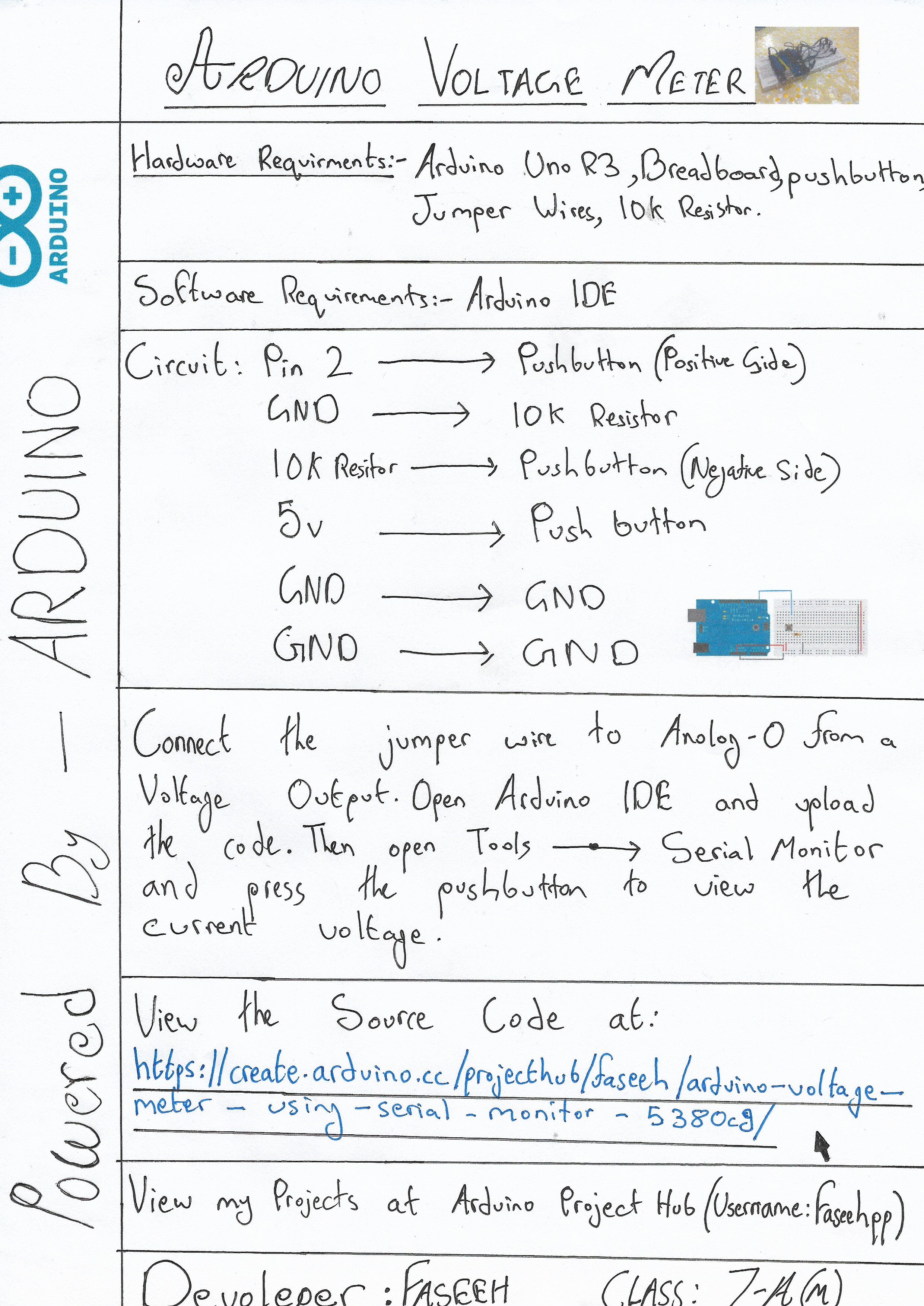
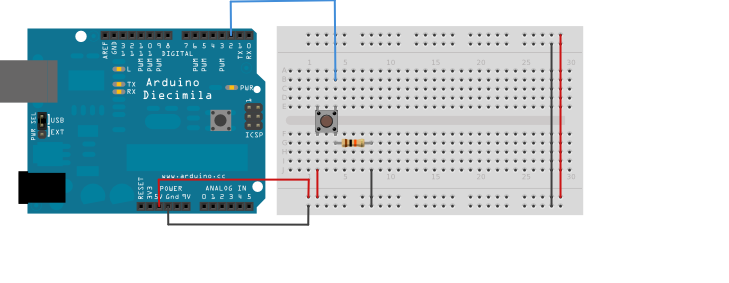
Circuit
Circuit
Instruction File
Instruction File

Comments
Only logged in users can leave comments