Devices & Components
Arduino Nano
Battery Holder, AA x 2
SparkFun RedBot Sensor - Line Follower
Slide Switch
Wheels for the motors
9V Battery Clip
AA Batteries
DC Motor, 12 V
9V battery (generic)
L298n Motor Driver
Hardware & Tools
3d pen (optional)
Software & Tools
Arduino IDE
Project description
Code
Main code
c_cpp
This is the entire code, if you want to make this project by yourself.
1//Defines the pin variables for the motors 2int posSpinn = 6; 3int negSpinn = 5; 4int negPulley = 10; 5int posPulley = 9; 6 7//Spinn expansion and retraction speed parameters 8int expSpeed = 20; 9int retSpeed = 110; 10 11//Defines state machine variable 12int flag = 0; 13 14//Defines the light sensor variable 15int sensor; 16 17void setup() { 18 //Motor pin variables in OUTPUT mode 19 pinMode(negSpinn,OUTPUT); 20 pinMode(posSpinn,OUTPUT); 21 pinMode(negPulley,OUTPUT); 22 pinMode(posPulley,OUTPUT); 23 24 //Initial pulley extenction 25 delay(1500); 26 analogWrite(negPulley,60); 27 delay(3800); 28 analogWrite(negPulley,0); 29} 30 31void loop() { 32 //Reads the sensor value and stores it in the "sensor" variable 33 sensor = analogRead(A0); 34 35 //First state 36 if (flag == 0){ 37 if (sensor > 500){ 38 //Next state 39 flag = 1; 40 } 41 } 42 43 //Second state 44 else if (flag == 1){ 45 if (sensor < 500){ 46 //Throwing signal 47 delay(3000); 48 analogWrite(posPulley,150); 49 delay(100); 50 analogWrite(posPulley,0); 51 52 //Pulley retraction 53 delay(400); 54 digitalWrite(posPulley,1); 55 delay(1500); 56 digitalWrite(posPulley,0); 57 58 //Next state 59 flag = 2; 60 } 61 } 62 63 //Third state 64 else if (flag == 2){ 65 if (sensor > 500){ 66 67 //Next state 68 flag = 3; 69 } 70 } 71 72 //Fourth state 73 else if (flag == 3){ 74 if (sensor < 500){ 75 //Starts spinning 76 delay(2000); 77 digitalWrite(posSpinn,0); 78 analogWrite(negSpinn, 220); 79 delay(1000); 80 digitalWrite(negSpinn,1); 81 delay(1000); 82 83 //Spinn expansion 84 digitalWrite(posPulley,0); 85 analogWrite(negPulley,60); 86 delay(100); 87 analogWrite(negPulley,expSpeed); 88 delay(3000); 89 digitalWrite(negPulley,0); 90 delay(1600); 91 92 //Spinn retraction 93 analogWrite(posPulley,retSpeed); 94 delay(2000); 95 96 //Spinn finalization 97 digitalWrite(posPulley, 0); 98 digitalWrite(negSpinn,0); 99 100 //pulley extenction 101 delay(1500); 102 analogWrite(negPulley,60); 103 delay(3800); 104 analogWrite(negPulley,0); 105 106 //Next state 107 flag = 0; 108 } 109 } 110 delay(4000); 111 112}
Main code
c_cpp
This is the entire code, if you want to make this project by yourself.
1//Defines the pin variables for the motors 2int posSpinn = 6; 3int 4 negSpinn = 5; 5int negPulley = 10; 6int posPulley = 9; 7 8//Spinn expansion 9 and retraction speed parameters 10int expSpeed = 20; 11int retSpeed = 110; 12 13//Defines 14 state machine variable 15int flag = 0; 16 17//Defines the light sensor variable 18int 19 sensor; 20 21void setup() { 22 //Motor pin variables in OUTPUT mode 23 pinMode(negSpinn,OUTPUT); 24 25 pinMode(posSpinn,OUTPUT); 26 pinMode(negPulley,OUTPUT); 27 pinMode(posPulley,OUTPUT); 28 29 30 //Initial pulley extenction 31 delay(1500); 32 analogWrite(negPulley,60); 33 34 delay(3800); 35 analogWrite(negPulley,0); 36} 37 38void loop() { 39 40 //Reads the sensor value and stores it in the "sensor" variable 41 sensor 42 = analogRead(A0); 43 44 //First state 45 if (flag == 0){ 46 if (sensor 47 > 500){ 48 //Next state 49 flag = 1; 50 } 51 } 52 53 //Second 54 state 55 else if (flag == 1){ 56 if (sensor < 500){ 57 //Throwing signal 58 59 delay(3000); 60 analogWrite(posPulley,150); 61 delay(100); 62 63 analogWrite(posPulley,0); 64 65 //Pulley retraction 66 delay(400); 67 68 digitalWrite(posPulley,1); 69 delay(1500); 70 digitalWrite(posPulley,0); 71 72 73 //Next state 74 flag = 2; 75 } 76 } 77 78 //Third state 79 80 else if (flag == 2){ 81 if (sensor > 500){ 82 83 //Next state 84 flag 85 = 3; 86 } 87 } 88 89 //Fourth state 90 else if (flag == 3){ 91 92 if (sensor < 500){ 93 //Starts spinning 94 delay(2000); 95 digitalWrite(posSpinn,0); 96 97 analogWrite(negSpinn, 220); 98 delay(1000); 99 digitalWrite(negSpinn,1); 100 101 delay(1000); 102 103 //Spinn expansion 104 digitalWrite(posPulley,0); 105 106 analogWrite(negPulley,60); 107 delay(100); 108 analogWrite(negPulley,expSpeed); 109 110 delay(3000); 111 digitalWrite(negPulley,0); 112 delay(1600); 113 114 115 //Spinn retraction 116 analogWrite(posPulley,retSpeed); 117 delay(2000); 118 119 120 //Spinn finalization 121 digitalWrite(posPulley, 0); 122 digitalWrite(negSpinn,0); 123 124 125 //pulley extenction 126 delay(1500); 127 analogWrite(negPulley,60); 128 129 delay(3800); 130 analogWrite(negPulley,0); 131 132 //Next 133 state 134 flag = 0; 135 } 136 } 137 delay(4000); 138 139}
Downloadable files
Circuit layout
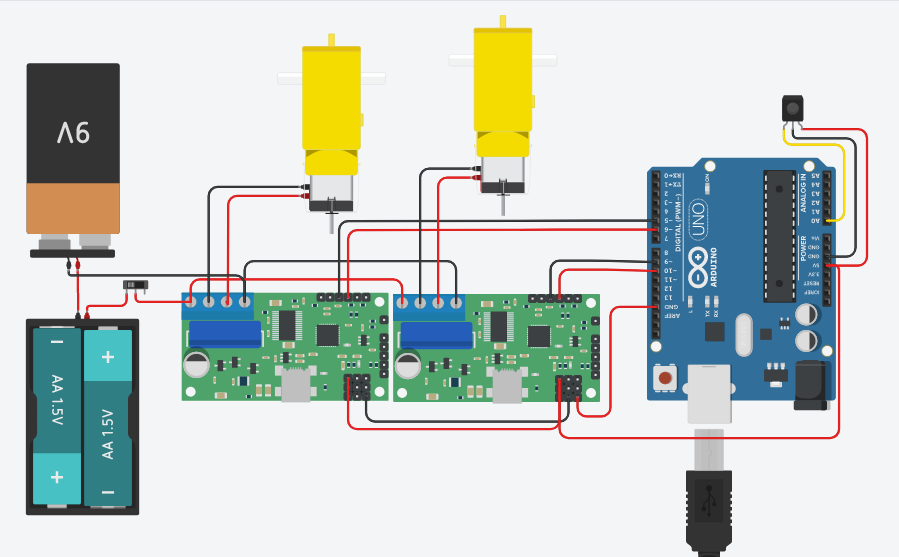
This is the entire circuit. If you have the specified driver you wont have to do all the mess with two drivers. You might have to make some changes if you use 1.5v batteries instead of 1.2v, couse the driver only supports up to 12v before you have to power it with aditional 5v for the inner circuitry, but you can probably figure that out.
Circuit layout
Comments
Only logged in users can leave comments