Mini Me - The Mini Humanoid Robot
Imagin being able to controll with your movements a mini version of yourself, well that's what this project is all about.
Components and supplies
MG90 Servo Motor
Arduino Mega 2560
SG90 Micro-servo motor
Tools and machines
Laser cutter (generic)
Apps and platforms
Arduino IDE
Project description
Code
Code for the exoskeleton
c_cpp
This is the code that goes into the nano in the exoskeleton. It uses the EasyTransfer Library, o make ure you have it istalled.
1#include <EasyTransfer.h> 2 3 4//create object 5EasyTransfer ET; 6 7struct SEND_DATA_STRUCTURE{ 8 //put your variable definitions here for the data you want to send 9 //THIS MUST BE EXACTLY THE SAME ON THE OTHER ARDUINO 10 int16_t shoulderPot; 11 int16_t elbowRPot; 12 int16_t elbowPot; 13}; 14 15//give a name to the group of data 16SEND_DATA_STRUCTURE mydata; 17 18void setup() { 19 Serial.begin(9600); 20 21 //start the library, pass in the data details and the name of the serial port. Can be Serial, Serial1, Serial2, etc. 22 ET.begin(details(mydata), &Serial); 23 24} 25 26void loop() { 27 28 mydata.shoulderPot = analogRead(A0); 29 mydata.elbowRPot = analogRead(A1); 30 mydata.elbowPot = analogRead(A2); 31 32 ET.sendData(); 33 34 /* 35 Serial.print(mydata.shoulderPot); 36 Serial.print(" , "); 37 Serial.print(mydata.elbowRPot); 38 Serial.print(" , "); 39 Serial.println(mydata.elbowPot); 40 delay(100); 41 */ 42 delay(50); 43}
Testing code
c_cpp
This is the testing code i've beeing using for testing the strength of the servos
1#include <Servo.h> 2 3int pos; 4Servo pinza; 5Servo muneca; 6Servo codo; 7Servo codoG; 8Servo hombro; 9 10void setup() { 11 pinza.attach(2); 12 muneca.attach(3); 13 codo.attach(4); 14 codoG.attach(5); 15 hombro.attach(6); 16 17 muneca.write(100); 18 codo.write(30); 19 codoG.write(100); 20 hombro.write(30); 21 22 23 24} 25 26void loop() { 27 //pinza 28 for (pos = 130; pos <= 180; pos += 1) { // goes from 0 degrees to 180 degrees 29 // in steps of 1 degree 30 pinza.write(pos); // tell servo to go to position in variable 'pos' 31 delay(15); // waits 15ms for the servo to reach the position 32 } 33 for (pos = 180; pos >= 130; pos -= 1) { // goes from 180 degrees to 0 degrees 34 pinza.write(pos); // tell servo to go to position in variable 'pos' 35 delay(15); // waits 15ms for the servo to reach the position 36 } 37 38 //muñeca 39 for (pos = 0; pos <= 180; pos += 1) { // goes from 0 degrees to 180 degrees 40 // in steps of 1 degree 41 muneca.write(pos); // tell servo to go to position in variable 'pos' 42 delay(15); // waits 15ms for the servo to reach the position 43 } 44 for (pos = 180; pos >= 0; pos -= 1) { // goes from 180 degrees to 0 degrees 45 muneca.write(pos); // tell servo to go to position in variable 'pos' 46 delay(15); // waits 15ms for the servo to reach the position 47 } 48 muneca.write(100); 49 50 //codo 51 for (pos = 0; pos <= 130; pos += 1) { // goes from 0 degrees to 180 degrees 52 // in steps of 1 degree 53 codo.write(pos); // tell servo to go to position in variable 'pos' 54 delay(15); // waits 15ms for the servo to reach the position 55 } 56 for (pos = 130; pos >= 0; pos -= 1) { // goes from 180 degrees to 0 degrees 57 codo.write(pos); // tell servo to go to position in variable 'pos' 58 delay(15); // waits 15ms for the servo to reach the position 59 } 60 codo.write(30); 61 62 //codoG 63 for (pos = 0; pos <= 180; pos += 1) { // goes from 0 degrees to 180 degrees 64 // in steps of 1 degree 65 codoG.write(pos); // tell servo to go to position in variable 'pos' 66 delay(15); // waits 15ms for the servo to reach the position 67 } 68 for (pos = 180; pos >= 0; pos -= 1) { // goes from 180 degrees to 0 degrees 69 codoG.write(pos); // tell servo to go to position in variable 'pos' 70 delay(15); // waits 15ms for the servo to reach the position 71 } 72 codoG.write(100); 73 74 //hombro 75 for (pos = 0; pos <= 180; pos += 1) { // goes from 0 degrees to 180 degrees 76 // in steps of 1 degree 77 hombro.write(pos); // tell servo to go to position in variable 'pos' 78 delay(15); // waits 15ms for the servo to reach the position 79 } 80 for (pos = 180; pos >= 0; pos -= 1) { // goes from 180 degrees to 0 degrees 81 hombro.write(pos); // tell servo to go to position in variable 'pos' 82 delay(15); // waits 15ms for the servo to reach the position 83 } 84 85 hombro.write(30); 86}
Code for the exoskeleton
c_cpp
This is the code that goes into the nano in the exoskeleton. It uses the EasyTransfer Library, o make ure you have it istalled.
1#include <EasyTransfer.h> 2 3 4//create object 5EasyTransfer ET; 6 7struct SEND_DATA_STRUCTURE{ 8 //put your variable definitions here for the data you want to send 9 //THIS MUST BE EXACTLY THE SAME ON THE OTHER ARDUINO 10 int16_t shoulderPot; 11 int16_t elbowRPot; 12 int16_t elbowPot; 13}; 14 15//give a name to the group of data 16SEND_DATA_STRUCTURE mydata; 17 18void setup() { 19 Serial.begin(9600); 20 21 //start the library, pass in the data details and the name of the serial port. Can be Serial, Serial1, Serial2, etc. 22 ET.begin(details(mydata), &Serial); 23 24} 25 26void loop() { 27 28 mydata.shoulderPot = analogRead(A0); 29 mydata.elbowRPot = analogRead(A1); 30 mydata.elbowPot = analogRead(A2); 31 32 ET.sendData(); 33 34 /* 35 Serial.print(mydata.shoulderPot); 36 Serial.print(" , "); 37 Serial.print(mydata.elbowRPot); 38 Serial.print(" , "); 39 Serial.println(mydata.elbowPot); 40 delay(100); 41 */ 42 delay(50); 43}
Exoskeleton code for the robot
c_cpp
This code goe on to the Mega in the robot. It reads the values sent by the other arduino and map it to use them to move the servos. It ues the EasyTranfer library for sending and reciving data, so make sure you have it istalled.
1#include <EasyTransfer.h> 2 3//create object 4EasyTransfer ET; 5 6struct RECEIVE_DATA_STRUCTURE{ 7 //put your variable definitions here for the data you want to receive 8 //THIS MUST BE EXACTLY THE SAME ON THE OTHER ARDUINO 9 int16_t blinks; 10 int16_t pause; 11}; 12 13//give a name to the group of data 14RECEIVE_DATA_STRUCTURE mydata; 15 16void setup(){ 17 Serial.begin(9600); 18 //start the library, pass in the data details and the name of the serial port. Can be Serial, Serial1, Serial2, etc. 19 ET.begin(details(mydata), &Serial); 20 21 pinMode(13, OUTPUT); 22 23} 24 25void loop(){ 26 //check and see if a data packet has come in. 27 if(ET.receiveData()){ 28 //this is how you access the variables. [name of the group].[variable name] 29 //since we have data, we will blink it out. 30 for(int i = mydata.blinks; i>0; i--){ 31 digitalWrite(13, HIGH); 32 delay(mydata.pause * 100); 33 digitalWrite(13, LOW); 34 delay(mydata.pause * 100); 35 } 36 } 37 38 //you should make this delay shorter then your transmit delay or else messages could be lost 39 delay(250); 40}
Testing code
c_cpp
This is the testing code i've beeing using for testing the strength of the servos
1#include <Servo.h> 2 3int pos; 4Servo pinza; 5Servo muneca; 6Servo codo; 7Servo codoG; 8Servo hombro; 9 10void setup() { 11 pinza.attach(2); 12 muneca.attach(3); 13 codo.attach(4); 14 codoG.attach(5); 15 hombro.attach(6); 16 17 muneca.write(100); 18 codo.write(30); 19 codoG.write(100); 20 hombro.write(30); 21 22 23 24} 25 26void loop() { 27 //pinza 28 for (pos = 130; pos <= 180; pos += 1) { // goes from 0 degrees to 180 degrees 29 // in steps of 1 degree 30 pinza.write(pos); // tell servo to go to position in variable 'pos' 31 delay(15); // waits 15ms for the servo to reach the position 32 } 33 for (pos = 180; pos >= 130; pos -= 1) { // goes from 180 degrees to 0 degrees 34 pinza.write(pos); // tell servo to go to position in variable 'pos' 35 delay(15); // waits 15ms for the servo to reach the position 36 } 37 38 //muñeca 39 for (pos = 0; pos <= 180; pos += 1) { // goes from 0 degrees to 180 degrees 40 // in steps of 1 degree 41 muneca.write(pos); // tell servo to go to position in variable 'pos' 42 delay(15); // waits 15ms for the servo to reach the position 43 } 44 for (pos = 180; pos >= 0; pos -= 1) { // goes from 180 degrees to 0 degrees 45 muneca.write(pos); // tell servo to go to position in variable 'pos' 46 delay(15); // waits 15ms for the servo to reach the position 47 } 48 muneca.write(100); 49 50 //codo 51 for (pos = 0; pos <= 130; pos += 1) { // goes from 0 degrees to 180 degrees 52 // in steps of 1 degree 53 codo.write(pos); // tell servo to go to position in variable 'pos' 54 delay(15); // waits 15ms for the servo to reach the position 55 } 56 for (pos = 130; pos >= 0; pos -= 1) { // goes from 180 degrees to 0 degrees 57 codo.write(pos); // tell servo to go to position in variable 'pos' 58 delay(15); // waits 15ms for the servo to reach the position 59 } 60 codo.write(30); 61 62 //codoG 63 for (pos = 0; pos <= 180; pos += 1) { // goes from 0 degrees to 180 degrees 64 // in steps of 1 degree 65 codoG.write(pos); // tell servo to go to position in variable 'pos' 66 delay(15); // waits 15ms for the servo to reach the position 67 } 68 for (pos = 180; pos >= 0; pos -= 1) { // goes from 180 degrees to 0 degrees 69 codoG.write(pos); // tell servo to go to position in variable 'pos' 70 delay(15); // waits 15ms for the servo to reach the position 71 } 72 codoG.write(100); 73 74 //hombro 75 for (pos = 0; pos <= 180; pos += 1) { // goes from 0 degrees to 180 degrees 76 // in steps of 1 degree 77 hombro.write(pos); // tell servo to go to position in variable 'pos' 78 delay(15); // waits 15ms for the servo to reach the position 79 } 80 for (pos = 180; pos >= 0; pos -= 1) { // goes from 180 degrees to 0 degrees 81 hombro.write(pos); // tell servo to go to position in variable 'pos' 82 delay(15); // waits 15ms for the servo to reach the position 83 } 84 85 hombro.write(30); 86}
Exoskeleton code for the robot
c_cpp
This code goe on to the Mega in the robot. It reads the values sent by the other arduino and map it to use them to move the servos. It ues the EasyTranfer library for sending and reciving data, so make sure you have it istalled.
1#include <EasyTransfer.h> 2 3//create object 4EasyTransfer ET; 5 6struct RECEIVE_DATA_STRUCTURE{ 7 //put your variable definitions here for the data you want to receive 8 //THIS MUST BE EXACTLY THE SAME ON THE OTHER ARDUINO 9 int16_t blinks; 10 int16_t pause; 11}; 12 13//give a name to the group of data 14RECEIVE_DATA_STRUCTURE mydata; 15 16void setup(){ 17 Serial.begin(9600); 18 //start the library, pass in the data details and the name of the serial port. Can be Serial, Serial1, Serial2, etc. 19 ET.begin(details(mydata), &Serial); 20 21 pinMode(13, OUTPUT); 22 23} 24 25void loop(){ 26 //check and see if a data packet has come in. 27 if(ET.receiveData()){ 28 //this is how you access the variables. [name of the group].[variable name] 29 //since we have data, we will blink it out. 30 for(int i = mydata.blinks; i>0; i--){ 31 digitalWrite(13, HIGH); 32 delay(mydata.pause * 100); 33 digitalWrite(13, LOW); 34 delay(mydata.pause * 100); 35 } 36 } 37 38 //you should make this delay shorter then your transmit delay or else messages could be lost 39 delay(250); 40}
Downloadable files
Latest Mini Me connection diagram
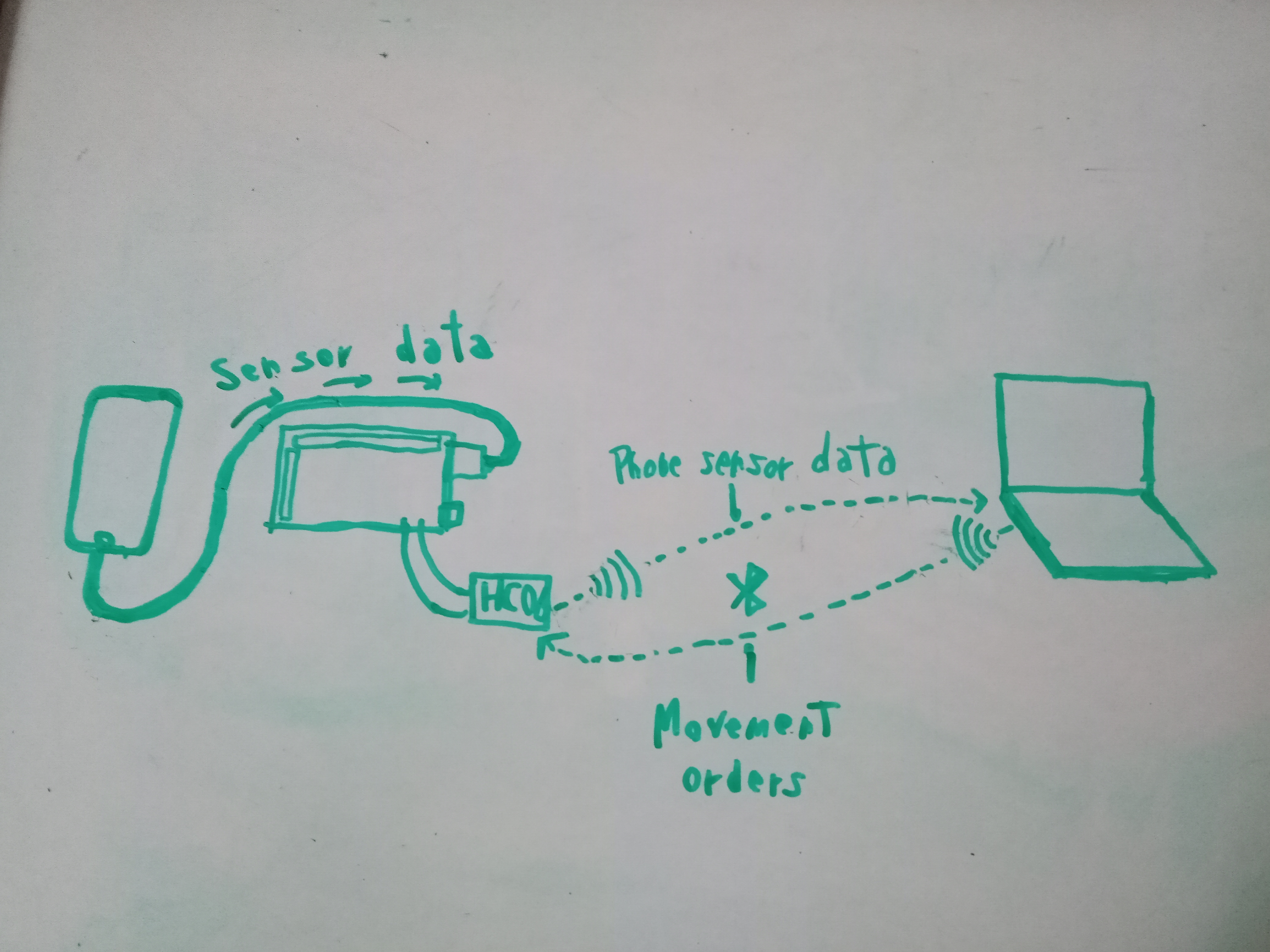
Latest Mini Me connection diagram

Documentation
Mini Me
The mini me design, all CAD Can be found in my Tinkercad: https://www.tinkercad.com/users/bn0FkXVLAYJ-coolrobotsandstuff
Mini Me
Comments
Only logged in users can leave comments