Devices & Components
1
Arduino Uno Rev3
1
RGB Diffused Common Cathode
1
Dk motor shield
3
9V battery (generic)
25
Jumper wires (generic)
1
Buzzer
1
Breadboard (generic)
1
SG90 Micro-servo motor
1
Ultrasonic Sensor - HC-SR04 (Generic)
2
DC motor (generic)
Hardware & Tools
1
Hot glue gun (generic)
Software & Tools
1
Arduino Web Editor
Project description
Code
CODE
arduino
copy and paste from the below
1#include <AFMotor.h>
2#include <Servo.h>    // Add Servo Motor library.
3#define  BuzzPIN A0  // Assign PIN A0 as BuzzPIN (Connect Arduino UNO "A0" PIN with Buzzer  "+" PIN).
4#define TrigPIN A1  //  PIN A1 as TrigPIN (Connect Arduino UNO "A1"  PIN with Ultrasonic Sonar Sensor "Trig" PIN).
5#define EchoPIN A2  // Assign  PIN A2 as EchoPIN (Connect Arduino UNO "A2" PIN with Ultrasonic Sonar Sensor "Trig"  PIN).
6#define LEDBPIN A3  // Assign PIN A3 as LEDBPIN (Connect Arduino UNO "A3"  PIN with RGB Diffused Common Cathode "LEDB" PIN).
7#define LEDGPIN A4  // Assign  PIN A4 as LEDGPIN (Connect Arduino UNO "A4" PIN with RGB Diffused Common Cathode  "LEDG" PIN).
8#define LEDRPIN A5  // Assign PIN A5 as LEDRPIN (Connect Arduino  UNO "A5" PIN with RGB Diffused Common Cathode "LEDR" PIN).
9#define DCMROFF  25  // This sets Offset to allow differences between the two DC traction Motors.
10AF_DCMotor  M1 (1, MOTOR12_64KHZ); // Create DCMotor #1 using M1 output, Set to 64kHz PWM frequency.
11AF_DCMotor  M2 (2, MOTOR12_64KHZ); // Create DCMotor #2 using M2 output, Set to 64kHz PWM frequency.
12Servo  SER1; // Create Servo object to control Servo.
13int Search (void) {                   //  Integer type variable declaration.
14  float Duration = 0.0;               // Float  type variable declaration.
15  float CM = 0.0;                     // Float type  variable declaration.
16  digitalWrite (TrigPIN, LOW);        // TrigPIN output  as 0V (Logic low level).
17  delayMicroseconds (2);              // Delay for 2us,  Send 10 us high pulse to Ultrasonic Sonar Sensor "TrigPIN".
18  digitalWrite  (TrigPIN, HIGH);       // TrigPIN output as 5V (Logic high level).
19  delayMicroseconds  (10);             // Delay for 10us.
20  digitalWrite (TrigPIN, LOW);        //  TrigPIN output as 0V (Logic low level).
21  Duration = pulseIn (EchoPIN, HIGH);  // Start counting time, Upto again EchoPIN back to logic "High Level" and puting  the "Time" into variable called "Duration".
22  CM = (Duration / 58.8);             //  Convert Distance into CM.
23  return CM;                          // Return to  CM.
24}
25int RightDistance, LeftDistance;  // Distances on either side.
26float  Distance = 0.00;            // Float type variable declaration.
27void setup ()  {               // Setup loop.
28  pinMode (BuzzPIN, OUTPUT);  // Declare BuzzPIN  as "Output PIN".
29  pinMode (TrigPIN, OUTPUT);  // Declare TrigPIN as "Output  PIN".
30  pinMode (EchoPIN, INPUT);   // Declare EchoPIN as "Output PIN".
31  pinMode (LEDBPIN, OUTPUT);  // Declare LEDBPIN as "Output PIN".
32  pinMode  (LEDGPIN, OUTPUT);  // Declare LEDGPIN as "Output PIN".
33  pinMode (LEDRPIN,  OUTPUT);  // Declare LEDRPIN as "Output PIN".
34  SER1.attach (10);           //  Attaches the Servo on pin 10 (SER1 on the Adafruit Motor Shield for Arduino kit  to the Servo object).
35}
36void loop () {                                    //  Main loop.
37  SER1.write (80);                                // Tells the Servo  to position at 80 degrees (Facing forward).
38  delay (100);                                    //  Delay for 0.1s.
39  Distance = Search ();                           // Measuring  the Distance in CM.
40  if (Distance < 30) {                            // If obstacle  found in 30cm.
41    digitalWrite (BuzzPIN, HIGH);                 // BuzzPIN output  as 5V (Logic high level).
42    digitalWrite (LEDBPIN, LOW);                  //  LEDBPIN output as 0V (Logic low level).
43    digitalWrite (LEDGPIN, LOW);                  //  LEDGPIN output as 0V (Logic low level).
44    digitalWrite (LEDRPIN, HIGH);                 //  LEDRPIN output as 5V (Logic high level).
45    M1.setSpeed (100);                            //  Speed down.
46    M2.setSpeed (100);                            // Speed down.
47    ChangePath ();                                // If forward is blocked Change  direction.
48  }
49  else if ((Distance >= 30) && (Distance < 60)) { // If obstacle  found between 30cm to 60cm.
50    digitalWrite (BuzzPIN, LOW);                  //  BuzzPIN output as 0V (Logic low level).
51    digitalWrite (LEDBPIN, HIGH);                 //  LEDBPIN output as 5V (Logic high level).
52    digitalWrite (LEDGPIN, LOW);                  //  LEDGPIN output as 0V (Logic low level).
53    digitalWrite (LEDRPIN, LOW);                  //  LEDRPIN output as 0V (Logic low level).
54    M1.setSpeed (150);                            //  Speed increase slightly.
55    M2.setSpeed (150);                            //  Speed increase slightly.
56    Forward ();                                   //  Robot move to Forward direction.
57  }
58  else if ((Distance >= 60) && (Distance  < 90)) { // If obstacle found between 60cm to 90cm.
59    digitalWrite (BuzzPIN,  LOW);                  // BuzzPIN output as 0V (Logic low level).
60    digitalWrite  (LEDBPIN, LOW);                  // LEDBPIN output as 0V (Logic low level).
61    digitalWrite (LEDGPIN, HIGH);                 // LEDGPIN output as 5V (Logic  high level).
62    digitalWrite (LEDRPIN, LOW);                  // LEDRPIN output  as 0V (Logic low level).
63    M1.setSpeed (200);                            //  Speed up.
64    M2.setSpeed (200);                            // Speed up.
65    Forward ();                                   // Robot move to Forward direction.
66  }
67  else {                                          // If obstacle cannot be  found in 90cm.
68    digitalWrite (BuzzPIN, LOW);                  // BuzzPIN output  as 0V (Logic low level).
69    digitalWrite (LEDBPIN, HIGH);                 //  LEDBPIN output as 5V (Logic high level).
70    digitalWrite (LEDGPIN, HIGH);                 //  LEDGPIN output as 5V (Logic high level).
71    digitalWrite (LEDRPIN, HIGH);                 //  LEDRPIN output as 5V (Logic high level).
72    M1.setSpeed (250);                            //  Speed increase fully.
73    M2.setSpeed (250);                            // Speed  increase fully.
74    Forward ();                                   // Robot move  to Forward direction.
75  }
76}
77void ChangePath () {         // Path Change  loop.
78  Stop ();                   // Robot Stop.
79  Backward ();               //  Robot run Backward direction.
80  Stop ();                   // Robot Stop.
81  SER1.write (12);           // Check Distance to the Right.
82  delay (500);               //  Delay for 0.5s.
83  RightDistance = Search (); // Set Right Distance.
84  delay  (500);               // Delay for 0.5s.
85  SER1.write (160);          // Check  Distance to the Left.
86  delay (1000);              // Delay for 1s.
87  LeftDistance  = Search ();  // Set Left Distance.
88  delay (500);               // Delay for  0.5s.
89  SER1.write (80);           // Return to center.
90  delay (500);               //  Delay for 0.5s.
91  CompareDistance ();        // Find the longest distance.
92}
93void  CompareDistance () {                   // Distance Compare loop.
94  if (RightDistance  > LeftDistance) {       // If Right is less obstructed.
95    TurnRight ();                          //  Robot Turn into Right direction.
96  }
97  else if (LeftDistance > RightDistance)  {  // If Left is less obstructed.
98    TurnLeft ();                          //  Robot Turn into Left direction.
99  }
100  else {                                    //  If both are equally obstructed.
101    TurnAround ();                        //  Robot Turn Around.
102  }
103}
104void Forward () {   // Forward loop.
105  M1.run  (FORWARD); // Turn DCMotor #1 to Forward.
106  M2.run (FORWARD); // Turn DCMotor  #1 to Forward.
107}
108void Backward () {    // Backward loop.
109  M1.run (BACKWARD);  // Turn DCMotor #1 to Backward.
110  M2.run (BACKWARD);  // Turn DCMotor #2 to  Backward.
111  delay (500);       // Delay for 1s.
112}
113void TurnRight () {           //  Right Turn loop.
114  M1.run (BACKWARD);          // Turn DCMotor #1 to Backward.
115  M2.run (FORWARD);           // Turn DCMotor #2 to Forward.
116  M1.setSpeed (100  + DCMROFF); // Calibrate the Speed of DCMotor #1.
117  delay (300);                //  Delay for 0.7s.
118}
119void TurnLeft () {            // Left Turn loop.
120  M1.run  (FORWARD);           // Turn DCMotor #1 to Forward.
121  M2.run (BACKWARD);          //  Turn DCMotor #2 to Backward.
122  M2.setSpeed (100 + DCMROFF); // Calibrate the  Speed of DCMotor #2.
123  delay (300);                // Delay for 0.7s.
124}
125void  TurnAround () {          // Trun Around loop.
126  M1.run (FORWARD);           //  Turn DCMotor #1 to Forward.
127  M2.run (BACKWARD);          // Turn DCMotor #2  to Backward.
128  M2.setSpeed (100 + DCMROFF); // Calibrate the Speed of DCMotor  #2.
129  delay (700);               // Delay for 2.1s.
130}
131void Stop () {      //  Stop loop.
132  M1.run (RELEASE); // Release DCMotor #1.
133  M2.run (RELEASE);  // Release DCMotor #2.
134  delay (100);      // Delay for 0.1s.
135}
CODE
arduino
copy and paste from the below
1#include <AFMotor.h>
2#include <Servo.h>    // Add Servo Motor library.
3#define
4  BuzzPIN A0  // Assign PIN A0 as BuzzPIN (Connect Arduino UNO "A0" PIN with Buzzer
5  "+" PIN).
6#define TrigPIN A1  //  PIN A1 as TrigPIN (Connect Arduino UNO "A1"
7  PIN with Ultrasonic Sonar Sensor "Trig" PIN).
8#define EchoPIN A2  // Assign
9  PIN A2 as EchoPIN (Connect Arduino UNO "A2" PIN with Ultrasonic Sonar Sensor "Trig"
10  PIN).
11#define LEDBPIN A3  // Assign PIN A3 as LEDBPIN (Connect Arduino UNO "A3"
12  PIN with RGB Diffused Common Cathode "LEDB" PIN).
13#define LEDGPIN A4  // Assign
14  PIN A4 as LEDGPIN (Connect Arduino UNO "A4" PIN with RGB Diffused Common Cathode
15  "LEDG" PIN).
16#define LEDRPIN A5  // Assign PIN A5 as LEDRPIN (Connect Arduino
17  UNO "A5" PIN with RGB Diffused Common Cathode "LEDR" PIN).
18#define DCMROFF
19  25  // This sets Offset to allow differences between the two DC traction Motors.
20AF_DCMotor
21  M1 (1, MOTOR12_64KHZ); // Create DCMotor #1 using M1 output, Set to 64kHz PWM frequency.
22AF_DCMotor
23  M2 (2, MOTOR12_64KHZ); // Create DCMotor #2 using M2 output, Set to 64kHz PWM frequency.
24Servo
25  SER1; // Create Servo object to control Servo.
26int Search (void) {                   //
27  Integer type variable declaration.
28  float Duration = 0.0;               // Float
29  type variable declaration.
30  float CM = 0.0;                     // Float type
31  variable declaration.
32  digitalWrite (TrigPIN, LOW);        // TrigPIN output
33  as 0V (Logic low level).
34  delayMicroseconds (2);              // Delay for 2us,
35  Send 10 us high pulse to Ultrasonic Sonar Sensor "TrigPIN".
36  digitalWrite
37  (TrigPIN, HIGH);       // TrigPIN output as 5V (Logic high level).
38  delayMicroseconds
39  (10);             // Delay for 10us.
40  digitalWrite (TrigPIN, LOW);        //
41  TrigPIN output as 0V (Logic low level).
42  Duration = pulseIn (EchoPIN, HIGH);
43  // Start counting time, Upto again EchoPIN back to logic "High Level" and puting
44  the "Time" into variable called "Duration".
45  CM = (Duration / 58.8);             //
46  Convert Distance into CM.
47  return CM;                          // Return to
48  CM.
49}
50int RightDistance, LeftDistance;  // Distances on either side.
51float
52  Distance = 0.00;            // Float type variable declaration.
53void setup ()
54  {               // Setup loop.
55  pinMode (BuzzPIN, OUTPUT);  // Declare BuzzPIN
56  as "Output PIN".
57  pinMode (TrigPIN, OUTPUT);  // Declare TrigPIN as "Output
58  PIN".
59  pinMode (EchoPIN, INPUT);   // Declare EchoPIN as "Output PIN".
60
61  pinMode (LEDBPIN, OUTPUT);  // Declare LEDBPIN as "Output PIN".
62  pinMode
63  (LEDGPIN, OUTPUT);  // Declare LEDGPIN as "Output PIN".
64  pinMode (LEDRPIN,
65  OUTPUT);  // Declare LEDRPIN as "Output PIN".
66  SER1.attach (10);           //
67  Attaches the Servo on pin 10 (SER1 on the Adafruit Motor Shield for Arduino kit
68  to the Servo object).
69}
70void loop () {                                    //
71  Main loop.
72  SER1.write (80);                                // Tells the Servo
73  to position at 80 degrees (Facing forward).
74  delay (100);                                    //
75  Delay for 0.1s.
76  Distance = Search ();                           // Measuring
77  the Distance in CM.
78  if (Distance < 30) {                            // If obstacle
79  found in 30cm.
80    digitalWrite (BuzzPIN, HIGH);                 // BuzzPIN output
81  as 5V (Logic high level).
82    digitalWrite (LEDBPIN, LOW);                  //
83  LEDBPIN output as 0V (Logic low level).
84    digitalWrite (LEDGPIN, LOW);                  //
85  LEDGPIN output as 0V (Logic low level).
86    digitalWrite (LEDRPIN, HIGH);                 //
87  LEDRPIN output as 5V (Logic high level).
88    M1.setSpeed (100);                            //
89  Speed down.
90    M2.setSpeed (100);                            // Speed down.
91
92    ChangePath ();                                // If forward is blocked Change
93  direction.
94  }
95  else if ((Distance >= 30) && (Distance < 60)) { // If obstacle
96  found between 30cm to 60cm.
97    digitalWrite (BuzzPIN, LOW);                  //
98  BuzzPIN output as 0V (Logic low level).
99    digitalWrite (LEDBPIN, HIGH);                 //
100  LEDBPIN output as 5V (Logic high level).
101    digitalWrite (LEDGPIN, LOW);                  //
102  LEDGPIN output as 0V (Logic low level).
103    digitalWrite (LEDRPIN, LOW);                  //
104  LEDRPIN output as 0V (Logic low level).
105    M1.setSpeed (150);                            //
106  Speed increase slightly.
107    M2.setSpeed (150);                            //
108  Speed increase slightly.
109    Forward ();                                   //
110  Robot move to Forward direction.
111  }
112  else if ((Distance >= 60) && (Distance
113  < 90)) { // If obstacle found between 60cm to 90cm.
114    digitalWrite (BuzzPIN,
115  LOW);                  // BuzzPIN output as 0V (Logic low level).
116    digitalWrite
117  (LEDBPIN, LOW);                  // LEDBPIN output as 0V (Logic low level).
118
119    digitalWrite (LEDGPIN, HIGH);                 // LEDGPIN output as 5V (Logic
120  high level).
121    digitalWrite (LEDRPIN, LOW);                  // LEDRPIN output
122  as 0V (Logic low level).
123    M1.setSpeed (200);                            //
124  Speed up.
125    M2.setSpeed (200);                            // Speed up.
126
127    Forward ();                                   // Robot move to Forward direction.
128
129  }
130  else {                                          // If obstacle cannot be
131  found in 90cm.
132    digitalWrite (BuzzPIN, LOW);                  // BuzzPIN output
133  as 0V (Logic low level).
134    digitalWrite (LEDBPIN, HIGH);                 //
135  LEDBPIN output as 5V (Logic high level).
136    digitalWrite (LEDGPIN, HIGH);                 //
137  LEDGPIN output as 5V (Logic high level).
138    digitalWrite (LEDRPIN, HIGH);                 //
139  LEDRPIN output as 5V (Logic high level).
140    M1.setSpeed (250);                            //
141  Speed increase fully.
142    M2.setSpeed (250);                            // Speed
143  increase fully.
144    Forward ();                                   // Robot move
145  to Forward direction.
146  }
147}
148void ChangePath () {         // Path Change
149  loop.
150  Stop ();                   // Robot Stop.
151  Backward ();               //
152  Robot run Backward direction.
153  Stop ();                   // Robot Stop.
154
155  SER1.write (12);           // Check Distance to the Right.
156  delay (500);               //
157  Delay for 0.5s.
158  RightDistance = Search (); // Set Right Distance.
159  delay
160  (500);               // Delay for 0.5s.
161  SER1.write (160);          // Check
162  Distance to the Left.
163  delay (1000);              // Delay for 1s.
164  LeftDistance
165  = Search ();  // Set Left Distance.
166  delay (500);               // Delay for
167  0.5s.
168  SER1.write (80);           // Return to center.
169  delay (500);               //
170  Delay for 0.5s.
171  CompareDistance ();        // Find the longest distance.
172}
173void
174  CompareDistance () {                   // Distance Compare loop.
175  if (RightDistance
176  > LeftDistance) {       // If Right is less obstructed.
177    TurnRight ();                          //
178  Robot Turn into Right direction.
179  }
180  else if (LeftDistance > RightDistance)
181  {  // If Left is less obstructed.
182    TurnLeft ();                          //
183  Robot Turn into Left direction.
184  }
185  else {                                    //
186  If both are equally obstructed.
187    TurnAround ();                        //
188  Robot Turn Around.
189  }
190}
191void Forward () {   // Forward loop.
192  M1.run
193  (FORWARD); // Turn DCMotor #1 to Forward.
194  M2.run (FORWARD); // Turn DCMotor
195  #1 to Forward.
196}
197void Backward () {    // Backward loop.
198  M1.run (BACKWARD);
199  // Turn DCMotor #1 to Backward.
200  M2.run (BACKWARD);  // Turn DCMotor #2 to
201  Backward.
202  delay (500);       // Delay for 1s.
203}
204void TurnRight () {           //
205  Right Turn loop.
206  M1.run (BACKWARD);          // Turn DCMotor #1 to Backward.
207
208  M2.run (FORWARD);           // Turn DCMotor #2 to Forward.
209  M1.setSpeed (100
210  + DCMROFF); // Calibrate the Speed of DCMotor #1.
211  delay (300);                //
212  Delay for 0.7s.
213}
214void TurnLeft () {            // Left Turn loop.
215  M1.run
216  (FORWARD);           // Turn DCMotor #1 to Forward.
217  M2.run (BACKWARD);          //
218  Turn DCMotor #2 to Backward.
219  M2.setSpeed (100 + DCMROFF); // Calibrate the
220  Speed of DCMotor #2.
221  delay (300);                // Delay for 0.7s.
222}
223void
224  TurnAround () {          // Trun Around loop.
225  M1.run (FORWARD);           //
226  Turn DCMotor #1 to Forward.
227  M2.run (BACKWARD);          // Turn DCMotor #2
228  to Backward.
229  M2.setSpeed (100 + DCMROFF); // Calibrate the Speed of DCMotor
230  #2.
231  delay (700);               // Delay for 2.1s.
232}
233void Stop () {      //
234  Stop loop.
235  M1.run (RELEASE); // Release DCMotor #1.
236  M2.run (RELEASE);
237  // Release DCMotor #2.
238  delay (100);      // Delay for 0.1s.
239}
Downloadable files
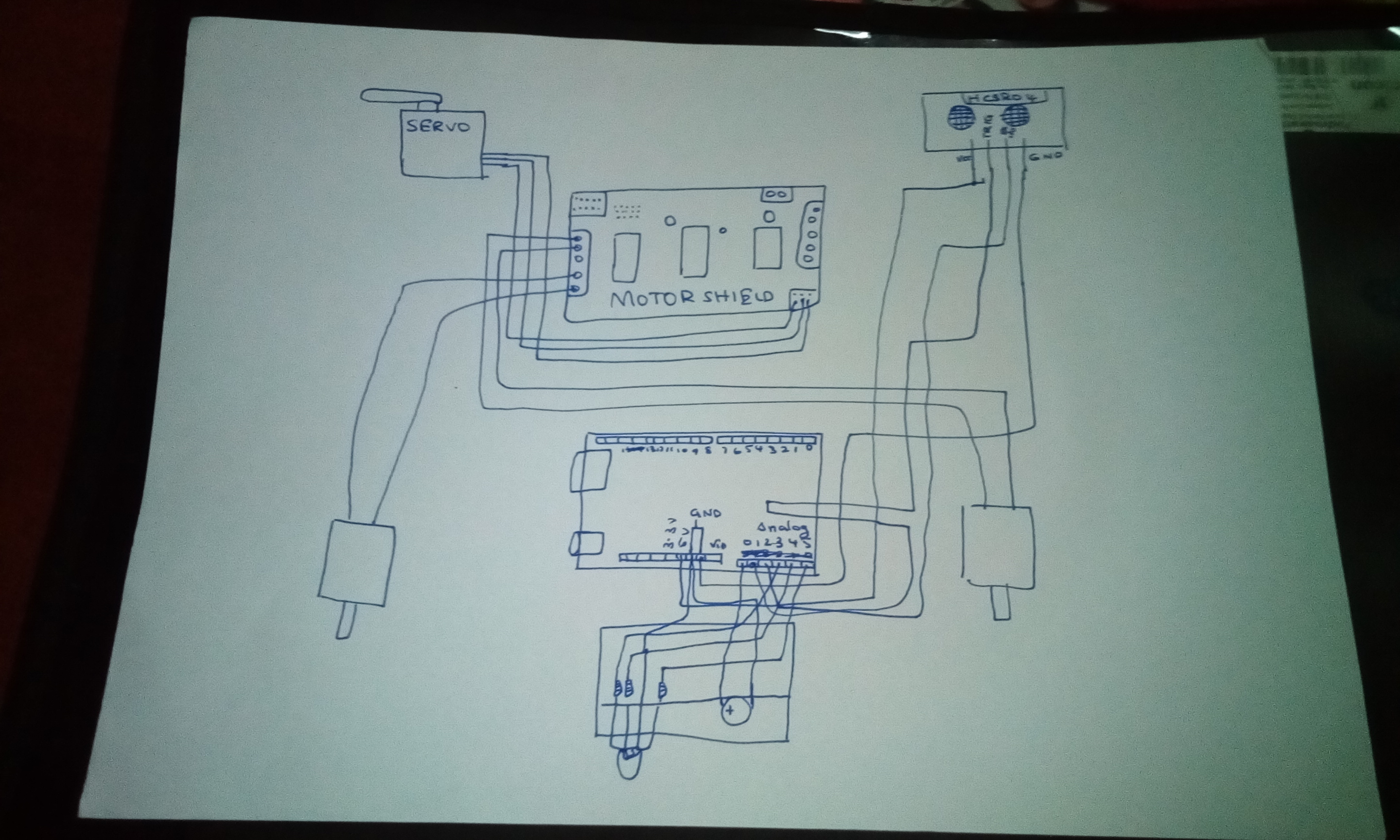
CIRCUIT
See the picture and connect the following
CIRCUIT
Comments
Only logged in users can leave comments