Devices & Components
Dual H-Bridge motor drivers L293D
RGB Diffused Common Cathode
Arduino Pro Mini 328 - 5V/16MHz
General Purpose Transistor NPN
Linear Regulator with Adjustable Output
Project description
Code
Microscope
arduino
Two buttons comand "Focus" of the microscope. 1 button changes color and 1 changes brightness of the light for the object. Stepper motor driver is connected to pins 7 and 8; RGB LEDs connected to pins 11, 10, 9; LED comand buttons are connected to pins 2 and 3; and stepper motor comand buttons are connected to pins 4 and 5
1#include <Stepper.h> 2 3#define motorSteps 100 // change this depending on the number of steps 4 // per revolution of your motor 5#define motorPin1 7 6#define motorPin2 8 7 8// define pins for RGB light and pins for buttons for control RGB and focus 9 10int data[7][9] = { 11 {255,255,160,190,190,80,90,90,34}, 12 {255,0,0,80,0,0,30,0,0}, 13 {0,255,0,0,100,0,0,50,0}, 14 {0,100,255,0,0,255,0,0,170}, 15 {255,153,0,160,100,0,100,70,0}, 16 {255,0,200,160,0,100,100,0,35}, 17 {0,0,0,0,0,0,0,0,0} 18}; 19int redpin = 11; //select the pin for the red LED 20int greenpin = 10; // select the pin for the green LED 21int bluepin = 9;// select the pin for the blue LED 22int i=0; 23int j=0; 24int col=2;// select the pin for change color 25int brg=3;// select the pin for change brightness 26int focpl=4;// select the pin for focus plus 27int focmin=5;// select the pin for focus minus 28 29// initialize of the Stepper library: 30Stepper myStepper(motorSteps, motorPin1,motorPin2); 31 32void setup() { 33 // set the motor speed at 10 RPMS: 34 myStepper.setSpeed(10); 35 36 pinMode(redpin, OUTPUT); pinMode(bluepin, OUTPUT); pinMode(greenpin, OUTPUT); 37 pinMode(col, INPUT); pinMode(brg, INPUT); 38 pinMode(focpl,INPUT); pinMode(focmin,INPUT); 39} 40 41void loop() { 42 if (((digitalRead(col)) == 1) or ((digitalRead(brg)) == 1)){ 43led();} // read buttons and if there is pressed - send to LED function 44 if (((digitalRead(focpl)) == 1) or ((digitalRead(focmin)) == 1)){ 45focus();} // read buttons and if there is pressed - send to stepper motor function 46 } 47 48// LED function 49void led(){ 50 analogWrite(redpin, data[i][j]); analogWrite(greenpin, data[i][(j+1)]); analogWrite(bluepin, data[i][(j+2)]); 51 delay (600); 52 i=(i+digitalRead(col)); 53 j=(j+(3*digitalRead(brg))); 54 delay (20); 55 if(i>=7){i=0;} 56 if(j>=9){j=0;} 57 } 58 59// Focus function 60void focus(){ 61 // Step forward 1 step: 62 if (digitalRead(focpl) == 1) { 63 myStepper.step(1);} 64 delay(100); 65 66 // Step backward 1 step: 67 if (digitalRead(focmin) == 1) { 68 myStepper.step(-1);} 69 delay(100); 70}
Microscope
arduino
Two buttons comand "Focus" of the microscope. 1 button changes color and 1 changes brightness of the light for the object. Stepper motor driver is connected to pins 7 and 8; RGB LEDs connected to pins 11, 10, 9; LED comand buttons are connected to pins 2 and 3; and stepper motor comand buttons are connected to pins 4 and 5
1#include <Stepper.h> 2 3#define motorSteps 100 // change this depending on the number of steps 4 // per revolution of your motor 5#define motorPin1 7 6#define motorPin2 8 7 8// define pins for RGB light and pins for buttons for control RGB and focus 9 10int data[7][9] = { 11 {255,255,160,190,190,80,90,90,34}, 12 {255,0,0,80,0,0,30,0,0}, 13 {0,255,0,0,100,0,0,50,0}, 14 {0,100,255,0,0,255,0,0,170}, 15 {255,153,0,160,100,0,100,70,0}, 16 {255,0,200,160,0,100,100,0,35}, 17 {0,0,0,0,0,0,0,0,0} 18}; 19int redpin = 11; //select the pin for the red LED 20int greenpin = 10; // select the pin for the green LED 21int bluepin = 9;// select the pin for the blue LED 22int i=0; 23int j=0; 24int col=2;// select the pin for change color 25int brg=3;// select the pin for change brightness 26int focpl=4;// select the pin for focus plus 27int focmin=5;// select the pin for focus minus 28 29// initialize of the Stepper library: 30Stepper myStepper(motorSteps, motorPin1,motorPin2); 31 32void setup() { 33 // set the motor speed at 10 RPMS: 34 myStepper.setSpeed(10); 35 36 pinMode(redpin, OUTPUT); pinMode(bluepin, OUTPUT); pinMode(greenpin, OUTPUT); 37 pinMode(col, INPUT); pinMode(brg, INPUT); 38 pinMode(focpl,INPUT); pinMode(focmin,INPUT); 39} 40 41void loop() { 42 if (((digitalRead(col)) == 1) or ((digitalRead(brg)) == 1)){ 43led();} // read buttons and if there is pressed - send to LED function 44 if (((digitalRead(focpl)) == 1) or ((digitalRead(focmin)) == 1)){ 45focus();} // read buttons and if there is pressed - send to stepper motor function 46 } 47 48// LED function 49void led(){ 50 analogWrite(redpin, data[i][j]); analogWrite(greenpin, data[i][(j+1)]); analogWrite(bluepin, data[i][(j+2)]); 51 delay (600); 52 i=(i+digitalRead(col)); 53 j=(j+(3*digitalRead(brg))); 54 delay (20); 55 if(i>=7){i=0;} 56 if(j>=9){j=0;} 57 } 58 59// Focus function 60void focus(){ 61 // Step forward 1 step: 62 if (digitalRead(focpl) == 1) { 63 myStepper.step(1);} 64 delay(100); 65 66 // Step backward 1 step: 67 if (digitalRead(focmin) == 1) { 68 myStepper.step(-1);} 69 delay(100); 70}
Downloadable files
Breadboard scheme
Breadboard scheme

Documentation
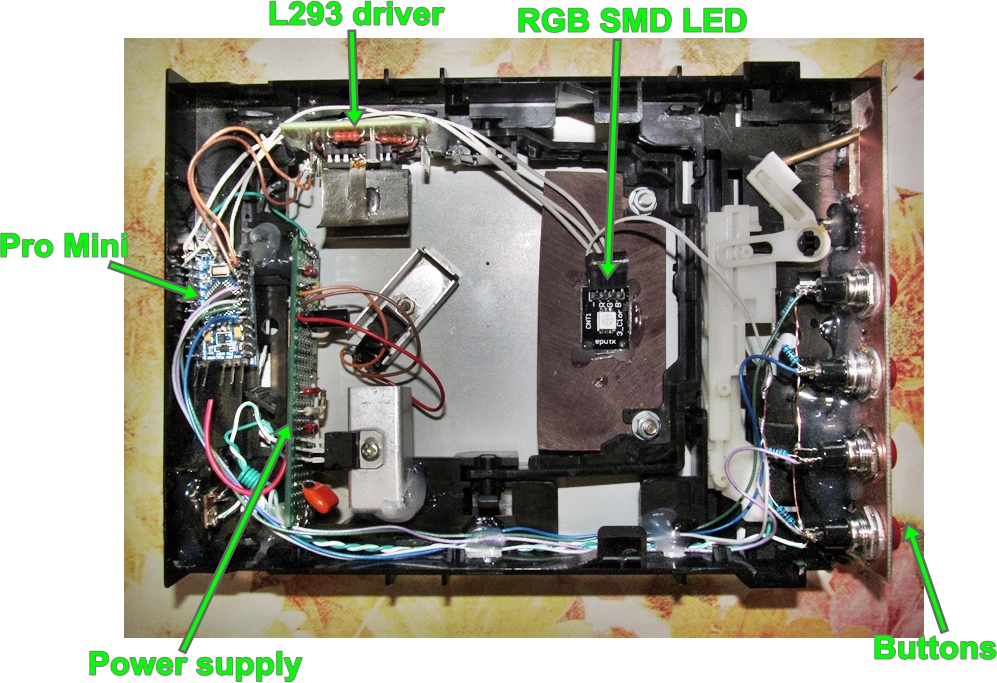
Inside the box
Inside the box
Power stabilizer
Power stabilizer
Inside the box
Inside the box

Power stabilizer
Power stabilizer
Comments
Only logged in users can leave comments