Distanceatron 3000
Using an ultrasonic sensor and LCD we made a digital tape measure.
Components and supplies
1
Alphanumeric LCD, 16 x 2
1
Jumper wires (generic)
1
9V battery (generic)
1
Arduino UNO
1
Rotary potentiometer (generic)
1
9V Battery Clip
1
Ultrasonic Sensor - HC-SR04 (Generic)
1
Slide Switch
Project description
Code
untitled
arduino
1 2#include <LiquidCrystal.h> 3 4LiquidCrystal lcd(1, 2, 4, 5, 6, 7); // Creates an LCD object. Parameters: (rs, enable, d4, d5, d6, d7) 5 6const int trigPin = 9; 7const int echoPin = 10; 8long duration; 9int distanceCm, distanceInch; 10 11void setup() { 12 13lcd.begin(16,2); // Initializes the interface to the LCD screen, and specifies the dimensions (width and height) of the display 14pinMode(trigPin, OUTPUT); 15pinMode(echoPin, INPUT); 16 17} 18 19void loop() { 20 21digitalWrite(trigPin, LOW); 22delayMicroseconds(2); 23digitalWrite(trigPin, HIGH); 24delayMicroseconds(10); 25digitalWrite(trigPin, LOW); 26 27duration = pulseIn(echoPin, HIGH); 28distanceCm= duration*0.034/2; 29distanceInch = duration*0.0133/2; 30 31lcd.setCursor(0,0); // Sets the location at which subsequent text written to the LCD will be displayed 32lcd.print("Distance: "); // Prints string "Distance" on the LCD 33lcd.print(distanceCm); // Prints the distance value from the sensor 34lcd.print(" cm"); 35delay(10); 36lcd.setCursor(0,1); 37lcd.print("Distance: "); 38lcd.print(distanceInch); 39lcd.print("inch"); 40delay(10); 41 42}
untitled
arduino
1 2#include <LiquidCrystal.h> 3 4LiquidCrystal lcd(1, 2, 4, 5, 6, 7); // Creates an LCD object. Parameters: (rs, enable, d4, d5, d6, d7) 5 6const int trigPin = 9; 7const int echoPin = 10; 8long duration; 9int distanceCm, distanceInch; 10 11void setup() { 12 13lcd.begin(16,2); // Initializes the interface to the LCD screen, and specifies the dimensions (width and height) of the display 14pinMode(trigPin, OUTPUT); 15pinMode(echoPin, INPUT); 16 17} 18 19void loop() { 20 21digitalWrite(trigPin, LOW); 22delayMicroseconds(2); 23digitalWrite(trigPin, HIGH); 24delayMicroseconds(10); 25digitalWrite(trigPin, LOW); 26 27duration = pulseIn(echoPin, HIGH); 28distanceCm= duration*0.034/2; 29distanceInch = duration*0.0133/2; 30 31lcd.setCursor(0,0); // Sets the location at which subsequent text written to the LCD will be displayed 32lcd.print("Distance: "); // Prints string "Distance" on the LCD 33lcd.print(distanceCm); // Prints the distance value from the sensor 34lcd.print(" cm"); 35delay(10); 36lcd.setCursor(0,1); 37lcd.print("Distance: "); 38lcd.print(distanceInch); 39lcd.print("inch"); 40delay(10); 41 42}
untitled
arduino
1 2#include <LiquidCrystal.h> 3 4LiquidCrystal lcd(1, 2, 4, 5, 5 6, 7); // Creates an LCD object. Parameters: (rs, enable, d4, d5, d6, d7) 6 7const 8 int trigPin = 9; 9const int echoPin = 10; 10long duration; 11int distanceCm, 12 distanceInch; 13 14void setup() { 15 16lcd.begin(16,2); // Initializes the 17 interface to the LCD screen, and specifies the dimensions (width and height) of 18 the display 19pinMode(trigPin, OUTPUT); 20pinMode(echoPin, INPUT); 21 22} 23 24 25void loop() { 26 27digitalWrite(trigPin, LOW); 28delayMicroseconds(2); 29digitalWrite(trigPin, 30 HIGH); 31delayMicroseconds(10); 32digitalWrite(trigPin, LOW); 33 34duration 35 = pulseIn(echoPin, HIGH); 36distanceCm= duration*0.034/2; 37distanceInch = duration*0.0133/2; 38 39 40lcd.setCursor(0,0); // Sets the location at which subsequent text written to 41 the LCD will be displayed 42lcd.print("Distance: "); // Prints string "Distance" 43 on the LCD 44lcd.print(distanceCm); // Prints the distance value from the sensor 45lcd.print(" 46 cm"); 47delay(10); 48lcd.setCursor(0,1); 49lcd.print("Distance: "); 50lcd.print(distanceInch); 51lcd.print("inch"); 52delay(10); 53 54 55}
Downloadable files
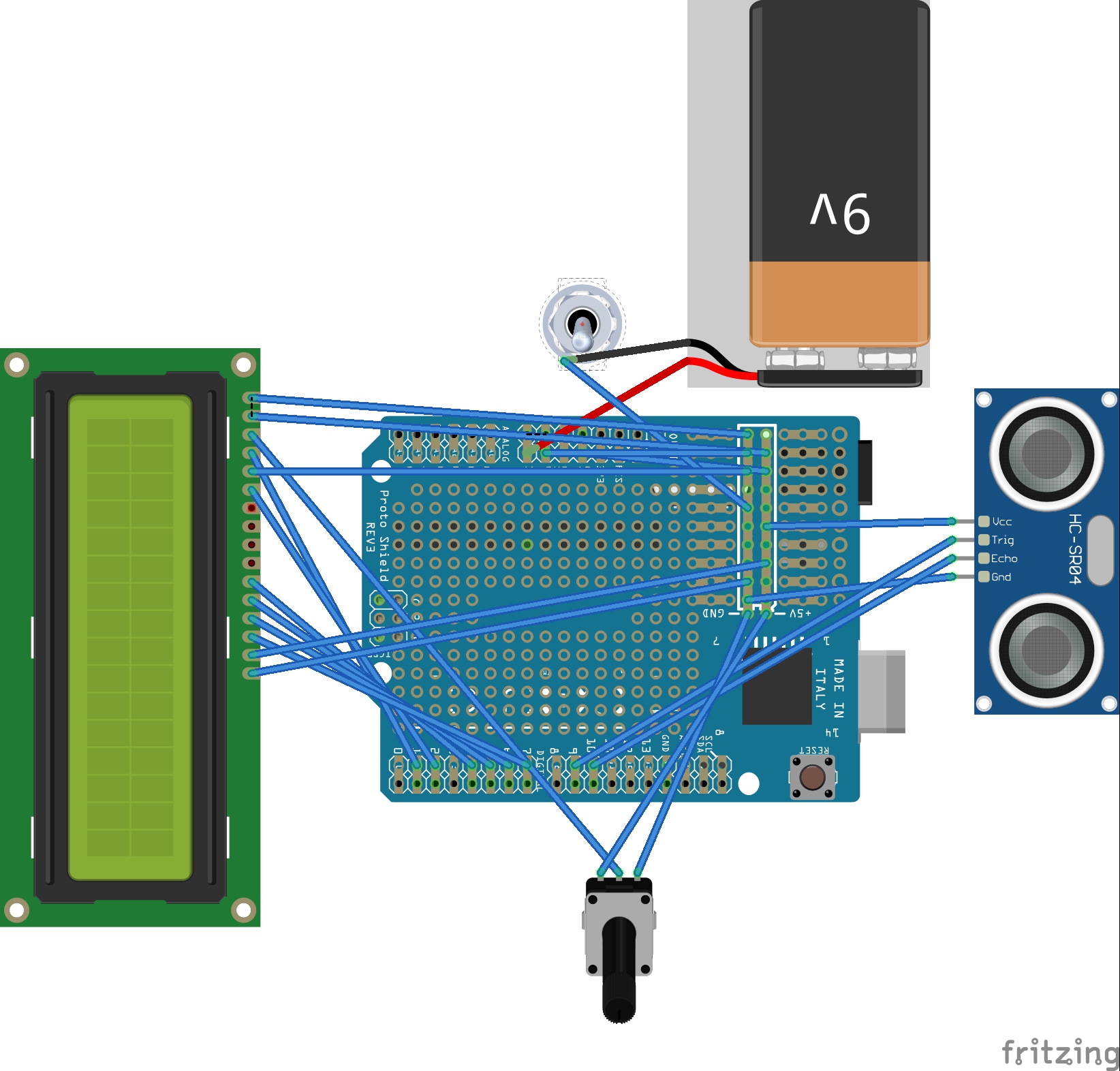
ultrasonic_lcd_wS6azwGN8M.jpg
Comments
Only logged in users can leave comments