Modulino programmable keypad
Create a programmable keypad using different Arduino Modulino nodes. Control your mouse and keyboard with ease!
Devices & Components
1
Arduino® Nano R4
1
Modulino™ Joystick
1
Arduino® UNO R4 WiFi
1
Modulino™ Vibro
1
Modulino™ Knob
1
Modulino™ Buttons
Software & Tools

Arduino IDE
Project description
Code
Main sketch
c
Main .ino sketch for the project
1/*
2  Modulino HID Controller with Optional UNO R4 WiFi LED Matrix
3  ------------------------------------------------------------
4  - Buttons A/B/C:   Copy / Cut / Paste using OS-appropriate modifier  // NEW
5  - Knob release:      Mute (Consumer control)
6  - Joystick press:  Hold to drag-select (Mouse left down while held)
7  - Joystick release:End drag (Mouse left up)
8  - Knob rotate:     Volume up/down (Consumer control)
9  - Joystick move:   Mouse move
10  - Optional LED Matrix icons when actions trigger
11
12  Change your OS here:
13    USER_OS = OS_WINDOWS | OS_MAC | OS_LINUX
14*/
15
16#include <Arduino_Modulino.h>
17#include <Mouse.h>
18#include <Keyboard.h>
19#include "ConsumerKeyboard.h"
20#include "Button2.h"
21
22#if defined(ARDUINO_UNOR4_WIFI)
23  #include "Arduino_LED_Matrix.h"
24  #include "drawings.h"     // declares: mouse[], copy[], cut[], paste[], volume[]
25  ArduinoLEDMatrix matrix;
26#endif
27
28// --------------------------- OS selection (user-configurable) ---------------------------
29// Set this to match your host OS.
30enum UserOS : uint8_t { OS_WINDOWS, OS_MAC, OS_LINUX };
31static const UserOS USER_OS = OS_WINDOWS;  // <-- CHANGE THIS if needed
32
33// Returns the correct modifier key for copy/cut/paste based on OS.
34// Windows/Linux → CTRL, macOS → GUI (Command).
35static inline uint8_t keyMod() {
36  switch (USER_OS) {
37    case OS_MAC:     return KEY_LEFT_GUI;   // Cmd on macOS
38    case OS_WINDOWS: // fallthrough
39    case OS_LINUX:   // Ctrl on Windows/Linux
40    default:         return KEY_LEFT_CTRL;
41  }
42}
43
44// --------------------------- Hardware instances ---------------------------
45Button2 buttonA, buttonB, buttonC, knobButton, joystickButton;
46ModulinoJoystick joystick;
47ModulinoKnob     knob;
48ModulinoButtons  modulinoButtons;
49ModulinoVibro    vibro;
50
51// --------------------------- Tunables ---------------------------
52static const int8_t  MOUSE_SENSITIVITY = 8;     // Lower = faster pointer
53static const int8_t  JOYSTICK_DEADZONE = 5;     // Ignore small jitters
54static const uint16_t MATRIX_MIN_INTERVAL_MS = 80;
55static const uint16_t VIBRO_MS = 50;
56
57// Debounce/lockout for knob press vs rotation
58static const uint16_t KNOB_ROTATE_LOCKOUT_MS = 120; // rotation ignored for this long after RELEASE
59
60// --------------------------- State ---------------------------
61int  knobValue = 0, lastKnobValue = 0;
62int8_t verticalValue = 0, horizontalValue = 0;
63
64static bool     knobIsHeld = false;              // true while knob push-switch is held
65static uint32_t knobRotateLockoutUntilMs = 0;    // time until which rotation is ignored
66
67#if defined(ARDUINO_UNOR4_WIFI)
68  uint32_t lastMatrixMs = 0;
69  int lastIconShown = 0;
70#endif
71
72// --------------------------- Helpers ---------------------------
73static inline void vibroTap(uint16_t ms = VIBRO_MS) {
74  vibro.on(ms);
75  vibro.off();
76}
77
78static inline void consumerTap(uint16_t keycode) {
79  ConsumerKeyboard.press(keycode);
80  ConsumerKeyboard.release();
81}
82
83#if defined(ARDUINO_UNOR4_WIFI)
84  void drawMatrixThrottled(int iconId) {
85    uint32_t now = millis();
86    if (iconId == lastIconShown && (now - lastMatrixMs) < MATRIX_MIN_INTERVAL_MS) return;
87    lastIconShown = iconId;
88    lastMatrixMs  = now;
89
90    switch (iconId) {
91      case 1: matrix.loadFrame(volume); break;
92      case 2: matrix.loadFrame(mouse);  break;
93      case 3: matrix.loadFrame(copy);   break;
94      case 4: matrix.loadFrame(cut);    break;
95      case 5: matrix.loadFrame(paste);  break;
96      default: break;
97    }
98  }
99  #define DRAW_ICON(id) drawMatrixThrottled(id)
100#else
101  #define DRAW_ICON(id) do { (void)(id); } while (0)
102#endif
103
104#if defined(ARDUINO_NANO_R4)
105  void drawLed(int ledId){
106    switch (ledId) {
107      case 1:
108        digitalWrite(LEDR, LOW);
109        digitalWrite(LEDG, HIGH);
110        digitalWrite(LEDB, HIGH);
111      break;
112      case 2:
113        digitalWrite(LEDR, HIGH);
114        digitalWrite(LEDG, LOW);
115        digitalWrite(LEDB, HIGH);
116      break;
117      case 3:
118        digitalWrite(LEDR, HIGH);
119        digitalWrite(LEDG, HIGH);
120        digitalWrite(LEDB, LOW);
121      break;
122    default: break;
123    }
124  }
125  #define DRAW_LED(id) drawLed(id)
126#else
127  #define DRAW_LED(id) do { (void)(id); } while (0)
128#endif
129
130// --------------------------- Button2 -> state adapters ---------------------------
131uint8_t button0StateHandler()  { modulinoButtons.update(); return modulinoButtons.isPressed(0) ? LOW : HIGH; }
132uint8_t button1StateHandler()  { modulinoButtons.update(); return modulinoButtons.isPressed(1) ? LOW : HIGH; }
133uint8_t button2StateHandler()  { modulinoButtons.update(); return modulinoButtons.isPressed(2) ? LOW : HIGH; }
134uint8_t knobStateHandler()     { return knob.isPressed() ? LOW : HIGH; }
135uint8_t joystickStateHandler() { return joystick.isPressed() ? LOW : HIGH; }
136
137// --------------------------- Unified click handler (A/B/C/Knob press) ---------------------------
138void handler(Button2& btn) {
139  const uint8_t id = btn.getID();
140
141  switch (id) {
142    case 0: // Button A -> Copy
143      DRAW_ICON(3);
144      DRAW_LED(2);
145      Keyboard.press(keyMod());
146      Keyboard.press('c');
147      Keyboard.releaseAll();
148      vibroTap();
149      break;
150
151    case 1: // Button B -> Cut
152      DRAW_ICON(4);
153      DRAW_LED(2);
154      Keyboard.press(keyMod());
155      Keyboard.press('x');
156      Keyboard.releaseAll();
157      vibroTap();
158      break;
159
160    case 2: // Button C -> Paste
161      DRAW_ICON(5);
162      DRAW_LED(2);
163      Keyboard.press(keyMod());
164      Keyboard.press('v');
165      Keyboard.releaseAll();
166      vibroTap();
167      break;
168
169    default:
170      // knob and joystick are handled with pressed/released handlers
171      break;
172  }
173}
174
175// --------------------------- Knob handlers (release-to-mute) ---------------------------
176void knobPressed(Button2& /*btn*/) {
177  // We only mark held on press; do NOT mute here.
178  knobIsHeld = true;
179
180  // While held, we'll ignore rotation and keep lastKnobValue in sync in loop().
181}
182
183void knobReleased(Button2& /*btn*/) {
184  knobIsHeld = false;
185
186  // Short post-release lockout to ignore any residual rotation when finger slips
187  knobRotateLockoutUntilMs = millis() + KNOB_ROTATE_LOCKOUT_MS;
188
189  // Perform the mute action on release
190  consumerTap(KEY_MUTE);
191  vibroTap();
192  DRAW_ICON(1);
193}
194
195// --------------------------- Joystick drag handlers ---------------------------
196void joystickPressed(Button2& /*btn*/) {
197  // Start drag: hold left mouse button
198  Mouse.press(MOUSE_LEFT);
199  DRAW_ICON(2);
200  DRAW_LED(3);
201}
202
203void joystickReleased(Button2& /*btn*/) {
204  // End drag: release left mouse button
205  Mouse.release(MOUSE_LEFT);
206  DRAW_ICON(2);
207  DRAW_LED(3);
208}
209
210// --------------------------- Setup ---------------------------
211void setup() {
212  Serial.begin(9600);
213  Modulino.begin();
214
215  vibro.begin();
216  knob.begin();
217  joystick.begin();
218  modulinoButtons.begin();
219  Mouse.begin();
220  Keyboard.begin();
221
222  lastKnobValue = knob.get();
223
224  const uint16_t DEBOUNCE_MS = 35;
225
226  buttonA.setDebounceTime(DEBOUNCE_MS);
227  buttonA.setButtonStateFunction(button0StateHandler);
228  buttonA.setClickHandler(handler);
229  buttonA.begin(BTN_VIRTUAL_PIN);
230
231  buttonB.setDebounceTime(DEBOUNCE_MS);
232  buttonB.setButtonStateFunction(button1StateHandler);
233  buttonB.setClickHandler(handler);
234  buttonB.begin(BTN_VIRTUAL_PIN);
235
236  buttonC.setDebounceTime(DEBOUNCE_MS);
237  buttonC.setButtonStateFunction(button2StateHandler);
238  buttonC.setClickHandler(handler);
239  buttonC.begin(BTN_VIRTUAL_PIN);
240
241  // Knob uses pressed/released to implement release-to-mute
242  knobButton.setDebounceTime(DEBOUNCE_MS);
243  knobButton.setButtonStateFunction(knobStateHandler);
244  knobButton.setPressedHandler(knobPressed);
245  knobButton.setReleasedHandler(knobReleased);
246  knobButton.begin(BTN_VIRTUAL_PIN);
247
248  joystickButton.setDebounceTime(DEBOUNCE_MS);
249  joystickButton.setButtonStateFunction(joystickStateHandler);
250  // Drag behavior:
251  joystickButton.setPressedHandler(joystickPressed);
252  joystickButton.setReleasedHandler(joystickReleased);
253  joystickButton.begin(BTN_VIRTUAL_PIN);
254
255  #if defined(ARDUINO_UNOR4_WIFI)
256    matrix.begin();
257  #endif
258
259  #if defined(ARDUINO_NANO_R4)
260    // Initialize LEDR, LEDG and LEDB as outputs
261    pinMode(LEDR, OUTPUT);
262    pinMode(LEDG, OUTPUT);
263    pinMode(LEDB, OUTPUT);
264
265    // Turn off all LEDs initially
266    digitalWrite(LEDR, HIGH);
267    digitalWrite(LEDG, HIGH);
268    digitalWrite(LEDB, HIGH);
269  #endif
270}
271
272// --------------------------- Main loop ---------------------------
273void loop() {
274  // Update input devices once per loop
275  joystick.update();
276  modulinoButtons.update();
277
278  // Service Button2 state machines
279  buttonA.loop();
280  buttonB.loop();
281  buttonC.loop();
282  knobButton.loop();
283  joystickButton.loop();
284
285// ----- Knob rotation -> volume control -----
286  knobValue = knob.get();
287
288  // Compute whether lockout expired (>=0 means "past" the lockout moment)
289  bool lockoutExpired = (int32_t)(millis() - knobRotateLockoutUntilMs) >= 0;
290
291  // While held OR during post-release lockout, ignore rotation but keep baseline updated
292  if (knobIsHeld || !lockoutExpired) {
293    lastKnobValue = knobValue;  // keep baseline tight to avoid jumps after lockout
294  } else {
295    if (knobValue != lastKnobValue) {
296      if (knobValue > lastKnobValue) {
297        consumerTap(KEY_VOLUME_INCREMENT);
298      } else {
299        consumerTap(KEY_VOLUME_DECREMENT);
300      }
301      lastKnobValue = knobValue;
302      DRAW_ICON(1);
303    }
304  }
305
306  // ----- Joystick -> mouse move -----
307  int8_t x = joystick.getX();
308  int8_t y = joystick.getY();
309
310  if (abs(x) < JOYSTICK_DEADZONE) x = 0;
311  if (abs(y) < JOYSTICK_DEADZONE) y = 0;
312
313  if (x != 0 || y != 0) {
314    verticalValue   = - (y / MOUSE_SENSITIVITY);  // invert Y for natural feel
315    horizontalValue =   (x / MOUSE_SENSITIVITY);
316
317    if (verticalValue != 0 || horizontalValue != 0) {
318      Mouse.move(horizontalValue, verticalValue, 0);
319      DRAW_ICON(2);
320      DRAW_LED(3);
321    }
322  }
323}
drawings.h
cpp
.h file for matrix drawings for the UNO R4
1const uint32_t mouse[] = {
2	0x7e042,
3	0x4404704,
4	0xf8778038,
5};
6
7const uint32_t copy[] = {
8	0xfc78,
9	0x44844844,
10	0x844fc7c0,
11};
12
13const uint32_t cut[] = {
14	0x3183b,
15	0x81b00e03,
16	0xb82a83b8,
17};
18
19const uint32_t paste[] = {
20	0xfe08,
21	0x20823822,
22	0x822823fe,
23};
24
25const uint32_t volume[] = {
26	0x81a439,
27	0x278a78a7,
28	0x923a4188,
29};
Downloadable files
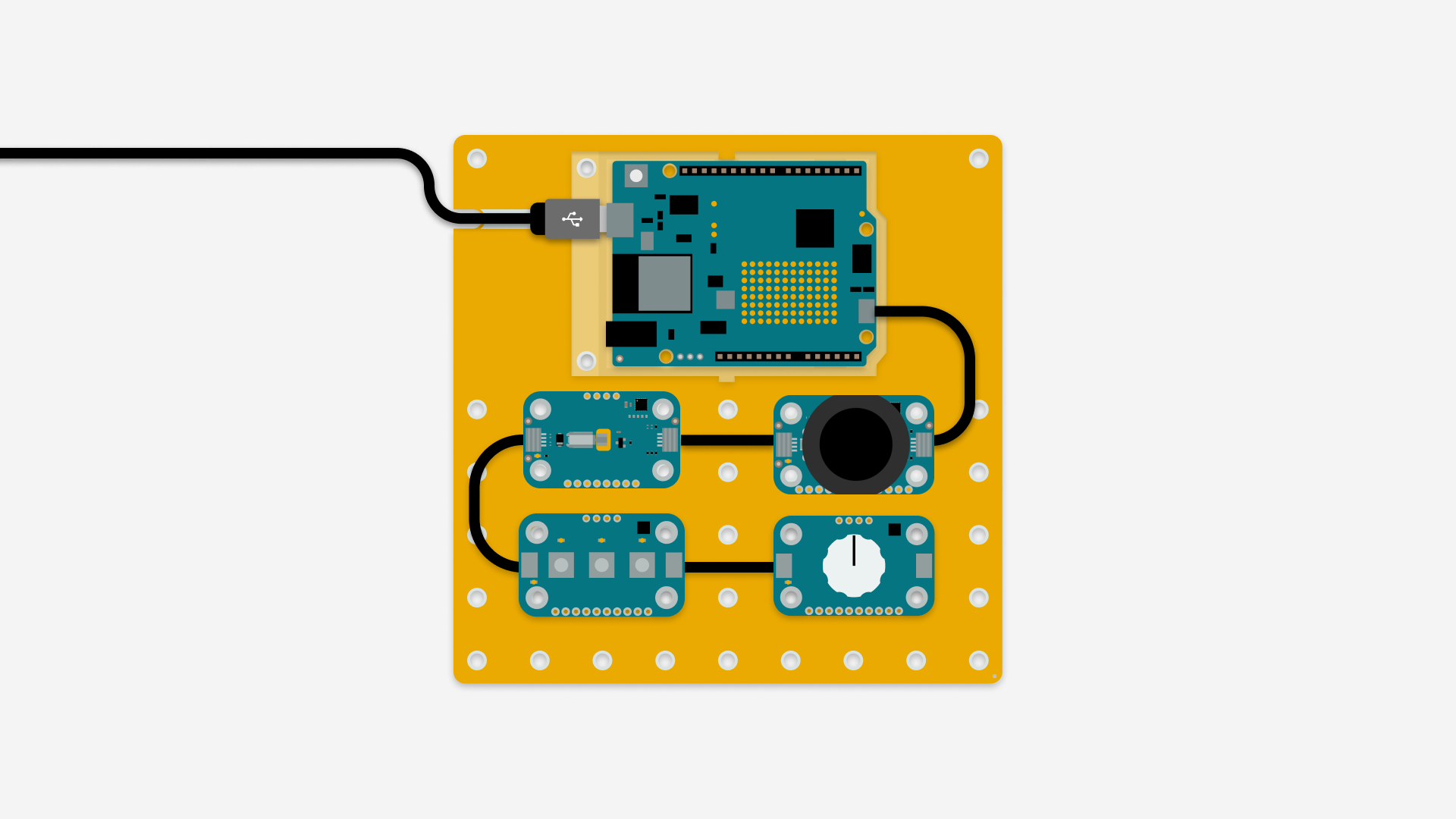
Schematic
All the modulinos connected
keypad-assembly.png
Comments
Only logged in users can leave comments