Environmental station
Build your own environment monitoring station! Monitoring temperature, humidity and light levels and displaying it with lights and colors.
Devices & Components
1
Modulino™ Pixels
1
Modulino™ Thermo
1
Modulino™ Light
1
Modulino™ Environmental Station Bundle UNO R4 WiFi
1
Modulino™ Buttons
Software & Tools

Arduino IDE
Project description
Code
Environmental Station
cpp
Main sketch for the project
1#include <Arduino_Modulino.h>
2
3#if defined(ARDUINO_UNOR4_WIFI)
4#include <ArduinoGraphics.h>
5#include <Arduino_LED_Matrix.h>
6
7ArduinoLEDMatrix matrix;
8
9// Global variables for non-blocking scroll
10unsigned long lastScrollTime = 0;
11int scrollOffset = 0;
12String displayText = "";
13#endif
14
15// Create object instances
16ModulinoThermo thermo;
17ModulinoPixels leds;
18ModulinoButtons buttons;
19ModulinoLight light;
20
21// For Latch relay integration
22// ModulinoLatchRelay relay;
23
24// Temperature variables. Change the min and max to whatever works best for your environment
25float temperature = 0;
26float minTemp = 10;
27float maxTemp = 30;
28
29// Humidity variables. Change the min and max to whatever works best for your environment
30float humidity = 0;
31float minHum = 10;
32float maxHum = 70;
33
34// Light sensor variables. Change the min and max to whatever works best for your environment
35int lux = 0;
36int minLux = 300;
37int maxLux = 1000;
38
39bool lightSwitch = true;
40
41// Mode: 0 = Temperature, 1 = Light, 2 = Humidity
42int displayMode = 0;
43
44void setup() {
45  Serial.begin(9600);
46  delay(1500);
47
48  Modulino.begin();
49  thermo.begin();
50  leds.begin();
51  buttons.begin();
52  light.begin();
53
54  // For Latch relay integration
55  // relay.begin();
56
57#if defined(ARDUINO_UNOR4_WIFI)
58  matrix.begin();
59#endif
60
61  // Turn on all three button LEDs
62  buttons.setLeds(true, true, true);
63}
64
65void loop() {
66  // Handle button input
67  checkButtonPress();
68
69  // Update sensor readings
70  temperature = thermo.getTemperature();
71  humidity = thermo.getHumidity();
72  light.update();
73  lux = light.getAL();
74
75  // LED control based on mode
76  if (lightSwitch) {
77    if (displayMode == 0) {
78      showTemperatureGradient(temperature, minTemp, maxTemp);
79    }
80    if (displayMode == 1) {
81      showLightGradient(lux, minLux, maxLux);
82      Serial.print("Light levels: ");
83      Serial.print(lux);
84      Serial.println(" lx");
85    }
86    if (displayMode == 2) {
87      showHumidityGradient(humidity, minHum, maxHum);
88    }
89  } else {
90    // Turn off LEDs
91    for (int i = 0; i < 8; i++) {
92      leds.set(i, WHITE, 0);
93    }
94    leds.show();
95  }
96
97#if defined(ARDUINO_UNOR4_WIFI)
98
99  if (displayMode == 0) {
100    displayText = "Temp: " + String(temperature, 1) + "°C";
101  }
102  if (displayMode == 1) {
103    displayText = "Light: " + String(lux) + " lx";
104  }
105  if (displayMode == 2) {
106    displayText = "Humid: " + String(humidity, 1) + "%";
107  }
108
109  updateMatrix();
110#endif
111
112  // For Latch relay integration
113  /*
114  if (temperature => maxTemp){
115    relay.set();
116  }
117  else{
118    relay.reset();
119  }
120  */
121}
122
123// Function to check Modulino buttons and switch display
124void checkButtonPress() {
125  if (buttons.update()) {
126    if (buttons.isPressed(0)) {  // Left button (A)
127      displayMode = 0;           // Temperature
128      Serial.println("Switched to Temperature mode");
129    }
130    if (buttons.isPressed(1)) {  // Right button (C)
131      displayMode = 1;           // Light
132      Serial.println("Switched to Light mode");
133    }
134    else if (buttons.isPressed(2)) {  // Right button (C)
135      displayMode = 2;                // Humidity
136      Serial.println("Switched to Humidity mode");
137    }
138  }
139}
140
141
142// Progressive gradient for Temperature: Green to Red
143void showTemperatureGradient(float value, float minVal, float maxVal) {
144  float clamped = constrain(value, minVal, maxVal);
145  float ratio = (clamped - minVal) / (maxVal - minVal);
146
147  // Determine how many LEDs to light based on ratio
148  int activeLEDs = round(ratio * 8);
149  if (activeLEDs < 1) activeLEDs = 1;
150
151  for (int i = 0; i < 8; i++) {
152    float posRatio = (float)i / 7.0; // LED position ratio (0 to 1)
153    // Interpolate between Green (0,255,0) and Red (255,0,0)
154    int r = posRatio * 255;
155    int g = (1 - posRatio) * 255;
156    int b = 0;
157
158    if (i < activeLEDs) {
159      leds.set(i, ModulinoColor(r, g, b), 15);
160    } else {
161      leds.set(i, WHITE, 0);
162    }
163  }
164  leds.show();
165}
166
167// Progressive gradient for Humidity: Purple to Blue
168void showHumidityGradient(float value, float minVal, float maxVal) {
169  float clamped = constrain(value, minVal, maxVal);
170  float ratio = (clamped - minVal) / (maxVal - minVal);
171
172  int activeLEDs = round(ratio * 8);
173  if (activeLEDs < 1) activeLEDs = 1;
174
175  for (int i = 0; i < 8; i++) {
176    float posRatio = (float)i / 7.0; // LED position ratio
177    // Interpolate between Purple (128,0,255) and Blue (0,0,255)
178    int r = 128 * (1 - posRatio); // fades from 128 to 0
179    int g = 0;                    // stays 0
180    int b = 255;                  // stays 255
181
182    if (i < activeLEDs) {
183      leds.set(i, ModulinoColor(r, g, b), 15);
184    } else {
185      leds.set(i, WHITE, 0);
186    }
187  }
188  leds.show();
189}
190
191// Progressive gradient for Light Level: Blue to White
192void showLightGradient(float value, float minVal, int maxVal) {
193  float clamped = constrain(value, minVal, maxVal);
194  float ratio = (clamped - minVal) / (maxVal - minVal);
195
196  int activeLEDs = round(ratio * 8);
197  if (activeLEDs < 1) activeLEDs = 1;
198
199  for (int i = 0; i < 8; i++) {
200    float posRatio = (float)i / 7.0; // LED position ratio
201    // Interpolate between Blue (0,0,255) and White (255,255,255)
202    int r = 255 * posRatio; // increases from 0 to 255
203    int g = 255 * posRatio; // increases from 0 to 255
204    int b = 255;            // stays 255
205
206    if (i < activeLEDs) {
207      leds.set(i, ModulinoColor(r, g, b), 15);
208    } else {
209      leds.set(i, WHITE, 0);
210    }
211  }
212  leds.show();
213}
214
215
216#if defined(ARDUINO_UNOR4_WIFI)
217void updateMatrix() {
218  unsigned long currentTime = millis();
219  if (currentTime - lastScrollTime >= 50) { // 50ms per step
220    lastScrollTime = currentTime;
221
222    matrix.beginDraw();
223    matrix.stroke(0xFFFFFFFF);
224    matrix.textFont(Font_5x7);
225
226    matrix.beginText(-scrollOffset, 1, 0xFFFFFF);
227    matrix.print(displayText);
228    matrix.endText();
229    matrix.endDraw();
230
231    scrollOffset++;
232    if (scrollOffset > (displayText.length() * 6)) { // Reset after full scroll
233      scrollOffset = 0;
234    }
235  }
236}
237#endif
Downloadable files
Schematic
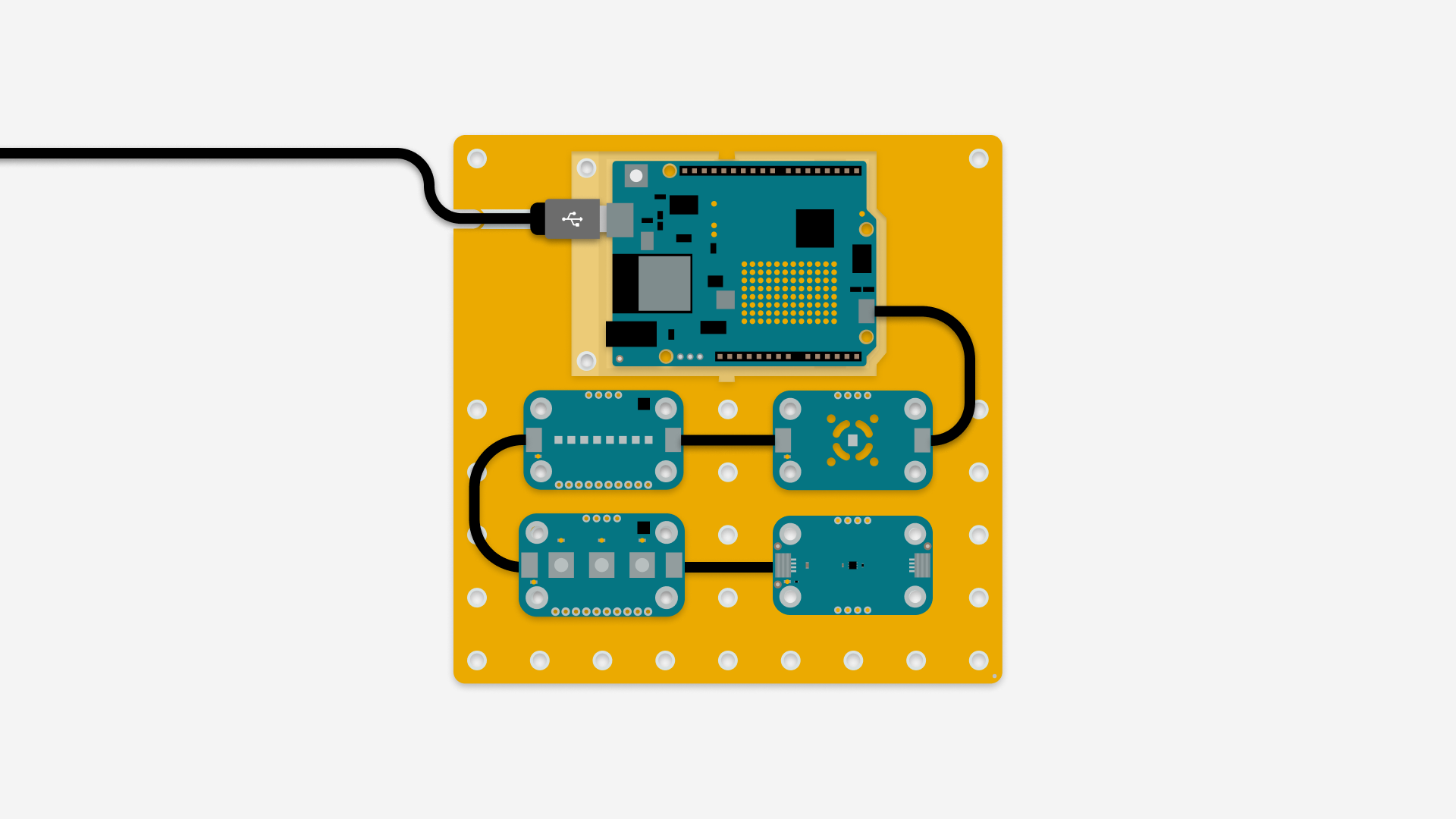
Connection schematic for project
kt-assembly (3).png
Comments
Only logged in users can leave comments