Internet of Things
Here I have different number of technologies work together under one roof.
Components and supplies

Arduino Uno Rev3

Arduino Mega 2560 Rev3
DHT11 Temperature & Humidity Sensor (4 pins)
Photo resistor
Ultrasonic Sensor - HC-SR04 (Generic)
Jumper wires (generic)
Relay Module
Rain Drop Sensor
Grove - Gas Sensor(MQ2)
HC-05 Bluetooth Module
SparkFun Soil Moisture Sensor (with Screw Terminals)
Project description
Code
Garduino , IOT , Emergency (Autonomous)
arduino
This is the code for the autonomous control of Gardening, Smart House and Emergency Protocol. This is the code for the Arduino Mega
1//#include <Wire.h>
2//#include <SPI.h>
3//#include <Adafruit_BMP280.h>
4
5#include  <dht.h>
6
7dht DHT;
8
9#define DHT11_PIN 46// temperature and humidity
10int  moisture_sensorpin = A0; //initialised sensorpin
11int led_pin = 12; //initialised  ledpin
12int waterpump_pin = 7; //initialised motorpin
13
14int ldrpin1 = A1;  //initialised ldrpin
15int ldrpin2 = A2; //Garden light intensity
16
17int green_led  = 13; //initialised emergency led pin
18
19int rainsensor_pin = A3; //initialised  rain detection
20
21int gassensor_pin = A15;  //initialised gas detection
22
23int  trig_pin = 52; //initialised ultrasonic protection
24int echo_pin = A5;
25int  buzzer_pin = 53;
26
27//#define BMP_SCL 21
28//#define BMP_SDA 20
29//
30//Adafruit_BMP280  bme;
31
32
33void setup() {
34  pinMode(moisture_sensorpin, INPUT); //Specifying  the declaration of pin to I/O
35  pinMode(waterpump_pin, OUTPUT);
36  pinMode(led_pin,  OUTPUT);
37  pinMode(ldrpin1, INPUT);
38  pinMode(ldrpin2, INPUT);
39  pinMode(green_led,  OUTPUT);
40
41  pinMode(trig_pin, OUTPUT);
42  pinMode(echo_pin, INPUT);
43  pinMode(buzzer_pin, OUTPUT);
44
45  pinMode(rainsensor_pin, INPUT);
46  pinMode(gassensor_pin,  INPUT);
47
48  Serial.begin(9600); //Serial communication speeds
49
50  digitalWrite(waterpump_pin,  HIGH);
51
52}
53
54void Garduino_Protocol() {
55
56    Serial.print("Welcome  to garduino the autonomous caretaker ");   // Serial statements to be printed on  the serial monitor for intro
57    Serial.println("of plants !!!");
58    Serial.println("");
59    delay(1000);
60    Serial.println("Today we are going to measure the following  qualities for the growth of plants :");
61    delay(1000);
62    Serial.println("Temperature");
63    delay(1000);
64    Serial.println("Humidity");
65    delay(1000);
66    Serial.println("Soil  moisture");
67    delay(1000);
68    Serial.println("Light intensity");
69    delay(1000);
70    Serial.println("Rain sensing");
71    delay(1000);
72    Serial.println("Gas sensing");
73    delay(1000);
74//    Serial.println("Atmospheric  Pressure");
75//    delay(1000);
76//    Serial.println("Altitude");
77//    delay(1000);
78    Serial.println("There is ultrasonic sensing aswell which  ensures that no one interfering with the growth of the plants");
79    Serial.println("");
80    delay(1000);
81
82    int lightvalue1 = analogRead(ldrpin1);
83    delay(1000);
84
85    int sensorvalue = analogRead(moisture_sensorpin);
86    int finalvalue = map(sensorvalue,550,0,0,100);  //mapping sensor value
87
88    int chk = DHT.read11(DHT11_PIN);
89
90    Serial.print("Temperature  : "); //printing temperature value
91    Serial.println(DHT.temperature);
92    delay(3000);
93
94
95    if (DHT.temperature > 35) {
96      Serial.println("There  is going to be a lot of sunshine, please take protective measures against it");
97      Serial.println("Irrigating the soil as a protective measure");
98      digitalWrite(waterpump_pin,  LOW);
99      delay(4000);
100      digitalWrite(waterpump_pin, HIGH);
101      Serial.println("");
102     }
103
104     else {
105      Serial.println("There is less temperature than  usual please be prepared");
106      Serial.println("I dont think watering the  soil would make a difference with the present climate");
107      Serial.println("");
108      delay(3000);
109     }
110
111
112    Serial.print("Humidity : "); //printing  humidity value
113    Serial.println(DHT.humidity);
114     delay(3000);
115
116
117    if (DHT.humidity > 87) {
118      Serial.println("There are high chance for  rain please carry your umbrella with you");
119      Serial.println("");
120      delay(3000);
121     }
122
123     else {
124      Serial.println("There  is less humidity take care of your skin");
125      Serial.println("");
126      delay(3000);
127     }
128
129    Serial.print("Moisture Content : "); //printing moisture value
130    Serial.print(finalvalue);
131    Serial.println("%");
132    delay(3000);
133
134
135    if (finalvalue > 10) {
136      Serial.println("The soil has good moisture  content, Good to go for the day");
137      digitalWrite(led_pin, LOW);
138      digitalWrite(waterpump_pin,  HIGH);
139      Serial.println("");
140      delay(3000);
141      }
142
143    else  {
144      Serial.println("The soil has very less moisture content, irrigation  process about to commence ");
145      digitalWrite(led_pin, HIGH);
146      digitalWrite(waterpump_pin,  LOW);
147      delay(10000);
148      digitalWrite(waterpump_pin, HIGH);
149      digitalWrite(led_pin,  LOW);
150      Serial.println("Irrigation process completed.");
151      Serial.println("");
152      delay(3000);
153      }
154
155    Serial.print("Light intensity : ");  //printing light intensity value
156    Serial.println(lightvalue1);
157    Serial.println("");
158    delay(3000);
159
160    if (lightvalue1 < 400) {
161      Serial.println("Please  turn on the lights to give the plants some photons for its growth");
162      Serial.println("");
163      delay(1000);
164    }
165
166    int rainvalue = analogRead(rainsensor_pin);
167    int final_rainvalue = map(rainvalue, 550, 0, 0, 100);
168    Serial.print("Rain  sensing value :");
169    Serial.print(final_rainvalue);
170    Serial.println("%");
171    Serial.println("");
172    delay(3000);
173
174    int gasvalue = analogRead(gassensor_pin);
175    Serial.print("Gas Value :");
176    Serial.println(gasvalue);
177    delay(1000);
178
179    if (gasvalue < 170) {
180      digitalWrite(buzzer_pin, LOW);
181      Serial.println("Nothing  to worry the air is perfectly normal and dosent contain any gas");
182      Serial.println("");
183      delay(1000);
184
185    }
186
187    else if (gasvalue > 500) {
188      Serial.println("There  is some diffence in the air please be careful");
189      Serial.println("");
190      digitalWrite(buzzer_pin, HIGH);
191      delay(10000);
192
193    }
194
195    digitalWrite(trig_pin, LOW);
196    delayMicroseconds(2);
197
198    digitalWrite(trig_pin,  HIGH);
199    delayMicroseconds(10);
200    digitalWrite(trig_pin, LOW);
201
202    long duration = pulseIn(echo_pin, HIGH);
203    long distance = duration*0.034/2;
204    Serial.print("Distance :");
205    Serial.print(distance);
206    Serial.println("");
207
208    if (distance < 60) {
209      digitalWrite(buzzer_pin, HIGH);
210      delay(10000);
211
212    }
213
214    else {
215
216      digitalWrite(buzzer_pin, LOW);
217
218    }
219
220//    if (!bme.begin()) {
221//    Serial.println("Could not find  a valid BMP280 sensor, check wiring!");
222//    while (1);
223//
224//    }
225//
226//    Serial.print("Pressure = ");
227//    Serial.print(bme.readPressure());
228//    Serial.println(" Pa");
229//    delay(3000);
230//    Serial.println("");
231//    Serial.println("");
232//
233//    Serial.print("Approx altitude = ");
234//    Serial.print(bme.readAltitude(1013.25));
235//    Serial.println(" m");
236//    delay(3000);
237//    Serial.println("");
238//    Serial.println("");
239//
240//    Serial.print("Temperature = ");
241//    Serial.print(bme.readTemperature());
242//    Serial.println(" *C");
243//    delay(3000);
244
245    Serial.println("");
246    Serial.println("");
247
248  }
249
250
251
252void Emergency_Protocol()  {
253
254  Serial.println("Welcome to Emergency_Protocol");
255  Serial.println("Here  we control the light intensity in a room and use it to trigger emergency lights.  As the light decreases the emergency lights turn on");
256  delay(3000);
257
258  int lightvalue2 = analogRead(ldrpin2);
259  delay(3000);
260
261  Serial.print("Light  Intensity : ");
262  Serial.println(lightvalue2);
263
264  if (lightvalue2 > 700)  {
265
266    Serial.println("The light intensity is perfect have a good day");
267    digitalWrite(green_led, LOW);
268
269  }
270
271  else if (lightvalue2 <  700){
272
273    Serial.println("The light intensity is low, switching on to emergency  lights");
274    digitalWrite(green_led, HIGH);
275
276  }
277  Serial.println("");
278  Serial.println("");
279}
280
281
282void loop() {
283
284  Garduino_Protocol();
285  Emergency_Protocol();
286
287
288}
289
290
291
292
Smart House
arduino
This is the code for Arduino Smart House based on IOT. This code is for the Arduino Uno
1int led_1 = 8;
2int led_2 = 9;
3int fan_pin1 = 10;
4int fan_pin2  = 11;
5int fan_pwm = 12;
6
7
8char bt ; //bluetooth communication
9
10void  setup() {
11  Serial.begin(9600);
12  Serial.println("Welcome to IOT_Protocol,  here we can control non smart devices smartly");
13  pinMode(led_1, OUTPUT); //led
14  pinMode(led_2, OUTPUT); //led
15  pinMode(fan_pin1, OUTPUT); //motor fan
16  pinMode(fan_pwm, OUTPUT);
17  pinMode(fan_pin2, OUTPUT);
18}
19
20void loop()  {
21  if (Serial.available() > 0) {
22    bt = Serial.read();
23
24
25    if (bt == '1') {
26      Serial.println("Turning on the Fan");
27      digitalWrite(fan_pin1,  HIGH);
28      analogWrite(fan_pwm, 255);
29    }
30
31    if (bt == '2') {
32      Serial.println("Turning off the Fan");
33      digitalWrite(fan_pin1, LOW);
34      analogWrite(fan_pwm, 0);
35    }
36
37    if (bt == '3') {
38      Serial.println("Turning  on Ligth control 1");
39      digitalWrite(led_1, HIGH);
40    }
41
42    if  (bt == '4') {
43      Serial.println("Turning off Light control 1");
44      digitalWrite(led_1,  LOW);
45    }
46
47    if (bt == '5') {
48      Serial.println("Turning on  the Light Control 2");
49      digitalWrite(led_2, HIGH);
50    }
51
52    if  (bt == '6') {
53      Serial.println("Turning off the Light Control 2");
54      digitalWrite(led_2, LOW);
55    }
56
57    }
58
59  }
60
Smart House
arduino
This is the code for Arduino Smart House based on IOT. This code is for the Arduino Uno
1int led_1 = 8;
2int led_2 = 9;
3int fan_pin1 = 10;
4int fan_pin2
5  = 11;
6int fan_pwm = 12;
7
8
9char bt ; //bluetooth communication
10
11void
12  setup() {
13  Serial.begin(9600);
14  Serial.println("Welcome to IOT_Protocol,
15  here we can control non smart devices smartly");
16  pinMode(led_1, OUTPUT); //led
17
18  pinMode(led_2, OUTPUT); //led
19  pinMode(fan_pin1, OUTPUT); //motor fan
20
21  pinMode(fan_pwm, OUTPUT);
22  pinMode(fan_pin2, OUTPUT);
23}
24
25void loop()
26  {
27  if (Serial.available() > 0) {
28    bt = Serial.read();
29
30
31
32    if (bt == '1') {
33      Serial.println("Turning on the Fan");
34      digitalWrite(fan_pin1,
35  HIGH);
36      analogWrite(fan_pwm, 255);
37    }
38
39    if (bt == '2') {
40
41      Serial.println("Turning off the Fan");
42      digitalWrite(fan_pin1, LOW);
43
44      analogWrite(fan_pwm, 0);
45    }
46
47    if (bt == '3') {
48      Serial.println("Turning
49  on Ligth control 1");
50      digitalWrite(led_1, HIGH);
51    }
52
53    if
54  (bt == '4') {
55      Serial.println("Turning off Light control 1");
56      digitalWrite(led_1,
57  LOW);
58    }
59
60    if (bt == '5') {
61      Serial.println("Turning on
62  the Light Control 2");
63      digitalWrite(led_2, HIGH);
64    }
65
66    if
67  (bt == '6') {
68      Serial.println("Turning off the Light Control 2");
69
70      digitalWrite(led_2, LOW);
71    }
72
73    }
74
75  }
76
Downloadable files
Emergency Protocol
Here is the schematics for Emergency protocol
Emergency Protocol
IOT HOUSE
This is a schematic on how my House Protocol Functions
IOT HOUSE
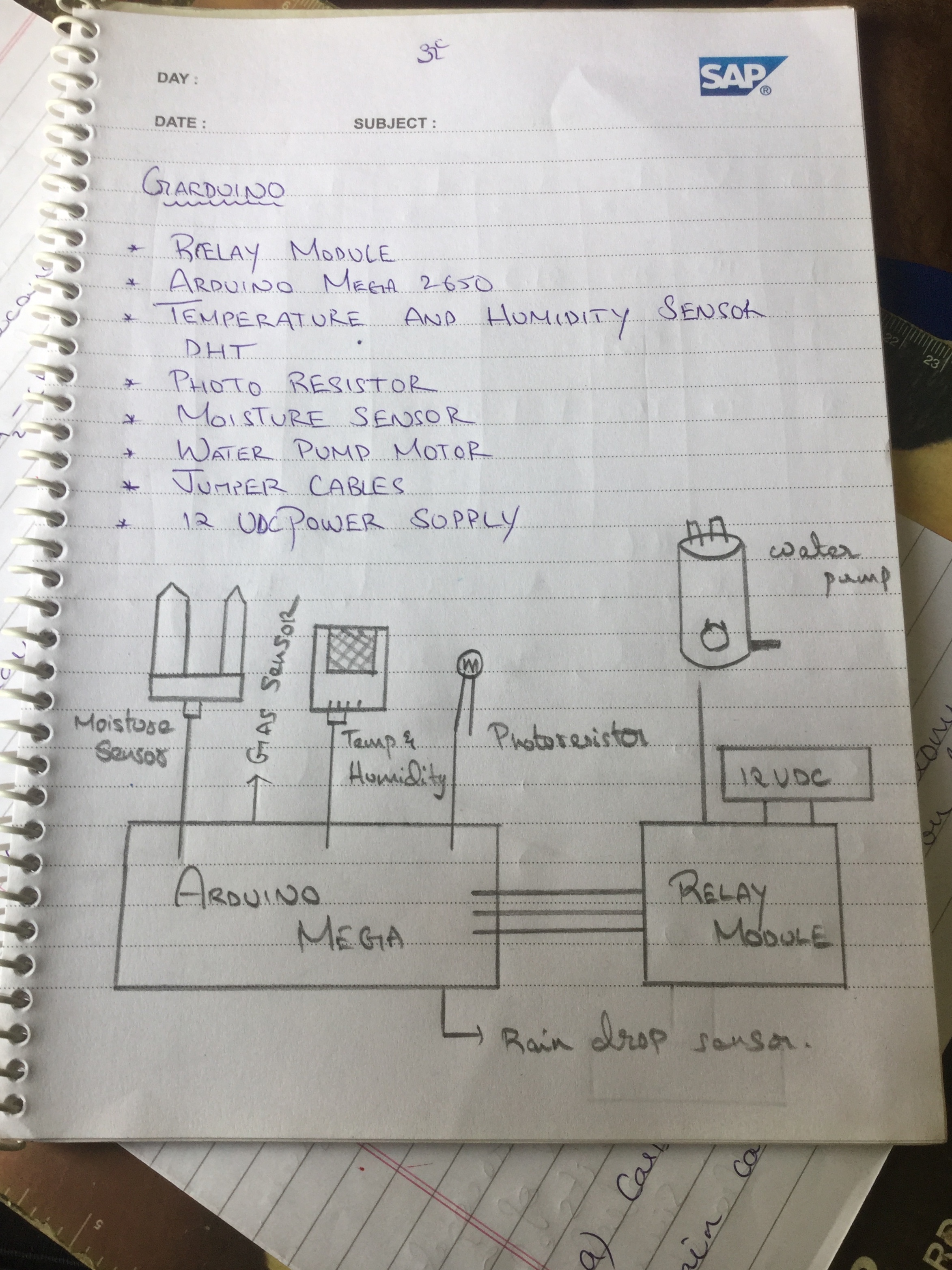
Garduino Circuit
This is how the circuit for Garduino looks
Garduino Circuit
IOT HOUSE
This is a schematic on how my House Protocol Functions
IOT HOUSE
Emergency Protocol
Here is the schematics for Emergency protocol
Emergency Protocol
Garduino Circuit
This is how the circuit for Garduino looks
Garduino Circuit
Comments
Only logged in users can leave comments