The Arduino Radar
This project basically functions by using an ultrasonic sensor, the Arduino and the Processing app.
Components and supplies
1
Ultrasonic Sensor - HC-SR04 (Generic)
1
Arduino UNO
Apps and platforms
1
Processing
1
Arduino IDE
Project description
Code
Arduino Code
csharp
1#include <Servo.h>
2/*
3  code for arduino bord ultrasonic radar system.
4*/
5
6Servo  leftRightServo;         // set a variable to map the servo
7int leftRightPos =  0;         // set a variable to store the servo position
8const int numReadings  = 10;   // set a variable for the number of readings to take
9int index = 0;                //  the index of the current reading
10int total = 0;                // the total of  all readings
11int average = 0;              // the average
12int echoPin = 6;              // the SRF05's echo pin
13int initPin = 7;              // the SRF05's  init pin
14unsigned long pulseTime = 0;  // variable for reading the pulse
15unsigned  long distance = 0;   // variable for storing distance
16
17/* setup the pins,  servo and serial port */
18void setup() {
19  leftRightServo.attach(9);
20  //  make the init pin an output:
21  pinMode(initPin, OUTPUT);
22  // make the echo  pin an input:
23  pinMode(echoPin, INPUT);
24  // initialize the serial port:
25  Serial.begin(9600);
26}
27
28/* begin rotating the servo and getting sensor  values */
29void loop() {
30  for (leftRightPos = 0; leftRightPos < 180; leftRightPos++)  { // going left to right.
31    leftRightServo.write(leftRightPos);
32    for  (index = 0; index <= numReadings; index++) {         // take x number of readings  from the sensor and average them
33      digitalWrite(initPin, LOW);
34      delayMicroseconds(50);
35      digitalWrite(initPin, HIGH);                           // send signal
36      delayMicroseconds(50);                                 // wait 50 microseconds  for it to return
37      digitalWrite(initPin, LOW);                            //  close signal
38      pulseTime = pulseIn(echoPin, HIGH);                    //  calculate time for signal to return
39      distance = pulseTime / 58;                             //  convert to centimetres
40      total = total + distance;                              //  update total
41      delay(10);
42    }
43    average = total / numReadings;                             // create average reading
44
45    if (index >= numReadings)  {                               // reset the counts when at the last item of the  array
46      index = 0;
47      total = 0;
48    }
49    Serial.print("X");                                         // print leading X to mark the following  value as degrees
50    Serial.print(leftRightPos);                                //  current servo position
51    Serial.print("V");                                         //  preceeding character to separate values
52    Serial.println(average);                                   //  average of sensor readings
53  }
54  /*
55    start going right to left after  we got to 180 degrees
56    same code as above
57  */
58  for (leftRightPos =  180; leftRightPos > 0; leftRightPos--) { // going right to left
59    leftRightServo.write(leftRightPos);
60    for (index = 0; index <= numReadings; index++) {
61      digitalWrite(initPin,  LOW);
62      delayMicroseconds(50);
63      digitalWrite(initPin, HIGH);
64      delayMicroseconds(50);
65      digitalWrite(initPin, LOW);
66      pulseTime  = pulseIn(echoPin, HIGH);
67      distance = pulseTime / 58;
68      total = total  + distance;
69      delay(10);
70    }
71    average = total / numReadings;
72    if (index >= numReadings)  {
73      index = 0;
74      total = 0;
75    }
76    Serial.print("X");
77    Serial.print(leftRightPos);
78    Serial.print("V");
79    Serial.println(average);
80  }
81}
82
Processing Code
python
1import processing.serial.*;     // import serial library
2Serial arduinoport;                  // declare a serial port
3float x, y;                       //  variable to store x and y co-ordinates for vertices
4int radius = 350;               //  set the radius of objects
5int w = 300;                    // set an arbitary  width value
6int degree = 0;                 // servo position in degrees
7int  value = 0;                  // value from sensor
8int motion = 0;                 //  value to store which way the servo is panning
9int[] newValue = new int[181];  // create an array to store each new sensor value for each servo position
10int[]  oldValue = new int[181];  // create an array to store the previous values.
11PFont  myFont;                   // setup fonts in Processing
12int radarDist = 0;              //  set value to configure Radar distance labels
13int firstRun = 0;               //  value to ignore triggering motion on the first 2 servo sweeps
14/* create background  and serial buffer */
15void setup(){
16// setup the background size, colour and  font.
17size(750, 450);
18background (0); // 0 = black
19myFont = createFont("verdana",  12);
20textFont(myFont);
21// setup the serial port and buffer
22arduinoport  = new Serial(this, Serial.list()[0], 9600);
23}
24/* draw the screen */
25void  draw(){
26fill(0);                              // set the following shapes to  be black
27noStroke();                           // set the following shapes to  have no outline
28ellipse(radius, radius, 750, 750);    // draw a circle with a  width/ height = 750 with its center position (x and y) set by the radius
29rectMode(CENTER);                     // set the following rectangle to be drawn around its center
30rect(350,402,800,100);                // draw rectangle (x, y, width, height)
31if (degree >= 179) {                  // if at the far right then set motion = 1/ true we're about to  go right to left
32motion = 1;                         // this changes the animation  to run right to left
33}
34if (degree <= 1) {                    // if servo at  0 degrees then we're about to go left to right
35motion = 0;                         //  this sets the animation to run left to right
36}
37/* setup the radar sweep */
38/*
39We use trigonmetry to create points around a circle.
40So the radius plus the  cosine of the servo position converted to radians
41Since radians 0 start at 90  degrees we add 180 to make it start from the left
42Adding +1 (i) each time through  the loops to move 1 degree matching the one degree of servo movement
43cos is for  the x left to right value and sin calculates the y value
44since its a circle we  plot our lines and vertices around the start point for everything will always be  the center.
45*/
46strokeWeight(7);                      // set the thickness  of the lines
47if (motion == 0) {                    // if going left to right
48for  (int i = 0; i <= 20; i++) {     // draw 20 lines with fading colour each 1 degree  further round than the last
49stroke(0, (10*i), 0);             // set the stroke  colour (Red, Green, Blue) base it on the the value of i
50line(radius, radius,  radius + cos(radians(degree+(180+i)))*w, radius + sin(radians(degree+(180+i)))*w);  // line(start x, start y, end x, end y)
51}
52} else {                              //  if going right to left
53for (int i = 20; i >= 0; i--) {     // draw 20 lines with  fading colour
54stroke(0,200-(10*i), 0);          // using standard RGB values,  each between 0 and 255
55line(radius, radius, radius + cos(radians(degree+(180+i)))*w,  radius + sin(radians(degree+(180+i)))*w);
56}
57}
58/* Setup the shapes made  from the sensor values */
59noStroke();                           // no outline
60/*  first sweep */
61fill(0,50,0);                         // set the fill colour of  the shape (Red, Green, Blue)
62beginShape();                         // start drawing  shape
63for (int i = 0; i < 180; i++) {     // for each degree in the array
64x  = radius + cos(radians((180+i)))*((oldValue[i])); // create x coordinate
65y =  radius + sin(radians((180+i)))*((oldValue[i])); // create y coordinate
66vertex(x,  y);                     // plot vertices
67}
68endShape();                           //  end shape
69/* second sweep */
70fill(0,110,0);
71beginShape();
72for (int i  = 0; i < 180; i++) {
73x = radius + cos(radians((180+i)))*(newValue[i]);
74y =  radius + sin(radians((180+i)))*(newValue[i]);
75vertex(x, y);
76}
77endShape();
78/*  average */
79fill(0,170,0);
80beginShape();
81for (int i = 0; i < 180; i++) {
82x  = radius + cos(radians((180+i)))*((newValue[i]+oldValue[i])/2); // create average
83y  = radius + sin(radians((180+i)))*((newValue[i]+oldValue[i])/2);
84vertex(x, y);
85}
86endShape();
87/*  if after first 2 sweeps, highlight motion with red circle*/
88if (firstRun >= 360)  {
89stroke(150,0,0);
90strokeWeight(1);
91noFill();
92for (int i = 0; i < 180;  i++) {
93if (oldValue[i] - newValue[i] > 35 || newValue[i] - oldValue[i] > 35)  {
94x = radius + cos(radians((180+i)))*(newValue[i]);
95y = radius + sin(radians((180+i)))*(newValue[i]);
96ellipse(x,  y, 10, 10);
97}
98}
99}
100/* set the radar distance rings and out put their  values, 50, 100, 150 etc.. */
101for (int i = 0; i <=6; i++){
102noFill();
103strokeWeight(1);
104stroke(0,  255-(30*i), 0);
105ellipse(radius, radius, (100*i), (100*i));
106fill(0, 100, 0);
107noStroke();
108text(Integer.toString(radarDist+50),  380, (305-radarDist), 50, 50);
109radarDist+=50;
110}
111radarDist = 0;
112/* draw  the grid lines on the radar every 30 degrees and write their values 180, 210, 240  etc.. */
113for (int i = 0; i <= 6; i++) {
114strokeWeight(1);
115stroke(0, 55,  0);
116line(radius, radius, radius + cos(radians(180+(30*i)))*w, radius + sin(radians(180+(30*i)))*w);
117fill(0,  55, 0);
118noStroke();
119if (180+(30*i) >= 300) {
120text(Integer.toString(180+(30*i)),  (radius+10) + cos(radians(180+(30*i)))*(w+10), (radius+10) + sin(radians(180+(30*i)))*(w+10),  25,50);
121} else {
122text(Integer.toString(180+(30*i)), radius + cos(radians(180+(30*i)))*w,  radius + sin(radians(180+(30*i)))*w, 60,40);
123}
124}
125/* Write information text  and values. */
126noStroke();
127fill(0);
128rect(350,402,800,100);
129fill(0, 100,  0);
130text("Degrees: "+Integer.toString(degree), 100, 380, 100, 50);         //  use Integet.toString to convert numeric to string as text() only outputs strings
131text("Distance:  "+Integer.toString(value), 100, 400, 100, 50);         // text(string, x, y, width,  height)
132text("Radar screen code ", 540, 380, 250, 50);
133fill(0);
134rect(70,60,150,100);
135fill(0,  100, 0);
136text("Screen Key:", 100, 50, 150, 50);
137fill(0,50,0);
138rect(30,53,10,10);
139text("First  sweep", 115, 70, 150, 50);
140fill(0,110,0);
141rect(30,73,10,10);
142text("Second  sweep", 115, 90, 150, 50);
143fill(0,170,0);
144rect(30,93,10,10);
145text("Average",  115, 110, 150, 50);
146noFill();
147stroke(150,0,0);
148strokeWeight(1);
149ellipse(29,  113, 10, 10);
150fill(150,0,0);
151text("Motion", 115, 130, 150, 50);
152}
153/*  get values from serial port */
154void serialEvent (Serial arduinoport) {
155String  xString = arduinoport.readStringUntil('\n');  // read the serial port until a new  line
156if (xString != null) {  // if theres data in between the new lines
157xString  = trim(xString); // get rid of any whitespace just in case
158String getX = xString.substring(1,  xString.indexOf("V")); // get the value of the servo position
159String getV =  xString.substring(xString.indexOf("V")+1, xString.length()); // get the value  of the sensor reading
160degree = Integer.parseInt(getX); // set the values to variables
161value  = Integer.parseInt(getV);
162oldValue[degree] = newValue[degree]; // store the values  in the arrays.
163newValue[degree] = value;
164/* sets a counter to allow for  the first 2 sweeps of the servo */
165firstRun++;
166if (firstRun > 360) {
167firstRun  = 360; // keep the value at 360
168}
169}
170}
171
Processing Code
python
1import processing.serial.*;     // import serial library
2Serial arduinoport;
3                  // declare a serial port
4float x, y;                       //
5  variable to store x and y co-ordinates for vertices
6int radius = 350;               //
7  set the radius of objects
8int w = 300;                    // set an arbitary
9  width value
10int degree = 0;                 // servo position in degrees
11int
12  value = 0;                  // value from sensor
13int motion = 0;                 //
14  value to store which way the servo is panning
15int[] newValue = new int[181];
16  // create an array to store each new sensor value for each servo position
17int[]
18  oldValue = new int[181];  // create an array to store the previous values.
19PFont
20  myFont;                   // setup fonts in Processing
21int radarDist = 0;              //
22  set value to configure Radar distance labels
23int firstRun = 0;               //
24  value to ignore triggering motion on the first 2 servo sweeps
25/* create background
26  and serial buffer */
27void setup(){
28// setup the background size, colour and
29  font.
30size(750, 450);
31background (0); // 0 = black
32myFont = createFont("verdana",
33  12);
34textFont(myFont);
35// setup the serial port and buffer
36arduinoport
37  = new Serial(this, Serial.list()[0], 9600);
38}
39/* draw the screen */
40void
41  draw(){
42fill(0);                              // set the following shapes to
43  be black
44noStroke();                           // set the following shapes to
45  have no outline
46ellipse(radius, radius, 750, 750);    // draw a circle with a
47  width/ height = 750 with its center position (x and y) set by the radius
48rectMode(CENTER);
49                     // set the following rectangle to be drawn around its center
50rect(350,402,800,100);
51                // draw rectangle (x, y, width, height)
52if (degree >= 179) {
53                  // if at the far right then set motion = 1/ true we're about to
54  go right to left
55motion = 1;                         // this changes the animation
56  to run right to left
57}
58if (degree <= 1) {                    // if servo at
59  0 degrees then we're about to go left to right
60motion = 0;                         //
61  this sets the animation to run left to right
62}
63/* setup the radar sweep */
64/*
65
66We use trigonmetry to create points around a circle.
67So the radius plus the
68  cosine of the servo position converted to radians
69Since radians 0 start at 90
70  degrees we add 180 to make it start from the left
71Adding +1 (i) each time through
72  the loops to move 1 degree matching the one degree of servo movement
73cos is for
74  the x left to right value and sin calculates the y value
75since its a circle we
76  plot our lines and vertices around the start point for everything will always be
77  the center.
78*/
79strokeWeight(7);                      // set the thickness
80  of the lines
81if (motion == 0) {                    // if going left to right
82for
83  (int i = 0; i <= 20; i++) {     // draw 20 lines with fading colour each 1 degree
84  further round than the last
85stroke(0, (10*i), 0);             // set the stroke
86  colour (Red, Green, Blue) base it on the the value of i
87line(radius, radius,
88  radius + cos(radians(degree+(180+i)))*w, radius + sin(radians(degree+(180+i)))*w);
89  // line(start x, start y, end x, end y)
90}
91} else {                              //
92  if going right to left
93for (int i = 20; i >= 0; i--) {     // draw 20 lines with
94  fading colour
95stroke(0,200-(10*i), 0);          // using standard RGB values,
96  each between 0 and 255
97line(radius, radius, radius + cos(radians(degree+(180+i)))*w,
98  radius + sin(radians(degree+(180+i)))*w);
99}
100}
101/* Setup the shapes made
102  from the sensor values */
103noStroke();                           // no outline
104/*
105  first sweep */
106fill(0,50,0);                         // set the fill colour of
107  the shape (Red, Green, Blue)
108beginShape();                         // start drawing
109  shape
110for (int i = 0; i < 180; i++) {     // for each degree in the array
111x
112  = radius + cos(radians((180+i)))*((oldValue[i])); // create x coordinate
113y =
114  radius + sin(radians((180+i)))*((oldValue[i])); // create y coordinate
115vertex(x,
116  y);                     // plot vertices
117}
118endShape();                           //
119  end shape
120/* second sweep */
121fill(0,110,0);
122beginShape();
123for (int i
124  = 0; i < 180; i++) {
125x = radius + cos(radians((180+i)))*(newValue[i]);
126y =
127  radius + sin(radians((180+i)))*(newValue[i]);
128vertex(x, y);
129}
130endShape();
131/*
132  average */
133fill(0,170,0);
134beginShape();
135for (int i = 0; i < 180; i++) {
136x
137  = radius + cos(radians((180+i)))*((newValue[i]+oldValue[i])/2); // create average
138y
139  = radius + sin(radians((180+i)))*((newValue[i]+oldValue[i])/2);
140vertex(x, y);
141}
142endShape();
143/*
144  if after first 2 sweeps, highlight motion with red circle*/
145if (firstRun >= 360)
146  {
147stroke(150,0,0);
148strokeWeight(1);
149noFill();
150for (int i = 0; i < 180;
151  i++) {
152if (oldValue[i] - newValue[i] > 35 || newValue[i] - oldValue[i] > 35)
153  {
154x = radius + cos(radians((180+i)))*(newValue[i]);
155y = radius + sin(radians((180+i)))*(newValue[i]);
156ellipse(x,
157  y, 10, 10);
158}
159}
160}
161/* set the radar distance rings and out put their
162  values, 50, 100, 150 etc.. */
163for (int i = 0; i <=6; i++){
164noFill();
165strokeWeight(1);
166stroke(0,
167  255-(30*i), 0);
168ellipse(radius, radius, (100*i), (100*i));
169fill(0, 100, 0);
170noStroke();
171text(Integer.toString(radarDist+50),
172  380, (305-radarDist), 50, 50);
173radarDist+=50;
174}
175radarDist = 0;
176/* draw
177  the grid lines on the radar every 30 degrees and write their values 180, 210, 240
178  etc.. */
179for (int i = 0; i <= 6; i++) {
180strokeWeight(1);
181stroke(0, 55,
182  0);
183line(radius, radius, radius + cos(radians(180+(30*i)))*w, radius + sin(radians(180+(30*i)))*w);
184fill(0,
185  55, 0);
186noStroke();
187if (180+(30*i) >= 300) {
188text(Integer.toString(180+(30*i)),
189  (radius+10) + cos(radians(180+(30*i)))*(w+10), (radius+10) + sin(radians(180+(30*i)))*(w+10),
190  25,50);
191} else {
192text(Integer.toString(180+(30*i)), radius + cos(radians(180+(30*i)))*w,
193  radius + sin(radians(180+(30*i)))*w, 60,40);
194}
195}
196/* Write information text
197  and values. */
198noStroke();
199fill(0);
200rect(350,402,800,100);
201fill(0, 100,
202  0);
203text("Degrees: "+Integer.toString(degree), 100, 380, 100, 50);         //
204  use Integet.toString to convert numeric to string as text() only outputs strings
205text("Distance:
206  "+Integer.toString(value), 100, 400, 100, 50);         // text(string, x, y, width,
207  height)
208text("Radar screen code ", 540, 380, 250, 50);
209fill(0);
210rect(70,60,150,100);
211fill(0,
212  100, 0);
213text("Screen Key:", 100, 50, 150, 50);
214fill(0,50,0);
215rect(30,53,10,10);
216text("First
217  sweep", 115, 70, 150, 50);
218fill(0,110,0);
219rect(30,73,10,10);
220text("Second
221  sweep", 115, 90, 150, 50);
222fill(0,170,0);
223rect(30,93,10,10);
224text("Average",
225  115, 110, 150, 50);
226noFill();
227stroke(150,0,0);
228strokeWeight(1);
229ellipse(29,
230  113, 10, 10);
231fill(150,0,0);
232text("Motion", 115, 130, 150, 50);
233}
234/*
235  get values from serial port */
236void serialEvent (Serial arduinoport) {
237String
238  xString = arduinoport.readStringUntil('\
239');  // read the serial port until a new
240  line
241if (xString != null) {  // if theres data in between the new lines
242xString
243  = trim(xString); // get rid of any whitespace just in case
244String getX = xString.substring(1,
245  xString.indexOf("V")); // get the value of the servo position
246String getV =
247  xString.substring(xString.indexOf("V")+1, xString.length()); // get the value
248  of the sensor reading
249degree = Integer.parseInt(getX); // set the values to variables
250value
251  = Integer.parseInt(getV);
252oldValue[degree] = newValue[degree]; // store the values
253  in the arrays.
254newValue[degree] = value;
255/* sets a counter to allow for
256  the first 2 sweeps of the servo */
257firstRun++;
258if (firstRun > 360) {
259firstRun
260  = 360; // keep the value at 360
261}
262}
263}
264
Arduino Code
csharp
1#include <Servo.h>
2/*
3  code for arduino bord ultrasonic radar system.
4*/
5
6Servo
7  leftRightServo;         // set a variable to map the servo
8int leftRightPos =
9  0;         // set a variable to store the servo position
10const int numReadings
11  = 10;   // set a variable for the number of readings to take
12int index = 0;                //
13  the index of the current reading
14int total = 0;                // the total of
15  all readings
16int average = 0;              // the average
17int echoPin = 6;
18              // the SRF05's echo pin
19int initPin = 7;              // the SRF05's
20  init pin
21unsigned long pulseTime = 0;  // variable for reading the pulse
22unsigned
23  long distance = 0;   // variable for storing distance
24
25/* setup the pins,
26  servo and serial port */
27void setup() {
28  leftRightServo.attach(9);
29  //
30  make the init pin an output:
31  pinMode(initPin, OUTPUT);
32  // make the echo
33  pin an input:
34  pinMode(echoPin, INPUT);
35  // initialize the serial port:
36
37  Serial.begin(9600);
38}
39
40/* begin rotating the servo and getting sensor
41  values */
42void loop() {
43  for (leftRightPos = 0; leftRightPos < 180; leftRightPos++)
44  { // going left to right.
45    leftRightServo.write(leftRightPos);
46    for
47  (index = 0; index <= numReadings; index++) {         // take x number of readings
48  from the sensor and average them
49      digitalWrite(initPin, LOW);
50      delayMicroseconds(50);
51
52      digitalWrite(initPin, HIGH);                           // send signal
53
54      delayMicroseconds(50);                                 // wait 50 microseconds
55  for it to return
56      digitalWrite(initPin, LOW);                            //
57  close signal
58      pulseTime = pulseIn(echoPin, HIGH);                    //
59  calculate time for signal to return
60      distance = pulseTime / 58;                             //
61  convert to centimetres
62      total = total + distance;                              //
63  update total
64      delay(10);
65    }
66    average = total / numReadings;
67                             // create average reading
68
69    if (index >= numReadings)
70  {                               // reset the counts when at the last item of the
71  array
72      index = 0;
73      total = 0;
74    }
75    Serial.print("X");
76                                         // print leading X to mark the following
77  value as degrees
78    Serial.print(leftRightPos);                                //
79  current servo position
80    Serial.print("V");                                         //
81  preceeding character to separate values
82    Serial.println(average);                                   //
83  average of sensor readings
84  }
85  /*
86    start going right to left after
87  we got to 180 degrees
88    same code as above
89  */
90  for (leftRightPos =
91  180; leftRightPos > 0; leftRightPos--) { // going right to left
92    leftRightServo.write(leftRightPos);
93
94    for (index = 0; index <= numReadings; index++) {
95      digitalWrite(initPin,
96  LOW);
97      delayMicroseconds(50);
98      digitalWrite(initPin, HIGH);
99
100      delayMicroseconds(50);
101      digitalWrite(initPin, LOW);
102      pulseTime
103  = pulseIn(echoPin, HIGH);
104      distance = pulseTime / 58;
105      total = total
106  + distance;
107      delay(10);
108    }
109    average = total / numReadings;
110
111    if (index >= numReadings)  {
112      index = 0;
113      total = 0;
114    }
115
116    Serial.print("X");
117    Serial.print(leftRightPos);
118    Serial.print("V");
119
120    Serial.println(average);
121  }
122}
123
Downloadable files
Please do not use the given diagram wirings. This is only as a demonstration.
Please do not use the given diagram wirings. This is only as a demonstration.
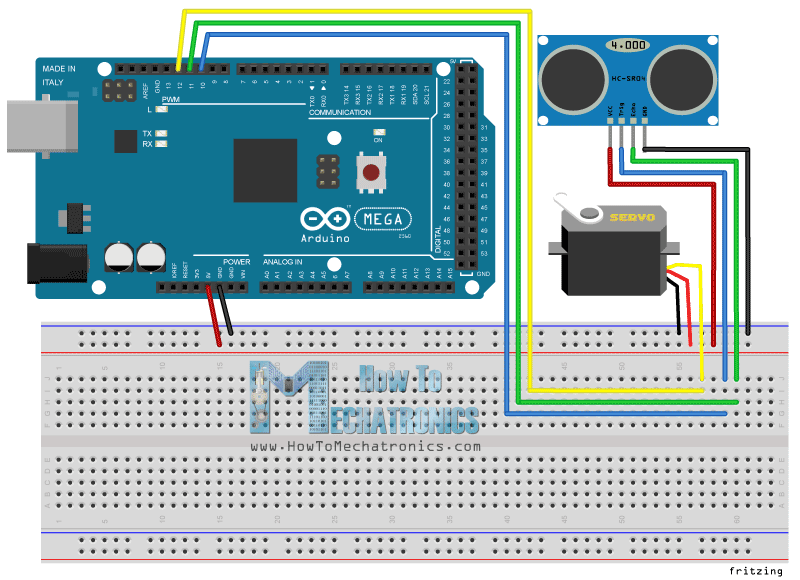
Please do not use the given diagram wirings. This is only as a demonstration.
Please do not use the given diagram wirings. This is only as a demonstration.
Documentation
ultrasonic_sensor_yUKZ11v0h4.pde
ultrasonic_sensor_yUKZ11v0h4.pde
Comments
Only logged in users can leave comments