Arduino game controler
Custom Arduino game controler with six buttons.
Devices & Components
1
Arduino Leonardo with Headers
1
Solderless Breadboard Half Size
1
Analog joystick (Generic)
Software & Tools

Arduino IDE
Project description
Code
code for game controler
c_cpp
you cannot use an Arduino uno for this project you myst use a board that has a 32u4 chip Leonardo and pro micro are the only ones that i know.
1#include <Keyboard.h>
2#include <Mouse.h>
3int horzPin = A0;  // Analog  output of horizontal joystick pin
4int vertPin = A1;  // Analog output of vertical  joystick pin
5int selPin = 9;  // select button pin of joystick
6
7int vertZero,  horzZero;  // Stores the initial value of each axis, usually around 512
8int vertValue,  horzValue;  // Stores current analog output of each axis
9const int sensitivity  = 150;  // Higher sensitivity value = slower mouse, should be <= about 500
10int  mouseClickFlag = 0;
11
12//int invertMouse = 1;        //Invert joystick based  on orientation
13int invertMouse = -1;         //Noninverted joystick based on  orientation
14
15// Emulating keyboard or mouse functions only work on 32u4 or  SAMD micro-based boards.
16void setup() {
17
18  //Configure pins as an input  and enable the internal pull-up resistor,
19  pinMode(2, INPUT_PULLUP);
20  pinMode(3,  INPUT_PULLUP);
21  pinMode(4, INPUT_PULLUP);
22  pinMode(5, INPUT_PULLUP);
23  pinMode(6, INPUT_PULLUP);
24  pinMode(horzPin, INPUT);  // Set both analog pins  as inputs
25  pinMode(vertPin, INPUT);
26  pinMode(selPin, INPUT);  // set button  select pin as input
27  digitalWrite(selPin, HIGH);  // Pull button select pin  high
28  delay(1000);  // short delay to let outputs settle
29  vertZero = analogRead(vertPin);  // get the initial values
30  horzZero = analogRead(horzPin);  // Joystick should  be in neutral position when reading these
31  Keyboard.begin();
32  Mouse.begin();  //Init mouse emulation
33}
34void loop() {
35//If corresponding button is pressed
36  if (digitalRead(2) == LOW) {
37    //Send an ASCII 'W',
38    Keyboard.write(87);
39
40
41  }
42 if (digitalRead(3) == LOW) {
43    //Send an ASCII 'A'
44    Keyboard.write(65);
45
46  }
47
48 if (digitalRead(4) == LOW) {
49    //Send an ASCII 'S',
50    Keyboard.write(83);
51
52  }
53
54 if (digitalRead(5)  == LOW) {
55    //Send an ASCII 'D',
56    Keyboard.write(68);
57
58  }
59
60  if (digitalRead(6) == LOW) {
61    //Send an ASCII 'shift',
62    Keyboard.write(16);
63
64  }
65  if (digitalRead(7) == LOW) {
66    //Send an ASCII 'space',
67    Keyboard.write(32);
68
69  }
70 else {
71    Keyboard.releaseAll();
72}
73vertValue  = analogRead(vertPin) - vertZero;  // read vertical offset
74  horzValue = analogRead(horzPin)  - horzZero;  // read horizontal offset
75
76  if (vertValue != 0)
77    Mouse.move(0,  (invertMouse * (vertValue / sensitivity)), 0); // move mouse on y axis
78  if (horzValue  != 0)
79    Mouse.move((invertMouse * (horzValue / sensitivity)), 0, 0); // move  mouse on x axis
80
81  if ((digitalRead(selPin) == 0) && (!mouseClickFlag))  //  if the joystick button is pressed
82  {
83    mouseClickFlag = 1;
84    Mouse.press(MOUSE_LEFT);  // click the left button down
85  }
86  else if ((digitalRead(selPin)) && (mouseClickFlag))  // if the joystick button is not pressed
87  {
88    mouseClickFlag = 0;
89    Mouse.release(MOUSE_LEFT);  // release the left button
90  }
91}
code for game controler
c_cpp
you cannot use an Arduino uno for this project you myst use a board that has a 32u4 chip Leonardo and pro micro are the only ones that i know.
1#include <Keyboard.h>
2#include <Mouse.h>
3int horzPin = A0;  // Analog
4  output of horizontal joystick pin
5int vertPin = A1;  // Analog output of vertical
6  joystick pin
7int selPin = 9;  // select button pin of joystick
8
9int vertZero,
10  horzZero;  // Stores the initial value of each axis, usually around 512
11int vertValue,
12  horzValue;  // Stores current analog output of each axis
13const int sensitivity
14  = 150;  // Higher sensitivity value = slower mouse, should be <= about 500
15int
16  mouseClickFlag = 0;
17
18//int invertMouse = 1;        //Invert joystick based
19  on orientation
20int invertMouse = -1;         //Noninverted joystick based on
21  orientation
22
23// Emulating keyboard or mouse functions only work on 32u4 or
24  SAMD micro-based boards.
25void setup() {
26
27  //Configure pins as an input
28  and enable the internal pull-up resistor,
29  pinMode(2, INPUT_PULLUP);
30  pinMode(3,
31  INPUT_PULLUP);
32  pinMode(4, INPUT_PULLUP);
33  pinMode(5, INPUT_PULLUP);
34
35  pinMode(6, INPUT_PULLUP);
36  pinMode(horzPin, INPUT);  // Set both analog pins
37  as inputs
38  pinMode(vertPin, INPUT);
39  pinMode(selPin, INPUT);  // set button
40  select pin as input
41  digitalWrite(selPin, HIGH);  // Pull button select pin
42  high
43  delay(1000);  // short delay to let outputs settle
44  vertZero = analogRead(vertPin);
45  // get the initial values
46  horzZero = analogRead(horzPin);  // Joystick should
47  be in neutral position when reading these
48  Keyboard.begin();
49  Mouse.begin();
50  //Init mouse emulation
51}
52void loop() {
53//If corresponding button is pressed
54
55  if (digitalRead(2) == LOW) {
56    //Send an ASCII 'W',
57    Keyboard.write(87);
58
59
60
61  }
62 if (digitalRead(3) == LOW) {
63    //Send an ASCII 'A'
64
65    Keyboard.write(65);
66
67  }
68
69 if (digitalRead(4) == LOW) {
70
71    //Send an ASCII 'S',
72    Keyboard.write(83);
73
74  }
75
76 if (digitalRead(5)
77  == LOW) {
78    //Send an ASCII 'D',
79    Keyboard.write(68);
80
81  }
82
83
84  if (digitalRead(6) == LOW) {
85    //Send an ASCII 'shift',
86    Keyboard.write(16);
87
88
89  }
90  if (digitalRead(7) == LOW) {
91    //Send an ASCII 'space',
92
93    Keyboard.write(32);
94
95  }
96 else {
97    Keyboard.releaseAll();
98}
99vertValue
100  = analogRead(vertPin) - vertZero;  // read vertical offset
101  horzValue = analogRead(horzPin)
102  - horzZero;  // read horizontal offset
103
104  if (vertValue != 0)
105    Mouse.move(0,
106  (invertMouse * (vertValue / sensitivity)), 0); // move mouse on y axis
107  if (horzValue
108  != 0)
109    Mouse.move((invertMouse * (horzValue / sensitivity)), 0, 0); // move
110  mouse on x axis
111
112  if ((digitalRead(selPin) == 0) && (!mouseClickFlag))  //
113  if the joystick button is pressed
114  {
115    mouseClickFlag = 1;
116    Mouse.press(MOUSE_LEFT);
117  // click the left button down
118  }
119  else if ((digitalRead(selPin)) && (mouseClickFlag))
120  // if the joystick button is not pressed
121  {
122    mouseClickFlag = 0;
123    Mouse.release(MOUSE_LEFT);
124  // release the left button
125  }
126}
Downloadable files
screen_shot_2021-09-02_at_4_18_56_pm_ELt8fvXADH.png
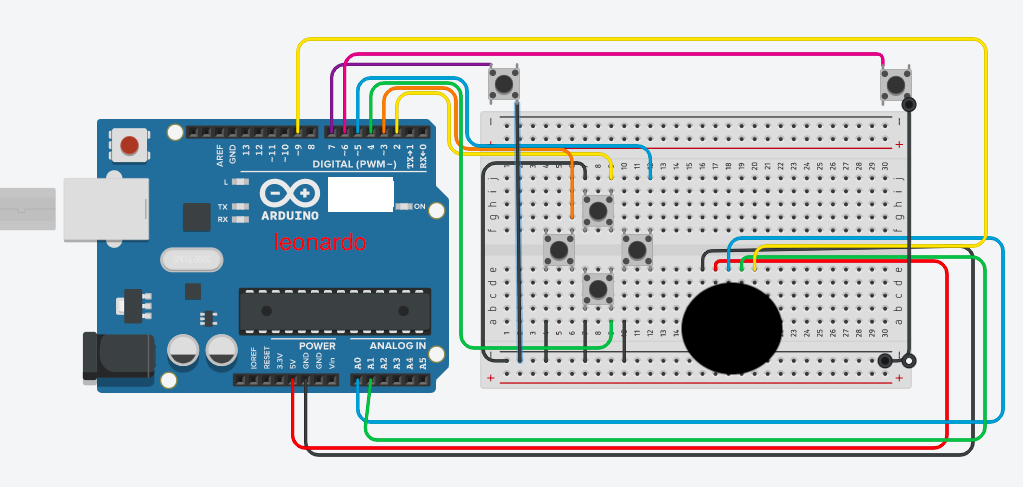
joystick connections sw=9 y=A1 x=A0 5v gnd
screen_shot_2021-09-02_at_4_18_56_pm_ELt8fvXADH.png
Comments
Only logged in users can leave comments