Devices & Components
Arduino Uno Rev3
Hardware & Tools
HC-SRO4
Premium Female/Male Extension Jumper Wires, 40 x 6" (150mm)
Software & Tools
Arduino IDE
Project description
Code
untitled
h
1// --------------------------------------------------------------------------- 2// Example NewPing library sketch that does a ping about 20 times per second. 3// --------------------------------------------------------------------------- 4 5#include <NewPing.h> 6 7#define TRIGGER_PIN 12 // Arduino pin tied to trigger pin on the ultrasonic sensor. 8#define ECHO_PIN 11 // Arduino pin tied to echo pin on the ultrasonic sensor. 9#define MAX_DISTANCE 200 // Maximum distance we want to ping for (in centimeters). Maximum sensor distance is rated at 400-500cm. 10 11NewPing sonar(TRIGGER_PIN, ECHO_PIN, MAX_DISTANCE); // NewPing setup of pins and maximum distance. 12 13void setup() { 14 Serial.begin(115200); // Open serial monitor at 115200 baud to see ping results. 15} 16 17void loop() { 18 delay(50); // Wait 50ms between pings (about 20 pings/sec). 29ms should be the shortest delay between pings. 19 Serial.print("Ping: "); 20 Serial.print(sonar.ping_cm()); // Send ping, get distance in cm and print result (0 = outside set distance range) 21 Serial.println("cm"); 22}
untitled
h
1// --------------------------------------------------------------------------- 2// 3 Example NewPing library sketch that does a ping about 20 times per second. 4// 5 --------------------------------------------------------------------------- 6 7#include 8 <NewPing.h> 9 10#define TRIGGER_PIN 12 // Arduino pin tied to trigger pin on 11 the ultrasonic sensor. 12#define ECHO_PIN 11 // Arduino pin tied to echo pin 13 on the ultrasonic sensor. 14#define MAX_DISTANCE 200 // Maximum distance we want 15 to ping for (in centimeters). Maximum sensor distance is rated at 400-500cm. 16 17NewPing 18 sonar(TRIGGER_PIN, ECHO_PIN, MAX_DISTANCE); // NewPing setup of pins and maximum 19 distance. 20 21void setup() { 22 Serial.begin(115200); // Open serial monitor 23 at 115200 baud to see ping results. 24} 25 26void loop() { 27 delay(50); // 28 Wait 50ms between pings (about 20 pings/sec). 29ms should be the shortest delay 29 between pings. 30 Serial.print("Ping: "); 31 Serial.print(sonar.ping_cm()); 32 // Send ping, get distance in cm and print result (0 = outside set distance range) 33 34 Serial.println("cm"); 35}
Downloadable files
16409381411242486892856494638272_I7AEFxsWOB.jpg
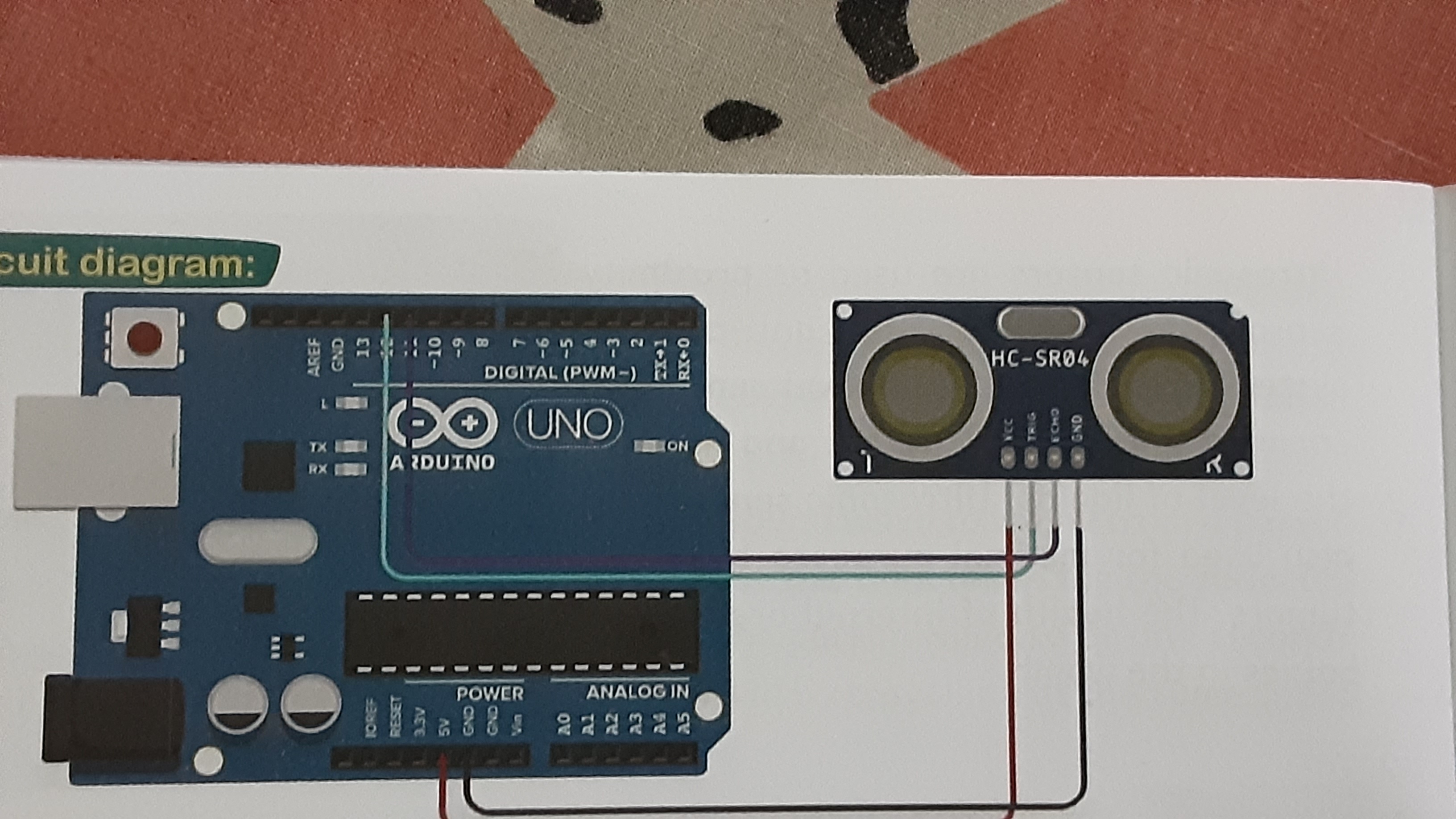
16409381411242486892856494638272_I7AEFxsWOB.jpg

Documentation
mis-2227-distance-sensing-product-newping-code_c7OheuYcTF.pdf
Comments
Only logged in users can leave comments